

- Top Pick: ASUS TUF Gaming A15 FA507XI-EH94
- Runner-up: ASUS ROG Zephyrus G14 (2024)
- Also consider: Lenovo Legion Slim 5 14
At this rung the RTX 4070 becomes the mainstream choice rather than a cameo, and the machines around it grow up: high-refresh QHD panels with serious color accuracy, OLED options in portable sizes, memory configurations that reach 32GB, and cooling systems designed to hold full power quietly for hours. This is the budget for a single laptop that anchors a 1440p desk setup, edits video without apology and still travels when needed. The five picks below split into full-power 4070 machines and premium designs where the panel and the portability are the point, and each earns its place differently.
As an Amazon Associate, we earn from qualifying purchases.
Quick answer
The ASUS TUF Gaming A15 is the complete RTX 4070 package at this rung, pairing full-power graphics with a big battery and a tough chassis. The ROG Zephyrus G14 is the pick for portable OLED quality, the MSI Katana 17 for a big-screen 4070, and the ROG Strix G16 for the finest high-refresh display here.
ASUS TUF Gaming A15 FA507XI-EH94
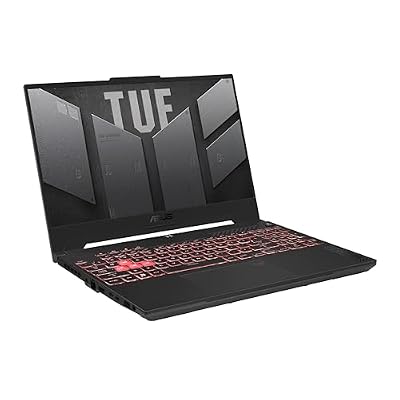
The TUF Gaming A15 in this configuration is the rung’s anchor: a Ryzen 9 7940HS processor feeding an RTX 4070 at its full power level, with a 1TB drive and the line’s trademark 90Wh battery. That combination delivers proper 1440p gaming at high settings, especially with DLSS frame generation in supported titles, and it holds that performance through long sessions thanks to dual fans with plenty of thermal headroom.
The 15.6-inch screen runs at 144Hz and 1080p, which the 4070 drives effortlessly, and the smarter play for many owners is pairing the laptop with a QHD external monitor at a desk, where the graphics card’s headroom turns into high-refresh 1440p play. Build quality follows the TUF formula of a military-grade toughness standard, the keyboard is comfortable, and memory and storage both upgrade easily. Battery life is a genuine strength for mixed use, since the Ryzen chip’s integrated graphics handle light work efficiently. If you want one durable, powerful, no-drama 4070 machine that does everything well, this is the default buy at this rung.
ASUS ROG Zephyrus G14 (2024)

The Zephyrus G14 plays a different game: it asks how much gaming power can fit into a slim aluminum 14-inch laptop you would happily carry all day. The answer is a Ryzen 9 8945HS and an RTX 4060 driving one of the best screens in this entire ladder, a 14-inch OLED panel at 2880 by 1800 resolution and 120Hz with G-SYNC and full DCI-P3 color coverage. Games look rich and fluid, and creative work gets a display that embarrasses most desktop monitors.
The compromises are the honest ones for this size: the graphics card runs at a lower power level than the big machines here, and the 16GB of memory is soldered, so choose the configuration carefully at purchase. Storage is 1TB and replaceable, the battery is a healthy 73Wh, and at around three and a half pounds it disappears into a bag. For students, travelers and creators who game, the G14 is not a smaller compromise but a different ideal: premium panel, premium build, and enough power for high-settings 1080p and upscaled 1440p play anywhere.
Lenovo Legion Slim 5 14

Lenovo’s compact Legion makes the same portable-OLED argument with its own twists. The 14.5-inch OLED screen runs at 2880 by 1800 and 120Hz with full DCI-P3 coverage and strong brightness, and the RTX 4060 behind it runs at a healthier power level than most thin machines manage, so frame rates stay competitive. The Ryzen 7 7840HS is efficient, and the 73.6Wh battery supports fast USB-C charging, which suits a laptop that actually leaves the desk.
This configuration’s 2TB of storage is the quiet headline: a serious game library plus creative projects fit without the juggling that smaller drives force. Memory is 16GB and soldered, the standard portable trade-off, and the chassis at just over four pounds is a little heavier than the Zephyrus while feeling every bit as solid. Ports are generous for the size, including an SD card reader that creators genuinely use. Between the two OLED portables here, the Slim 5 is the pick for buyers who prioritize storage, charging flexibility and Lenovo’s keyboard, while the G14 counters with lower weight and a slightly sharper design.
MSI Katana 17
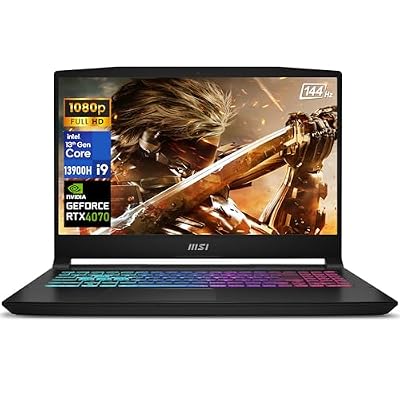
The Katana 17 is the big-screen route to RTX 4070 power. A Core i9-13900H processor and the 4070 sit in a 17.3-inch chassis with a 144Hz 1080p display, 16GB of memory, a 1TB drive and Windows 11 Pro included. The large body gives the cooling system room to work, so the hardware sustains its pace through marathon sessions, and the full-size keyboard with number pad suits both games with deep keybinds and everyday data entry.
At native 1080p the 4070 is frankly overpowered, which is another way of saying frame rates stay high for years and there is headroom to drive a QHD monitor later, the natural upgrade path for this machine. The compromises mirror its smaller sibling: the screen’s color range is ordinary, the battery is small, and the build favors function over flair. This is a desktop replacement in the truest sense, bought to live on a desk and deliver 4070-class performance without the premium that slim designs command. If screen size and raw power top your list and portability barely registers, the Katana 17 is the efficient way to buy both.
ASUS ROG Strix G16 G614JV-ES94

The Strix G16 ES94 exists for one reason: the display. Its 16-inch Nebula panel runs at 2560 by 1600 and a blistering 240Hz, with full DCI-P3 color coverage and the brightness to make HDR content convincing. Behind it, a Core i9-13980HX, the strongest processor in this roundup, drives an RTX 4060 at full power with triple-fan cooling and liquid metal, so esports titles at QHD can actually chase that 240Hz ceiling.
Around that core, ASUS includes the full ROG treatment: MUX switch with Advanced Optimus, Thunderbolt 4, per-key RGB, strong speakers and a 1TB drive. It is heavy, the battery is a backup rather than a feature, and the graphics card is a class below the 4070 picks, which is the deliberate trade: this machine spends its budget on the screen and the CPU instead. For competitive players who want the smoothest, sharpest panel at this rung and creators who want its color range, nothing else here competes. Everyone else should take the TUF’s stronger graphics card and spend the change on games.
How to choose
Split this rung into two questions. If the laptop will drive a 1440p monitor or you play the newest releases, prioritize the RTX 4070 picks and their full power limits, since that headroom decides settings for the next three years. If the built-in screen is your main display and you travel, prioritize panel quality and weight, where the OLED portables excel. Check memory carefully here, because some premium designs solder it while the larger machines keep slots open, and 32GB configurations are worth it for creative workloads. Prices and offers change often, so check the current price on the Amazon product page before ordering.
Who should skip
Skip this rung if your gaming stays at 1080p on the laptop’s own screen and you never create, because lower rungs deliver that experience for notably less. Skip it if you want RTX 4080-class performance for 4K or maxed ray tracing, which lives further up the ladder. And skip the portable picks if you know you will never carry the laptop, since their screens and batteries cost money that big chassis spend on power.
When to step up or down a rung
Step down to the rung below if your budget is firm and your gaming is 1080p-first: the 4070 appears there too, and its premium 4060 machines are excellent. Step up to the next rung when you want the strongest 4070 configurations with flagship screens as standard, or the first taste of the class above. Our overview of the best gaming laptops of 2026 puts this rung in context against the whole market if you are still deciding where your money belongs.
Frequently asked questions
Is the RTX 4070 a true 1440p graphics card in a laptop?
Yes. At full power it plays modern releases at native 1440p with high settings, and DLSS pushes frame rates further in supported games. It is not a 4K card and heavy ray tracing still asks for upscaling, but for a 1440p high-refresh monitor or a QHD laptop screen, it is the right tool for this generation.
Are OLED screens worth it for gaming laptops?
For image quality, emphatically yes: contrast, color and response times are a class above IPS, and the 120Hz OLED panels here are fast enough for all but the most extreme esports play. The cautions are burn-in over years of static desktop use and lower brightness than the best IPS panels, which is why they suit mixed gaming and creative work so well.
Should I choose 32GB of memory at this budget?
If you edit video, work with large photo libraries, run virtual machines or stream while gaming, yes, it removes a ceiling you would otherwise hit within the laptop’s life. Pure gamers can stay at 16GB today, but should favor the models here with open slots so the upgrade stays possible later.
How long will an RTX 4070 laptop stay relevant?
Comfortably through this console generation for 1440p play. The card’s DLSS support, including frame generation, extends its useful life in new releases, and the processors in this roundup will not bottleneck it. Expect to lower a few settings in the final years rather than replace the machine.
Final verdict
Take the TUF Gaming A15 for the complete RTX 4070 package, the Katana 17 for big-screen 4070 value, and the Strix G16 if the finest display matters most. The Zephyrus G14 and Legion Slim 5 14 prove that portable no longer means weak, with OLED screens that lead this ladder. This rung is where a single laptop can honestly do everything.










