As an Amazon Associate we earn from qualifying purchases
A desktop that edits video well and a desktop that games well overlap a lot, but they stress a system in different ways. Editing rewards core counts, fast storage, and generous memory, because a timeline has to decode several clips at once, hold effects in memory, and read large files without stalling. Gaming rewards a strong graphics card, responsive single-core performance, and the same fast storage, because modern titles stream assets constantly and punish slow drives with stutter. The best desktop for video editing and gaming is therefore not the machine with the single flashiest part. It is the machine where the processor, graphics card, memory, and solid-state drive are balanced, so neither workload waits on the other.
The five prebuilt desktops below were chosen for that dual role. Each pairs a multi-core processor with a dedicated NVIDIA GeForce RTX graphics card, DDR5 memory, and NVMe solid-state storage. They differ in how much headroom they leave for heavier timelines, higher resolutions, and future upgrades. If you are narrowing a shortlist by editing workload first, our guide to the best gaming PCs for video editing is a useful companion read alongside the picks here.
How to Choose a Desktop for Both Editing and Gaming
Processor core counts and timeline work
Video editors use more processor cores than most games do. Encoding and exporting draw on as many cores as the software can feed, effects rendering spreads across threads, and proxy creation keeps running while you continue to cut. Eight or more cores is a sensible floor for serious timeline work, and higher core counts give exports and multitasking more room.
GPU acceleration in editors and in games
Modern editors offload much work to the graphics card. Colour effects, scaling, noise reduction, and many transitions are GPU accelerated, and playback of high-resolution footage is smoother when the card has enough video memory for the frames being processed. The same card drives gaming, where video memory supports higher texture settings and resolutions. The cards here range from 12GB to 16GB of graphics memory, a practical band for 1440p gaming and demanding timelines alike.
Memory for timelines and multitasking
Sixteen gigabytes of RAM can run an editor and a game, but it leaves little room for a browser full of reference tabs, a capture application, chat tools, and the editor’s own cache. Thirty-two gigabytes is the more comfortable target for dual use, because a timeline holds more in memory and scrubbing feels less heavy. Every system here uses DDR5, and the sections below note which models start at 16GB and which at 32GB.
Storage speed and project space
An NVMe solid-state drive loads game levels quickly, opens large project files without a long wait, and feeds footage to the timeline at the pace editing software expects. Capacity matters just as much, because raw footage, rendered previews, and a modern game library compete for the same space. One terabyte is a workable start if finished projects move to external storage, while two terabytes gives a dual-use desktop far more breathing room.
Ports, cooling, and upgrade room
Check display outputs and USB ports against your desk, and favour cooling built for sustained loads, since long exports and sessions generate heat over hours. Spare storage room and power supply headroom make later upgrades simpler.
Comparison Table
| Product | CPU | GPU | RAM | SSD | Upgrade notes |
|---|---|---|---|---|---|
| CyberPowerPC Gamer Xtreme VR (GXiVR8040A14) | Intel Core i7-13700F | GeForce RTX 4060 Ti 16GB | 16GB DDR5 | 1TB PCIe Gen4 NVMe SSD | Plan a memory increase to 32GB for heavier timelines; add storage as the library grows |
| CyberPowerPC Gamer Xtreme (GXiVR8080A41) | AMD Ryzen 9 9900X | GeForce RTX 5070 12GB | 32GB DDR5 | 1TB PCIe 4.0 SSD | Strong starting memory; storage is the first likely addition for large archives |
| Skytech King 95 | AMD Ryzen 7 7700 | GeForce RTX 4070 Super 12GB | 16GB DDR5 6000 | 1TB NVMe SSD | Memory upgrade is the clearest next step; 750W Gold power supply leaves GPU headroom |
| Skytech Chronos | AMD Ryzen 7 7700X | GeForce RTX 4070 12GB | 32GB DDR5 | 1TB NVMe SSD | Balanced as supplied; add a second drive when 1TB fills |
| MSI Aegis R2 AI 2nd | Intel Core Ultra 7 265 | GeForce RTX 5070 Ti 16GB | 32GB DDR5 | 2TB SSD | Largest storage and memory as supplied; fewest immediate upgrades needed |
The Five Picks
CyberPowerPC Gamer Xtreme VR Gaming PC (GXiVR8040A14)

This CyberPowerPC is the most accessible entry point in the roundup. The Intel Core i7-13700F is listed at 2.1GHz with an 8+8 core layout on the Intel B760 chipset, giving editing software a solid pool of threads for exports and background rendering while keeping timeline work responsive. The GeForce RTX 4060 Ti carries 16GB of video memory: GPU-accelerated effects and high-resolution playback benefit from the larger frame buffer, and in games the same capacity supports higher texture settings. One HDMI and two DisplayPort outputs make a two-monitor desk straightforward. Sixteen gigabytes of DDR5 is a starting point, with 32GB the natural first upgrade, and the 1TB PCIe Gen4 NVMe drive suits a current project plus an active game library. A keyboard and mouse are included.
Specs
- CPU: Intel Core i7-13700F 2.1GHz, 8+8 cores, Intel B760 chipset
- GPU: NVIDIA GeForce RTX 4060 Ti 16GB
- RAM: 16GB DDR5
- Storage: 1TB PCIe Gen4 NVMe SSD
- Ports: 6 x USB 3.1, 2 x USB 2.0, 1 x RJ-45 Ethernet, 1 x HDMI, 2 x DisplayPort, 802.11AC Wi-Fi, 7.1 channel audio
- OS: Windows 11 Home 64-bit
CyberPowerPC Gamer Xtreme Gaming PC (GXiVR8080A41)
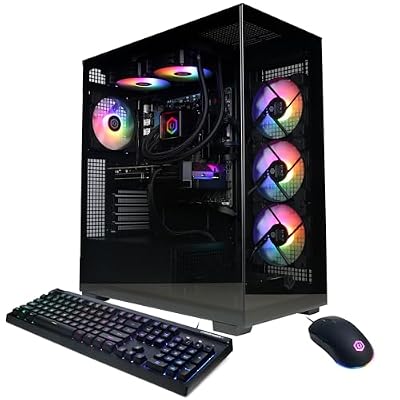
This CyberPowerPC configuration leans toward processor power. The AMD Ryzen 9 9900X runs at 4.4GHz on the AM5 socket, aimed at the multi-threaded side of editing: exports, effects rendering, and running an editor alongside capture and communication tools. The GeForce RTX 5070 carries 12GB of GDDR7 memory, handling GPU-accelerated colour work, scaling, and playback in the editor, and high settings at 1440p in games. Thirty-two gigabytes of DDR5 at 4800 MT/s is fitted as standard, so the timeline, the game, and background applications are not fighting over a small memory pool. Storage is a 1TB PCIe 4.0 drive, fast for projects and game loading, though high-volume editors will likely add capacity. Eight USB ports, HDMI and DisplayPort outputs, Bluetooth, and Wi-Fi are listed, with a keyboard and mouse included.
Specs
- CPU: AMD Ryzen 9 9900X 4.4GHz, AM5 socket
- GPU: NVIDIA GeForce RTX 5070 12GB GDDR7
- RAM: 32GB DDR5, 4800 MT/s
- Storage: 1TB PCIe 4.0 SSD
- Ports: 8 USB ports in total, 1 x HDMI, DisplayPort, Bluetooth, Wi-Fi
- OS: Windows 11 Home
Skytech King 95 Gaming PC

The Skytech King 95 builds its dual-use case around the graphics card. Its NVIDIA GeForce RTX 4070 Super carries 12GB of GDDR6X memory, a comfortable match for GPU-accelerated editing effects and for 1440p gaming with high settings. The AMD Ryzen 7 7700 runs at 3.8GHz with boost to 5.3GHz, an eight-core AM5 chip that handles timeline work, exports, and gaming well. Memory is 16GB of DDR5 at 6000 speed — fast, but best viewed as the starting configuration, with 32GB the planned upgrade for larger timelines. The listed 750W Gold power supply leaves headroom for future upgrades. Storage is a 1TB NVMe M.2 drive, the white case uses ARGB fans, wireless support is 802.11AC, and a gaming keyboard and mouse are included.
Specs
- CPU: AMD Ryzen 7 7700 3.8GHz (up to 5.3GHz), 8 cores, AM5 socket
- GPU: NVIDIA GeForce RTX 4070 Super 12GB GDDR6X
- RAM: 16GB DDR5 6000
- Storage: 1TB NVMe M.2 SSD
- Ports: HDMI, DisplayPort, USB 2.0 and USB 3.0, 802.11AC Wi-Fi, Ethernet
- OS: Windows 11 Home 64-bit
Skytech Chronos Gaming PC

The Skytech Chronos is the balanced-as-supplied Skytech option. Its AMD Ryzen 7 7700X runs at 4.5GHz with boost to 5.4GHz, giving timeline work and games a fast eight-core processor, and it is paired with 32GB of DDR5 RGB memory from the start. The NVIDIA GeForce RTX 4070 carries 12GB of GDDR6X memory; Skytech describes the Chronos series around 1440p and higher-resolution gaming, and for editing the card covers GPU-accelerated effects, playback, and export assistance in applications that use it. The 650W Gold power supply and four RGB fans in the black mesh-front case address sustained loads, since long exports and sessions generate heat over hours. Storage is a 1TB NVMe drive, so the likely upgrade is a second drive for footage archives. Wi-Fi, display outputs, and an RGB keyboard and mouse are included.
Specs
- CPU: AMD Ryzen 7 7700X 4.5GHz (up to 5.4GHz max boost), 8 cores, Socket AM5
- GPU: NVIDIA GeForce RTX 4070 12GB GDDR6X
- RAM: 32GB DDR5 RGB
- Storage: 1TB NVMe SSD
- Ports: 5 USB ports in total, 1 x HDMI, DisplayPort, USB 2.0 and USB 3.0, 802.11AC Wi-Fi, Ethernet
- OS: Windows 11 Home 64-bit
MSI Aegis R2 AI 2nd Gaming Desktop

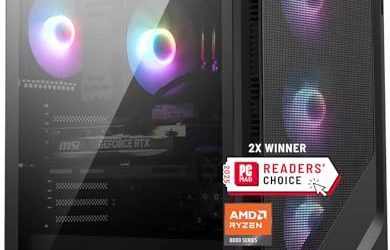
The MSI Aegis R2 AI 2nd is the headroom pick, with the most storage and the strongest graphics card here as supplied. Its Intel Core Ultra 7 265 processor is listed with 20 cores and speeds up to 5.3GHz, speaking directly to editing — exports, rendering, and multitasking across an editor, capture software, and background tools — while keeping the responsiveness games need. The NVIDIA GeForce RTX 5070 Ti carries 16GB of GDDR7 memory, serving GPU-accelerated editing at high resolutions and gaming at 1440p and beyond, and the listing describes support for up to four displays through HDMI 2.1 and DisplayPort 1.4a, suiting a multi-monitor desk. A 360mm closed-loop liquid cooler is fitted for sustained loads, backed by a 750W 80 Plus Gold power supply. Thirty-two gigabytes of DDR5 and a 2TB solid-state drive complete the picture, doubling the storage of the other picks. Wi-Fi 7, 5Gb Ethernet, USB-C 3.2, and USB-A 3.2 are listed, Windows 11 Pro is pre-installed, and a keyboard and mouse are included.
Specs
- CPU: Intel Core Ultra 7 265, 20 cores, up to 5.3GHz turbo
- GPU: NVIDIA GeForce RTX 5070 Ti 16GB GDDR7
- RAM: 32GB DDR5
- Storage: 2TB SSD
- Ports: HDMI, DisplayPort, USB Type C, Ethernet, Wi-Fi 7, 5Gb Ethernet, USB-C 3.2 and USB-A 3.2
- OS: Windows 11 Pro
FAQ
How much RAM does a desktop need for both video editing and gaming?
Sixteen gigabytes runs both workloads, and two picks here start there, but 32GB is the more comfortable target for dual use. Timelines, caches, browsers, and capture tools add up quickly. Choosing 32GB from the start, as three of these desktops offer, removes the most common early upgrade, while a 16GB model remains sensible if a later memory upgrade is already planned.
Is a gaming graphics card good for video editing?
Yes, within the limits of the editing software being used. Modern editors accelerate colour effects, scaling, transitions, and playback through the graphics card, and more video memory helps at higher resolutions. The RTX cards here carry 12GB or 16GB of memory, serving both timeline work and gaming at 1440p and above.
Should the processor or the graphics card come first for a dual-use desktop?
Neither should be bought in isolation. Exports and rendering lean on processor cores, timeline playback and effects lean on the graphics card, and games lean on both in different proportions depending on the title. The balanced approach used here — a multi-core processor, an RTX card with at least 12GB of memory, DDR5 RAM, and NVMe storage — avoids a system that exports quickly but plays poorly, or plays well but stalls on a timeline.
How much SSD space do video projects and games need together?
One terabyte is a workable start if finished projects are archived to external or network storage and the game library is rotated. A 2TB drive, as fitted to the MSI pick, delays that housekeeping considerably, and adding a second drive later is the standard path for the 1TB models.
Conclusion
The best desktop for video editing and gaming is a balanced one: enough processor cores for exports and rendering, an RTX graphics card with the memory for accelerated effects and modern games, enough RAM for a timeline and everything around it, and NVMe storage fast and large enough for footage and a game library at once. The CyberPowerPC Gamer Xtreme VR is the accessible starting point with a clear memory upgrade path, the Ryzen 9 CyberPowerPC configuration puts editing processing first, the Skytech King 95 leads with its graphics card, the Skytech Chronos arrives balanced with 32GB fitted, and the MSI Aegis R2 AI 2nd offers the most headroom as supplied. Match the pick to the workload that will grow fastest, and the same tower can carry both jobs for years.