The best air cooler for a Ryzen 9 9950X in this group is the Thermalright Peerless Assassin 120 SE, a dual-tower design with six heat pipes and two 120mm fans that gives the 16-core chip the most cooling surface of any listing here. The 9950X is a 170W-class AM5 processor that boosts hard and happily runs near 95 degrees Celsius under all-core loads, so the cooler matters more than it would on a mid-range chip. Two of the six listings below are processor-and-motherboard bundles, not coolers, and they are marked as such.
Quick List
- Cooler Master Hyper 612 APEX – best for a six-heat-pipe tower with two matched fans and a compact footprint
- Cooler Master V4 Alpha 3DHP – best for a quieter-leaning dual-fan tower with a different heat pipe design
- Ryzen 9 9950X3D with Gigabyte X870E AORUS Elite WIFI7 ICE combo – best for a white-themed AM5 platform (processor and board, not a cooler)
- Ryzen 9 9950X3D with Gigabyte X870E AORUS Elite combo – best for buyers building a new AM5 system (processor and board, not a cooler)
- Thermalright Assassin X 120R Digital ARGB Black – best for a slim single-tower cooler with a temperature display
- Thermalright Peerless Assassin 120 SE – best for maximum air-cooling capacity on a sensible budget
Which One Is Right for You?
| If you… | Choose |
|---|---|
| want the most cooling capacity from an air cooler | Thermalright Peerless Assassin 120 SE |
| want a six-heat-pipe tower with a compact build and matched fans | Cooler Master Hyper 612 APEX |
| prefer a Cooler Master tower with a different heat pipe approach | Cooler Master V4 Alpha 3DHP |
| like a digital readout and a slim profile and will run the chip moderately | Thermalright Assassin X 120R Digital |
| need a processor and board for a new AM5 build | Either 9950X3D and Gigabyte X870E combo, plus a separate cooler |
| plan to run Eco Mode or mostly gaming workloads | Assassin X 120R Digital or V4 Alpha |
The simplest rule for this processor is to pick the largest cooler your case will accept. If you plan sustained all-core work such as video rendering, choose the two-fan towers. If your use is mixed gaming and light creation, the smaller options are reasonable, especially if you lower the power limit in the BIOS.
All 6 Picks in Detail
1. Cooler Master Hyper 612 APEX – Best Compact Six-Heat-Pipe Tower
As an Amazon Associate we earn from qualifying purchases at no extra cost to you.
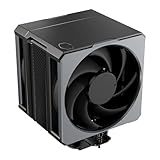
The Hyper 612 APEX is a single-tower air cooler with six superconductive composite heat pipes and two PWM fans, with AM5 and AM4 support as well as Intel LGA1851 and LGA1700. It targets buyers who want strong air cooling without moving to a wide dual-tower, and its tower is described as compact so it is less likely to crowd memory modules.
Published specifications describe two 120mm Mobius fans with a wide speed range, topping out around 2400 RPM, and a height of roughly 159mm. A retailer listing cites a 260W rating, which is above the 9950X’s stock power ceiling, but treat any manufacturer wattage as a rough guide and not as a promise. In a 9950X system it should do well in mixed use. Under a constant all-core render you may see the chip sit at its 95 degree limit, which is normal for this processor and is not a sign of failure. Check your case’s maximum cooler height before buying.
- Design: single tower, six superconductive composite heat pipes
- Fans: two 120mm PWM fans
- Sockets: AMD AM5 and AM4; Intel LGA1851 and LGA1700
- Height: about 159mm per published specifications (confirm on listing)
- Rated capacity: a retailer lists 260W; confirm with the maker
Pros:
- Six heat pipes and two fans in a compact tower
- Broad socket support for later upgrades
Cons:
- Fans can get audible at full speed
- Less surface area than a true dual-tower
Compared with the Peerless Assassin 120 SE, it is slimmer and easier to fit, while the Thermalright offers more fin area.
2. Cooler Master V4 Alpha 3DHP – Best for a Different Take on Tower Cooling

The V4 Alpha 3DHP is a single-tower, dual-fan air cooler with AM5, AM4, LGA1851 and LGA1700 support. Instead of a bank of round heat pipes it uses what Cooler Master calls 3DHP technology, a flatter heat pipe design built to move heat efficiently through a tower with fewer pipes. Published details point to two heat pipes and about 53 aluminum fins.
The two fans reportedly differ: the front fan spins faster than the rear, up to about 2500 RPM against 1850, which suggests the design is tuned for airflow through the stack rather than for equal fans. It stands about 161mm tall. For a Ryzen 9 9950X that is a more modest cooler than the Hyper 612 APEX, so it fits best in a case with good airflow, with a lowered power limit, or in a system that spends more time gaming than rendering. If you want to pair it with a 16-core processor under constant load, a larger tower or liquid cooler gives more headroom.
- Design: single tower with 3DHP heat pipes (about two pipes per published details)
- Fans: two PWM fans, front and rear speeds differ
- Sockets: AMD AM5 and AM4; Intel LGA1851 and LGA1700
- Height: about 161mm per published specifications (confirm on listing)
- Fin stack: about 53 aluminum fins, per published reviews
Pros:
- Modern look and broad socket support
- Dual fans in a tower that is not unusually wide
Cons:
- Fewer heat pipes than the other towers here
- Less ideal for sustained 16-core loads
The APEX next to it has six heat pipes and is the better choice for heavy loads.
3. Ryzen 9 9950X3D with Gigabyte X870E AORUS Elite WIFI7 ICE – Not a Cooler (Processor and Board Combo)

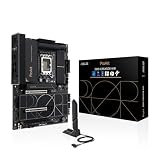
This listing is a Micro Center bundle of an AMD Ryzen 9 9950X3D processor and a Gigabyte X870E AORUS Elite WIFI7 ICE motherboard, a white-themed ATX board. It is not a CPU cooler, so it does not belong in a list of coolers for the 9950X. We keep it as a runner-up because it is relevant to the same buyer: someone assembling a Ryzen 9 9950-class system who still needs a cooler.
The title mentions an ATX form factor, DDR5 and four M.2 slots. The important takeaway for cooling is that the 9950X3D sits in the same 170W class as the 9950X, and AMD does not include a cooler with this type of chip, so you must buy one separately from this page. Any of the coolers elsewhere in this guide can be paired with the AM5 socket on the board. The combo is a convenient way to buy the parts, nothing more.
- Type: processor and motherboard bundle, no cooler
- Processor: AMD Ryzen 9 9950X3D
- Board: Gigabyte X870E AORUS Elite WIFI7 ICE, ATX
- Memory: DDR5 per the listing
- Storage slots: four M.2 per the listing
Pros:
- Matches the AM5 socket all the coolers here support
- Convenient purchase of two core parts
Cons:
- Does not include any cooling hardware
- Not a substitute for a CPU cooler
Unlike the coolers in the list, it only answers the question of what to cool, not how.
4. Ryzen 9 9950X3D with Gigabyte X870E AORUS Elite – Not a Cooler (Processor and Board Combo)
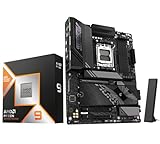
The second bundle is again a Ryzen 9 9950X3D and a Gigabyte X870E AORUS Elite motherboard, with the listing highlighting PCIe 5.0, DDR5 and several M.2 slots. It has the same limitation: it is a platform purchase, so there is no heatsink or fan in the box that this listing describes. We include it only because readers searching for 9950X cooling often land on these combos.
If you buy a combo, plan the cooler at the same time. A processor that runs this hot will need a tower or liquid cooler that matches your case. Measure the clearance, decide on air versus liquid and choose the cooler before the parts arrive. The board’s AM5 socket is compatible with AM4 mounting hardware in many coolers, but confirm the bracket type that ships with your chosen model.
- Type: processor and motherboard bundle, no cooler
- Processor: AMD Ryzen 9 9950X3D
- Board: Gigabyte X870E AORUS Elite, ATX
- Expansion: PCIe 5.0 per the listing
- Memory: DDR5 per the listing
Pros:
- Pairs a high-end processor with a capable board
- Fits any AM5 cooler
Cons:
- No cooler included
- Overlaps heavily with the ICE-colored bundle
It is nearly the same bundle as the previous listing, differing in board color and listing details.
5. Thermalright Assassin X 120R Digital ARGB Black – Best Slim Tower With a Display

The Assassin X 120R Digital is a single-tower air cooler with four heat pipes, one 120mm PWM fan running up to 2000 RPM and a small digital screen on top. The display can show information such as temperature, which some builders like in a glass-sided case. Thermalright’s published specifications put the heatsink at about 120 by 46 by 151mm, making it one of the slimmer, shorter options in this list.
For the Ryzen 9 9950X this is a lighter cooler than the towers above. It can be a sensible match if you use Eco Mode, lower the power limit, or run mostly gaming and light creation. For sustained all-core rendering it will probably run at the processor’s thermal limit sooner and with a louder fan than a two-fan tower. Treat it as a style-first, space-saving option, and choose the Peerless Assassin if raw capacity is the priority. No official TDP rating was found in the published specifications, so confirm one on the product page.
- Design: single tower, four heat pipes
- Fan: one 120mm PWM fan, up to 2000 RPM
- Sockets: AM4 and AM5; Intel LGA1700 and LGA1851 per published specifications
- Size: about 120 x 46 x 151mm
- Extras: digital display and ARGB lighting
Pros:
- Slim, short and easy to fit in many cases
- Digital display adds a useful readout
Cons:
- Single fan and four heat pipes limit sustained capacity
- Higher fan speed under load
It shares a brand with the Peerless Assassin below but gives up cooling capacity for size and style.
6. Thermalright Peerless Assassin 120 SE – Best Air-Cooling Capacity for the Money

The Peerless Assassin 120 SE is a dual-tower cooler with six 6mm heat pipes, a nickel-plated copper base and two 120mm PWM fans running up to 1550 RPM. Published specifications put it at roughly 125 by 110 by 155mm and about 730g. It supports AM4 and AM5, plus recent Intel sockets, and it is the cooler most often recommended as a high-capacity air option for hot processors.
For a 16-core Ryzen 9 9950X, the dual-tower arrangement offers the largest fin area and the lowest fan speed needed to hold a given temperature, which is why it tops this list. It still cannot make the chip run cool in an absolute sense, because the 9950X is designed to boost until it reaches around 95 degrees Celsius. The main caution is size: the second tower and fan can interfere with tall memory modules or case panels, so check your RAM height and the case’s cooler clearance. Sources disagree on an exact TDP rating, so confirm with the maker.
- Design: dual tower, six 6mm heat pipes
- Fans: two 120mm PWM fans up to 1550 RPM
- Sockets: AM4 and AM5; Intel LGA1700 and LGA1851
- Size: about 125 x 110 x 155mm and 730g per published specifications
- Base: nickel-plated copper
Pros:
- Largest air-cooling capacity in this list
- Two fans spinning at moderate speeds
Cons:
- Bulky; can clash with tall memory
- No display or lighting features
Compared with the Hyper 612 APEX, it offers more fin area but needs more room.
Specs Compared
| Listing | Type | Design | Heat pipes | Fans | Approx. height | AM5 support |
|---|---|---|---|---|---|---|
| Cooler Master Hyper 612 APEX | Air cooler | Single tower | 6 superconductive | 2 x 120mm PWM | About 159mm | Yes (AM5/AM4) |
| Cooler Master V4 Alpha 3DHP | Air cooler | Single tower | 3DHP, about 2 per published details | 2 PWM | About 161mm | Yes (AM5/AM4) |
| Ryzen 9 9950X3D + X870E AORUS Elite WIFI7 ICE | CPU and board combo | Not a cooler | Not applicable | Not applicable | Not applicable | AM5 platform |
| Ryzen 9 9950X3D + X870E AORUS Elite | CPU and board combo | Not a cooler | Not applicable | Not applicable | Not applicable | AM5 platform |
| Thermalright Assassin X 120R Digital | Air cooler | Single tower | 4 | 1 x 120mm PWM, up to 2000 RPM | About 151mm | Yes (AM5/AM4) |
| Thermalright Peerless Assassin 120 SE | Air cooler | Dual tower | 6 (6mm) | 2 x 120mm PWM, up to 1550 RPM | About 155mm | Yes (AM5/AM4) |
How We Chose These
We began with catalog listings associated with Ryzen 9 9950X cooling and separated real coolers from processor-and-motherboard bundles that appear in the same search results. For each cooler we compared socket support, tower design, heat pipe count, fan count and height as stated in the listing names and in published manufacturer and review information. We gave extra weight to dual-fan designs and larger fin areas, because the 9950X draws well over 200W at its boost limit. We flagged anything the listings do not state, such as exact TDP ratings, as something to confirm on the product page. This is a desk-research comparison. We did not run thermal tests.
What to Look For
Understanding the 9950X’s heat output
The Ryzen 9 9950X has a 170W TDP, but the real power limit, called PPT, is about 230W. That is the figure a cooler must handle during sustained all-core work like rendering or compiling. The chip is also built to boost until it nears 95 degrees Celsius, so seeing that temperature under load is normal behavior, not a defect. A better cooler lets the chip hold higher clocks for longer and lowers fan noise at a given workload; it does not change the fact that the processor targets its thermal limit.
Air versus liquid cooling
A large dual-tower air cooler can handle a 9950X for gaming and mixed workloads, and it has no pump or leak risk. A 240mm or 360mm liquid cooler offers more headroom for long renders and usually lower noise at the same temperature, but costs more and adds a pump. Rule of thumb: if the processor spends hours per day above 80 percent load, step up to a 280mm to 360mm liquid cooler; if it spends most of its time gaming or editing with short bursts, a quality dual-tower is enough.
Eco Mode as a worked example
AMD’s BIOS offers Eco Mode settings. Setting a 105W TDP limits PPT to about 142W, and a 65W TDP limits it to about 88W. A cooler that struggles at 230W will run comfortably at 142W, at the cost of some multi-core speed. For many creators that trade is attractive, and it makes a slim cooler like the Assassin X 120R Digital a more realistic choice. Test any limit with your own workload and monitor the temperature.
Clearance, mounting and compatibility
Check three measurements before you order: the maximum cooler height your case allows, usually between 155mm and 170mm for a mid-tower; the memory height beneath the front fan on a dual-tower; and the clearance around the top PCIe slot. AM5 uses the board’s existing backplate and holes with AM4-style brackets, so most modern coolers fit without special adapters. Make sure the bracket kit lists AM5 explicitly. Apply a pea-sized amount of thermal paste if the cooler does not have it preinstalled.
Case airflow matters as much as the cooler
An air tower can only exhaust heat into the case, so the case has to move that air out. Aim for at least one intake fan at the front and one exhaust fan at the rear or top, with the tower fans pushing air from front to back so they line up with the case flow. A closed-front case with no intake can raise processor temperature by several degrees regardless of which cooler you buy, and a mesh front or a pair of 140mm intakes often helps more than moving up one cooler tier. If you use a dual-tower, keep the top exhaust fan clear so the rear tower fan can send heat out of the case instead of into the power supply shroud. Dust filters should be cleaned every few months, since a clogged filter acts like a restricted case.
Installation tips that prevent hot spots
Mount the cooler with even pressure by tightening the screws a little at a time in a cross pattern, and stop when the springs or stops bottom out. Use a pea-sized dot of paste in the center, or the pre-applied paste if supplied, and avoid reusing paste after remounting. Remove any plastic film from the cooler base before installing, a mistake that causes immediate overheating. After the first boot, open the BIOS or a monitoring tool and check idle temperature: if the processor idles above about 50 degrees Celsius in a cool room, remount the cooler before running heavy loads. Plug the fan connectors into the CPU fan and CPU optional headers so the board can control them as a pair.
Fans and noise
PWM fans change speed with temperature, so a cooler with larger or more fans can spin slower for the same cooling. Set your motherboard fan curve to ramp gently rather than jump, which avoids the audible surge when a short load spike hits.
Questions
Does the Ryzen 9 9950X come with a cooler?
No. This class of processor is sold without a cooler, so you must buy one separately. Choose a tower or liquid cooler with explicit AM5 support.
Is air cooling enough for a 9950X?
For gaming and mixed use, a good dual-tower air cooler is enough. For constant all-core rendering, a 280mm or 360mm liquid cooler gives more margin.
Is 95 degrees Celsius normal for a 9950X?
Yes, under heavy all-core loads the processor is designed to boost until it reaches about 95 degrees. Lowering the power limit or using a stronger cooler reduces the temperature and keeps clocks steadier.
Will an AM4 cooler work on AM5?
Often, yes, because AM5 shares the AM4 mounting hole spacing, but you must confirm the cooler’s bracket supports AM5. Some older coolers need a new kit.
Do the processor and motherboard combos include a cooler?
The listings do not mention one, and this class of processor ships without a cooler. Plan to buy a cooler separately.
What matters more, fan count or heat pipes?
Both contribute, but total fin area and airflow matter most. A dual-tower with two fans generally gives the most capacity.
Update History
- October 20, 2026 – Initial publication; product set drawn from current catalog listings.
- Check the product page for current specifications and availability before buying.
Sources
- Retailer listing titles and specification fields for each cooler and bundle
- Thermalright and Cooler Master product specification details as published by manufacturers and hardware reviewers
- AMD published power figures for the Ryzen 9 9950X (TDP and PPT) and Eco Mode behavior