

- Top Pick: ASRock Phantom Gaming B860 Lightning WiFi 6E Intel Core Ultra LGA1851 DDR5 8933 MHz 256GB M.2 ATX Motherboard Thunderbolt SATA3 6.0 Gb/s PCIe 5.0
- Best Value: ASRock B850 Steel Legend WiFi AMD AM5 ATX Motherboard, Supports AMD Ryzen 9000/8000/7000 Series Processors, DDR5 8000+ (OC), PCIe 5.0, 2.5G LAN, WiFi 7, 14+2+1 Power Phase
- Premium Choice: ASUS Pro WS W680-ACE IPMI Intel LGA1700 ATX workstation motherboard,2x PCIe 5.0×16 slot,DDR5,ECC memory,2×2.5 Gb Lan,3xM.2 slots,SlimSAS,BMC header,THUNDERBOLT4 Header,IPMI Expansion card bundled,ACCE
For a content creation PC, the motherboard is the connectivity backbone that decides how many fast drives you can run, how much memory you can install, and what you can plug in — cameras, capture devices, external SSDs and high-bandwidth USB-C gear. Where a pure gaming board can get by with the basics, a creator’s board is judged on its I/O: the number of M.2 slots for scratch and project storage, the RAM capacity for memory-hungry editing and rendering, and the speed of its rear USB ports. This guide rounds up the best content creation motherboards in 2026 across both AMD and Intel platforms and a range of budgets.
- Best Content Creation Motherboards at a Glance
- 1. GIGABYTE B650 AORUS Elite AX AMD AM5 ATX Motherboard, DDR5, WiFi 6E
- 2. GIGABYTE Z790 AORUS Elite AX LGA 1700 ATX Motherboard, Intel 14th/13th Gen
- 3. MSI MAG B550 Tomahawk MAX WiFi Gaming Motherboard, AMD AM4, DDR4
- 4. GIGABYTE B550 AORUS Elite AX V2 AMD AM4 ATX Motherboard, Ryzen 5000/4000, WiFi
- 5. Asus ROG X570 Crosshair VIII Hero (Wi-Fi) ATX Motherboard, PCIe 4.0
- 6. MSI PRO B550M-VC WiFi ProSeries Micro-ATX Motherboard, AM4, DDR4
- How to Choose a Content Creation Motherboard
- Frequently Asked Questions
- Related Guides
- Related Articles
- Related Guides
Our picks were chosen on what genuinely serves a creative workstation: M.2 and storage expansion, supported RAM capacity and speed, the quality and speed of rear and front USB-C connectivity, networking, and value. We have included AMD AM5, AMD AM4 and Intel LGA 1700 boards, with prices from around $80 up to a premium flagship at around $433, and we are honest about which boards are modern, high-I/O platforms and which are older or budget options better suited to a lighter build. Below is an at-a-glance comparison of all six, then a closer look at each and a buyer’s guide built around connectivity, storage and expansion.
As an Amazon Associate we earn from qualifying purchases at no extra cost to you.



🛒 Best Price Today on Amazon
Prime members get fast, free shipping on everything above, plus member-only deals. New members get a 30-day free trial — cancel anytime.
Best Content Creation Motherboards at a Glance
| Motherboard | Best For | Standout Spec | Approx Price |
|---|---|---|---|
| GIGABYTE B650 AORUS Elite AX | Modern AM5 creator build | AM5, DDR5, Ryzen 9000/8000/7000, WiFi 6E | around $150 |
| GIGABYTE Z790 AORUS Elite AX | Intel creator workstation | LGA 1700, Intel 14th/13th, DDR5 | around $190 |
| MSI MAG B550 Tomahawk MAX WiFi | Balanced AM4 creator value | AM4, DDR4, robust I/O, WiFi | around $158 |
| GIGABYTE B550 AORUS Elite AX V2 | AM4 creator with WiFi | AM4, DDR4, Ryzen 5000/4000, WiFi | around $140 |
| Asus ROG X570 Crosshair VIII Hero | High-end AM4 expansion | X570, PCIe 4.0, premium I/O | around $433 |
| MSI PRO B550M-VC WiFi | Compact budget creator | Micro-ATX, AM4, DDR4, WiFi | around $80 |
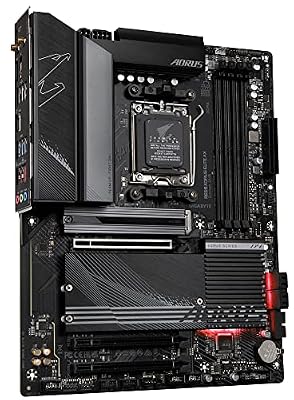
1. GIGABYTE B650 AORUS Elite AX AMD AM5 ATX Motherboard, DDR5, WiFi 6E

GIGABYTE B650 AORUS Elite AX AMD AM5 ATX Motherboard, Support Ryzen 9000/8000/7000 Series, DDR5, 14+2+1 Power Phase, PCIe 5.0 M.2, USB-C 3.2 Gen 2, WIFI6E, 2.5GbE, EZ-Latch, Q-Flash, RGB Fusion



As an Amazon Associate we earn from qualifying purchases. Product prices and availability are accurate as of the date/time indicated.
The GIGABYTE B650 AORUS Elite AX is the top content-creation pick because it is a modern AM5 platform built for the connectivity creators need. It supports current Ryzen 9000, 8000 and 7000 processors, takes high-speed DDR5 memory, and brings the multiple M.2 slots, USB-C and WiFi 6E that a creative workstation depends on. At around $150 it pairs a future-ready platform with the I/O that matters for editing and rendering.
For content creation, the AM5 platform is the draw: DDR5 support means a large, fast memory pool for video editing and heavy multitasking, the board’s multiple M.2 slots let you separate a fast OS drive from dedicated scratch and project storage, and the rear USB-C plus WiFi 6E handle modern peripherals and networking. Building on a current socket also means a clear upgrade path for your CPU down the line. For a new creator workstation that needs strong I/O and room to grow, this is the standout choice.
Pros: Modern AM5 with DDR5, multiple M.2 slots, USB-C, WiFi 6E, clear upgrade path.
Cons: B650 is a mainstream tier rather than a maxed-out HEDT board; AM5 needs DDR5.
2. GIGABYTE Z790 AORUS Elite AX LGA 1700 ATX Motherboard, Intel 14th/13th Gen
The GIGABYTE Z790 AORUS Elite AX is the Intel content-creation pick, a strong LGA 1700 platform for creators invested in Intel Core processors. It supports 14th and 13th Gen chips, takes DDR5 memory, and delivers the multiple M.2 slots, fast USB connectivity and WiFi a creative workstation wants. At around $190 it is a well-equipped Z790 board with the expansion creators rely on.
For content creation on Intel, the Z790 chipset unlocks the platform’s full I/O and memory potential: DDR5 support feeds a large, fast memory pool for editing and rendering, the several M.2 slots allow a dedicated layout of OS, scratch and export drives, and the robust rear USB and WiFi handle cameras, external SSDs and networking. Intel’s high-clock cores suit single-threaded creative tasks well, and this board gives them a capable, expandable home. For a creator who prefers the Intel ecosystem, it is the natural pick.
Pros: Z790 LGA 1700 platform, DDR5, multiple M.2 slots, fast USB, WiFi, strong expansion.
Cons: Z790 boards run pricier than B-series; DDR5 and a compatible CPU required.
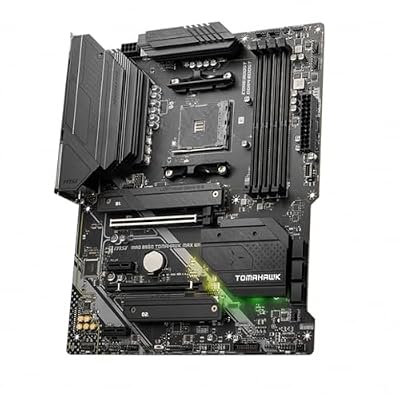
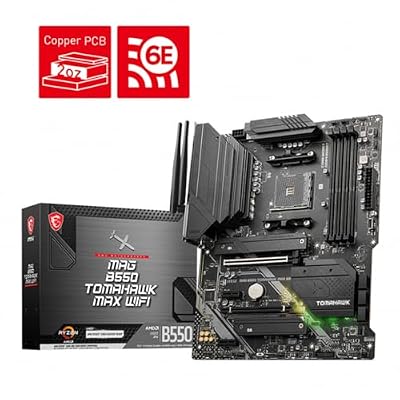
3. MSI MAG B550 Tomahawk MAX WiFi Gaming Motherboard, AMD AM4, DDR4

MSI MAG B550 Tomahawk MAX WiFi Gaming Motherboard (AMD Ryzen 5000 Series, AM4, DDR4, PCIe 4.0, SATA 6Gb/s, M.2, USB 3.2 Gen 2, HDMI/DP, Wi-Fi 6E, Bluetooth 5.2, 2.5Gbps LAN, ATX)



As an Amazon Associate we earn from qualifying purchases. Product prices and availability are accurate as of the date/time indicated.
The MSI MAG B550 Tomahawk MAX WiFi is the balanced AM4 value pick, a board with a deservedly strong reputation for solid power delivery and well-rounded I/O. It supports AMD Ryzen 5000 series processors on the AM4 socket, takes DDR4 memory, and offers dependable M.2 storage, USB connectivity and built-in WiFi. At around $158 it is a proven, well-equipped foundation for a cost-conscious creator build.
For content creation, the Tomahawk MAX earns its place through reliability and balance: its robust VRM keeps a multi-core Ryzen CPU fed steadily during long renders and exports, the M.2 slots cover a fast OS drive plus working storage, and the WiFi and USB handle everyday creative peripherals. As a mature DDR4 platform it is more affordable than the latest AM5 and Intel boards while still delivering the dependable I/O a workstation needs. For a creator who wants proven value over the newest socket, it is a smart, sensible choice.
Pros: Robust VRM for sustained multi-core loads, dependable M.2 and USB I/O, WiFi, great value.
Cons: AM4/DDR4 is a mature platform with a shorter upgrade runway than AM5.
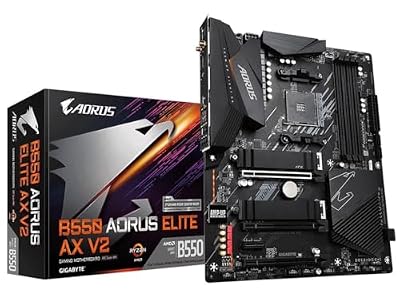
4. GIGABYTE B550 AORUS Elite AX V2 AMD AM4 ATX Motherboard, Ryzen 5000/4000, WiFi
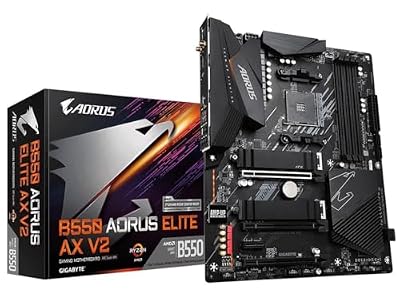
GIGABYTE B550 AORUS Elite AX V2 AMD AM4 ATX Motherboard, Supports Ryzen 5000/4000/3000 Processors, DDR4, 12+2 Power Phase, 2X M.2, PCIe 4.0, Front USB-C, WIFI6, 2.5 GbE LAN, Q-Flash Plus, RGB Fusion
As an Amazon Associate we earn from qualifying purchases. Product prices and availability are accurate as of the date/time indicated.
The GIGABYTE B550 AORUS Elite AX V2 is the AM4-with-WiFi pick, a well-rounded board that supports Ryzen 5000 and 4000 processors with DDR4 memory and integrated wireless. It offers M.2 storage slots, a solid rear I/O layout and WiFi connectivity in the AORUS Elite line’s familiar, dependable package. At around $140 it is a capable, affordable base for a creator who is building or upgrading on AM4.
For content creation, this board covers the essentials a workstation needs without overspending: the M.2 slots let you run a fast OS drive alongside dedicated working storage, the supported DDR4 capacity handles editing and multitasking comfortably, and the built-in WiFi plus rear USB connect your creative peripherals and network cleanly. It is a sensible AM4 option for a creator reusing a Ryzen 5000 or 4000 CPU, or building a value workstation where the latest platform is not a priority. Reliable I/O at a fair price is its appeal.
Pros: AM4 with WiFi, M.2 storage slots, solid rear I/O, Ryzen 5000/4000 support, affordable.
Cons: DDR4-era platform; fewer high-bandwidth lanes than current AM5 or Z790 boards.
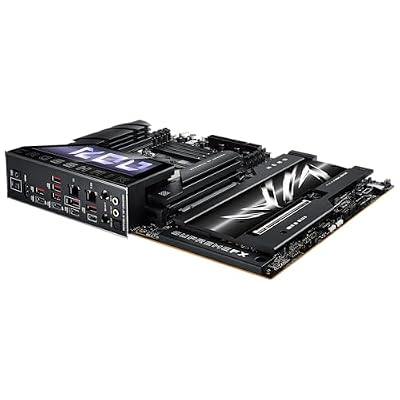
5. Asus ROG X570 Crosshair VIII Hero (Wi-Fi) ATX Motherboard, PCIe 4.0

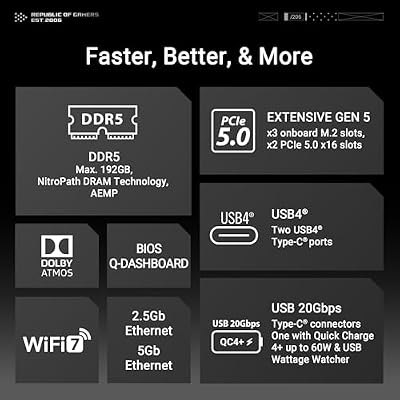
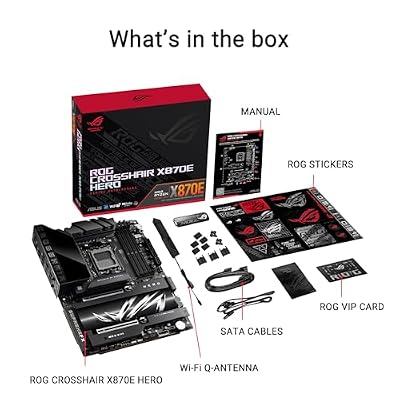
ASUS ROG Crosshair X870E Hero AMD X870E AM5 ATX Motherboard, Advanced AI PC Ready, 18+2+2 Power Stages, DDR5, PCIe® 5.0, 5X M.2, Wi-Fi 7, USB4®, AI Overclocking, Core Flex, PCIe Slot Q-Release Slim





As an Amazon Associate we earn from qualifying purchases. Product prices and availability are accurate as of the date/time indicated.
The Asus ROG X570 Crosshair VIII Hero is the high-end expansion pick, a premium flagship board with extensive I/O. It is an X570 platform with PCIe 4.0 support, generous M.2 storage, a heavy-duty power design, abundant rear USB and onboard WiFi, all in ROG’s top-tier package. At around $433 it is by far the most expensive board here, and it is fair to note it is an older AM4 flagship rather than a current-generation release.
For content creation, this board’s appeal is its sheer expansion and build quality: the abundant M.2 slots and PCIe 4.0 lanes let a creator run several fast drives and add-in cards together, the premium VRM steadily feeds a high-core-count Ryzen CPU through demanding renders, and the rich rear I/O connects a studio’s worth of gear. The honest caveat is value — at this price on a mature AM4 platform, a creator chasing the newest features may prefer a modern AM5 or Z790 board, but for maximal AM4 expansion and flagship components, the Crosshair VIII Hero remains formidable.
Pros: Flagship X570 with PCIe 4.0, abundant M.2 and USB, premium VRM, rich expansion.
Cons: Most expensive here and an older AM4 flagship; modern AM5/Z790 may offer better value.
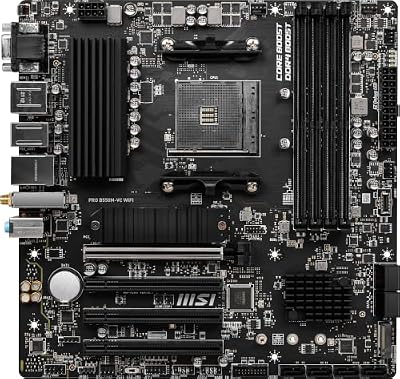
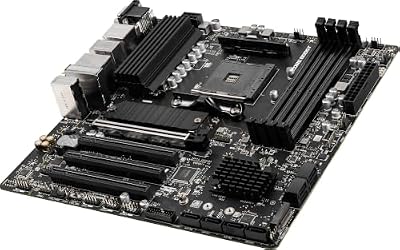
6. MSI PRO B550M-VC WiFi ProSeries Micro-ATX Motherboard, AM4, DDR4

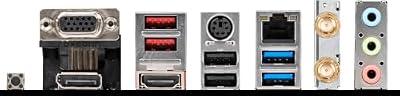
MSI PRO B550M-VC WiFi ProSeries Motherboard (AMD Ryzen 5000 Series, AM4, DDR4, PCIe 4.0, SATA 6Gb/s, M.2, USB 3.2 Gen 2, HDMI/DP, Wi-Fi 6E, Bluetooth 5.2, mATX)



As an Amazon Associate we earn from qualifying purchases. Product prices and availability are accurate as of the date/time indicated.
Rounding out the list is the MSI PRO B550M-VC WiFi, the compact budget pick. It is a micro-ATX ProSeries board for the AM4 socket, supporting Ryzen 5000 series processors with DDR4 memory and including built-in WiFi. At around $80 it is the most affordable board here, and it is honest to frame it as a small, value-oriented foundation rather than a high-expansion workstation platform.
For content creation, this board suits a specific use: a compact, budget creator build or a small-form-factor edit box where space and cost matter more than maximal expansion. The micro-ATX layout fits smaller cases, the WiFi and rear USB cover essential peripherals, and the AM4 platform keeps the overall build affordable. You get fewer M.2 slots and expansion lanes than the larger ATX boards here, so it is best for lighter editing and entry creative work rather than a heavy multi-drive studio rig. As an inexpensive, space-saving starting point, it does its job well.
Pros: Lowest price here, compact micro-ATX, AM4 with WiFi, tidy essentials for small builds.
Cons: Micro-ATX limits M.2 and expansion slots; best for lighter creative workloads.
How to Choose a Content Creation Motherboard
Choosing a content creation motherboard starts with storage expansion, because creators live and die by fast drives. Look first at the number of M.2 slots: a creative workstation benefits enormously from separating a fast OS drive, a dedicated scratch or cache drive, and project or export storage, and the ATX boards here — the B650 AORUS Elite, Z790 AORUS Elite and X570 Crosshair — offer more M.2 slots and lanes than the compact micro-ATX option. Count the slots and confirm they run at the speed your workflow needs.
Memory capacity and type are the next decision, since editing, rendering and heavy multitasking are memory-hungry. A modern platform like AM5 (the B650 board) or Intel LGA 1700 (the Z790 board) supports fast DDR5 and large capacities, which keeps timelines, layers and many open applications smooth under load. The AM4 boards here use DDR4, which is more affordable and still perfectly capable for many creators — just confirm the maximum supported capacity and speed match your editing and rendering ambitions.
Connectivity is where a creator’s board really proves itself, so scrutinise the rear I/O. Fast USB-C and plentiful USB ports let you connect cameras, external SSDs, audio interfaces and capture devices without a hub, and onboard WiFi — present on every board here — keeps a workstation networked even without a wired drop. If your workflow leans on high-bandwidth external storage or a lot of peripherals, prioritise a board with strong, fast USB-C connectivity and a generous port count over one with the bare minimum.
Finally, choose your platform and balance expansion against value. A modern AM5 or Z790 board gives you DDR5, the newest connectivity and a longer upgrade runway; a mature AM4 board like the Tomahawk MAX or B550 AORUS Elite delivers dependable I/O for less; and a compact micro-ATX board suits a small, budget-minded build. Be honest about whether you need flagship expansion — the premium X570 Crosshair is formidable but pricey on an older platform. Match the socket, memory, storage and ports to how you actually create, and pick the board on this list that fits your workstation and budget.
Frequently Asked Questions
How many M.2 slots do I need for content creation?
Ideally at least two, and three or more is better for a serious workstation. Separating a fast OS drive from a dedicated scratch or cache drive and your project storage keeps editing and rendering smooth and your data organised. The ATX boards here, such as the GIGABYTE B650 and Z790 AORUS Elite, offer more M.2 slots than the compact micro-ATX option, which is why they suit heavier creative builds.
Is AMD or Intel better for a content creation motherboard?
Both are excellent, and the right choice depends on your CPU and budget. AMD AM5 boards like the GIGABYTE B650 AORUS Elite offer modern DDR5 support and a long upgrade path with high-core-count Ryzen chips, while Intel Z790 boards like the Z790 AORUS Elite pair DDR5 with strong single-threaded clocks. Pick the platform that matches the processor and software you plan to use, then choose a board with the I/O your workflow needs.
Do I need DDR5, or is DDR4 fine for creative work?
DDR4 is still perfectly capable for a great deal of creative work and keeps a build more affordable, which is why the AM4 boards here remain popular. DDR5, on the AM5 and Z790 boards, offers higher bandwidth and larger capacities that benefit memory-heavy editing, rendering and multitasking. If you are building new and your workloads are demanding, DDR5 is the more future-ready choice; for value or an upgrade, DDR4 is a sensible option.
How important is USB-C and rear I/O for a creator’s motherboard?
Very important. Creators connect cameras, external SSDs, audio interfaces and capture devices, and fast USB-C with a generous port count lets you do that without relying on hubs. Check the rear I/O carefully and favour a board with strong, fast connectivity if your workflow depends on high-bandwidth external storage or many peripherals — it makes day-to-day creative work far smoother.
Related Guides
- Best Motherboards
- Best AM5 Motherboards
- Best NVMe SSDs for Creators
- Best CPUs for Content Creation
- Best RAM for Your Build
- Best Workstation PC Builds
Affiliate Disclosure: As an Amazon Associate, we earn from qualifying purchases. If you click a link and make a purchase, we may earn a small commission at no extra cost to you. Prices and availability are accurate as of publication and may change.










