

- Top Pick: Cudy AX1500 Gigabit Mesh Wi-Fi 6 Router, 4X GbE, OFDMA, VPN, WR1500
- Best Value: Cudy AC1200 Dual-Band Wi-Fi Router, 5X Fast Ethernet, VPN Client, WR1200
- Premium Choice: Mercusys MW302R, 300 Mbps, Parental Controls, All-in-one( Router, Access Point, Range Extender, WISP) Modes, Easy Setup with Mobile App, Wireless N Router
Three hundred dollars is a comfortable budget for home networking, and it changes what you should be shopping for. Instead of squeezing into a single router, this ceiling comfortably covers a whole-home WiFi 6 mesh system — the kind of multi-unit setup that blankets a house in fast, seamless wireless and kills dead zones in back bedrooms and upstairs offices. With money to spare under $300, mesh is the headline you can realistically buy, and that is where this guide leads. We have rounded up the best routers under $300 in 2026, with mesh systems up front and strong single-unit routers as the lean, money-saving alternative.
- Best Routers under $300 at a Glance
- 1. TP-Link Deco X55 AX3000 WiFi 6 Mesh System (up to 6,500 sq ft)
- 2. Amazon eero 6+ mesh wifi router (gigabit-class)
- 3. TP-Link Deco S4 AC1900 WiFi Mesh System (up to 5,500 sq ft)
- 4. TP-Link AX1800 WiFi 6 Router (Archer AX21 V5)
- 5. TP-Link Smart WiFi 6 Router (Archer AX10 / AX1500)
- 6. TP-Link AC1200 Gigabit WiFi Router (Archer A6)
- How to Choose a Router under $300
- Frequently Asked Questions
- Related Guides
- Related Articles
Our picks were chosen on what genuinely matters at this budget: coverage area, WiFi standard (WiFi 6 wherever possible), the number of devices a system handles gracefully, and value. Every product here lands well under the $300 line, so the real decision is mesh versus a single powerful router, and how much house you need to cover. Prices run from around $40 for a capable standalone unit up to around $150 for a multi-pack mesh kit — leaving plenty of headroom in the budget. Below is an at-a-glance comparison of all six, then a closer look at each and a buyer’s guide built around coverage, WiFi 6 and mesh — the criteria that decide your home network.
As an Amazon Associate we earn from qualifying purchases at no extra cost to you.


🛒 Best Price Today on Amazon
Prime members get fast, free shipping on everything above, plus member-only deals. New members get a 30-day free trial — cancel anytime.
Best Routers under $300 at a Glance
| Router | Best For | Standout Spec | Approx Price |
|---|---|---|---|
| TP-Link Deco X55 (AX3000 Mesh) | Whole-home WiFi 6 mesh | WiFi 6, up to 6,500 sq ft | around $150 |
| Amazon eero 6+ (Mesh) | Simple gigabit mesh | WiFi 6 mesh, gigabit-class | around $140 |
| TP-Link Deco S4 (AC1900 Mesh) | Budget whole-home coverage | Mesh, up to 5,500 sq ft | around $96 |
| TP-Link Archer AX21 (AX1800) | Single-unit WiFi 6 value | WiFi 6, dual-band gigabit | around $52 |
| TP-Link Archer AX10 (AX1500) | Entry WiFi 6 router | WiFi 6, 4 gigabit LAN | around $60 |
| TP-Link Archer A6 (AC1200) | Cheapest reliable router | AC1200, MU-MIMO gigabit | around $40 |
1. TP-Link Deco X55 AX3000 WiFi 6 Mesh System (up to 6,500 sq ft)

TP-Link Deco X55 AX3000 WiFi 6 Mesh System, Deco X55(3-Pack) | Covers up to 6500 Sq.Ft. , Replaces Wireless Router and Extender, 3 Gigabit ports per unit, supports Ethernet Backhaul





As an Amazon Associate we earn from qualifying purchases. Product prices and availability are accurate as of the date/time indicated.
With a $300 budget, the TP-Link Deco X55 is the pick that uses it best. It is an AX3000 WiFi 6 mesh system that, in a multi-pack, blankets up to roughly 6,500 square feet in seamless wireless — enough for most whole homes — while still costing only around $150 and leaving half your budget untouched. WiFi 6 brings better efficiency in busy households, and the mesh design means your devices roam between units on a single network name without dropping.
This is the headline buy at this ceiling: genuine whole-home coverage with a current wireless standard, for well under $300. The Deco X55 is the right choice if you have a multi-storey or sprawling home with dead zones a single router cannot reach, and you want WiFi 6 efficiency for a house full of phones, laptops, TVs and smart devices. Setup runs through the friendly Deco app, and you can add more units later. For most under-$300 shoppers chasing coverage, this is where to start.
Pros: WiFi 6 mesh, up to ~6,500 sq ft, easy app setup, huge value under $300.
Cons: Mesh satellites share bandwidth; not a tri-band powerhouse.
2. Amazon eero 6+ mesh wifi router (gigabit-class)

Amazon eero 6+ mesh wifi router - Supports internet plans up to a Gigabit, Coverage up to 1,500 sq. ft., Connect 75+ devices, 1-pack


As an Amazon Associate we earn from qualifying purchases. Product prices and availability are accurate as of the date/time indicated.
The Amazon eero 6+ is the simplest way to get whole-home WiFi 6 mesh under $300. It supports internet plans up to a gigabit, covers a large home in a multi-pack, and is famous for its near-effortless setup through the eero app, which walks you through everything and handles updates automatically. At around $140 it sits comfortably inside the budget with room to spare.
This is the pick for the under-$300 buyer who values ease and a tidy ecosystem over manual tinkering. The eero 6+ delivers WiFi 6 mesh coverage, gigabit-class throughput, and a genuinely painless app experience, plus optional eero Secure features and smart-home hub support. If you would rather set up your network in minutes and forget about it — while still getting modern WiFi 6 and seamless roaming across a large home — the eero 6+ is the easy, polished choice at this budget.
Pros: WiFi 6 mesh, gigabit-class, exceptionally easy setup, smart-home friendly.
Cons: Advanced controls are limited; some features behind eero Secure.
3. TP-Link Deco S4 AC1900 WiFi Mesh System (up to 5,500 sq ft)

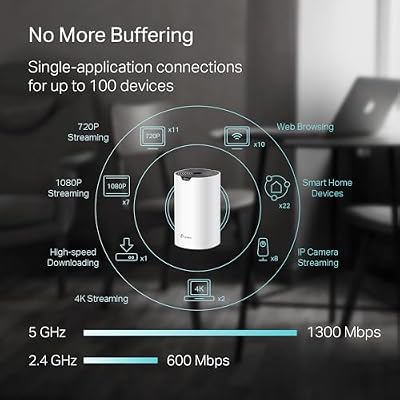
TP-Link Deco S4 Mesh AC1900 WiFi System, Deco S4(3-Pack) | Up to 5,500 Sq.ft. Coverage, Replaces WiFi Router and Extender, Gigabit Ports, Works with Alexa



As an Amazon Associate we earn from qualifying purchases. Product prices and availability are accurate as of the date/time indicated.
If you want whole-home mesh coverage for the lowest possible outlay, the TP-Link Deco S4 is the value answer well within a $300 budget. It is an AC1900 (WiFi 5) mesh system that covers up to around 5,500 square feet in a multi-pack, eliminating dead zones across most homes for around $96 — leaving the bulk of your $300 in your pocket. It uses the same easy Deco app as its WiFi 6 siblings.
This is the choice for an under-$300 shopper who prioritises pure coverage and value over the latest standard. WiFi 5 is still plenty for everyday browsing, streaming and video calls across a busy home, and the Deco S4’s mesh design delivers the same seamless single-network roaming as pricier kits. If your home does not yet have a flood of WiFi 6 devices and you simply want reliable, affordable whole-home wireless, the Deco S4 stretches the budget furthest.
Pros: Affordable mesh, up to ~5,500 sq ft, easy Deco app, leaves budget to spare.
Cons: WiFi 5 (AC), not WiFi 6; no Wi-Fi 6 efficiency gains.
4. TP-Link AX1800 WiFi 6 Router (Archer AX21 V5)
Not every home needs mesh, and the TP-Link Archer AX21 is the single-unit WiFi 6 router that proves it. It is a dual-band AX1800 router with gigabit ports that brings WiFi 6 efficiency to apartments and small-to-mid homes for around $52 — a fraction of the $300 budget. For a place a single router can cover, it is one of the best value WiFi 6 buys around.
This is the pick for under-$300 shoppers who do not need whole-home mesh and would rather pocket the savings. In an apartment, condo or smaller house, the Archer AX21 delivers modern WiFi 6 to dozens of devices, supports OneMesh if you want to extend it later, and runs TP-Link’s mature firmware with HomeShield security. If your space is well served by one well-placed router, this is a smart, frugal way to get current WiFi without buying a mesh kit you do not need.
Pros: Affordable WiFi 6, dual-band gigabit, OneMesh-ready, excellent single-unit value.
Cons: Single unit; coverage limited compared with a mesh system.
5. TP-Link Smart WiFi 6 Router (Archer AX10 / AX1500)
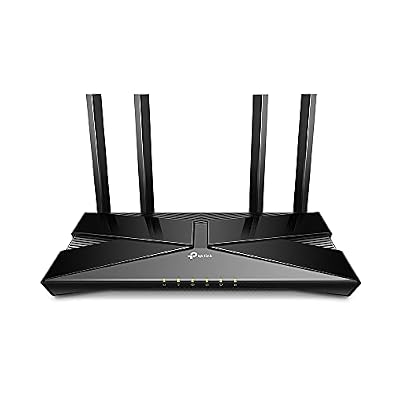
TP-Link Smart WiFi 6 Dual Band Router 4 Gigabit LAN Ports | 802.11AX Router, Beamforming, OFDMA, MU-MIMO, Parental Controls, Dual-Core 900MHz Processor, Works with Alexa (Archer AX10)


As an Amazon Associate we earn from qualifying purchases. Product prices and availability are accurate as of the date/time indicated.
The TP-Link Archer AX10 is the entry point into WiFi 6 on this list. It is an AX1500 dual-band router with four gigabit LAN ports that delivers the core benefits of the 802.11ax standard — better efficiency with many devices — at a budget price of around $60, leaving almost all of your $300 unspent. For a small home or a first WiFi 6 upgrade, it covers the basics well.
This is the choice for the under-$300 buyer who wants to step up to WiFi 6 without spending much, in a space a single router can handle. The AX10 brings improved handling of busy networks over older WiFi 5 routers, four wired gigabit ports for desktops and consoles, and TP-Link’s reliable app and firmware. It is not built to flood a large house, but for an apartment or compact home wanting modern wireless on a tight outlay, it is a sensible, low-cost entry.
Pros: Affordable WiFi 6 entry, four gigabit LAN ports, reliable firmware, low cost.
Cons: Entry-tier AX1500; single-unit coverage only.
6. TP-Link AC1200 Gigabit WiFi Router (Archer A6)

TP-Link AC1200 Gigabit Dual Band WiFi Router (Archer A6) | MU-MIMO Wireless Internet Router, 4 x Antennas, OneMesh and AP Mode, Long Range Coverage


As an Amazon Associate we earn from qualifying purchases. Product prices and availability are accurate as of the date/time indicated.
Rounding out the under-$300 list is the TP-Link Archer A6, the cheapest reliable router here at around $40. It is an AC1200 dual-band router with gigabit ports and MU-MIMO, designed to serve multiple devices at once on the proven WiFi 5 standard. It is the absolute-minimum-spend option for a budget that could stretch far higher.
This is the pick for someone who needs a dependable router for a small space and wants to spend as little of their $300 as possible — perhaps keeping the rest for other gear. The Archer A6 handles everyday browsing, HD streaming and video calls comfortably, MU-MIMO helps it juggle several devices, and TP-Link’s firmware keeps it stable and easy to manage. It is not WiFi 6 and it will not cover a mansion, but as a rock-solid budget router, it is hard to fault for the money.
Pros: Very affordable, gigabit ports, MU-MIMO, reliable everyday WiFi 5 router.
Cons: WiFi 5 only; basic coverage suited to smaller spaces.
How to Choose a Router under $300
With a $300 budget the first question is not ‘how fast’ but ‘how much house’ — because at this ceiling, coverage is the differentiator. A single router, however capable, broadcasts from one spot, so signal fades through walls, floors and across larger homes. A mesh system like the Deco X55, eero 6+ or Deco S4 uses multiple units that hand your devices off seamlessly, blanketing a whole house on one network name. If you have dead zones, a multi-storey layout, or simply a big footprint, mesh is what your $300 should buy.
WiFi standard is the next lever, and under $300 you can comfortably insist on WiFi 6 (802.11ax). WiFi 6 is not just about peak speed; its real strength is handling many devices at once more efficiently, which matters in a modern home full of phones, TVs, consoles and smart gadgets. The Deco X55, eero 6+, Archer AX21 and Archer AX10 all bring WiFi 6, while the Deco S4 and Archer A6 are WiFi 5 (AC). If your household is device-heavy, prioritise a WiFi 6 option — your budget easily allows it.
Match the system to your home size and device count honestly. A 6,500 sq ft mesh kit is overkill for a one-bedroom apartment, where a single Archer AX21 would serve better and save money; conversely, a lone router will frustrate you in a three-storey house no matter how good it is. Count your rough square footage and the number of connected devices, then size the system to fit. Under $300 you have the luxury of buying exactly the right amount of network rather than compromising.
Finally, weigh ease of setup and future expansion against price. App-driven systems like eero and Deco make installation genuinely simple and let you add units later as your needs grow, while OneMesh-ready single routers such as the Archer AX21 can be extended down the line. Because everything here sits well under $300, the smart move is to buy the coverage and standard you actually need — most likely a WiFi 6 mesh kit — and keep the change rather than overspending on capacity you will never use.
Frequently Asked Questions
Is $300 enough for a good whole-home mesh WiFi system?
Comfortably, yes. Under $300 you can buy a capable WiFi 6 mesh kit such as the TP-Link Deco X55 (around $150) or the Amazon eero 6+ (around $140) and still leave roughly half your budget unspent. Both cover large homes, support modern WiFi 6, and set up through a simple app. At this ceiling, whole-home mesh is the headline you can realistically afford.
Do I need mesh, or will a single router cover my home?
It depends on size and layout. A single router like the Archer AX21 is ideal for apartments and small-to-mid homes and saves you money. But in a multi-storey or sprawling house, one router leaves dead zones no matter how powerful it is — that is where a mesh system like the Deco X55, eero 6+ or Deco S4 earns its place by blanketing the whole space on one network.
Should I prioritise WiFi 6 under a $300 budget?
Yes, if your home is device-heavy. WiFi 6 (802.11ax) handles many simultaneous devices more efficiently than WiFi 5, which matters with phones, TVs, consoles and smart gadgets all online. The Deco X55, eero 6+, Archer AX21 and Archer AX10 are all WiFi 6 and well within budget. The WiFi 5 Deco S4 and Archer A6 remain fine value if you want maximum coverage or the lowest price.
Which under-$300 router is best for a large multi-storey house?
A mesh system, and the TP-Link Deco X55 is the standout — its AX3000 WiFi 6 mesh covers up to roughly 6,500 square feet in a multi-pack for around $150. For the easiest setup, the eero 6+ is a close alternative. If you want maximum coverage on the smallest spend, the WiFi 5 Deco S4 reaches up to about 5,500 square feet for around $96.
Related Guides
- Best Routers under $400
- Best Routers under $500
- Best Gaming Routers
- Best Mesh WiFi Systems
- Best WiFi Extenders
- Best Budget Gaming Setup
Affiliate Disclosure: As an Amazon Associate, we earn from qualifying purchases. If you click a link and make a purchase, we may earn a small commission at no extra cost to you. Prices and availability are accurate as of publication and may change.










