

Stepping the budget up to $400 changes the conversation from ‘covering the house’ to ‘future-proofing it.’ This is the ceiling where the next tier of home networking becomes accessible: WiFi 6E, with its extra 6GHz band, and support for faster-than-gigabit internet plans up to 2.5 Gbps. The headline upgrade $400 specifically buys is a tri-band WiFi 6E mesh system that can keep up with multi-gig fibre and a congested airspace, and that is what this guide leads with. We have rounded up the best routers under $400 in 2026, with the newer WiFi 6E hardware up front and proven WiFi 6 mesh and value routers behind it.
- Best Routers under $400 at a Glance
- 1. Amazon eero Pro 6E mesh wifi router (WiFi 6E, up to 2.5 Gbps)
- 2. Amazon eero 6+ mesh wifi router (gigabit-class)
- 3. TP-Link Deco S4 AC1900 WiFi Mesh System (up to 5,500 sq ft)
- 4. TP-Link AX1800 WiFi 6 Router (Archer AX21 V5)
- 5. TP-Link Smart WiFi 6 Router (Archer AX10 / AX1500)
- 6. TP-Link AC1200 Gigabit WiFi Router (Archer A6)
- How to Choose a Router under $400
- Frequently Asked Questions
- Related Guides
- Related Articles
Our picks were chosen for this budget’s purpose: the wireless standard (reaching WiFi 6E where it counts), support for faster internet plans, coverage for a busy home, and overall value. Because $400 is generous, the real opportunity is to buy the most future-ready hardware that fits — which is why the multi-gig, 6GHz-capable eero Pro 6E leads the list. Prices span from around $40 for a dependable single router up to around $200 for the flagship WiFi 6E mesh unit, so you can spend up for headroom or step down for value. Below is an at-a-glance comparison of all six, then a closer look at each and a buyer’s guide built around WiFi 6E, multi-gig speeds and coverage.
As an Amazon Associate we earn from qualifying purchases at no extra cost to you.




🛒 Best Price Today on Amazon
Prime members get fast, free shipping on everything above, plus member-only deals. New members get a 30-day free trial — cancel anytime.
Best Routers under $400 at a Glance
| Router | Best For | Standout Spec | Approx Price |
|---|---|---|---|
| Amazon eero Pro 6E (Tri-band Mesh) | WiFi 6E + multi-gig future-proofing | WiFi 6E, up to 2.5 Gbps plans | around $200 |
| Amazon eero 6+ (Mesh) | Simple gigabit WiFi 6 mesh | WiFi 6 mesh, gigabit-class | around $140 |
| TP-Link Deco S4 (AC1900 Mesh) | Maximum coverage on a budget | Mesh, up to 5,500 sq ft | around $96 |
| TP-Link Archer AX21 (AX1800) | Single-unit WiFi 6 value | WiFi 6, dual-band gigabit | around $52 |
| TP-Link Archer AX10 (AX1500) | Entry WiFi 6 router | WiFi 6, 4 gigabit LAN | around $60 |
| TP-Link Archer A6 (AC1200) | Lowest-cost reliable router | AC1200, MU-MIMO gigabit | around $40 |
1. Amazon eero Pro 6E mesh wifi router (WiFi 6E, up to 2.5 Gbps)

Amazon eero Pro 6E mesh wifi router - Supports internet plans up to 2.5 Gbps, Coverage up to 2,000 sq. ft., Connect 100+ devices, 1-pack


As an Amazon Associate we earn from qualifying purchases. Product prices and availability are accurate as of the date/time indicated.
At a $400 budget, the Amazon eero Pro 6E is the router that unlocks the next tier — and it is the reason to spend up. It is a tri-band WiFi 6E mesh system that adds the new 6GHz band on top of the usual 2.4 and 5GHz, and it supports internet plans up to 2.5 Gbps, well beyond standard gigabit. At around $200 it sits squarely inside this budget while delivering hardware the cheaper tiers simply cannot match.
This is the headline buy under $400: genuine future-proofing for fast fibre and a crowded airspace. The 6GHz band gives newer WiFi 6E devices a clean, high-bandwidth lane free of older-device congestion, the 2.5 Gbps support means the router will not bottleneck a multi-gig internet plan, and the eero app keeps setup effortless with automatic updates. If you have or plan to get faster-than-gigabit service, or you simply want the most current standard your $400 can buy, the eero Pro 6E is where to put the money.
Pros: WiFi 6E with 6GHz band, supports up to 2.5 Gbps plans, easy app, future-ready.
Cons: Pricier per unit; 6E benefits need WiFi 6E client devices.
2. Amazon eero 6+ mesh wifi router (gigabit-class)

Amazon eero 6+ mesh wifi router - Supports internet plans up to a Gigabit, Coverage up to 1,500 sq. ft., Connect 75+ devices, 1-pack


As an Amazon Associate we earn from qualifying purchases. Product prices and availability are accurate as of the date/time indicated.
The Amazon eero 6+ is the value mesh option that sits one rung below the Pro 6E in this $400 list. It is a WiFi 6 mesh system supporting internet plans up to a gigabit, covering a large home in a multi-pack with the same renowned eero app simplicity. At around $140 it leaves a healthy chunk of the budget unspent for those who do not need 6E or multi-gig speeds.
This is the pick for the under-$400 buyer on a standard gigabit (or slower) plan who wants reliable WiFi 6 mesh without paying for the 6GHz band they cannot yet use. The eero 6+ delivers seamless whole-home coverage, gigabit-class throughput, painless setup and smart-home hub support. If your internet tops out at gigabit and most of your devices are WiFi 6 rather than 6E, the eero 6+ gives you the bulk of the experience for considerably less money.
Pros: WiFi 6 mesh, gigabit-class, effortless setup, strong value below the 6E tier.
Cons: No 6GHz band; tops out around gigabit rather than multi-gig.
3. TP-Link Deco S4 AC1900 WiFi Mesh System (up to 5,500 sq ft)

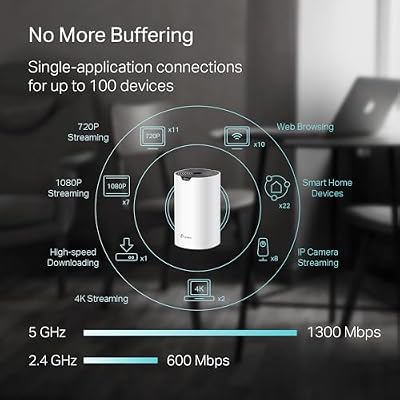
TP-Link Deco S4 Mesh AC1900 WiFi System, Deco S4(3-Pack) | Up to 5,500 Sq.ft. Coverage, Replaces WiFi Router and Extender, Gigabit Ports, Works with Alexa



As an Amazon Associate we earn from qualifying purchases. Product prices and availability are accurate as of the date/time indicated.
For maximum coverage at minimum cost within a $400 budget, the TP-Link Deco S4 is the value workhorse. It is an AC1900 (WiFi 5) mesh system blanketing up to around 5,500 square feet in a multi-pack, eliminating dead zones for around $96 — a small slice of this budget. It runs the same friendly Deco app as TP-Link’s newer kits.
This is the choice for the under-$400 shopper who cares more about reaching every corner of the house than about owning the newest standard. WiFi 5 still handles everyday streaming, browsing and calls across a busy home with ease, and the Deco S4’s mesh roaming is seamless. With most of your $400 left over, you could pair it with other upgrades — but on its own it is a dependable, wide-coverage system that proves you do not have to spend big to kill dead zones.
Pros: Wide ~5,500 sq ft mesh coverage, easy app, very low cost within budget.
Cons: WiFi 5 (AC) only; no WiFi 6/6E or multi-gig support.
4. TP-Link AX1800 WiFi 6 Router (Archer AX21 V5)
The TP-Link Archer AX21 is the single-unit WiFi 6 value pick for buyers who do not need mesh, even with $400 to spend. It is a dual-band AX1800 router with gigabit ports bringing WiFi 6 to apartments and small-to-mid homes for around $52. For a space one router can cover, it remains one of the smartest-value WiFi 6 buys available.
This is the option for the under-$400 shopper whose home is well served by a single well-placed router and who would rather not spend on coverage they do not need. The Archer AX21 supports plenty of WiFi 6 devices, can be extended later via OneMesh, and includes HomeShield security in TP-Link’s mature firmware. With the rest of the budget free, it pairs well with a switch, powerline kit or other gear — but as a standalone WiFi 6 router for the right space, it is excellent.
Pros: Affordable WiFi 6, dual-band gigabit, OneMesh-ready, leaves budget free.
Cons: Single unit; not a multi-gig or 6E device.
5. TP-Link Smart WiFi 6 Router (Archer AX10 / AX1500)
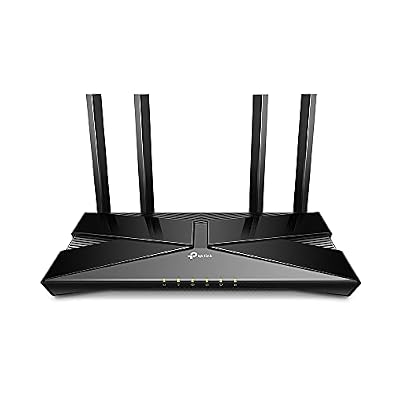
TP-Link Smart WiFi 6 Dual Band Router 4 Gigabit LAN Ports | 802.11AX Router, Beamforming, OFDMA, MU-MIMO, Parental Controls, Dual-Core 900MHz Processor, Works with Alexa (Archer AX10)


As an Amazon Associate we earn from qualifying purchases. Product prices and availability are accurate as of the date/time indicated.
The TP-Link Archer AX10 is the budget WiFi 6 entry point in this $400 list. An AX1500 dual-band router with four gigabit LAN ports, it brings the efficiency benefits of 802.11ax to small homes for around $60. It is the choice when you want a current standard at the lowest sensible price and have no need for mesh, 6E or multi-gig.
This is the pick for the under-$400 buyer upgrading a small home or apartment to WiFi 6 on a frugal outlay. The AX10 handles busy networks better than older WiFi 5 routers, provides four wired gigabit ports for desktops and consoles, and runs TP-Link’s reliable firmware and app. It will not saturate a multi-gig plan or cover a large house, but for modern wireless in a compact space, it covers the essentials for very little of your budget.
Pros: Affordable WiFi 6, four gigabit LAN ports, reliable firmware, low spend.
Cons: Entry AX1500; single-unit, no 6E or multi-gig.
6. TP-Link AC1200 Gigabit WiFi Router (Archer A6)

TP-Link AC1200 Gigabit Dual Band WiFi Router (Archer A6) | MU-MIMO Wireless Internet Router, 4 x Antennas, OneMesh and AP Mode, Long Range Coverage


As an Amazon Associate we earn from qualifying purchases. Product prices and availability are accurate as of the date/time indicated.
Rounding out the under-$400 list is the TP-Link Archer A6, the lowest-cost reliable router here at around $40. It is an AC1200 dual-band router with gigabit ports and MU-MIMO, serving multiple devices on the proven WiFi 5 standard. With $400 available, it is the deliberate minimum-spend choice for a small space.
This is the option for someone who needs a stable router for an apartment or small home and wants to commit almost none of their $400 to it. The Archer A6 manages everyday browsing, HD streaming and video calls comfortably, MU-MIMO helps it serve several devices at once, and TP-Link’s firmware keeps it simple and dependable. It is neither WiFi 6 nor multi-gig, but as a no-fuss budget router it does its job well and leaves the rest of your budget intact.
Pros: Lowest cost here, gigabit ports, MU-MIMO, reliable WiFi 5 performance.
Cons: WiFi 5 only; basic coverage for smaller homes.
How to Choose a Router under $400
A $400 budget is your chance to buy ahead of your needs, so the first question is how future-ready you want to be. This ceiling unlocks WiFi 6E — the standard that adds a third, 6GHz band on top of 2.4 and 5GHz — which the eero Pro 6E brings to this list. That extra band is a clean, high-bandwidth lane reserved for newer 6E devices, free from the congestion of older gear. If you want the most current wireless your money can buy, WiFi 6E is the headline feature $400 puts within reach.
Your internet plan is the second deciding factor. Most routers, including the eero 6+ and TP-Link WiFi 6 models, are built around gigabit-class service. But if you have — or are moving to — a faster-than-gigabit plan, you need hardware that can keep up: the eero Pro 6E supports plans up to 2.5 Gbps, so it will not bottleneck multi-gig fibre. Check the speed you actually pay for. There is no point spending up for multi-gig support on a gigabit line, but equally no sense throttling fast fibre with a gigabit-capped router.
Coverage and home size still matter even at this budget. A mesh system — whether the tri-band eero Pro 6E, the WiFi 6 eero 6+, or the value WiFi 5 Deco S4 — blankets a large or multi-storey home on one seamless network, while a single router like the Archer AX21 is the efficient, money-saving choice for an apartment or compact house. Size the system to your square footage and device count first; then decide how much of the standard and speed headroom your $400 should buy on top.
Finally, balance future-proofing against what you will genuinely use today. WiFi 6E only benefits you if you own (or soon will own) 6E client devices, and multi-gig support only matters with a multi-gig plan — so the eero Pro 6E is the smart spend if either applies to you, while the eero 6+ or a WiFi 6 router delivers excellent value if not. Because $400 is generous, the winning strategy is to match the hardware to your real plan and devices, buying the most future-ready option that you will actually take advantage of rather than paying for unused capability.
Frequently Asked Questions
What does a $400 budget get me that a cheaper router doesn’t?
Headroom for the next tier. Under $400 you can buy a tri-band WiFi 6E mesh system like the Amazon eero Pro 6E (around $200), which adds the 6GHz band and supports faster-than-gigabit plans up to 2.5 Gbps. Cheaper routers top out at WiFi 6 and gigabit-class speeds. The extra budget buys future-proofing for multi-gig internet and newer 6E devices, not just more coverage.
What is WiFi 6E and is it worth it under $400?
WiFi 6E extends WiFi 6 by adding a third radio band at 6GHz, giving newer 6E devices a wide, congestion-free lane separate from older 2.4 and 5GHz traffic. It is worth it under $400 if you own WiFi 6E client devices or have a fast, congested network — the eero Pro 6E delivers it. If most of your devices are standard WiFi 6, a WiFi 6 router like the eero 6+ saves money with little real-world loss.
Do I need a router that supports 2.5 Gbps?
Only if your internet plan is faster than gigabit. The eero Pro 6E supports plans up to 2.5 Gbps, so it can fully use multi-gig fibre without bottlenecking it. If your service tops out at gigabit or below — as most plans do — a gigabit-class router like the eero 6+ or the TP-Link WiFi 6 models is all you need, and you can save the difference.
Is the eero Pro 6E overkill for a normal home?
It can be, if you are on a standard gigabit plan with mostly older devices — in that case the eero 6+ or a TP-Link WiFi 6 router gives you nearly the same day-to-day experience for less. The Pro 6E earns its place when you have multi-gig internet, a dense WiFi 6E device collection, or simply want the most future-ready hardware your $400 can buy.
Related Guides
- Best Routers under $300
- Best Routers under $500
- Best Gaming Routers
- Best Mesh WiFi Systems
- Best WiFi 6E Routers
- Best Budget Gaming Setup
Affiliate Disclosure: As an Amazon Associate, we earn from qualifying purchases. If you click a link and make a purchase, we may earn a small commission at no extra cost to you. Prices and availability are accurate as of publication and may change.










