

WiFi 6E takes everything WiFi 6 introduced and adds one transformative ingredient: access to the brand-new 6 GHz radio band. Where 2.4 GHz and 5 GHz are crowded with years of legacy devices and neighbouring networks, the 6 GHz band is a wide, largely empty motorway reserved for the newest WiFi 6E and WiFi 7 hardware. The payoff is less congestion, more available channels, and lower, more consistent latency for the devices that can use it — exactly what competitive gaming, high-bitrate streaming and a future-proof home want. This guide rounds up the best WiFi 6E routers in 2026, the tri-band systems built around that 6 GHz band, alongside the capable WiFi 6 options worth considering if 6E is not yet right for you.
- Best WiFi 6E Routers at a Glance
- 1. TP-Link Deco XE75 AXE5400 Tri-Band WiFi 6E System (3-Pack, 7,200 Sq Ft)
- 2. TP-Link Deco XE75 AXE5400 Tri-Band WiFi 6E System (1-Pack, 2,900 Sq Ft)
- 3. TP-Link Deco XE75 AXE5400 Tri-Band WiFi 6E System (2-Pack, 5,500 Sq Ft)
- 4. TP-Link Deco X55 AX3000 WiFi 6 Mesh System (3-Pack, 6,500 Sq Ft)
- 5. Amazon eero 6 Dual-Band Mesh Wi-Fi 6 Router
- 6. TP-Link AX1800 WiFi 6 Router (Archer AX21 V5)
- How to Choose the Right WiFi 6E Router
- Frequently Asked Questions
- Related Guides
- Related Articles
- Related Guides
Our picks were chosen on what actually matters for stepping up to 6E: tri-band design and access to the 6 GHz band, real-world coverage for the square footage, value, and how the system fits a home full of mixed-generation devices. We have included a deliberate price spread — from around $52 to around $198 — and have been honest about which models are true tri-band WiFi 6E and which are strong dual-band WiFi 6 alternatives, so you can decide whether the 6 GHz band is worth it for you today. Below you will find an at-a-glance comparison, then a closer look at each router and a buyer’s guide covering the 6 GHz band, congestion, client requirements and tri-band design — what really separates 6E from 6.
As an Amazon Associate we earn from qualifying purchases at no extra cost to you.







🛒 Best Price Today on Amazon
Prime members get fast, free shipping on everything above, plus member-only deals. New members get a 30-day free trial — cancel anytime.
Best WiFi 6E Routers at a Glance
| Router | Best For | Standout Spec | Approx Price |
|---|---|---|---|
| TP-Link Deco XE75 (3-pack, 7,200 sq ft) | Whole-home 6 GHz coverage | Tri-band AXE5400, 6 GHz | around $198 |
| TP-Link Deco XE75 (1-pack, 2,900 sq ft) | Single-room 6E entry | Tri-band AXE5400, 6 GHz | around $100 |
| TP-Link Deco XE75 (2-pack, 5,500 sq ft) | Mid-large 6E mesh | Tri-band AXE5400, 6 GHz | around $150 |
| TP-Link Deco X55 (3-pack, 6,500 sq ft) | WiFi 6 mesh alternative | AX3000 dual-band mesh | around $150 |
| Amazon eero 6 router (single) | Simple WiFi 6 alternative | Dual-band, up to 900 Mbps | around $90 |
| TP-Link Archer AX21 (AX1800) | Budget WiFi 6 alternative | AX1800 dual-band, gigabit WAN | around $52 |
1. TP-Link Deco XE75 AXE5400 Tri-Band WiFi 6E System (3-Pack, 7,200 Sq Ft)

TP-Link Deco XE75 AXE5400 Tri-Band WiFi 6E System, 3-Pack | Wi-Fi up to 7200 Sq.Ft, Engadget Rated Best for Most People, Replaces WiFi Router & Extender, AI-Driven, 6GHz Band, WPA3




As an Amazon Associate we earn from qualifying purchases. Product prices and availability are accurate as of the date/time indicated.
The three-pack TP-Link Deco XE75 is the flagship WiFi 6E pick of this list — the way to bring the clean 6 GHz band to an entire home. It is an AXE5400 tri-band WiFi 6E mesh system with three nodes rated to cover up to 7,200 square feet, dedicating a third radio to the new 6 GHz band on top of the usual 2.4 GHz and 5 GHz. At around $198 it is the premium, do-it-all 6E option here.
This is the system for anyone who wants genuine WiFi 6E across a large home, not just one room. The 6 GHz band gives compatible phones, laptops and consoles a wide, uncongested lane for low-latency gaming and high-bitrate streaming, while older devices still ride the 2.4 and 5 GHz radios — and the tri-band design means mesh backhaul can use 6 GHz to keep the nodes talking fast. Three units blanket a big house in one seamless network. For comprehensive, future-proof 6E coverage, the Deco XE75 three-pack is the standout.
Pros: True tri-band 6 GHz, covers up to 7,200 sq ft, three-node mesh, future-proof backhaul.
Cons: Highest price here; you need 6E client devices to use the 6 GHz band.
2. TP-Link Deco XE75 AXE5400 Tri-Band WiFi 6E System (1-Pack, 2,900 Sq Ft)

TP-Link Deco XE75 AXE5400 Tri-Band WiFi 6E Mesh System, 1-Pack | Whole Home WiFi Router Replacement, Covers up to 2900 Sq.Ft, Gaming & Streaming WiFi, 6GHz Band, WPA3, AI-Driven


As an Amazon Associate we earn from qualifying purchases. Product prices and availability are accurate as of the date/time indicated.
The single-unit Deco XE75 is the affordable entry into true WiFi 6E. It is the same AXE5400 tri-band hardware — including the 6 GHz radio — in one node rated to cover up to 2,900 square feet, and it can be expanded with more XE75 units later. At around $100 it is the cheapest way to get an actual 6 GHz band into your home, ideal for a smaller space or as a starter you grow into a mesh.
This is the router for someone who wants to unlock 6 GHz now without buying a multi-pack. A single XE75 gives your newest devices access to the clean 6 GHz band for low-congestion, low-latency performance, keeps older gear on 2.4 and 5 GHz, and uses the Deco app for simple setup and management. Because it is part of the XE75 mesh family, you can add nodes as your coverage needs grow. For an affordable, single-unit gateway to WiFi 6E, this is the smart entry point.
Pros: True tri-band 6 GHz in one unit, covers up to 2,900 sq ft, expandable, affordable 6E entry.
Cons: Single unit limits coverage; 6 GHz benefits need 6E-capable devices.
3. TP-Link Deco XE75 AXE5400 Tri-Band WiFi 6E System (2-Pack, 5,500 Sq Ft)

TP-Link Deco XE75 AXE5400 Tri-Band WiFi 6E Mesh System, 2-Pack | Whole Home WiFi Router Replacement, Covers up to 5500 Sq.Ft, Gaming & Streaming WiFi, 6GHz Band, WPA3, AI-Driven


As an Amazon Associate we earn from qualifying purchases. Product prices and availability are accurate as of the date/time indicated.
The two-pack Deco XE75 is the mid-to-large home 6E pick and arguably the value sweet spot of the 6E range. It is the AXE5400 tri-band WiFi 6E mesh with two nodes rated to cover up to 5,500 square feet, bringing the 6 GHz band to most of a typical house without paying for the full three-pack. At around $150 it balances genuine 6E performance with sensible coverage and cost.
This is the kit for the home that is too large for a single unit but does not need the three-pack’s maximum reach. Two XE75 nodes spread one seamless tri-band network, giving compatible devices the uncongested 6 GHz band for responsive gaming and streaming while legacy devices use the 2.4 and 5 GHz radios, and the tri-band design supports fast mesh backhaul between the units. For most mid-to-large homes that want real WiFi 6E coverage at a fair price, the XE75 two-pack is the practical choice.
Pros: True tri-band 6 GHz mesh, up to 5,500 sq ft, fast backhaul, strong 6E value.
Cons: Two units may not reach the very largest homes; needs 6E clients for 6 GHz.
4. TP-Link Deco X55 AX3000 WiFi 6 Mesh System (3-Pack, 6,500 Sq Ft)

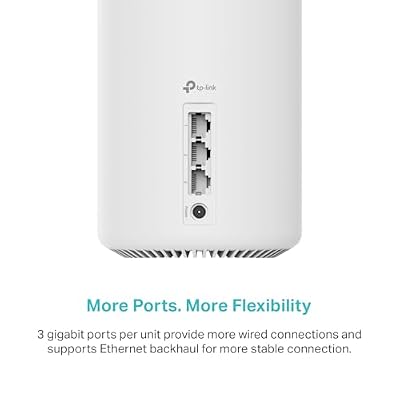
TP-Link Deco X55 AX3000 WiFi 6 Mesh System, Deco X55(3-Pack) | Covers up to 6500 Sq.Ft. , Replaces Wireless Router and Extender, 3 Gigabit ports per unit, supports Ethernet Backhaul





As an Amazon Associate we earn from qualifying purchases. Product prices and availability are accurate as of the date/time indicated.
The three-pack TP-Link Deco X55 is included as the WiFi 6 mesh alternative — the pick for buyers who want big whole-home coverage but are not ready to pay for the 6 GHz band. It is an AX3000 dual-band WiFi 6 mesh rated to cover up to 6,500 square feet across three nodes. At around $150 it matches the XE75 two-pack on price while trading the 6 GHz radio for wider, dual-band coverage.
This is the system to choose if your devices are mostly WiFi 6 rather than 6E, and coverage matters more to you than a new band you cannot yet use. Three Deco X55 nodes blanket a large home in one seamless dual-band network, the AX3000 radios keep a busy household responsive, and the Deco app manages everything. You miss the uncongested 6 GHz lane, but if none of your gear is 6E-capable today, the X55 three-pack delivers excellent whole-home WiFi 6 for the same money.
Pros: Wide whole-home WiFi 6 coverage up to 6,500 sq ft, three-node mesh, app-managed.
Cons: Dual-band only — no 6 GHz band; not future-proofed for 6E/WiFi 7 clients.
5. Amazon eero 6 Dual-Band Mesh Wi-Fi 6 Router

Amazon eero 6 mesh wifi router - Supports internet plans up to 900 Mbps, Coverage up to 1,500 sq. ft., Connect 75+ devices, 1-pack


As an Amazon Associate we earn from qualifying purchases. Product prices and availability are accurate as of the date/time indicated.
The single Amazon eero 6 router is the simple WiFi 6 alternative for smaller spaces. It is a dual-band WiFi 6 unit rated for internet plans up to 900 Mbps, with eero’s famously easy app setup, and it can be expanded into a mesh later. At around $90 it is the pick for someone who wants a fast, fuss-free WiFi 6 router and does not need the 6 GHz band yet.
This is the router to choose when 6E is overkill for your devices and simplicity is the priority. The dual-band WiFi 6 radios keep a busy home smooth on plans up to 900 Mbps, the eero app handles setup and parental controls effortlessly, and the option to add eeros later means you are not boxed in. It lacks the 6 GHz band, so it is not future-proofed for the newest hardware, but as an affordable, dead-simple WiFi 6 router for a smaller home, the eero 6 is a dependable alternative.
Pros: Easy eero app setup, supports up to 900 Mbps, expandable to mesh, affordable WiFi 6.
Cons: Dual-band WiFi 6 only — no 6 GHz band; single unit covers less area.
6. TP-Link AX1800 WiFi 6 Router (Archer AX21 V5)
Rounding out the list is the TP-Link Archer AX21, the budget WiFi 6 alternative for anyone weighing 6E against cost. It is a dual-band AX1800 WiFi 6 router with a gigabit WAN port and TP-Link’s full feature set, delivering real WiFi 6 efficiency at the lowest price here — around $52. It does not touch the 6 GHz band, but it is the value benchmark every 6E system is measured against.
This is the router to choose if you have decided the 6 GHz band is not worth it for your current devices and you simply want a reliable, affordable WiFi 6 upgrade. The AX1800 rating handles typical broadband and online gaming well, the gigabit WAN port suits faster plans, and QoS lets you prioritise a console or PC. It also supports OneMesh for later expansion. As the budget yardstick — the capable WiFi 6 box you buy when 6E can wait — the Archer AX21 earns its place on the list.
Pros: Lowest price here, real WiFi 6 efficiency, gigabit WAN, QoS, OneMesh-ready.
Cons: Dual-band WiFi 6 only — no 6 GHz band; entry-tier AX1800 speed.
How to Choose the Right WiFi 6E Router
Choosing a WiFi 6E router starts with understanding what the 6 GHz band actually buys you. WiFi 6E adds a third radio band — 6 GHz — on top of the 2.4 GHz and 5 GHz bands that every router uses. That 6 GHz band is new and largely empty, free of the legacy devices and neighbouring networks that clog the older bands, so it offers more clean channels and lower, more consistent latency. For competitive gaming, high-bitrate streaming and a future-proof network, that uncongested lane is the whole point of paying for 6E over 6.
Client requirements are the catch you must not overlook: only WiFi 6E (and newer WiFi 7) devices can connect to the 6 GHz band. Your existing phones, laptops and consoles will keep using 2.4 and 5 GHz unless they specifically support 6E. So before buying a tri-band XE75, take stock of your gear — if few or none of your devices are 6E-capable today, you will not yet feel the 6 GHz benefit, and a strong dual-band WiFi 6 system like the Deco X55, eero 6 or Archer AX21 may serve you better for the money right now while keeping the door open to upgrade later.
Tri-band design and coverage go hand in hand on these systems. A true WiFi 6E router like the Deco XE75 is tri-band (2.4 + 5 + 6 GHz), and in a mesh that third band can also serve as a fast dedicated backhaul between nodes, keeping the network quick as it scales. Match the number of units to your home: the XE75 single covers up to 2,900 sq ft, the two-pack up to 5,500 sq ft, and the three-pack up to 7,200 sq ft. Buy for the area you need to cover, and remember that more nodes also means more capable backhaul on the clean band.
Finally, weigh future-proofing against today’s needs and budget. WiFi 6E is the more future-proof choice — the 6 GHz band is where WiFi 6E and WiFi 7 devices will increasingly live — so if you buy infrequently and want the network to stay current, paying for tri-band 6E makes sense. If your devices are mostly WiFi 6, coverage and value matter more than an unused band, so a dual-band WiFi 6 system is the pragmatic pick. Take stock of your devices, decide whether the 6 GHz band is worth it now, match the coverage to your home, and pick the router on this list that fits both your hardware and your horizon.
Frequently Asked Questions
What is the difference between WiFi 6 and WiFi 6E?
WiFi 6E adds a third radio band — the new 6 GHz band — on top of the 2.4 GHz and 5 GHz bands that WiFi 6 uses. The 6 GHz band is largely empty and free of legacy congestion, offering more clean channels and lower, more consistent latency for devices that support it. Otherwise the two share the same 802.11ax efficiency features; 6E is essentially WiFi 6 plus access to that extra, uncongested band.
Do I need WiFi 6E-capable devices to benefit?
Yes — this is the key requirement. Only WiFi 6E (and newer WiFi 7) devices can connect to the 6 GHz band. Your existing phones, laptops and consoles will keep using 2.4 and 5 GHz unless they specifically support 6E. If few of your devices are 6E-capable today, you will not yet feel the 6 GHz benefit, and a strong dual-band WiFi 6 router like the Archer AX21 or eero 6 may be a better value for now.
Is WiFi 6E worth it for gaming?
It can be, particularly on a congested network or in a busy area. The 6 GHz band gives 6E-capable devices a clean, uncongested lane with more channels and lower, more consistent latency — useful for competitive online play — provided your gaming device actually supports 6E. For the absolute lowest latency a wired connection is still best, but for wireless gaming on compatible hardware, the clean 6 GHz band of a router like the Deco XE75 is a real advantage.
How is WiFi 6E more future-proof than WiFi 6?
Because the 6 GHz band is where the newest devices are headed. WiFi 6E and the latest WiFi 7 hardware increasingly use 6 GHz, so a tri-band 6E router like the Deco XE75 gives your network room to grow as you add compatible devices over time. If you upgrade your router infrequently and want it to stay current, the 6 GHz band makes 6E the more future-proof choice over a dual-band WiFi 6 model.
Related Guides
- Best WiFi 6 Routers
- Best Gaming Routers
- Best Mesh WiFi Systems
- Best WiFi 7 Routers
- Best Network Switches
- Best Budget Gaming Setup
Affiliate Disclosure: As an Amazon Associate, we earn from qualifying purchases. If you click a link and make a purchase, we may earn a small commission at no extra cost to you. Prices and availability are accurate as of publication and may change.










