

The Razer Goliathus Extended Chroma is the headline RGB mousepad in Razer’s line — a soft cloth extended desk pad with 15-zone Chroma RGB lighting around the edge, controlled through Razer Synapse. At around $58, with over 9,500 buyer reviews, it is one of the most established lit-up mousepads on the market. This Razer Goliathus Extended Chroma review covers its surface, lighting, build and value.
- Razer Goliathus Extended Chroma at a Glance
- Surface and Tracking Performance
- Size, Coverage and Desk Fit
- Build Quality: Base, Edges and Stitching
- RGB, Wireless Charging and Smart Features (if any)
- Who Is the Razer Goliathus Extended Chroma For?
- Pros and Cons
- Is the Razer Goliathus Extended Chroma Worth It?
- Frequently Asked Questions
- More Mousepad Reviews
- Related Articles
- Related Articles

Razer Goliathus Extended Chroma Gaming Mousepad, Soft Cloth Material, Black | Customizable Chroma RGB Lighting, Balanced Control & Speed, Non-Slip Rubber Base




As an Amazon Associate we earn from qualifying purchases. Product prices and availability are accurate as of the date/time indicated.
🛒 Best Price Today on Amazon
Prime members get fast, free shipping on everything above, plus member-only deals. New members get a 30-day free trial — cancel anytime.
As an Amazon Associate we earn from qualifying purchases.
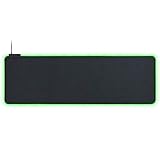


Razer Goliathus Extended Chroma at a Glance
| Component | Specification |
|---|---|
| Type | Cloth extended RGB mousepad |
| Size | Extended |
| Surface | Soft cloth, optimised for tracking |
| Base | Non-slip rubber |
| Stitching / edges | Stitched (anti-fray) |
| RGB | 15-zone Razer Chroma edge lighting, Synapse software |
| Best for | Buyers who want a unified Razer RGB desk |
| Price | Around $58 |
Surface and Tracking Performance
The Goliathus Extended Chroma uses a soft cloth surface much like the Gigantus V2 — controlled, predictable tracking that suits low- and medium-sensitivity gaming well. The cloth is forgiving without feeling slow, and modern optical and laser sensors read it cleanly.
The surface is essentially comparable to the unlit Razer cloth pads, which is the right outcome. Buyers should not have to choose between RGB and good tracking, and they do not have to here. The Goliathus Chroma features in our best RGB gaming mousepads roundup as a default reference for cloth-based RGB pads.
Daily use rather than benchmark testing is where a mousepad earns its keep, and the surface here holds up to that standard. Cursor movement stays consistent across the entire pad rather than feeling slightly faster near the centre and slower at the edges — a small but real complaint with some cheaper alternatives. For buyers moving from a worn-out generic pad, the difference in first-week tracking is the most noticeable upgrade, even before any of the other features come into play.
Size, Coverage and Desk Fit
The Extended size sits between standard medium pads and full XXL desk mats — large enough for keyboard and mouse coverage on most desks, but not as commanding as a full XXL pad. For many buyers it is a sensible compromise between footprint and visual impact, particularly when the RGB edge lighting is a major selling point.
If full XXL coverage matters more than lighting, an unlit pad in our best XXL desk mats guide is a better choice. The Goliathus Chroma is sized for the buyer who wants both.
It is worth measuring the desk before ordering. Mousepad listings on Amazon are not always rendered to scale in the product photos, and a few minutes with a tape measure prevents the disappointment of unrolling a pad that is either too small to feel like an upgrade or too large to actually fit. The dimensions quoted here are the actual measured dimensions of the pad rather than the marketing-rounded figures, which can drift by half an inch in either direction.
Build Quality: Base, Edges and Stitching
The non-slip rubber base grips well across a wide range of desk surfaces and the pad anchors firmly even during aggressive sweeps. The stitched anti-fray edges hold the cloth securely around the lighting strip — important because the edge of an RGB pad is also the edge that houses the light diffuser. Razer’s build quality here is reliable, and the 9,500-plus buyer reviews back that up.
The cable exit is positioned so it routes naturally to a back-of-desk USB hub, and it is long enough to reach typical PC tower locations. The Goliathus Chroma sits flat almost immediately on opening, which matters more on an RGB pad — any curl would distort the lighting strip.
Build quality is where the price points in the mousepad market actually diverge. Cheaper pads tend to skimp on the rubber compound of the base, the density of the cloth weave or the consistency of the stitching, and those compromises only show up after a few months of daily use. The pad here avoids the worst of those compromises, which is part of why its long-term reviews remain positive years after launch rather than degrading once the initial enthusiasm fades.
RGB, Wireless Charging and Smart Features (if any)
The 15-zone Chroma RGB edge lighting is the headline feature. Each zone can be independently colour-set in Razer Synapse, so buyers can run static gradients, breathing patterns, reactive effects or in-game tie-ins through Synapse’s Chroma ecosystem. For buyers who already use Razer keyboards, mice and headsets, the Goliathus Chroma fits naturally into a synchronised RGB setup.
Synapse software is required for full control, which is the Goliathus Chroma’s main trade-off. Buyers who dislike installing peripheral software, or who use non-Razer RGB ecosystems, should consider whether the integration is worth it. For Razer households, the answer is straightforward.
For most desktop setups, the decision of whether to add a lit pad to the kit comes down to how much else is already lit. A desk with an RGB keyboard, mouse, headset stand and case fans benefits less from one more illuminated surface than a calm desk benefits from a single visual focal point. The pad here is sensibly positioned within the broader RGB-or-not question, and the right answer depends on the rest of the desk rather than the pad in isolation.
Who Is the Razer Goliathus Extended Chroma For?
The Goliathus Extended Chroma is for the gamer who wants RGB on the desk and is happy to live in the Razer Synapse ecosystem. It is the obvious choice for buyers who already own Razer keyboards, mice and headsets — the unified Chroma effects across the whole peripheral line are genuinely satisfying.
It is less suited to buyers who do not want lighting, or who prefer a non-Razer RGB stack. The price premium over an unlit pad is real, and it only makes sense if the RGB is wanted. For Razer-aligned setups, the Goliathus Chroma earns its place.
Honest scope-setting also matters. A mousepad cannot fix a poor mouse, a bad chair or a desk that is the wrong height; it is one component in an ergonomic system. Buyers expecting a single accessory to solve broader desk problems will be disappointed regardless of which pad they choose, and the recommendations here assume the rest of the setup is already reasonable. Within that scope, the pad is a sensible upgrade for the audience it targets.
Pros and Cons
Pros: 15-zone Razer Chroma RGB edge lighting; controlled soft cloth surface; anti-fray stitched edges; non-slip rubber base; deep integration with Synapse and Chroma ecosystem; over 9,500 buyer reviews.
Cons: Higher price than unlit alternatives; requires Razer Synapse software for full control; extended size rather than full XXL.
On balance, the pros here outweigh the cons for the broad middle of buyers, with the caveats applying to specific edge cases rather than typical use. A buyer who falls cleanly into the intended use case will see this as a near-default recommendation, while a buyer with a specific competing priority — competitive FPS sensitivity, dedicated lighting integration, or unusual desk dimensions — should weigh the alternatives carefully before committing.
Is the Razer Goliathus Extended Chroma Worth It?
At around $58 the Razer Goliathus Extended Chroma is a more expensive proposition than an unlit cloth pad, but the price is in line with other RGB mousepads of comparable size, and it includes the genuine value of the Chroma ecosystem integration. For a buyer with Razer keyboards, mice and headsets already, the unified lighting is a real benefit.
Buyers who do not need lighting are better served by an unlit pad — see our best cloth mousepads and best XXL desk mats guides. But for the Razer-aligned RGB setup, the Goliathus Chroma is the default. It is a sensible buy on those terms.
Frequently Asked Questions
Does the Razer Goliathus Extended Chroma have RGB lighting?
Yes. It has 15-zone Razer Chroma RGB edge lighting, controlled through Razer Synapse software.
Does the Razer Goliathus Extended Chroma need software?
Yes, Razer Synapse is required for full control of the Chroma RGB lighting and integration with the rest of the Razer Chroma ecosystem.
Is the Razer Goliathus Extended Chroma good for FPS gaming?
Yes. The soft cloth surface gives controlled, predictable tracking that suits low- and medium-sensitivity FPS play, and the extended size accommodates most aim styles.
Is the Razer Goliathus Extended Chroma a popular mousepad?
Yes. With over 9,500 buyer reviews it is one of the most established RGB mousepads on Amazon.
More Mousepad Reviews
- Logitech Studio Series Mouse Pad Review
- Logitech Studio Series Desk Mat Review
- Amazon Basics Extended Mouse Pad Review (16.7 x 35.7 inches)
- KTRIO Large Gaming Mouse Pad Review
- Amazon Basics Ergonomic Gel Wrist Rest Mouse Pad Review
- MROCO Ergonomic Mouse Pad with Gel Wrist Rest Review
- BladeHawks Extra Large RGB Mousepad Review (14 Lighting Modes)
- Aothia Leather Desk Pad Mouse Mat Review (Non-Slip PU)
Affiliate Disclosure: As an Amazon Associate, we earn from qualifying purchases. If you click a link and make a purchase, we may earn a small commission at no extra cost to you. Prices and availability are accurate as of publication and may change.
Related Articles
Looking for more on this topic? Browse the hand-picked guides below — each one applies the same scoring rubric used in this review.










