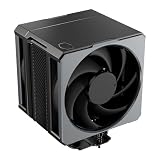
- Top Pick: Dell Precision Tower 5820 Workstation W-2123 4C 3.6Ghz 64GB 1TB NVMe P2000 Win 11 (Renewed)
- Best Value: HP Workstation PC Desktop Computer | Editing and Design | NVIDIA Quadro K1200 4GB GPU | Intel Core i5 | 32GB DDR4 RAM, 1TB SSD + 4TB HDD | Wi-Fi 5G + Bluetooth | Windows 11 Pro (Renewed)
- Premium Choice: BOSGAME P3 Lite Mini PC AMD Ryzen 7 6800H, 32GB DDR5 RAM 1TB NVMe SSD | Dual 2.5GbE LAN, USB4, Triple 4K Display, Desktop Computer for Office, Home, Workstation
Most CAD modeling is limited by how fast one processor core can rebuild a feature tree, not by how many cores a machine has, so the best CAD workstation is usually the one with strong per-core speed, enough RAM for your largest assembly, and a graphics card your software vendor supports. Judged that way, the Dell Precision 5820 and the PCSP Z4 G4 are the sturdiest towers on this list, while the HP Z2 SFF G9 and ThinkStation P3 Tiny are the newer, compact options. Most listings here are renewed, so condition and warranty matter as much as specs. We omit prices because they change; the listing shows today’s figure.
Short list
As an Amazon Associate we earn from qualifying purchases at no extra cost to you.
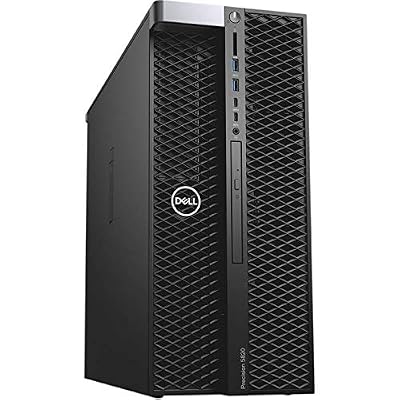


- Dell Precision Tower 5820 (Xeon W-2123) – best all-round renewed CAD tower
- PCSP Z4 G4 (Xeon W-2133, Quadro M4000 8GB) – best for more graphics memory in a renewed tower
- HP Z2 SFF G9 (Core i5-14500) – best newer small workstation with a long warranty
- Lenovo ThinkStation P3 Tiny (i5-14500) – best for tight desks, configurable RAM
- Dell Precision T5810 (Xeon E5-2680 v3, 12-core) – best for multi-core rendering add-ons, weak graphics
- Dell Precision with Quadro P620 (Core i5-9500) – best entry-level pro-graphics seat
- HP Workstation, Quadro K1200, renewed – best low-cost drafting seat with lots of storage
- BOSGAME P3 Lite (mini PC, not a workstation) – a compact 2D drafting and viewing machine
Specs side by side
| Model | Type | Key specs as stated in the title | Best for |
|---|---|---|---|
| Dell Precision Tower 5820 | Renewed tower | Xeon W-2123 4-core 3.6GHz, 64GB, 1TB NVMe, Quadro P2000 | Mixed 3D CAD |
| PCSP Z4 G4 | Renewed tower | Xeon W-2133 6-core up to 3.9GHz, 64GB DDR4, 512GB NVMe + 2TB HDD, Quadro M4000 8GB | Large part models |
| HP Z2 SFF G9 | Small form factor | Core i5-14500, 16GB DDR5, 512GB SSD, 3-year warranty | New, compact seat |
| Lenovo ThinkStation P3 Tiny | Tiny desktop | Core i5-14500 vPro, 16/32/64GB RAM options, 512GB to 2TB | Small desks |
| Dell Precision T5810 | Renewed tower | Xeon E5-2680 v3 12-core 2.5GHz, 64GB, Quadro NVS 315, 480GB SSD, no OS | Cores over graphics |
| Dell Precision (Quadro P620) | Renewed desktop | Core i5-9500, 16GB, 1TB SSD, Quadro P620 | Entry 3D CAD |
| HP Workstation (Quadro K1200) | Renewed desktop | Core i5, 32GB DDR4, 1TB SSD + 4TB HDD, Quadro K1200 4GB | Drafting, storage |
| BOSGAME P3 Lite | Mini PC | Ryzen 7 6800H, 32GB DDR5, 1TB NVMe, USB4 | 2D drafting |
Each pick in detail
Dell Precision Tower 5820 (Xeon W-2123, 64GB, Quadro P2000)
The title packs a lot into one line: a Xeon W-2123 with four cores at 3.6GHz, 64GB of memory, a 1TB NVMe drive, a Quadro P2000 and Windows 11 Pro, sold renewed. A four-core chip at that clock speed suits CAD well, because most modeling operations lean on a single fast core. The Xeon W platform also supports ECC memory in general, but the title does not say the installed modules are ECC, so ask. If it is ECC, that matters for long simulation runs where a flipped bit could ruin hours of work; if it is not, nothing is lost for everyday modeling.
The Quadro P2000 is a professional card, which usually means it appears on CAD vendors’ certified lists, though an older generation may no longer be on the newest lists. Check your software’s current certification page against the exact model. The listing does not name the Precision tower generation beyond 5820, so confirm the warranty terms and that Windows 11 is a licensed install rather than a trial.
Pros
- Single-thread-friendly clock speed for feature-tree rebuilds
- 64GB of RAM handles mid-size assemblies
- Professional graphics card and NVMe boot drive
Cons
- Only four cores, so rendering add-ons will be slow
- Renewed condition and warranty vary
Who it’s for: mechanical and architectural designers working in mid-size assemblies who want a proven tower.
Who should skip it: anyone who needs fast CPU rendering or the latest certified GPU generation.
PCSP Z4 G4 Workstation (Xeon W-2133, Quadro M4000 8GB)
PCSP lists an HP-style Z4 G4 tower with a six-core Xeon W-2133 up to 3.9GHz, 64GB of DDR4, a 512GB NVMe drive with a 2TB hard drive, a Quadro M4000 with 8GB and Windows 11 Pro, labeled both refurbished and renewed. The extra two cores over the 5820 help with simulation previews and render add-ons, and 8GB of video memory is useful for large textured models and for running several viewports at once.
The M4000 is an older professional generation, so check driver support and your CAD vendor’s list before buying. The title says “Z4 G4” while the seller is PCSP, not HP, which means this is a third-party refurbishment: read the seller’s own warranty and return terms. The 512GB boot drive is the other thing to plan around: a few large assemblies and their caches will fill it, so the 2TB hard drive should hold archives only.
Pros
- Six cores, up to 3.9GHz per the title
- 8GB of video memory is generous for this price tier
- Fast NVMe boot drive plus a large hard drive
Cons
- Older GPU generation, driver support may be limited
- Third-party refurbishment, warranty terms vary
- Only 512GB of NVMe space for projects
Who it’s for: designers with large part models and textures who want more graphics memory in a renewed tower.
Who should skip it: buyers who need current-generation certified graphics.
HP Z2 SFF G9 (Core i5-14500, 16GB DDR5)
The one newer system among the HP picks: Core i5-14500, 16GB of DDR5, a 512GB SSD, UHD Graphics 770, two DisplayPorts, Ethernet, a three-year warranty and Windows 11 Pro. The title also contains stray text about an Ultra 7 155U that does not match the rest, so treat it as keyword padding and verify the processor on the listing.
The G9 shines for 2D drafting and light 3D, with strong single-core performance for its class. Integrated graphics are a weakness for heavy assemblies, and small form factor cases generally take only low-profile graphics cards. Sixteen gigabytes is also the minimum for most professional CAD; plan an upgrade if your assemblies are large. Ask how many DIMM slots are free and whether the 3-year term covers parts you add yourself.
Pros
- Modern CPU with a long warranty claimed
- Small footprint, two DisplayPorts
- Windows 11 Pro preinstalled
Cons
- Integrated graphics only
- 16GB is tight for large assemblies
Who it’s for: drafters and design offices that want a compact, new machine for 2D and light 3D.
Who should skip it: anyone modeling large assemblies or needing certified GPUs.
Lenovo ThinkStation P3 Tiny (i5-14500 vPro, configurable)
Sold by a reseller (ist computers), this ThinkStation P3 Tiny lists an Intel i5-14500 vPro, RAM options of 16, 32 or 64GB, storage options of 512GB, 1TB or 2TB, support for an 8K display and Windows 11 Pro. The title also mentions ThinkCentre model names and another processor, so it reads as keyword padding. Choose your configuration carefully, since the price and capability depend on which option you select.
The Tiny chassis is a good fit for a crowded desk, but it offers little room for a large graphics card, so discrete options are limited; the title names none. For CAD, pick the 32GB or 64GB version, and confirm the exact variant that ships. Because it is a reseller listing, also check who supplies warranty support and whether the Lenovo factory term carries over, since resellers handle those details differently.
Pros
- Choose 16, 32 or 64GB RAM and storage size
- Very small footprint with vPro management
- Windows 11 Pro preinstalled
Cons
- No graphics card named, and little room for one
- Confusing title with mixed model names
Who it’s for: offices that want a space-saving CAD seat for 2D and light 3D.
Who should skip it: those who need a certified discrete GPU.
Dell Precision T5810 (Xeon E5-2680 v3, 12-core, 64GB)
A renewed Precision T5810 with a Xeon E5-2680 v3 at 2.5GHz and 12 cores, 64GB of DDR4, a 480GB SSD and a Quadro NVS 315, shipped with no operating system. The lower clock speed compared with the Xeon W towers means individual modeling operations are slower, while the 12 cores help with rendering and simulation add-ons. The NVS 315 is an entry-level display card meant for driving monitors, not for 3D viewports, so budget for a real professional GPU.
No operating system is included, which means you must buy and install Windows yourself, and the v3 processor generation is old enough that Microsoft’s Windows 11 requirements may not be met. Check the compatibility list before planning around Windows 11. If you already own a spare professional card and a Windows license, this becomes a very cheap multi-core box; if not, the extra purchases erase much of the saving.
Pros
- 12 cores and 64GB RAM at a low cost
- Tower chassis with room to add a graphics card
Cons
- Weak graphics card for CAD
- No operating system included
- Older processor generation, possible Windows 11 limits
Who it’s for: budget builders who will add their own GPU and mostly render on the CPU.
Who should skip it: anyone who needs a ready-to-use CAD seat.
Dell Precision with Quadro P620 (Core i5-9500, 16GB)
A renewed Precision desktop with a Quadro P620, a Core i5-9500, 16GB of memory, a 1TB SSD, Wi-Fi 6 (AX200) and Bluetooth, running Windows 11 Pro. The P620 is an entry-level professional card with modest video memory, and the title does not state how much, so check the listing. The i5-9500 is a six-core part from Intel’s 9th generation.
This is a workable seat for 2D drafting and small 3D models, and the 1TB SSD is an easy win. The 16GB of RAM is the limit, so if the board has free slots, price an upgrade. The title does not name the Precision model, which affects upgrade paths and the power supply. A low-profile card like this is also easy to outgrow, so think of it as a starter seat that earns its place by keeping the cost of entry low.
Pros
- Professional graphics in a low-cost seat
- 1TB SSD and Wi-Fi 6 included
- Windows 11 Pro preinstalled
Cons
- 16GB RAM is tight for 3D assemblies
- Precision model not named in the title
Who it’s for: students and small shops handling 2D drawings and small 3D parts.
Who should skip it: large assemblies or heavy surface modeling.
HP Workstation with Quadro K1200 (Renewed, 32GB, 1TB SSD + 4TB HDD)
A renewed HP workstation with a Quadro K1200 4GB, an Intel Core i5 (generation not stated), 32GB of DDR4, a 1TB SSD plus a 4TB hard drive, Wi-Fi, Bluetooth and Windows 11 Pro. The K1200 is an older entry-level professional card, and the missing processor generation is a real gap for CAD, where clock speed drives performance.
The generous storage makes it a decent drafting and document-heavy seat, but treat the specs as unverified until the seller names the exact CPU and model. Check Windows 11 eligibility with the model, and ask about the renewed grade and return window. The 4TB hard drive is useful for scanned drawings and project archives, though a hard drive is slow for active work, so keep the files you edit on the SSD.
Pros
- 32GB RAM and 5TB total storage at a low cost
- Professional-class graphics card
Cons
- Processor generation not stated
- Old GPU generation, driver support may be limited
Who it’s for: drafters who store many large files and run simpler models.
Who should skip it: anyone who needs predictable per-core speed.
BOSGAME P3 Lite Mini PC (not a workstation)
Clearly outside the workstation category, this mini PC is included because the title uses the word “Workstation.” It lists a Ryzen 7 6800H, 32GB of DDR5, a 1TB NVMe drive, dual 2.5GbE, USB4 and triple 4K display support. It names no discrete graphics, and there are no certified CAD graphics options in a box this size.
It makes sense as a 2D drafting machine, a model viewer on the shop floor or a second seat for reviewing drawings. For parametric 3D work with large assemblies, choose a real workstation. Check how much of the 32GB is shared with graphics and whether the RAM is replaceable. Its dual 2.5GbE ports make it handy for reading files from a shared drive in a small office, and the triple display support suits reference drawings on a second and third screen.
Pros
- Compact, quiet and fast for 2D
- 32GB DDR5 and fast networking
- Triple-display support
Cons
- No certified workstation graphics
- Not designed for large assemblies
Who it’s for: 2D drafters and viewers who need a tiny, capable PC.
Who should skip it: anyone modeling large parts in parametric 3D.
How these were chosen
We started from the listings supplied for this keyword and ranked them by how well they serve CAD: processor speed, memory, professional graphics and expansion room. The basis is published specifications, manufacturer documentation and buyer reviews, and nothing else. Nobody on the team used or measured these units. Several entries are renewed, and we say so each time because condition, warranty and driver support change the value. Titles are seller claims, so we flagged mixed model names, missing processor generations and unusual spellings instead of inferring specs from memory. Two similar renewed Dell and HP listings were left out as near-duplicates.
Buying guide: what CAD software actually asks for
Single-thread speed beats core count for modeling
Parametric CAD recalculates a feature tree largely on a single thread, so a four-core chip at a high clock can rebuild a part faster than a 12-core chip at a lower clock. If you also render, the extra cores matter; if you do not, avoid paying for them. Extra cores earn their keep in rendering, simulation and mesh work. When a listing names a processor, look at its clock speed and generation first, then its core count. The Dell 5820 and PCSP Z4 G4 here show the point: modest core counts at higher clocks, against the 12-core T5810 at 2.5GHz.
Certified graphics and video memory
CAD vendors publish lists of graphics cards they certify, and professional cards are validated against them. A certified card is more likely to display complex shading and sketches correctly, and support will ask for one if you call. Match the exact card name in the listing to your software’s current list, because a card can be certified for one release and dropped in the next. Older cards, such as the K1200, NVS 315 and M4000 here, may sit on older lists only. Integrated graphics are fine for 2D and light 3D but not for heavy assemblies. See our guide to workstation GPUs for the current professional cards.
RAM sizing by assembly size
Memory use grows with assembly size, textures and the number of open documents. The table below is a planning ladder, not a measurement; use it to filter listings, then confirm with your own largest file.
| Work type | Minimum RAM | Graphics need | Listings above that fit |
|---|---|---|---|
| 2D drafting, small parts | 16GB | Integrated or entry pro card | HP Z2 SFF G9, ThinkStation P3 Tiny, BOSGAME, Dell P620 |
| Mid-size assemblies, daily 3D modeling | 32 to 64GB | Certified pro card | Dell 5820, PCSP Z4 G4, HP K1200 (32GB) |
| Large assemblies, simulation previews | 64GB or more | Certified card with 8GB or more | PCSP Z4 G4; others need an upgrade |
| CPU rendering add-on | 64GB | Any, plus many cores | Dell T5810 once a GPU is added |
Storage, operating system and Windows 11
An NVMe drive speeds file opening and caching, and a second drive holds archives and backups. Several renewed listings pair a small SSD with a big hard drive, which is a sensible arrangement if your active projects fit on the SSD. Keep the operating system and live projects on the SSD, push archives to the hard drive, and back up externally either way. Windows 11 requires a supported processor from Microsoft’s list; older Xeons and Core processors may not qualify, so check the model before relying on Windows 11. One listing here ships with no operating system at all.
Run this five-line audit on any listing
- Name the exact processor model, not just Core i5 or Xeon.
- Look up its clock speed and generation, and weigh single-core speed above core count.
- Match the graphics card name to your CAD vendor’s certified list.
- Count RAM against your largest assembly, then check free slots.
- Read the condition grade, return window and warranty owner.
A listing that passes all five is a safer bet than one that wins on a single headline number.
Form factor and upgrades
A tower gives room for a larger graphics card, more drives and a bigger power supply. A small form factor or tiny chassis saves space but caps expansion, and low-profile cards are weaker. If you expect to upgrade, check the number of free memory slots, the drive bays and the power supply rating, and read our notes on PC cases for CAD if you are tempted to rebuild a tower around a new motherboard.
Where CAD buyers go wrong
Choosing by core count. A 12-core chip at a low clock can feel slower in a sketch than a four-core chip at a high clock. Rendering and CAD modeling are different loads.
Skipping the certified-hardware page. A card that is fast in games may not appear on your CAD vendor’s list. Check before you pay.
Ignoring the operating system line. The T5810 here ships with none, and some older processors may not qualify for Windows 11. Budget for a license and confirm eligibility.
Treating renewed as new. Condition grades, warranty length and return windows differ by seller. A cheap listing with a short return period is risky.
Accepting vague specs. Titles like “Intel Core i5” with no model number hide a gap of several generations. Ask the seller before ordering.
Forgetting the monitor side. Several of these boxes list two DisplayPorts or triple display support; CAD seats often need two or three screens, so check outputs and cable types.
Final recommendation
For most CAD users the Dell Precision 5820 is the safest renewed pick, with the PCSP Z4 G4 as the choice when you need more graphics memory and cores. The HP Z2 SFF G9 and ThinkStation P3 Tiny suit compact new setups for 2D and light 3D. The T5810 only makes sense if you will add a GPU and an operating system. Confirm each listing’s exact processor, RAM and warranty before you buy, and plan upgrades for any entry with 16GB of memory. Treat the BOSGAME as a drafting extra rather than a CAD station.
Related guides
Frequently asked questions
Is a Xeon better than a Core processor for CAD?
Not automatically. CAD modeling rewards high single-core speed, which many Core chips deliver well, while Xeon W platforms add ECC memory support and workstation certification. Choose on clock speed, memory needs and your vendor’s guidance, and check that the listing names the exact model, since older Xeon generations can have lower clocks than a current Core chip.
How much RAM does CAD need?
Sixteen gigabytes covers 2D drafting and small parts. Thirty-two to 64GB suits daily 3D modeling and mid-size assemblies, and more helps with very large assemblies and simulation. Check whether the machine has free memory slots so you can expand later, and remember that integrated graphics borrow part of the system memory.
Is a Quadro or other professional graphics card necessary?
For large assemblies and anything covered by vendor support, yes, because certified professional cards are validated with CAD software. For 2D drafting and light 3D, integrated graphics can be enough. Check your software’s certified list against the exact card named in the listing, and be wary of older generations that vendors may have dropped.
Are renewed workstations a good idea for CAD?
They can offer solid value because the platforms were built for professional work, but condition, warranty and driver support vary. Read the return window, check the processor and graphics generations, and avoid listings that hide key specs such as the processor generation, the amount of video memory or the exact model name.
Can a mini PC run CAD software?
A mini PC can run 2D drafting and light 3D models. For large assemblies it lacks certified graphics and cooling headroom. Treat it as a viewing or drafting seat, and keep a proper workstation for heavy modeling, especially if a vendor requires certified graphics for support or you work with large files.