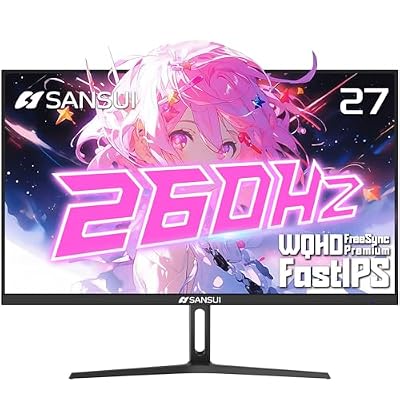
1440p at 240Hz used to be a $500+ proposition. That’s no longer true. Panel costs have dropped enough that you can get a genuinely good 1440p/240Hz monitor for $250-$300, and a decent one for even less if you’re willing to compromise on panel type. The catch is knowing which compromises actually matter and which are just spec sheet noise.
As an Amazon Associate we earn from qualifying purchases at no extra cost to you.

Why 1440p/240Hz is the sweet spot
1080p/240Hz is cheaper, but on anything above 24 inches it looks soft. 4K/240Hz exists now but still costs a lot and needs a serious GPU to actually hit those frame rates in anything demanding. 1440p splits the difference: a mid-range card like an RTX 4060 Ti or RX 7700 XT can push competitive shooters past 200fps at this resolution, and the pixel density (around 109 PPI on a 27-inch panel) still looks sharp for desktop work and single-player games.
The 240Hz part matters less than people think if you’re not playing fast-paced competitive titles. Going from 60Hz to 144Hz is a massive, obvious jump. Going from 144Hz to 240Hz is smaller and only shows up clearly in low-latency games like Valorant, CS2, or Overwatch 2, and only if your GPU can actually feed the panel that many frames. If you’re mostly playing story-driven or strategy games, a 165Hz panel is genuinely enough and will save you money.
IPS vs VA vs TN at this price point
Almost nothing worth buying at 1440p/240Hz uses TN anymore. The few that still do are the cheapest option on paper, but they have weak color and contrast, and viewing angles that noticeably shift color if you’re not dead center. Unless you’re in an extreme budget bind, skip them.
The real decision is IPS vs VA.
- IPS gives better color accuracy and far better viewing angles. The downside is lower contrast (typically 1000:1) and visible IPS glow in dark scenes, especially off-angle.
- VA gives much better contrast (3000:1 to 6000:1 is common), so blacks look genuinely black. The trade-off is slower pixel response, which shows up as dark-scene smearing, sometimes called “black smear,” during fast motion.
For competitive gaming, IPS is the safer pick because response time consistency matters more than contrast. For single-player or atmospheric games, VA’s contrast is a real, visible benefit that a lot of buyers underrate until they see it next to an IPS panel at night.
Quick comparison
| Panel type | Typical contrast | Response time behavior | Best for | Watch out for |
|---|---|---|---|---|
| IPS | ~1000:1 | Consistent, minimal smearing | Competitive FPS, color work | IPS glow in dark rooms |
| VA | 3000:1-6000:1 | Can smear in dark fast scenes | Single-player, movies, mixed use | Black smear in shooters |
| TN | ~700:1-1000:1 | Fastest raw response | Ultra-budget builds only | Washed-out color, bad angles |
Specs that actually matter at this price
Don’t shop by refresh rate alone. At the budget end, check these:
Adaptive sync compatibility. Make sure it’s certified or at least confirmed working with your GPU brand (G-Sync Compatible for Nvidia, FreeSync Premium for AMD). Most budget 1440p/240Hz panels support both in practice, but cheap unbadged units sometimes have a narrow VRR range, which causes flicker at low frame rates.
HDR labeling. Budget monitors often say “HDR400” or similar. Ignore it. True HDR needs local dimming and high peak brightness, and almost nothing at this price has either. Treat HDR mode as a gimmick, not a feature, and judge the monitor on SDR picture quality instead.
Stand build quality. This is where budget monitors cut corners that aren’t on the spec sheet. Wobbly stands, no height adjustment, or VESA mount plates that don’t match standard patterns are common at the low end. If you plan to use a monitor arm, confirm VESA compatibility before buying.
Actual response time, not the marketing number. Manufacturers quote the best-case gray-to-gray number achievable only with aggressive overdrive, which introduces overshoot (ghosting with a bright halo). Independent review sites that measure response curves are more reliable than the box.
When the cheaper option is actually fine
If you’re not playing competitive shooters, a $200-ish 1440p/165Hz VA monitor will serve you better day to day than stretching to 240Hz on a worse panel. The jump in perceived smoothness from 165Hz to 240Hz is small, while the jump in contrast and color between a good and bad panel is large and visible in everything you do. People chasing the Hz number at this budget often end up with a panel that looks worse overall than if they’d bought one tier down in refresh rate and one tier up in panel quality.
If you do want to shop by category, browsing 1440p 240Hz IPS monitors will surface the competitive-gaming-oriented options, while 1440p 240Hz VA monitors covers the contrast-focused side. If 240Hz turns out to be overkill for your GPU or your games, it’s worth also checking 1440p 165Hz monitors, which routinely cost less for a panel that’s otherwise equal or better.
One more practical note: at 240Hz, you need a cable rated for the bandwidth. DisplayPort 1.4 handles 1440p/240Hz without compression tricks; HDMI 2.0 does not, and HDMI 2.1 does but check which ports are actually on the monitor, since budget models sometimes include only one of each.