

The PS5 doesn’t care that it’s plugged into an Asus monitor instead of a TV, but Asus makes some of the better gaming-focused panels on the market, so if you’ve already decided on the brand, the question is really which model and spec combination actually uses what the console can do. That’s narrower than it sounds. The PS5’s HDMI 2.1 port supports 4K at up to 120Hz and VRR, and a lot of Asus monitors, especially older or cheaper ones, don’t have the ports or panel speed to take advantage of that.
As an Amazon Associate we earn from qualifying purchases at no extra cost to you.


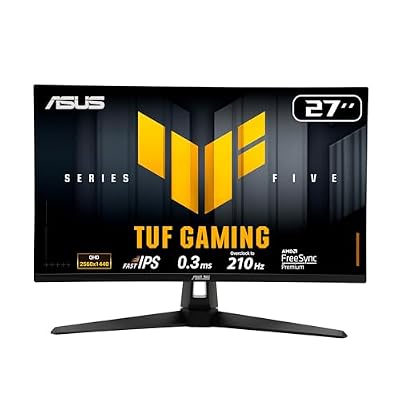
What actually matters for PS5 gaming
Three things decide whether an Asus monitor is a good match: resolution, HDMI version, and refresh rate. The PS5 outputs native 4K in most games, so a 1440p or 1080p monitor means you’re either running at a lower output resolution or relying on the console’s downscaling, which works fine but leaves resolution on the table. For full compatibility you want a 4K panel with an actual HDMI 2.1 port, not just “4K supported” written on the box with an HDMI 2.0 port underneath, which caps you at 60Hz.
Refresh rate is where people overspend without benefit. The PS5 can push 120fps in some games, mostly older or less demanding ones, and most AAA titles run at 30-60fps even in “performance mode.” A 144Hz or 165Hz Asus monitor isn’t wasted, since VRR and fast response times still help with motion clarity at lower frame rates, but you’re not getting 120fps in Spider-Man 2 regardless of panel spec. If your game library leans toward competitive shooters and arcade-style games, the extra Hz pays off more often.
Panel types: IPS vs VA vs TN on Asus monitors
Asus sells all three panel types across its gaming lines, and the differences matter more for console use than people expect.
IPS panels (common in Asus TUF Gaming and ROG Swift lines) give the best color accuracy and viewing angles, which matters if you’re sitting at a normal desk distance rather than dead-center. The trade-off is lower native contrast, usually around 1000:1, so blacks look grayish in dark scenes unless the monitor has a strong local dimming implementation.
VA panels push contrast ratios of 3000:1 or higher, so dark, atmospheric games look noticeably better out of the box. The catch is slower pixel response in dark transitions, which shows up as smearing or trailing in high-contrast motion, think a character running past a shadowed doorway. It’s a real issue in fast games, less noticeable in slower ones.
TN panels are mostly gone from Asus’s current lineup except at the budget end, and I wouldn’t recommend one for a PS5 setup in 2024. The color shift at normal viewing angles is distracting on a big screen, and the speed advantage TN used to have over IPS has mostly evaporated.
Comparison: typical Asus gaming monitor tiers for PS5
| Tier | Resolution | Panel | HDMI 2.1 | Good fit for PS5 if… |
|---|---|---|---|---|
| Budget (TUF Gaming, entry 1080p/1440p) | 1080p-1440p | IPS or VA | Rarely | You mainly want a bigger, sharper picture than a TV at desk distance and don’t need 4K/120 |
| Mid-range (TUF Gaming 4K, some ROG Strix) | 4K | IPS or VA | Usually yes | You want full 4K/120 and VRR without paying for extreme refresh rates you won’t use |
| High-end (ROG Swift, PG-series) | 4K or 1440p ultra-high refresh | IPS, Fast IPS, or Mini LED VA | Yes | You also use the monitor for PC gaming and want HDR performance, not just PS5 compatibility |
HDR is where cheap monitors fall apart
Almost every current monitor claims HDR support, but a lot of mid-range Asus panels have HDR400 certification, which means peak brightness around 400 nits with no real local dimming. On the PS5, HDR games can actually look worse on these than with HDR off, because the panel can’t hit the brightness or contrast range the content expects, and you get washed-out highlights instead of punch. If HDR matters to you, look for Mini LED models or at least HDR600 and above with local dimming zones. Otherwise, it’s fine to just leave HDR disabled in the PS5 settings and run SDR, which often looks more consistent on budget panels.
Size and desk distance
A 27-inch 1440p monitor and a 32-inch 4K monitor have nearly identical pixel density, so the “bigger is better” instinct doesn’t automatically apply at typical 2-3 foot desk distances. Go bigger than 32 inches at desk distance and you’ll be turning your head to see the corners, which gets tiring in open-world games with a lot of UI at the screen edges. If you’re setting the monitor up more like a small TV, 6+ feet away on a stand, then 32-34 inches with 4K makes more sense.
What I’d actually buy
For most people buying an Asus monitor specifically for PS5, the mid-range 4K tier is the sweet spot: real HDMI 2.1, 4K/120 and VRR support, and IPS color without paying for 240Hz you’ll never use on console. Browsing Asus 4K gaming monitors with HDMI 2.1 is a reasonable starting point, since that spec combination filters out most of the mismatched options.
If budget is tight and you mostly play single-player or slower-paced games, a 1440p IPS model is a legitimate downgrade, not a compromise, since you won’t notice the resolution gap as much as the price difference. Worth checking Asus TUF Gaming 1440p monitors for that tier.
If you want HDR to actually look like HDR, skip straight to Asus ROG Mini LED monitors, since that’s effectively the only tier where local dimming is good enough to matter on console content. It costs more, and if you’re PS5-only without plans to also use it for PC gaming, it’s a harder purchase to justify than it looks on paper.














