Top Picks at a Glance
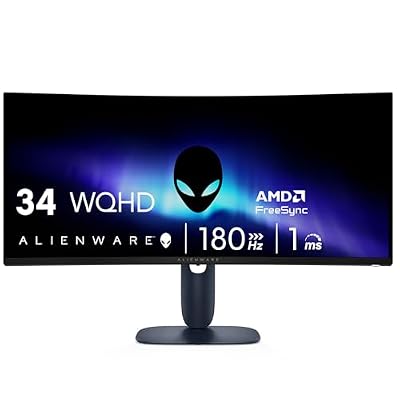
Alienware 34 Curved Gaming Monitor – AW3425DWM - 34-inch WQHD 180Hz 1ms Display, 1500R, AMD FreeSync Premium, VESA AdaptiveSync.
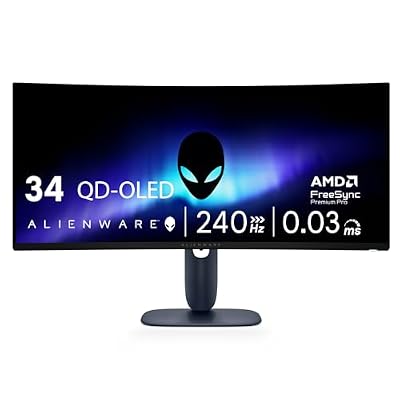
Alienware 34 240Hz QD-OLED Curved Gaming Monitor - AW3425DW - 34.2-inch WQHD (3440 x 1440) 0.03ms Display, 1800R Curve, AMD FreeSync Premium Pro, VESA AdaptiveSync, DisplayHDR TrueBlack 400

Alienware AW2725DF OLED Gaming Monitor - 26.7-inch Quantom-Dot WQHD (2560x1440) 360Hz 0.03Ms Display, AMD FreeSync Premium Pro, HDMI/DP/USB 3.2 Gen1, Height/Tilt/Swivel/Pivot Adjustability - Black

Alienware AW3423DWF Curved QD-OLED Gaming Monitor - 34-inch Quantum Dot, 0.1Ms 165Hz 21:9, 99.3% DCI-P3 Color Gamut, VESA DisplayHDR, 400, AMD FreeSync Premium Pro - Black

Alienware AW3423DW Curved Gaming Monitor 34.18 inch Quantom Dot-OLED 1800R Display, 3440x1440 Pixels at 175Hz, True 0.1ms Gray-to-Gray, 1M:1 Contrast Ratio, 1.07 Billions Colors - Lunar Light
As an Amazon Associate we earn from qualifying purchases. Product prices and availability are accurate as of the date/time indicated.
Affiliate disclosure: We may earn a commission from qualifying purchases at no extra cost to you. Tested picks, honest verdicts.
Best Alienware Monitor Gaming Monitors in 2026
Quick Answer
The Alienware AW3225QF remains the value champion of 32″ 4K QD-OLED at around $899 after spring price cuts. For ultrawide enthusiasts, the AW3425DW (34″ QD-OLED 240Hz) is the new mid-2025 release that finally undercuts Samsung at this size class. Competitive players should pick the AW2725QF, the 27″ dual-mode QD-OLED.
Why Alienware
Alienware was first to market with a 34″ QD-OLED ultrawide back in 2022 and has consistently undercut competitors using the same Samsung Display panels. The brand’s strategy is straightforward: get the latest QD-OLED panels into the market faster than anyone except Samsung itself, price aggressively, and lean on Dell’s logistics network for fast availability. The Legend 3.0 industrial design (rear cooling vents, white chassis option, hexagonal grilles) is divisive but distinctive.
Where Alienware lags ASUS ROG is software polish and OSD navigation — the joystick-driven OSD is functional but lacks the depth of ASUS’s GameVisual presets. Factory calibration is good but not class-leading. What you get in exchange is the lowest QD-OLED street prices from any tier-1 brand, plus Dell’s 3-year burn-in warranty (industry-leading) and Dell’s premium panel exchange program (any uniformity issue gets a replacement, no questions).
Our Top 5 Picks
1. Alienware AW3225QF — The 32″ 4K QD-OLED value champion. 32″ QD-OLED at 240Hz, 0.03ms response, Dolby Vision support, 3-year burn-in warranty. Around $899. Why it wins: cheapest 32″ 4K 240Hz QD-OLED from a tier-1 brand. Target buyer: RTX 5080/5090 gamers who want flagship image quality without paying ASUS ROG prices.
2. Alienware AW3425DW — The 34″ ultrawide refresh. 34″ 3440×1440 QD-OLED at 240Hz, 1800R curvature, USB-C with 90W power delivery. Around $799. Why it wins: only 34″ QD-OLED with 90W USB-C single-cable laptop support. Target buyer: hybrid laptop-plus-desktop users running RTX 5070 Ti class GPUs.
3. Alienware AW2725QF — The dual-mode 27″. 27″ QD-OLED that toggles between 4K 240Hz and 1080p 480Hz. Around $799. Why it wins: only 27″ dual-mode QD-OLED on the market. Target buyer: mixed AAA and competitive gamers who want one monitor for both.
4. Alienware AW2725Q — The 27″ 4K 240Hz QD-OLED. 27″ QD-OLED at 4K and 240Hz natively. Around $899. Why it wins: highest pixel density 240Hz OLED you can buy. Target buyer: productivity-plus-gaming users who want pixel-perfect text and high refresh.
5. Alienware AW3225DM — The 32″ Mini-LED budget alternative. 32″ 4K IPS Mini-LED at 240Hz, 1152-zone dimming, around $649. Why it wins: cheapest 32″ 4K 240Hz Mini-LED with full burn-in immunity. Target buyer: bright-room gamers and productivity users worried about OLED burn-in.
Buyer’s Guide
The Alienware buying decision usually comes down to QD-OLED versus Mini-LED. QD-OLED (AW3225QF, AW3425DW, AW2725QF, AW2725Q) offers per-pixel contrast, instant response, and the QD-OLED purple cast in bright rooms. Mini-LED (AW3225DM) offers higher peak HDR brightness, no burn-in concern, and slightly slower pixel response. For pure gaming in controlled lighting, QD-OLED wins. For mixed use in bright rooms, Mini-LED is the safer pick.
Size sizing depends on viewing distance. 27″ is comfortable at 60cm desk distance; 32″ wants 70cm+; 34″ ultrawide is comfortable at 70cm; 49″ ultrawide needs 80cm and a deeper desk. The 32″ 4K AW3225QF at 60cm distance is genuinely too large for comfortable peripheral viewing — measure your desk before committing.
Dell’s 3-year burn-in warranty is the strongest in the industry and a major reason to choose Alienware over LG (2 years) or even ASUS (3 years but with registration friction). Dell honors burn-in claims liberally and ships replacements rather than refurbs. This warranty alone is worth roughly $100 of value.
USB-C power delivery on the AW3425DW is increasingly important. A single cable carries display signal, USB-A passthrough, and 90W to charge a laptop. If you alternate between desktop gaming and laptop work, this consolidates your cable mess significantly.
Common Brand-Specific Pitfalls
The AW3423DW (2022 original) is still on shelves at deep clearance. It’s a great monitor but uses the gen-1 QD-OLED panel (lower brightness, more pronounced subpixel fringing on text). The AW3425DW (2025) uses gen-3 QD-OLED with significantly better text rendering. Pay $200 more for the newer model.
The AW3225QF and AW3225DM look identical in marketing photos but are completely different panels (OLED vs Mini-LED). The DM is the Mini-LED variant; the QF is the OLED. Read the suffix.
Alienware’s joystick OSD is on the bottom-rear of the monitor and notoriously hard to reach on the 49″ ultrawides. Plan to set up your OSD preferences once via Dell Display Manager (desktop software) and avoid the physical joystick whenever possible.
Lastly: the Legend 3.0 industrial design has prominent rear vents that exhaust warm air upward. If you wall-mount the monitor close to a low ceiling, the heat can be noticeable. Standard desk mounting is fine.
FAQ
How does the AW3225QF compare to the Samsung G80SD using the same panel? The Alienware undercuts the Samsung by roughly $100 and adds a longer burn-in warranty. The Samsung adds Tizen smart features. For pure gaming, the Alienware is the better value.
Does Dell really replace OLED monitors for any burn-in issue? Yes, within the 3-year window. They require a uniformity test pattern showing the issue but don’t quibble about severity — even mild image retention qualifies.
Will the AW3425DW charge a 16″ MacBook Pro? Yes — the 90W USB-C power delivery handles a 16″ MacBook Pro under most workloads. Heavy sustained CPU+GPU load may exceed 90W and slowly discharge the battery, but everyday use charges normally.
How does the AW3225DM’s Mini-LED compare to OLED in HDR? Higher peak brightness (1500+ nits vs 1000 nits sustained), but blooming around bright objects on dark backgrounds. Per-pixel contrast goes to OLED; raw HDR impact goes to Mini-LED.
Final Take
Alienware in 2026 is the QD-OLED value play. The AW3225QF undercuts every competitor at 32″ 4K, the AW3425DW finally brings 90W USB-C to the 34″ ultrawide class, and the AW3225DM Mini-LED gives bright-room gamers a credible alternative. Stick to 2025-and-newer models with gen-3 QD-OLED panels, take advantage of Dell’s 3-year warranty, and you’ll have the best dollar-per-pixel gaming display money can buy.