Apex Legends Competitive Settings & Keybinds 2026
Apex Legends rewards consistent aim more than any single setting. A mouse you can control precisely, a sensitivity you do not have to think about and a set of keybinds that keeps your hands on the keys all matter more than a few extra frames per second. This guide covers the in-game settings, the keybind layout and the mouse choice that supports them. It is a setup guide, not a list of tournament configurations, and we have not run controlled tests on any of the products below.
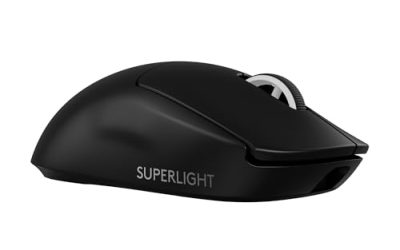
The hero listing is a gaming mouse, and the four alternatives are in the same general class of sensor and shape choices. Treat it as a closest-match listing for the kind of mouse this guide describes, not as the exact model a particular player uses. Check the product card for the sensor, weight, button layout and connection type before you buy, because those details change how the mouse feels in a fight more than the headline DPI number does.
Build Your Sensitivity Around the Mouse
Sensitivity in Apex comes from two numbers multiplied together: the DPI set on the mouse and the in-game sensitivity. Many competitive players settle somewhere between 400 and 1600 DPI, then tune the in-game value until a 180-degree turn feels comfortable. The exact range is a personal choice, and the right answer is the one you can repeat without thinking. The safest method is to fix the DPI first, change only the in-game sensitivity afterwards, and avoid changing both at once during the same session.
Why DPI Should Stay Fixed
Changing DPI and in-game sensitivity together makes it hard to know which change helped or hurt. Pick a DPI value, keep it for several weeks of play and adjust only the in-game number. If your aim drifts during a long session, reduce the number of variables before you buy a new mouse. Our guide to the best mouse for gaming explains which sensor and shape features matter most for steady aim.
Choosing a Mouse Shape and Weight
Shape decides how the mouse rests in your hand, and weight decides how much effort a quick flick takes. A lighter mouse suits players who use fast, small movements, while a heavier one can feel steadier for slow tracking. There is no universal right answer, so handle a few models if you can. For a wider look at the category, see the best wireless gaming mice and our ultralight mouse picks.
Field of View, Display and Graphics
Apex offers a field-of-view setting, and it changes how much of the map you see at once. A wider field of view shows more of the area around you, which helps when you need to spot movement at the edge of the screen. It also changes the way the scene feels, so test it in a practice range before you commit. Pick the setting that lets you track targets without feeling that the image is stretched or distant.
For display settings, choose a fullscreen mode that matches your monitor’s native resolution and refresh rate. Turn off options that add motion blur or unnecessary post-processing, because those add visual noise without helping you read the field. Frame-rate targets depend on the rest of your system, so if you are still choosing a monitor, our guide to the best 240Hz gaming monitors is a useful next step.
Keybinds That Keep Your Hands Still
The default layout works for many players, but a competitive setup usually moves the actions you press most often closer to the fingers that already rest on the mouse and keyboard. Apex’s controls menu lets you rebind jump, crouch, reload, ping and the other common actions. Make changes in small batches, and practise with the new layout in a casual session before you rely on it in ranked play.
Mouse Buttons and Keyboard Placement
If your mouse has extra buttons, bind the ones you can reach without shifting your grip. Keep the keys you press under pressure, such as movement and jump, where your fingers already sit. A keyboard with a comfortable layout reduces wasted reaches, and a good mechanical keyboard can make the difference in long sessions. Our overview of the best keyboards for gaming covers the common layouts, and the best mechanical keyboards for gaming explains the switch choices.
Pings and Communication
Apex relies on fast callouts. Bind the ping action to a button you can press without taking your aim off the target, and practise using it on a few common situations, such as an enemy behind cover or a loot location. A ping that is easy to send becomes a habit, and that habit is worth more to a team than any single setting.
Hardware Choices That Support Aim
Your mouse and keyboard matter most, but they work best on a stable system with a steady frame rate. A frame rate that bounces up and down makes tracking harder, even when the mouse feels accurate. The steps below help you keep the system consistent, and the table compares the listing with the four alternatives by role.
| Option | Role in this guide | Best for | What to confirm | Price |
|---|---|---|---|---|
| Hero listing | Primary mouse pick | Players who want a balanced shape and sensor | Sensor, weight, button layout, connection | Check current price |
| Alternative 1 | Lightweight option | Fast, small movements | Weight and grip shape | Check current price |
| Alternative 2 | Wireless option | Players who want a clean desk | Battery life and wireless latency specs | Check current price |
| Alternative 3 | Budget option | Players building a first competitive setup | Sensor quality and button durability | Check current price |
| Alternative 4 | Larger-hand option | Players who prefer a fuller grip | Length and width against your hand | Check current price |
Use the table as a shortlist and compare the specs that affect feel. Two mice with the same sensor can feel very different because of shape, weight and button tension.
If frame rate or stutter is the problem, check the hardware before you change the settings again. Our guide to the best CPU for Apex Legends and the best GPU for Apex Legends cover the parts that set your frame rate, and our current mouse roundup helps you decide when the mouse itself is the limit.
Frequently Asked Questions
What DPI should I use for Apex Legends?
There is no single correct DPI. Many players use a value between 400 and 1600 and keep it fixed while they tune in-game sensitivity. Choose the number you can repeat consistently, then stop changing it for several weeks so you can judge your aim fairly.
Should I change my keybinds from the default layout?
Change them only if the default layout forces you to move your hand away from the mouse or keyboard during important actions. Rebind a few keys at a time and practise each change before you rely on it in ranked matches.
Is a lightweight mouse better for Apex?
A lighter mouse can help with fast, small movements, but it is not automatically better. Shape and grip often matter more than weight, so try a few models before you choose.
Does field of view affect competitive play?
Yes, because it changes how much of the scene you see at once. Test a few values in a practice range and choose the one that lets you track movement at the edge of the screen without making the image feel distorted.
Apex competitive setup is a sequence of small, deliberate choices: fix the DPI, set a field of view you can read, bind the keys you press under pressure and choose a mouse that fits your grip. Change one thing at a time, and keep the setup stable long enough to judge it fairly.