The real decision with a wireless mouse for PS5 is not which sensor tops a spec chart. It is whether the mouse connects to the console at all, because the PS5 only accepts mouse input inside games that enable it, and it only accepts that input through a USB connection. A wireless model therefore lives or dies by its 2.4GHz USB dongle: plug the receiver into the console and the mouse behaves like a wired USB device, while a Bluetooth-only mouse never gets recognised for gameplay.
This guide is for PS5 players who aim with a mouse in supported shooters and strategy titles, couch players who need freedom from a cable across the living room, and desk players who share one mouse between console and PC. Every pick below ships with a 2.4GHz USB receiver, and each one was chosen from the name, specifications and platform details printed on its Amazon product page.
Quick Picks
As an Amazon Associate we earn from qualifying purchases
| Product | Best for | Key spec from title |
|---|---|---|
| Corsair Harpoon RGB Wireless | Console-first buyers who want PS5 named in the listing | 10,000 DPI, Slipstream wireless, lists PS5 |
| Razer DeathAdder V3 HyperSpeed | Light ergonomic aim in fast shooters | 55g, Focus X 26K optical sensor |
| Logitech G502 LIGHTSPEED | Players who bind many actions to the mouse | HERO 25K sensor, 11 programmable buttons |
| Razer Orochi V2 | Small hands and marathon sessions between charges | 18K DPI optical sensor, up to 950 hours battery |
How to Choose
Start with the dongle, because Bluetooth does not play
On PS5, a wireless mouse connects through its 2.4GHz USB receiver or it does not connect for gaming at all. The console treats the receiver as an ordinary USB pointing device, which is the only route mouse input takes in supported games. Bluetooth pairing, by contrast, is reserved for audio and controller accessories, so a Bluetooth-only mouse that works beautifully with a laptop will sit unused on a PS5. Every mouse in this guide includes a USB dongle. Our wider overview of gaming mice for PS5 explains the console’s per-game support rules, and the same rule applies here: check your game’s settings menu for a keyboard and mouse option before buying anything.
Polling rate and DPI are capped by the console, not the mouse
Marketing pages compete on polling rates and five-figure DPI ceilings, yet a console session flattens most of that advantage. PS5 games that accept a mouse read it as a standard USB device, so polling beyond 1,000 Hz brings no visible gain on the console, and the 8,000 Hz modes some mice advertise need a separate high-polling dongle and a PC to matter. DPI works the same way: a 26,000 DPI ceiling is headroom you will never use at television distance, where most players settle far lower for steady tracking. Treat both numbers as proof of sensor quality rather than targets, and spend your attention on shape, weight and buttons instead.
Match the shell to your hand and your seat
Size decides more sessions than any sensor. A compact shell such as the Orochi V2 suits smaller hands and fingertip control on a couch tray, while a sculpted right-handed body like the DeathAdder V3 HyperSpeed fills a palm and supports the wrist during long desk sessions. Weight pulls in the same direction: a 55-gram mouse flicks quickly in shooters but can feel twitchy in slower strategy games, whereas a heavier, contoured mouse tracks calmly and tires the hand less over an evening. Think about where you actually sit, because a mouse that feels perfect at a desk can feel oversized balanced on a sofa arm.
Battery style and settings that survive without a PC
Console players cannot lean on desktop software mid-session, so the practical questions are how the mouse charges and what it remembers. A rechargeable mouse with a USB-C port tops up from the console itself, while an AA-powered model trades that convenience for months between swaps. Settings matter just as much: a physical DPI button on the shell lets you adjust sensitivity inside a game, and on-board memory keeps those choices when the mouse moves between console and PC. Mice that hide every adjustment inside a Windows app will still work on PS5, but they arrive with factory settings you cannot change from the couch.
The 4 Best Options
Corsair Harpoon RGB Wireless

This is the one pick whose Amazon listing names the PS5 outright, alongside PS4 and Xbox, which removes the guesswork that surrounds most console mouse purchases. Its Slipstream connection runs through a USB transceiver with sub-1ms response, and the same mouse can fall back to Bluetooth for a laptop or a wired connection when the battery runs low. The contoured right-handed shell with rubber side grips suits palm and relaxed claw grips, and at 99 grams it feels planted rather than twitchy on a couch tray. Six programmable buttons cover the binds most console shooters expose.
Specs
- Sensor: 10,000 DPI optical sensor
- Connectivity: Slipstream 2.4GHz wireless, Bluetooth, or USB wired
- Buttons: 6 programmable buttons
- Weight: 99 grams
- Battery life: up to 60 hours
- Switches: Omron switches rated for 50 million clicks
- Platform support listed: PC, Mac, PS5, PS4, Xbox
- Model: CH-9311011-NA
Best for: PS5 players who want the console named in the listing before they buy.
Watch out for: the 60-hour battery figure applies to Bluetooth mode, so expect less on the Slipstream connection you will actually use on PS5.
ASIN: B07KQWR72Z
Razer DeathAdder V3 HyperSpeed

Razer trimmed its best-known ergonomic shape down to 55 grams, and that combination of a palm-filling right-handed shell with genuine lightweight construction is rare. The Focus X 26K optical sensor tracks at 500 IPS with 99.6 percent resolution accuracy according to the listing, and the third-generation optical switches are rated for 90 million clicks with no debounce delay. HyperSpeed wireless runs through the included USB dongle at 1,000 Hz, which is exactly the rate a PS5 can use, and the battery is rated for up to 100 hours at that setting. It suits right-handed players who aim with the whole arm in fast shooters.
Specs
- Sensor: Razer Focus X 26K optical sensor, up to 26,000 DPI
- Max speed: 500 IPS
- Switches: Razer Optical Mouse Switches Gen-3, 90-million click lifespan
- Connectivity: HyperSpeed 2.4GHz wireless via USB dongle, or wired USB-C
- Weight: 55 grams
- Battery life: up to 100 hours at 1,000 Hz
- Programmable controls: 6 buttons
- Dimensions: 4.81 x 2.55 inches
- Model: RZ01-05140100-R3U1
Best for: right-handed shooter players who want a light mouse with a full ergonomic shape.
Watch out for: the 8,000 Hz polling upgrade needs a separate HyperPolling dongle and brings nothing to a PS5, so skip that accessory for console play.
ASIN: B0D4RF55QK
Logitech G502 LIGHTSPEED
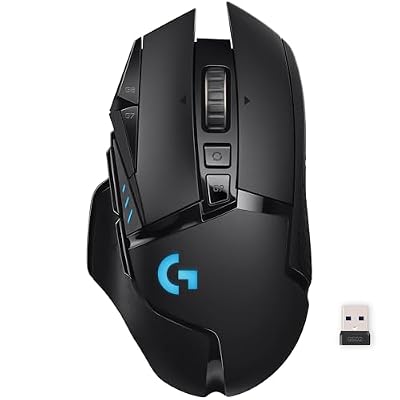
Where the other picks strip things away, this one adds them: eleven programmable buttons, a thumb rest, and a weight system that lets you add up to 16 grams across six included weights until the balance feels right. The HERO 25K sensor covers 100 to 25,600 DPI, and LIGHTSPEED wireless reports at 1 millisecond through its USB receiver, matching what the console can accept. Battery life reaches 60 hours per charge, and POWERPLAY compatibility means a compatible charging pad can keep it topped up on a desk between console sessions. It is the natural choice for players who bind abilities, pings and weapon swaps to the mouse.
Specs
- Sensor: HERO 25K, 100 to 25,600 DPI
- Connectivity: LIGHTSPEED 2.4GHz wireless via USB receiver, 1 ms report rate
- Buttons: 11 programmable buttons
- Battery life: up to 60 hours
- Weight: adjustable with six included weights (four 2g, two 4g)
- Extras: POWERPLAY wireless charging compatible, LIGHTSYNC RGB, on-board memory
- Dimensions: 132 x 75 x 40 mm
- Model: 910-005565
Best for: players who want maximum buttons and tunable weight in one wireless mouse.
Watch out for: at its size and weight this is a desk mouse first, so measure your couch tray or lap desk before assuming it travels well.
ASIN: B07L4BM851
Razer Orochi V2

The Orochi V2 is built around a simple promise: charge it almost never. Its single AA battery is rated for up to 950 hours of use, so the dongle stays in the console and the battery door stays shut for months. The compact symmetrical shell weighs under 60 grams with a lithium battery fitted, which flatters small hands and fingertip grips, and the 5G optical sensor reaches 18,000 DPI with mechanical switches under the main buttons. For a shared living-room setup where the mouse also serves a laptop, that endurance is the argument.
Specs
- Sensor: Razer 5G advanced optical sensor, up to 18,000 DPI
- Connectivity: HyperSpeed 2.4GHz wireless via USB dongle, or Bluetooth
- Battery life: up to 950 hours
- Battery type: single AA battery
- Switches: mechanical mouse switches
- Weight: under 60 grams with lithium battery
- Model: RZ01-03730100-R3U1 (Black)
Best for: small-handed players and shared setups that prize months of battery over raw features.
Watch out for: the headline 950-hour figure is the listing’s maximum rating, and real endurance on the 2.4GHz connection the PS5 needs will be shorter, so judge it as months of use rather than a promise.
ASIN: B0916N2LPZ
Which One Fits Your Situation
You play supported shooters from the couch
Pick the Corsair Harpoon RGB Wireless. Its listing names the PS5 directly, the Slipstream dongle gives you the USB connection the console demands, and the contoured shell with rubber grips stays secure on a lap tray where a slick ultralight shell can wander during quick turns. The wired fallback also rescues a forgotten charge mid-evening without ending the session.
You aim with your arm and play ranked modes
Pick the Razer DeathAdder V3 HyperSpeed. The 55-gram ergonomic shell supports fast, wide swipes without dragging on the wrist, its 1,000 Hz dongle matches the rate the console can use, and 100 hours of battery means charging rarely interrupts a run of matches across a full week of evening sessions.
You bind half your controls to the mouse
Pick the Logitech G502 LIGHTSPEED. Eleven programmable buttons and on-board memory let you arrange binds on a PC once and carry them to the console, and the tunable weights settle the mouse for deliberate tracking in slower games as well as shooters. It rewards players who treat the mouse as a second controller.
One mouse serves the console, a laptop and a small desk
Pick the Razer Orochi V2. The dongle lives in the PS5, Bluetooth covers the laptop, and the AA battery lasts months in either role, so the mouse simply stays where it was left. Its compact shell also fits the cramped surface of a small desk, a media unit, or a narrow side table.
Common Mistakes
- Buying a Bluetooth-only mouse for PS5 gaming, then discovering the console will not pair it for gameplay at all.
- Assuming every PS5 game accepts a mouse, when support is decided game by game and toggled in each title’s settings.
- Paying extra for 8,000 Hz polling or a high-polling dongle that only a PC can take advantage of.
- Leaving the tiny USB receiver in a PC and expecting the mouse to connect to the console wirelessly on its own.
- Judging a mouse by its maximum DPI figure instead of its shape, weight and button layout.
Frequently Asked Questions
Does a wireless mouse work on PS5 without a cable?
Yes, provided it connects through a 2.4GHz USB receiver. The PS5 reads that dongle as a standard USB mouse, so any model in this guide works wirelessly in games that enable mouse input. Bluetooth mice are the exception: the console does not accept them for gameplay, even though the same mouse pairs happily with a laptop or tablet.
Which PS5 games let me play with a mouse?
Support is decided by each developer, so there is no console-wide guarantee. Popular shooters and several strategy and simulation titles include a keyboard and mouse option in their settings, while most action and sports games remain controller-only. Check the settings menu of the specific game you own before buying a mouse for it.
Is 1,000 Hz polling enough on a console?
Yes. A 1,000 Hz connection reports the mouse position every millisecond, which matches what the PS5 accepts from a USB device and feels immediate in supported games. Higher polling rates exist for high-refresh PC monitors and compatible PCs; on a console they add cost and drain battery without changing what the game receives.
Can I set DPI and button binds without a PC?
Partly. A physical DPI button changes sensitivity straight from the shell, and mice with on-board memory keep settings saved earlier. Full remapping, macros and fine DPI steps usually need the maker’s Windows or Mac software, so borrow a computer for one setup session if you want custom binds, then carry those settings back to the console.