The real decision is not which keyboard has the brightest lighting; it is whether a keyboard can actually join the games you play on your iPad, and how it connects once it does. iPadOS accepts standard Bluetooth and USB keyboards, but each game decides for itself whether keyboard input works at all, and the port on your iPad generation decides whether a wired board or a 2.4 GHz dongle is even an option. A USB-C iPad Pro or Air can take a cable or a dongle through an adapter; a Lightning model is effectively Bluetooth-only.
This guide serves three groups: couch players who want real keys for strategy, MMO and shooter titles that support them, desk players pairing an iPad with a stand, and travellers who share one keyboard between an iPad and a PC. Every pick below is a model sold on Amazon US whose own listing names iPad, iOS or tablet support, and the specifications quoted come from those product pages.
Quick Picks
As an Amazon Associate we earn from qualifying purchases
| Product | Best for | Key spec from title |
|---|---|---|
| Logitech G915 X LIGHTSPEED TKL | Couch play on a USB-C iPad with a gaming PC at the same desk | Tri-mode LIGHTSPEED, Bluetooth and wired USB-C |
| Keychron K3 Max | Low-latency rounds on USB-C iPads via the 2.4 GHz receiver | 1000 Hz polling over 2.4 GHz and wired modes |
| Keychron K3 | Lightning iPads and light travel bags | Bluetooth 5.1 pairing for up to 3 devices, iPad named in the listing |
| NuPhy Air75 V2 | Long sessions away from a charger | 4000 mAh battery rated up to 220 hours with lights off |
| EPOMAKER RT100 | A fixed desk where the iPad sits in a stand all day | 97 keys with a knob and a detachable display screen |
How to Choose
Match the connection to your iPad’s port
Start with the port, because it rules out whole connection types. iPad Pro and iPad Air models with USB-C can use a wired USB-C keyboard directly, and their port also accepts a 2.4 GHz receiver through a USB-C adapter or hub, which is how the low-latency modes below reach an iPad. The standard iPad and older Air and mini models with a Lightning port have no such route: a dongle has nowhere sensible to plug in, and wired adapters are unreliable, so Bluetooth is the realistic choice. Every keyboard in this guide pairs over Bluetooth, so Lightning owners lose nothing except the dongle modes — check your port before paying for features you cannot use.
Check that your games accept keyboard input at all
A keyboard only helps in games that listen for one. iPadOS routes keyboard input to the system, but developers choose whether a title uses it, and support is uneven: many strategy games, MMOs and ports of PC titles accept keyboard control, while plenty of touch-first games ignore keys entirely or accept them only for chat. Before buying, check each favourite game’s support pages for keyboard support, and treat any board as a typing tool first and a controller second. If your library is mostly touch games, start from the tablet itself — this overview of the best gaming iPad models shows which generations pair well with accessories — and buy only for titles that will actually use it.
Weigh Bluetooth latency against dongle and wired modes
Bluetooth is the universal route, but it is also the slowest one on paper. The Keychron K3 Max listing, for example, quotes a 90 Hz polling rate over Bluetooth against 1000 Hz over its 2.4 GHz receiver and USB-C cable, and the NuPhy Air75 V2 lists 125 Hz over Bluetooth against 1000 Hz on its other modes. In turn-based, strategy and menu-heavy games that gap is invisible; in a fast shooter it can add a small delay to every keystroke. USB-C iPad owners who play those faster titles should favour a board with a dongle or wired mode, while Bluetooth-only play suits almost everything else on the App Store.
Plan around battery size, charging and device switching
Wireless boards live or die by their battery and their charging port. Capacities in this guide run from 1550 mAh in the slim Keychron models to 5000 mAh in the EPOMAKER RT100, and backlighting is the biggest drain: NuPhy rates the Air75 V2 at 35 to 57 hours with lights on against up to 220 hours with them off. All five boards recharge over USB-C, which matches current iPad chargers and cables. If the same keyboard also serves a PC, count the pairing slots — three Bluetooth devices on the Keychron and Logitech boards, four connection slots on the NuPhy — so the iPad keeps a dedicated channel.
The 5 Best Options
Logitech G915 X LIGHTSPEED TKL

The G915 X TKL is the premium route for a player whose iPad shares a desk or a couch with a gaming PC. Its LIGHTSPEED receiver gives the PC a low-latency link, Bluetooth covers the iPad — Logitech’s compatibility list includes iOS devices for the Bluetooth mode — and a USB-C cable handles wired play and charging. Low-profile GL Tactile switches and double-shot PBT keycaps suit long strategy sessions as much as shooters, and the tenkeyless frame leaves room for a mouse beside a propped-up iPad. KEYCONTROL lets keys carry extra functions, configured on a computer and stored on the board.
Specs
- Layout: Tenkeyless, low-profile
- Switches: GL Tactile mechanical
- Connectivity: LIGHTSPEED 2.4 GHz receiver, Bluetooth, wired USB-C
- Keycaps: Double-shot PBT
- Lighting: LIGHTSYNC RGB
- Battery: Up to 42 hours, rechargeable over USB-C
- Model number: 920-012715
Best for: Players splitting time between a gaming PC and a USB-C iPad who want one premium board for both.
Watch out for: The LIGHTSPEED receiver is USB-A, so an iPad needs a USB-C adapter or hub to use it; Bluetooth is the cable-free route.
ASIN: B0DB1X3LLT
Keychron K3 Max
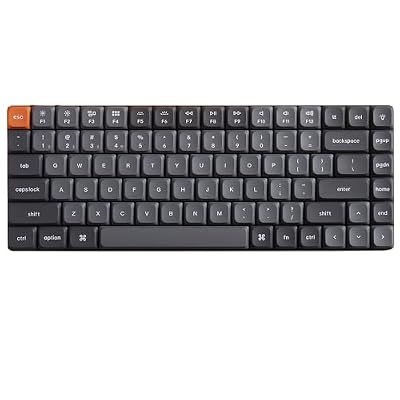
Most gaming keyboards reach an iPad over Bluetooth alone; the K3 Max is the compact board that also offers a genuinely fast wireless mode. Its listing quotes a 1000 Hz polling rate over the 2.4 GHz receiver and the USB-C cable, against 90 Hz over Bluetooth, so a USB-C iPad Pro or Air with a small adapter gets dongle-grade response for shooters and rhythm games. The 75 percent frame keeps the arrow and function keys, the low-profile Gateron switches are hot-swappable, and QMK/VIA support means remaps and macros are saved to the board rather than to an app your iPad cannot run.
Specs
- Layout: 75 percent, 84 keys
- Connectivity: 2.4 GHz receiver, Bluetooth 5.1, wired USB-C
- Polling rate: 1000 Hz over 2.4 GHz and wired, 90 Hz over Bluetooth
- Switches: Low-profile Gateron mechanical, hot-swappable
- Backlight: RGB
- Battery: 1550 mAh rechargeable
- Dimensions: 12.05 x 4.57 inches
Best for: USB-C iPad owners who play fast titles and want dongle polling rates from a slim board.
Watch out for: The receiver is USB-A, so budget for a USB-C adapter; the sockets take low-profile switches only, so standard-height spares will not fit.
ASIN: B0CNVZF6PK
Keychron K3

The K3 is the straightforward pick for older iPads and for bags. Its Amazon listing says the board connects with a smartphone, laptop and iPad, which makes it one of the few gaming-capable mechanical keyboards that names the iPad outright. Bluetooth 5.1 holds three devices at once, so a Lightning iPad, a phone and a laptop can share it without re-pairing, and the wired USB-C mode covers USB-C iPads at a desk. Low-profile Optical Brown switches give a tactile bump for strategy and MMO play, and the white backlight stays useful on a dim couch without draining the small battery as quickly as full RGB.
Specs
- Layout: 75 percent, 84 keys
- Connectivity: Bluetooth 5.1 and wired USB-C
- Switches: Low-profile Keychron Optical Brown, hot-swappable
- Backlight: White LED
- Battery: 1550 mAh rechargeable li-polymer
- Dimensions: 306 x 116 x 22 mm
- Compatibility note: The listing names iPad among the devices it connects with
Best for: Lightning-port iPads and travellers who need a slim mechanical board that pairs with three devices.
Watch out for: There is no 2.4 GHz receiver, so Bluetooth is the only wireless mode; wired mode needs a USB-C iPad or an adapter.
ASIN: B09GG1ZD6V
NuPhy Air75 V2
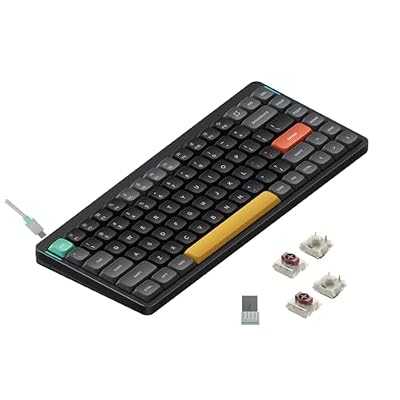
Battery life is the Air75 V2’s headline. NuPhy’s listing rates its 4000 mAh cell at 35 to 57 hours with the backlight running and up to 220 hours with the lights off, which suits players who carry an iPad between rooms or on trips and forget chargers. The listing also confirms iOS among its supported systems, alongside Bluetooth 5.1, a 2.4 GHz receiver and a USB-C wired mode, with up to four devices connected across the modes. Gateron Brown low-profile switches, double-shot PBT keycaps and QMK/VIA remapping round out a board that types as well as it games.
Specs
- Layout: 75 percent, 84 keys, low-profile
- Connectivity: Bluetooth 5.1, 2.4 GHz receiver, wired USB-C
- Polling rate: 1000 Hz over 2.4 GHz and wired, 125 Hz over Bluetooth
- Battery: 4000 mAh; 35–57 hours with lights on, up to 220 hours with lights off
- Switches: Gateron Brown low-profile, hot-swappable
- Keycaps: Double-shot PBT
- Dimensions: 316.4 x 132.5 x 13.5 mm; 598 g
Best for: Travellers and couch players who want the longest time between charges.
Watch out for: The 2.4 GHz receiver is USB-A and needs an adapter on an iPad; VIA remapping is done from a computer browser, not on the iPad.
ASIN: B0CMXC46KH
EPOMAKER RT100

The RT100 is the desk anchor of this guide: a 97-key board with a number pad, a volume knob and a small detachable display screen that shows connection and battery status. Its compatibility list includes iOS, so an iPad in a stand can pair over Bluetooth 5.0, while the 2.4 GHz receiver and USB-C cable serve a nearby PC. The 5000 mAh battery is the largest here, the Kailh sockets accept hot-swappable switches, and the Wisteria linear switches fitted to this listing keep keystrokes smooth for long sessions. It is far too big for a travel bag, and that is the point.
Specs
- Layout: 95 percent, 97 keys plus a knob
- Connectivity: Bluetooth 5.0, 2.4 GHz receiver, wired USB-C
- Battery: 5000 mAh rechargeable
- Switches: Wisteria linear, hot-swappable Kailh sockets
- Extras: Detachable smart display screen, media knob
- Keycaps: PBT, MDA profile
- Dimensions: 12.99 x 4.57 x 0.98 inches
Best for: A permanent desk or TV-side setup where the iPad lives in a stand.
Watch out for: At just over three pounds it is a stay-at-home board, and the display screen occupies the slot where the 2.4 GHz receiver is stored.
ASIN: B0C4TNF64V
Which One Fits Your Situation
Playing on the couch with a USB-C iPad
A USB-C iPad Pro or Air opens every connection route in this guide. For fast titles, the Keychron K3 Max is the natural fit: its 2.4 GHz receiver reaches 1000 Hz polling through a small USB-C adapter, and its slim frame balances on a lap desk. The Logitech G915 X TKL is the step up if the same couch setup also hosts a gaming PC, since its receiver can stay with the PC while Bluetooth serves the iPad.
Your iPad still has a Lightning port
Lightning models — the standard iPad up to the 9th generation, older Airs and minis — should shop Bluetooth-first and ignore dongle specifications entirely. The Keychron K3 is the cleanest match because its listing names the iPad directly and its Bluetooth 5.1 holds three pairings, so the same board can serve a phone as well. The NuPhy Air75 V2 also works over Bluetooth, and its long battery life suits a tablet that is rarely near its charger.
One keyboard for an iPad and a gaming PC
Sharing one board between two machines is a pairing-slot problem. The NuPhy Air75 V2 connects to up to four devices across its modes, so a PC on the receiver, a wired desk connection and the iPad over Bluetooth can coexist. The Logitech G915 X TKL takes a different split: LIGHTSPEED for the PC, Bluetooth for the iPad, cable when either needs charging. Either way, pick the board whose switching method you will actually use mid-session.
Taking the iPad on trips
Travel favours thin boards with forgiving batteries. The NuPhy Air75 V2 is 13.5 mm thick, weighs 598 g and stretches to 220 hours with its backlight off, so it survives a week of hotel play without its cable. The Keychron K3 is similarly slim and lighter on features, with a white backlight instead of RGB; both fit beside an iPad in a sleeve far better than the desk-bound EPOMAKER RT100.
Common Mistakes
- Buying a wired-only gaming keyboard for a Lightning iPad, where the cable has no reliable way to connect.
- Assuming every iPad game supports keyboards, when each developer decides and many touch-first titles ignore keys completely.
- Paying for a 2.4 GHz dongle mode without checking that the receiver is USB-A and the iPad needs a USB-C adapter to host it.
- Leaving RGB backlighting at full brightness, then blaming a small battery that was rated with the lights low or off.
- Choosing a full-size board for couch or travel play, when a 75 percent layout keeps the arrow keys and fits a lap or a bag.
Frequently Asked Questions
Can you play iPad games with a keyboard?
Sometimes. iPadOS accepts Bluetooth and USB keyboards at the system level, but each game decides whether to use keyboard input. Strategy games, MMOs and many PC ports support full keyboard control, while touch-first titles may ignore keys or allow them only for chat. Check a game’s support page before buying a keyboard for it.
Do wired gaming keyboards work with iPad?
On USB-C models, yes: an iPad Pro or Air can use a USB-C keyboard directly, and a USB-A board or receiver through a USB-C adapter or hub. On Lightning models a wired connection is not practical, because the port needs adapters that are unreliable for keyboards. Lightning owners should treat Bluetooth as the connection that matters.
Is Bluetooth fast enough for gaming on an iPad?
For most iPad genres, yes. Bluetooth polling on the boards here runs at 90 to 125 Hz, which feels fine in strategy, RPG and menu-driven games. Players chasing the lowest delay in fast shooters can use a 2.4 GHz receiver or a cable on a USB-C iPad, where the Keychron K3 Max and NuPhy Air75 V2 both quote 1000 Hz polling.
Will a gaming keyboard drain the iPad’s battery?
Barely, over Bluetooth: the keyboard runs on its own rechargeable battery and the iPad only maintains the wireless link. A wired keyboard is different, because it draws power from the iPad’s port while connected. Players planning long wired sessions on a USB-C model can use a hub that passes charging power through to the tablet.