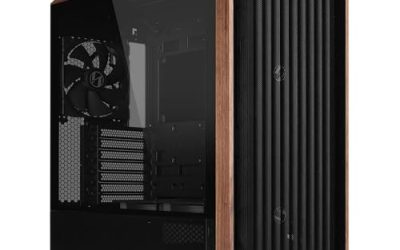
Our Short List of 3
All 3 Picks at a Glance
| Product | Specs | Action |
|---|---|---|
 Corsair 4000D Airflow (ASIN: B08C7BGV3D) | Check price on Amazon | |
 Lian Li Lancool 216 (ASIN: B0BN3SY5XW) | Check price on Amazon | |
 NZXT H7 Flow 2024 (ASIN: B0CV4RYKLF) | Check price on Amazon |
As an Amazon Associate we earn from qualifying purchases
A good PC case fits the parts you already own, moves air without forcing fans to work harder than needed, and leaves room to build and maintain the machine. This guide compares four widely available mid-tower cases on published specifications only, so you can match a chassis to your motherboard, graphics card, cooler and power supply before you buy.
Manufacturer specifications and measured results are different things. Clearance figures, fan counts and radiator support below come from maker listings. Real temperatures and noise depend on your components and fan settings, and they are not established by a spec sheet. Treat every number here as a fit check, and confirm the exact SKU because colors and fan bundles change what is included.
What to check before you choose
Motherboard format and socket layout. Cases do not have a CPU socket, but motherboard format decides standoff positions, cable cutouts and back-connect support. Confirm ATX, Micro-ATX or Mini-ITX support, and check that your board headers line up with the case cutouts.
Graphics card and cooler clearance. Compare your card length with the case limit with and without a front radiator; the two numbers often differ. Do the same for cooler height and radiator plus fan thickness.
Fan mounts, connectors and power. Count included fans and whether they use PWM connectors. Check for a hub or controller, motherboard header needs, and lighting connector type. Confirm power supply format, length and cable clearance behind the tray.
Front ports and daily use. Front USB-C needs a matching motherboard header. Check USB-A count, filters and panel removal for cleaning. Warranty terms vary by region and seller, so confirm coverage for the exact listing.
Four cases compared on published specifications
Fractal Design North (ASIN: B09Y9FJDG9)
The North is an ATX mid-tower with a wood front panel over mesh, tempered glass on the listed variant, two included 140mm Aspect PWM fans and a front USB-C port, per the Amazon US listing for the Chalk White tempered glass version. It suits builders who want a case that looks at home in a living room or office without giving up mesh intake.
Fit notes from maker information: support covers ATX, Micro-ATX and Mini-ITX boards, and graphics card clearance is commonly listed around 355mm, dropping when a thick front radiator is fitted. That drop is the key check. If you plan a front-mounted 360mm liquid cooler, measure card length against the reduced figure, not the headline figure. Two large front fans move air at lower speeds than smaller fans, but only two fans are included, so budget for exhaust or top fans if your parts run warm. Confirm panel type (mesh or glass) on the SKU, because both versions exist under similar names.
Corsair 4000D Airflow (ASIN: B08C7BGV3D)
The 4000D Airflow is a tempered glass mid-tower with a high-airflow steel front panel, two included 120mm AirGuide fans and Corsair RapidRoute cable management with 25mm of routing space behind the motherboard tray, according to the Amazon US product information. Motherboard support is listed as Extended ATX, ATX, Micro-ATX and Mini-ITX, though Extended ATX boards vary in width, so check tray cutouts if you use one.
This case fits builders who value tidy cable runs and straightforward assembly. The included fan count is modest, so plan on adding intake or exhaust fans for high-power graphics cards. Radiator support and cooler height are published by Corsair for this model; verify them against your cooler before ordering, especially with top-mounted radiators where memory height can clash. The steel front panel prioritizes airflow over solid-panel looks, and dust filtration should be checked on the exact listing.
Lian Li Lancool 216 (ASIN: B0BN3SY5XW)
The Lancool 216 is an airflow-focused mid-tower that includes two front 160mm PWM fans and one rear 140mm PWM fan, with support for up to ten fans in total, per the Amazon US listing. Maker materials list support for E-ATX, ATX, Micro-ATX and Mini-ITX boards, graphics cards up to about 392mm and CPU coolers up to about 180.5mm, with radiator support at the front, top and bottom depending on configuration.
Large front fans are the main draw: they can move a useful volume of air without spinning fast. Check fan connector types and whether the RGB variant includes a controller, because included accessories differ between the standard and RGB versions. The rear PCIe fan bracket is a distinctive feature for directing air toward the graphics card; confirm it suits your card thickness and slot layout. As with any mesh-heavy case, expect to clean filters regularly in dusty rooms.
NZXT H7 Flow 2024 (ASIN: B0CV4RYKLF)
The H7 Flow 2024 is a mid-tower ATX airflow case with three pre-installed 120mm fans, support for bottom fans for direct graphics card cooling, and cable management channels, according to the Amazon US listing for the white version. Published support includes large front and top radiators, with front support commonly listed up to 420mm and top support up to 360mm on maker materials for this generation.
Bottom fan mounts are worth attention if your graphics card runs warm, because they feed air directly to the card fans. Confirm whether your power supply and cable length still fit with bottom fans installed. Tool-less panel access is listed for this model, which helps with cleaning and upgrades. Check front port types on the exact SKU, since port layouts have changed between H7 generations.
How to pick between them
Choose the Fractal Design North if appearance matters most and your graphics card fits with room to spare, especially with a front radiator. Choose the Corsair 4000D Airflow if cable management space and a simple steel-and-glass layout matter more than included fan count. Choose the Lian Li Lancool 216 if you want large included front fans and generous clearance figures on paper. Choose the NZXT H7 Flow 2024 if bottom fans for graphics card cooling and large radiator support are priorities.
In every case, run the same final checks: motherboard format, graphics card length with and without a front radiator, cooler height, power supply format and length, front USB-C header compatibility, and the exact fan bundle in the box. For a broader side-by-side look at chassis options, see our PC case comparison guide.
Common mistakes to avoid
Buying by tower label alone is a common error: mid-tower is not a standard size. Assuming included fans cover a high-power build is another; two fans may suit modest parts and not a large graphics card. Mixing up variants also causes returns, because mesh versus glass panels and RGB versus non-RGB fans change ports and accessories. Match the ASIN and model code, not just the family name.
Bottom line
The right choice is the smallest case that fits your board, card, cooler and power supply with margin, moves air in a straight path, and gives you front ports you will actually use. Confirm the exact SKU before ordering and your build will go together without surprises.