Path of Exile 2 does not ask for much hardware on paper. Grinding Gear Games publishes the game’s PC requirements on its official Steam store listing, and even the recommended tier tops out at a GeForce RTX 2060-class graphics card, 16GB of memory and a processor from several generations ago. With the full release arriving on December 11, 2026, plenty of returning and new players are shopping for a machine that will carry them from the campaign into the endgame without a self-build project on the side.
Every prebuilt in this guide clears the recommended specification rather than the bare minimum, and the five picks are tiered by how much headroom they add on top of it: comfortable high-refresh play at 1080p first, then 1440p, then the crowded endgame maps where this game leans hardest on the processor.
As an Amazon Associate we earn from qualifying purchases.
Path of Exile 2’s official PC requirements
These are the minimum and recommended specifications exactly as Grinding Gear Games lists them for the PC version on Steam. They are the anchor for every pick that follows.
| Component | Minimum | Recommended |
|---|---|---|
| OS | Windows 10 | Windows 10 |
| Processor | Intel Core i7-7700 or AMD Ryzen 5 2500X | Intel Core i5-10500 or AMD Ryzen 5 3700X |
| Memory | 8GB RAM | 16GB RAM |
| Graphics | GeForce GTX 960 (3GB), Intel Arc A380, or Radeon RX 470 | GeForce RTX 2060, Intel Arc A770, or Radeon RX 5600 XT |
| DirectX | Version 12 | Version 12 |
| Storage | 100GB available space | 100GB available space |
Two notes in the official listing matter when you shop. The minimum tier states that a GPU with at least 3GB of VRAM is required, and the recommended tier adds that solid state storage is recommended. The 100GB install size applies to both tiers, so a small boot drive fills up fast once a few other games join it. If you want the line-by-line detail before choosing a machine, our breakdown of the Path of Exile 2 PC requirements for 2026 walks through what each tier means in practice.
What actually matters in a prebuilt for this game
Processor headroom. The campaign is undemanding, but endgame mapping fills the screen with monsters, projectiles and effects, and frame pacing in those scenes leans on the CPU more than the modest recommended processor suggests. A modern six-core or better chip is the sensible floor, and cache-heavy gaming processors such as AMD’s X3D models are the premium option for CPU-limited scenes.
Graphics card and VRAM. Every current gaming GPU clears the RTX 2060 recommended bar with room to spare. The real decision is resolution: 8GB of VRAM is workable at 1080p, while 12GB or 16GB gives textures and effect-heavy zones more breathing room at 1440p and on high-refresh monitors.
Memory and storage. Treat 16GB of RAM as the target, since that is the recommended figure; 32GB is comfort headroom for voice chat, a browser and recording tools running alongside the game. An NVMe SSD matches the developer’s solid state recommendation and covers the 100GB install with room left over.
The five picks, tier by tier
1. CyberPowerPC Gamer Xtreme VR (GXiVR8060A24) — the starter tier
Specs
- Processor: Intel Core i5-13400F
- Graphics: NVIDIA GeForce RTX 4060 8GB
- Memory: 16GB DDR5
- Storage: 1TB PCIe Gen4 SSD
- Operating system: Windows 11 Home
- View on Amazon
This is the entry point of the guide and it still clears the recommended specification on every line: the Core i5-13400F is a newer, stronger processor than the recommended Core i5-10500, the RTX 4060 sits well above the RTX 2060 tier, and the 16GB of DDR5 matches the recommended memory figure exactly. The 1TB Gen4 SSD covers the 100GB install many times over and follows the developer’s solid state recommendation. For a 1080p monitor, this is the tier where Path of Exile 2 stops being a question of whether the game runs and becomes a question of settings. The LGA1700 platform also leaves a CPU upgrade path to later 14th-generation Intel chips if you outgrow the processor first.
2. CyberPowerPC Gamer Xtreme VR (GXiVR8040A14) — extra VRAM headroom

Specs
- Processor: Intel Core i7-13700F
- Graphics: NVIDIA GeForce RTX 4060 Ti 16GB
- Memory: 16GB DDR5
- Storage: 1TB NVMe SSD
- Chipset: Intel B760
- Operating system: Windows 11 Home
- View on Amazon
The second CyberPowerPC pairs a stronger Core i7-13700F with the 16GB version of the RTX 4060 Ti. That doubled VRAM buffer is the reason to pick it: texture-heavy zones and effect-dense maps at 1080p or entry-level 1440p get more memory headroom before the game has to shuffle assets, and the extra CPU cores help when the screen fills with enemies. Memory and storage match the first pick at 16GB of DDR5 and a 1TB NVMe drive, which meet the recommended tier rather than exceed it, so consider this the balanced option for players who split time between 1080p and a 1440p display.
3. Skytech Chronos (ST-CHRONOS2-0990-B-AM) — the 1440p step up

Specs
- Processor: AMD Ryzen 7 7700X
- Graphics: NVIDIA GeForce RTX 4070 12GB GDDR6X
- Memory: 32GB DDR5
- Storage: 1TB NVMe SSD
- Power supply: 650W Gold
- Operating system: Windows 11 Home
- View on Amazon
The Chronos moves the guide onto AMD’s AM5 platform and doubles system memory to 32GB. The Ryzen 7 7700X brings strong single-core performance for simulation-heavy scenes, and the RTX 4070’s 12GB of VRAM is a comfortable match for 1440p play. With 32GB of RAM, the game, voice chat and a stream or recording session can share the machine without pressure. Because it is built on AM5, the processor can be replaced with a later Ryzen generation on the same motherboard platform, which makes this the first pick in the list with a genuinely long upgrade runway.
4. Skytech King 95 (ST-KING95-2422-W-AL) — high-refresh 1440p

Specs
- Processor: AMD Ryzen 7 7700
- Graphics: NVIDIA GeForce RTX 4070 Super 12GB GDDR6X
- Memory: 16GB DDR5 6000
- Storage: 1TB NVMe SSD
- Power supply: 750W Gold
- Operating system: Windows 11 Home
- View on Amazon
The King 95 trades the Chronos’s extra memory for a faster graphics card. The RTX 4070 Super is the stronger 1440p GPU of the two, aimed at players with a high-refresh 1440p monitor who want settings headroom in busy endgame content rather than multitasking headroom. The Ryzen 7 7700 keeps the same AM5 upgrade path, and the 750W Gold power supply leaves more room for a future graphics card swap than the 650W unit in the Chronos. The one compromise is 16GB of system memory: it matches the game’s recommended figure, and adding a second pair of DDR5 sticks later is a simple upgrade if your habits change.
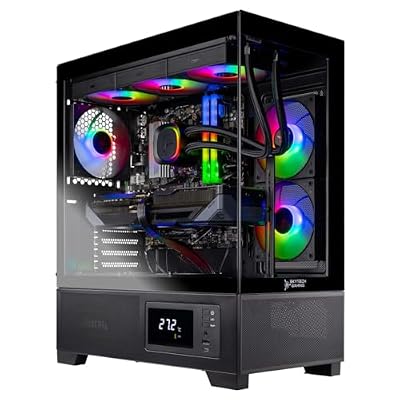
5. Skytech Azure 3 Plus (ST-AZURE3PLUS-1957-B-AM) — the endgame tier
Specs
- Processor: AMD Ryzen 7 7800X3D
- Graphics: NVIDIA GeForce RTX 5070 Ti 16GB GDDR7
- Memory: 32GB DDR5 5600
- Storage: 1TB Gen4 NVMe SSD
- Power supply: 850W Gold ATX 3
- Cooling: 360mm ARGB liquid cooler
- Operating system: Windows 11 Home
- View on Amazon
The Azure 3 Plus is the no-compromise pick. The Ryzen 7 7800X3D’s stacked cache is built for exactly the CPU-limited, effect-heavy scenes that define Path of Exile 2’s endgame, and the RTX 5070 Ti pairs it with 16GB of current-generation VRAM for high-refresh 1440p or upscaled 4K play. The 850W ATX 3 power supply and AM5 platform give it the strongest upgrade headroom in this guide, and 32GB of memory plus a 1TB Gen4 SSD match the rest of the specification. If you play one game for thousands of hours and want the machine to age slowly, this is the tier to buy.
All five systems compared
| System | CPU | GPU | RAM | SSD | Upgradability |
|---|---|---|---|---|---|
| CyberPowerPC Gamer Xtreme VR (GXiVR8060A24) | Core i5-13400F | RTX 4060 8GB | 16GB DDR5 | 1TB Gen4 NVMe | LGA1700 CPU path; DDR5 and storage expansion in a standard tower |
| CyberPowerPC Gamer Xtreme VR (GXiVR8040A14) | Core i7-13700F | RTX 4060 Ti 16GB | 16GB DDR5 | 1TB NVMe | LGA1700 CPU path; DDR5 and storage expansion in a standard tower |
| Skytech Chronos | Ryzen 7 7700X | RTX 4070 12GB | 32GB DDR5 | 1TB NVMe | AM5 CPU path; 650W PSU suits mid-tier GPU swaps |
| Skytech King 95 | Ryzen 7 7700 | RTX 4070 Super 12GB | 16GB DDR5 6000 | 1TB NVMe | AM5 CPU path; 750W PSU gives wider GPU upgrade room |
| Skytech Azure 3 Plus | Ryzen 7 7800X3D | RTX 5070 Ti 16GB | 32GB DDR5 5600 | 1TB Gen4 NVMe | AM5 CPU path; 850W ATX 3 PSU gives the widest GPU upgrade room |
Product and ASIN Reference
| Product | ASIN |
|---|---|
| CyberPowerPC Gamer Xtreme VR Gaming PC (GXiVR8060A24) | B0DCMPRRFD |
| CyberPowerPC Gamer Xtreme VR Gaming PC (GXiVR8040A14) | B0CBL8N3FC |
| Skytech Chronos Gaming PC (ST-CHRONOS2-0990-B-AM) | B0CJDF76BC |
| Skytech King 95 Gaming PC (ST-KING95-2422-W-AL) | B0FR4CLBC2 |
| Skytech Azure 3 Plus Desktop PC (ST-AZURE3PLUS-1957-B-AM) | B0F6MVVZSC |
Verdict: which one should you buy?
Buy the first CyberPowerPC if you play at 1080p and want the lowest tier that still beats the recommended specification everywhere. Step up to the second CyberPowerPC if you want 16GB of VRAM and a stronger processor without leaving the value tier. The Skytech Chronos is the balanced 1440p choice, with 32GB of memory and the AM5 platform’s long upgrade path. The King 95 suits high-refresh 1440p players who would rather spend on the graphics card than on memory. The Azure 3 Plus is for endgame-focused players who want the cache-heavy X3D processor, a current-generation GPU and the most upgrade headroom, so the machine stays relevant through years of league cycles.
FAQ
Does a budget prebuilt run Path of Exile 2 properly?
Yes. The official minimum is a GTX 960-era graphics card with at least 3GB of VRAM, 8GB of RAM and a Core i7-7700 or Ryzen 5 2500X. Every pick in this guide is built to the recommended tier or above, which is the level worth buying for.
How much RAM does Path of Exile 2 need?
Grinding Gear Games lists 8GB as the minimum and 16GB as recommended. A 16GB system matches the recommended figure; 32GB simply adds headroom for other apps running at the same time.
Does Path of Exile 2 need an SSD?
The game needs 100GB of available space on either tier, and the recommended specification explicitly says solid state storage is recommended. All five systems here ship with a 1TB NVMe SSD, so they satisfy that guidance out of the box.
Is the CPU or the GPU more important for the endgame?
Both matter, but in different places. The GPU decides your resolution and settings ceiling, while crowded endgame maps with dense effects lean heavily on the processor. That is why the top pick pairs a strong graphics card with a cache-heavy X3D processor rather than spending the whole budget on one side.