As an Amazon Associate we earn from qualifying purchases.
Retro gaming makes different demands than modern AAA titles. A DOS classic, a GOG release from the 16-bit or 32-bit era, or an emulator running a game from two decades ago rarely needs a flagship graphics card. It needs a processor with strong single-core performance, because many emulators lean heavily on one or two fast cores; a screen that handles older resolutions and aspect ratios gracefully; enough storage for a large library of small games; and the right ports for wired controllers, arcade sticks and external drives full of disc images.
This guide takes that wider retro view: PC classics and older-system emulation up to roughly the PlayStation 2 and GameCube generation at a qualitative level, not pushing the newest consoles’ emulators to their limits. The five laptops below are chosen because their published specifications suit that job — capable CPUs, modest but sufficient GPUs, upgradeable memory and storage on most models, and displays that work well at the low resolutions retro software was built for.
What Makes a Laptop Good for Retro Gaming
CPU single-core speed comes first. Emulation is mostly a processor task. A modern Intel Core i5 or i7 H-series chip, or an AMD Ryzen 7 HS chip, has far more per-core speed than the hardware being emulated, which is what older emulators reward. Check the exact processor in the listing, because the same chassis ships with several very different CPUs.
The GPU matters less than you think. A modest discrete GPU such as an RTX 3050, 4050 or 4060 gives comfortable headroom for shaders, upscaling filters, CRT effects and texture packs, and for the more demanding end of classic emulation. Chasing an RTX 4080 or 4090 buys almost nothing for retro use. Do still check the GPU power limit published for the exact model, since the same GPU name appears at different wattages in different chassis.
Displays and aspect ratios. Most retro software was designed for 4:3 or 16:9 screens at low resolutions. A 16:10 panel adds black bars on 4:3 content but gives extra vertical room for DOS and strategy titles, while a standard 1080p panel matches many later classics exactly. Integer scaling matters more than a very high native resolution, although a sharper panel makes scanline and CRT filters look cleaner.
Ports decide your controller options. Look for multiple USB-A ports for wired pads, fight sticks and adapters, USB-C for docks and modern controllers, HDMI for a TV, and Ethernet if you use network shares for your library. An SD card reader is a quiet bonus. Pairing the laptop with the right pad matters as much as the laptop itself, so see our roundup of the best retro controllers once you have shortlisted a machine.
Storage and memory. Retro libraries are individually small but grow fast once disc-based games arrive. A 512GB SSD is workable, 1TB is comfortable, and a second M.2 slot or a replaceable drive decides whether the machine can grow with the collection. Sixteen gigabytes of RAM is plenty for this use.
Warranty and seller. Confirm whether the listing is a standard manufacturer configuration or a reseller-modified unit, because the warranty route can differ. Check the seller, return terms and warranty length on the listing page before buying.
The Five Picks
1. Acer Nitro V 15 (ANV15-51-73B9) — The Sensible All-Rounder
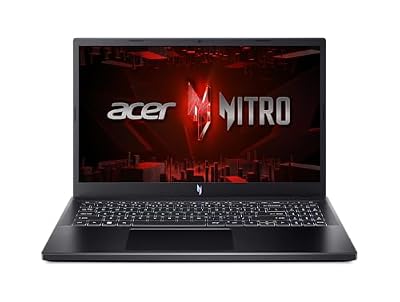
This Nitro V configuration pairs an Intel Core i7-13620H with an NVIDIA GeForce RTX 4050 Laptop GPU, 16GB of DDR5 memory and a 512GB Gen 4 SSD behind a 15.6-inch Full HD IPS display at 144Hz. For retro work that is well judged: the i7’s single-core speed is the part an emulator actually uses, the RTX 4050 is far more graphics power than classic titles require, and the 1080p panel matches the native resolution of many later PC classics without awkward scaling. Ethernet, HDMI and USB-C cover wired controllers, a TV and a dock.
Upgrade path: the ANV15-51 uses socketed DDR5 memory, so RAM can be expanded later, and its M.2 storage can be replaced or supplemented. Buy the 512GB version only if you are comfortable adding storage down the line.
Specs
- CPU: Intel Core i7-13620H
- GPU: NVIDIA GeForce RTX 4050 Laptop GPU
- Display: 15.6-inch FHD (1920 x 1080) IPS 144Hz
- RAM: 16GB DDR5, socketed, upgradeable
- Storage: 512GB PCIe Gen 4 SSD, M.2, upgradeable
2. Lenovo Legion Slim 5 14 (14APH8) — The Portable OLED Pick

The Legion Slim 5 14 is the travel-friendly option: an AMD Ryzen 7 7840HS, a GeForce RTX 4060 Laptop GPU and a 14.5-inch OLED display at 2880 x 1800 in a compact chassis. The Ryzen 7’s per-core performance is excellent for emulation, the high-resolution OLED makes CRT and scanline filters look particularly clean, and the 16:10 panel gives DOS and older strategy games extra vertical space, with bars on strict 4:3 content. An SD card reader is fitted, handy for shuffling files and saves between machines.
The caveat is memory. Lenovo’s specification for the 14APH8 lists 16GB of soldered memory that is not upgradeable, so the factory capacity is permanent. Storage is a 512GB M.2 2280 PCIe 4.0 SSD that can be replaced. Choose this one for portability and screen quality, accepting the fixed RAM.
Specs
- CPU: AMD Ryzen 7 7840HS
- GPU: NVIDIA GeForce RTX 4060 Laptop GPU
- Display: 14.5-inch OLED (2880 x 1800) 120Hz, 16:10
- RAM: 16GB, soldered, not upgradeable
- Storage: 512GB M.2 2280 PCIe 4.0 SSD, replaceable
3. MSI Katana 15 (B13VGK-2000US) — Headroom for Demanding Classics

The Katana 15 in this factory configuration combines an Intel Core i7-13620H with a GeForce RTX 4070 Laptop GPU, 16GB of DDR5 and a 1TB NVMe SSD, behind a 15.6-inch QHD display at 165Hz, with MSI’s Cooler Boost 5 cooling. That is more power than most retro software will ever touch, which is the point for buyers who also want the heavier end of classic emulation with shaders and upscaling enabled, or who mix a retro library with modern games on the same machine. The 1TB drive swallows a large disc-based collection without immediate upgrades, and the ports include Ethernet and HDMI for a desk or TV setup.
Upgrade path: memory is socketed DDR5 and can be expanded, and the NVMe storage can be upgraded. Check the GPU power limit MSI publishes for this exact model on the listing, and confirm the seller and warranty terms, since several similar configurations exist.
Specs
- CPU: Intel Core i7-13620H
- GPU: NVIDIA GeForce RTX 4070 Laptop GPU
- Display: 15.6-inch QHD 165Hz
- RAM: 16GB DDR5, socketed, upgradeable
- Storage: 1TB NVMe SSD, upgradeable
4. Acer Nitro 16 (AN16-41-R4CY) — The Big-Screen 16:10 Option

The Nitro 16 takes the larger route: an AMD Ryzen 7 7840HS, a GeForce RTX 4060 Laptop GPU, 16GB of DDR5 and a 1TB Gen 4 SSD, with a 16-inch WUXGA display at 165Hz. The 1920 x 1200 panel’s 16:10 shape suits retro use well, giving older PC and DOS titles more vertical room than a standard 1080p screen while staying close enough to their intended resolutions that scaling stays clean. The Ryzen 7 provides the single-core speed emulators want, and the RTX 4060 leaves headroom for filters and texture enhancements.
Upgrade path: this chassis uses socketed DDR5 memory and upgradeable M.2 storage, so both can grow over the machine’s life. It is the least portable pick here, so treat it as a desk-first machine, and check the warranty position on the listing as usual.
Specs
- CPU: AMD Ryzen 7 7840HS
- GPU: NVIDIA GeForce RTX 4060 Laptop GPU
- Display: 16-inch WUXGA (1920 x 1200) IPS 165Hz, 16:10
- RAM: 16GB DDR5, socketed, upgradeable
- Storage: 1TB PCIe Gen 4 SSD, M.2, upgradeable
5. ASUS TUF Gaming F15 (FX507ZC-ES53) — The Older, Honest Budget Route

The TUF Gaming F15 in this 2022 configuration is the reminder that retro gaming does not need current-generation hardware: an Intel Core i5-12500H, a GeForce RTX 3050, 16GB of DDR4 memory and a 512GB PCIe SSD, with a 15.6-inch Full HD display at 144Hz. The i5 still has ample per-core speed for classic emulation, the RTX 3050 handles shaders and upscaling on older titles, and the 1080p 16:9 panel matches many retro PC games exactly. Ethernet, HDMI and USB-C alongside USB-A suit wired controllers and external drives well.
Upgrade path: memory sits in two SO-DIMM slots and can be upgraded, and the SSD can be replaced or expanded. Because this is an older model, pay extra attention to the seller and the warranty terms stated on the listing.
Specs
- CPU: Intel Core i5-12500H
- GPU: NVIDIA GeForce RTX 3050 Laptop GPU
- Display: 15.6-inch FHD (1920 x 1080) 144Hz
- RAM: 16GB DDR4, two SO-DIMM slots, upgradeable
- Storage: 512GB PCIe SSD, M.2, upgradeable
How to Choose
Start with where the laptop will live. The Legion Slim 5 14 is the one to carry around; the Nitro 16 and Katana 15 are desk machines that happen to have batteries. Next, decide on storage: the 1TB Katana and Nitro 16 hold a big disc-based library from day one, while the 512GB models rely on their upgrade paths. Then check the one permanent decision in this list — the Legion’s soldered memory — against how long you plan to keep the machine.
Whichever you choose, verify the exact CPU, GPU and GPU power limit on the listing for that specific configuration, confirm the RAM and SSD actually fitted, count the USB-A ports your controllers need, and read the warranty and seller terms before paying.