As an Amazon Associate we earn from qualifying purchases.
Our top pick: MSI Gaming RTX 5060 Ti 16G Ventus 3X OC. Runner-up: Gigabyte GeForce RTX 5070 Gaming OC 12G.
A gaming GPU and a creator GPU are often the same card used in very different ways. Games care about frame rates at a set resolution. Creator workloads care about how much video memory you have for timelines, textures and render caches, whether your applications can use CUDA, how good the hardware encoder is for streaming and fast exports, and how much power the card draws during a render that can run for hours. The best GPUs for creator workloads balance those four things for the work you actually do.
This guide covers five desktop cards currently sold on Amazon US: a high-VRAM value pick, a current mid-range card, a compact previous-generation option, a flagship-class card for heavy 3D, and an AMD alternative for creators who do not need CUDA.
How to choose a GPU for creator work
Start with VRAM, not core count. Video memory is a hard limit. If a DaVinci Resolve timeline with noise reduction and Fusion effects, a Blender scene with high-resolution textures, or a local AI image model does not fit in VRAM, the job slows sharply or fails outright. For 1080p and straightforward 4K editing, 12GB is workable. For 4K timelines with effects, larger 3D scenes and light local AI work, 16GB gives noticeably more headroom and a longer useful life.
Check whether your software needs CUDA. Blender’s Cycles renderer and many AI frameworks are most mature on NVIDIA CUDA, and Puget Systems, in its 2025 Professional GPU Content Creation Roundup covering DaVinci Resolve, Blender, After Effects and AI workloads, consistently found NVIDIA ahead in After Effects and strong across its suite, with Blackwell showing modest gains over Ada. If your pipeline uses CUDA-only tools, stay with NVIDIA; if you mainly edit in Resolve or Premiere Pro, AMD is a realistic option.
Treat the encoder as a separate feature. For livestreaming and fast review exports, the hardware encoder matters more than raw shading power. NVIDIA’s NVENC is the most widely supported option in OBS Studio and editing software, and current Blackwell cards support AV1 encoding. AMD cards offer AV1 encode and decode through the RDNA media engine, which works well in supported applications but has a smaller software ecosystem.
Plan power and case space before you buy. Published total board power ranges from 180W on the most efficient pick here to 360W on the fastest. A long render holds a card near that level for extended periods, so check your power supply capacity, PCIe power connectors, and the length and slot width of the specific board partner model, especially in small-form-factor cases.
If you split work between a desk and travel, it is also worth comparing these desktop options with a gaming laptop built for creator work before committing to a full desktop upgrade.
1. MSI Gaming RTX 5060 Ti 16G Ventus 3X OC — high VRAM for editing and light AI

For most independent creators, this is the sensible default. The 16GB version of the RTX 5060 Ti — not the separate 8GB variant, a different listing and a poor fit for larger timelines — gives a full 16GB frame buffer, CUDA for Blender and AI tools, and a current NVENC encoder with AV1 support, at the lowest power draw here. It suits 4K editing, moderate Blender scenes, OBS streaming, and entry-level local AI work where VRAM matters more than throughput. Its 128-bit bus and mid-range cores mean complex renders take longer than on a 5070 or 5080.
Specs
- GPU: NVIDIA GeForce RTX 5060 Ti (Blackwell)
- VRAM: 16GB GDDR7, 128-bit
- CUDA cores: 4,608
- Board power: 180W total board power (NVIDIA published specification)
- Interface: PCIe 5.0
- Encoder: NVENC with AV1 encode support
- Model: MSI Gaming RTX 5060 Ti 16G Ventus 3X OC
2. Gigabyte GeForce RTX 5070 Gaming OC 12G — faster cores for 4K timelines

The RTX 5070 moves up a tier for creators who find mid-range cards slow with GPU effects, colour grading and AI-assisted editing features. More CUDA cores, faster GDDR7 on a wider bus, and the same Blackwell NVENC set make it a strong single card for a 4K editing and streaming workstation that also handles Blender work. The trade-off is capacity: at 12GB it has less VRAM than the cheaper 5060 Ti 16GB, so editors with effects-heavy 4K timelines will benefit most, while large-scene 3D and AI users may prefer capacity. Published board power is 250W.
Specs
- GPU: NVIDIA GeForce RTX 5070 (Blackwell)
- VRAM: 12GB GDDR7, 192-bit
- CUDA cores: 6,144
- Board power: 250W total board power (NVIDIA published specification)
- Interface: PCIe 5.0
- Encoder: NVENC with AV1 encode support
- Model: Gigabyte GeForce RTX 5070 Gaming OC 12G, GV-N5070GAMING OC-12GD
3. ASUS Prime GeForce RTX 4070 Super OC — compact Ada power for PCIe 4.0 systems

The RTX 4070 Super remains relevant for creators upgrading an older PCIe 4.0 system or building in a small case. This ASUS Prime model is marketed as SFF-ready, uses a 2.5-slot design, and delivers Ada-generation CUDA performance still well suited to Premiere Pro, Resolve, Blender and OBS. Its NVENC encoder supports AV1 encoding, which keeps it current for streaming and fast exports.
Choose it mainly for fit and platform: if your case cannot take a larger current-generation card, or you are upgrading a PCIe 4.0 build and find this model available, it is a coherent creator card. Its 12GB of GDDR6X is adequate for 4K editing but offers no capacity advantage, and its 220W board power is close to the newer 5070, so efficiency is not a reason to prefer it.
Specs
- GPU: NVIDIA GeForce RTX 4070 Super (Ada Lovelace)
- VRAM: 12GB GDDR6X, 192-bit
- CUDA cores: 7,168
- Board power: 220W total graphics power (NVIDIA published specification)
- Interface: PCIe 4.0
- Encoder: NVENC with AV1 encode support
- Model: ASUS Prime GeForce RTX 4070 Super OC Edition, PRIME-RTX4070S-O12G
4. MSI GeForce RTX 5080 16G Gaming Trio OC — for heavy 3D, 8K and long renders

The RTX 5080 is for creators whose GPU is a production bottleneck: large CUDA render workloads, complex Resolve timelines with noise reduction at 4K and above, 8K projects, and demanding local AI work. It combines the largest core count here with 16GB of GDDR7 on a 256-bit bus. In Puget Systems’ professional testing, higher-tier Blackwell cards sat at the top of its DaVinci Resolve, Blender and AI results — gains show up most in renders and effects, not basic timeline scrubbing. Published board power is 360W, and this large triple-fan card needs a fast CPU, ample memory and fast storage to keep it fed.
Specs
- GPU: NVIDIA GeForce RTX 5080 (Blackwell)
- VRAM: 16GB GDDR7, 256-bit
- CUDA cores: 10,752
- Board power: 360W total board power (NVIDIA published specification)
- Interface: PCIe 5.0
- Encoder: NVENC with AV1 encode support
- Model: MSI GeForce RTX 5080 16G Gaming Trio OC
5. ASRock Radeon RX 9060 XT Challenger 16GB OC — the non-CUDA 16GB alternative
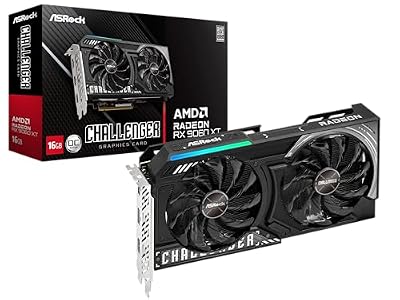
Not every creator needs CUDA. For DaVinci Resolve or Premiere Pro editing and streaming in applications with solid AMD support, the 16GB RX 9060 XT offers a large frame buffer, an RDNA 4 media engine with AV1 encode and decode, and PCIe 5.0, at 182W. The caveat is decisive: Blender Cycles, many AI frameworks and many plug-ins are built first — or only — for CUDA, and Puget Systems’ roundup showed AMD trailing NVIDIA by a wide margin in some professional applications such as After Effects. Verify Radeon support in every tool you depend on first. The pick here is specifically the 16GB Challenger model, not the 8GB variant.
Specs
- GPU: AMD Radeon RX 9060 XT (RDNA 4)
- VRAM: 16GB GDDR6, 128-bit
- Stream processors: 2,048
- Board power: 182W total board power (AMD published specification)
- Interface: PCIe 5.0
- Encoder: AMD media engine with AV1 encode and decode support
- Model: ASRock Radeon RX 9060 XT Challenger 16GB OC, RX9060XT CL 16GO
Which one should you buy?
Choose the RTX 5060 Ti 16GB if VRAM capacity, CUDA and low power draw matter most and your renders are moderate. Choose the RTX 5070 if you want faster cores for effects-heavy 4K editing and accept 12GB. Choose the RTX 4070 Super if you need a compact card for a PCIe 4.0 or small-form-factor build. Choose the RTX 5080 if rendering, high-resolution timelines or local AI are core paid work and your power supply and case can support it. Choose the RX 9060 XT 16GB only after confirming your applications, renderers and plug-ins work well without CUDA.
Whichever card you pick, confirm the exact variant on the listing before ordering — memory size in particular, since several of these GPU names are sold in distinct 8GB and 16GB versions — and confirm the board partner’s stated length, slot width and power connector requirements against your case and power supply.