

- Top Pick: Samsung T7 Portable SSD 1TB
- Runner-up: SanDisk Extreme Portable SSD 1TB
- Also consider: Samsung T9 Portable SSD 1TB
An external SSD is the easiest way to carry one emulation library between a desktop PC, a handheld and the box under the TV, and it loads disc images far faster than the microSD cards most portable setups rely on. The catch is that portable SSD marketing leads with a peak speed your host may never deliver.
As an Amazon Associate, we earn from qualifying purchases.
This guide starts with the two things that actually decide a good buy: how large your library really is, and which USB generation your machines support. Then it compares five drives with honest fit notes, covers formatting, and finishes with the cases where an SSD is simply more drive than you need.
This article contains affiliate links, and we may earn a commission when you buy through them at no extra cost to you.
Quick Answer
For most emulation libraries, a 1TB USB 3.2 Gen 2 drive such as the Samsung T7 is the sweet spot: every handheld PC and TV box can use its full speed, and 1TB swallows even large disc-image collections. Faster Gen 2×2 drives only pay off on the rare hosts with a 20Gbps port.
How Big an Emulation Library Actually Gets
Cartridge libraries are tiny. Individual NES, SNES, Genesis and Game Boy dumps run from kilobytes to a few megabytes each, so a complete personal collection for every cartridge system you own usually fits in a few gigabytes. Handheld disc formats stay modest too: PSP images top out around 1.8GB, and most are far smaller.
Disc images change the maths. A CD image runs to roughly 700MB, a GameCube disc to about 1.4GB, and a single-layer PS2 DVD image can approach 4.7GB, with dual-layer titles going higher. A few hundred disc games, kept as full images, is a library measured in hundreds of gigabytes. Compression helps: CHD, the format MAME and several disc emulators prefer, squeezes many disc images well below their raw size, and it is worth converting before you copy a collection onto any drive.
So the realistic sizing rule is simple. Cartridge-only players need capacity they will never fill and should buy on price and size. Anyone keeping PS1, Saturn, Dreamcast, GameCube or PS2 libraries should start at 1TB, and collectors with several disc systems should look at 2TB.
The Interface Ceiling Most Hosts Impose
Every portable SSD headline speed assumes a matching host port, and that assumption is where buyers overspend. USB 3.2 Gen 2 runs at 10Gbps, which caps real transfers at roughly 1,000MB/s no matter how fast the drive inside is. USB 3.2 Gen 2×2 doubles the lanes to 20Gbps and unlocks the 2,000MB/s class of drives, but Gen 2×2 ports are rare: most handheld PCs, mini PCs and TV boxes ship with Gen 2 at best, and Thunderbolt and USB4 controllers do not carry the Gen 2×2 mode at all, so a Gen 2×2 drive plugged into a Thunderbolt port falls back to Gen 2 speeds.
Loading games is even less demanding than copying them. Emulators stream data at rates far below any of these ceilings, so in-game you will not feel the difference between a Gen 2 and a Gen 2×2 drive. The faster interface only shortens the day you copy the library across, and only on a host that supports it. Buy the interface your machines have, not the one the box advertises.
Sustained writes matter more than peaks for that copy day, because makers quote burst figures. A drive that holds its speed through a 500GB copy beats a sprinter that throttles halfway.
The Five Drives, Compared
Samsung T7 Portable SSD 1TB

The T7 is the default recommendation because it matches the port almost everyone actually has. Samsung states up to 1,050MB/s read and 1,000MB/s write over USB 3.2 Gen 2, which a Steam Deck, a ROG Ally, a mini PC or a TV box can each use in full. It is a slim metal slab that disappears into a handheld case, with AES 256-bit hardware encryption built in. For a mixed cartridge and disc library at 1TB, this is the balanced pick.
Specs:
- Capacity: 1TB
- Model: MU-PC1T0T/AM
- Interface: USB 3.2 Gen 2, USB-C
- Read speed: up to 1,050MB/s as stated by the maker
- Write speed: up to 1,000MB/s as stated by the maker
- Encryption: AES 256-bit hardware encryption as stated by the maker
Crucial X9 Pro 1TB
The X9 Pro is the pick when the drive lives in a bag rather than on a desk. Crucial states up to 1,050MB/s read and write over USB 3.2 Gen 2, matching the T7 on speed while shrinking the shell to one of the smallest in this class, with IP55 water and dust resistance as stated by the maker. That sealing suits a drive that rides in a backpack pocket next to a handheld. Capacity tops out at 1TB in this listing, so disc-heavy collectors should look further down the page.
Specs:
- Capacity: 1TB
- Model: CT1000X9PROSSD902
- Interface: USB 3.2 Gen 2, USB-C
- Read speed: up to 1,050MB/s as stated by the maker
- Write speed: up to 1,050MB/s as stated by the maker
- Resistance: IP55 water and dust resistance as stated by the maker
SanDisk Extreme Portable SSD 1TB
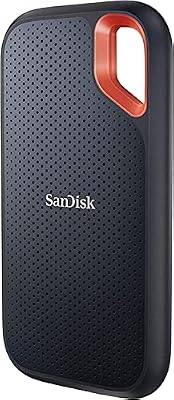
SanDisk’s Extreme line is built for drives that travel rough. The maker states up to 1,050MB/s read and 1,000MB/s write over USB 3.2 Gen 2, with IP65 water and dust resistance and a carabiner loop moulded into the corner of the shell. Performance matches the other Gen 2 drives here, because the port is the limit, so the choice comes down to the enclosure: if your emulation drive shares a bag with controllers, cables and a handheld, this is the shell built for that life.
Specs:
- Capacity: 1TB
- Model: SDSSDE61-1T00-G25
- Interface: USB 3.2 Gen 2, USB-C
- Read speed: up to 1,050MB/s as stated by the maker
- Write speed: up to 1,000MB/s as stated by the maker
- Resistance: IP65 water and dust resistance as stated by the maker
Samsung T9 Portable SSD 1TB

The T9 is the first of two Gen 2×2 drives here, and it only makes sense with the right host. Samsung states sequential speeds up to 2,000MB/s over USB 3.2 Gen 2×2, double the Gen 2 ceiling, and a desktop or laptop with a genuine 20Gbps port will copy a large library in about half the time. On a handheld, a TV box or a Thunderbolt port it runs at Gen 2 speeds and behaves like the T7. Buy it if your main PC has the port and the handheld is the second home, not the other way round.
Specs:
- Capacity: 1TB
- Model: MU-PG1T0B/AM
- Interface: USB 3.2 Gen 2×2, USB-C
- Transfer speed: up to 2,000MB/s as stated by the maker
- Weight: 122g as stated by the maker
- Encryption: AES 256-bit hardware encryption as stated by the maker
SanDisk Extreme Pro Portable SSD 2TB

The Extreme Pro pairs the Gen 2×2 interface with the largest capacity in this roundup. SanDisk states up to 2,000MB/s read and write, wraps the drive in a forged aluminium chassis with a silicone shell, and rates it IP65 against water and dust. That combination suits the collector with several disc systems whose library will not fit in 1TB and whose drive travels. The same caveat as the T9 applies: the headline speed needs a Gen 2×2 host, and everywhere else it is a rugged Gen 2 drive with generous room.
Specs:
- Capacity: 2TB
- Model: SDSSDE81-2T00-G25
- Interface: USB 3.2 Gen 2×2, USB-C
- Read speed: up to 2,000MB/s as stated by the maker
- Write speed: up to 2,000MB/s as stated by the maker
- Resistance: IP65 water and dust resistance as stated by the maker
Formatting: exFAT, FAT32 and the 4GB Wall
Format the drive exFAT if it will move between Windows, macOS, Linux-based frontends and Android TV boxes, because all of them read exFAT and it has no practical file-size limit. FAT32 still appears on older setups and some console-side tools, but it cannot hold a single file larger than 4GB, which rules out uncompressed dual-layer DVD images and some GameCube and Wii files. NTFS is the wrong choice for a travelling drive: several non-Windows hosts read it read-only or not at all.
Two habits protect a library. Keep a second copy of your saves somewhere else, since saves are tiny and irreplaceable compared with game images you can re-dump from your own discs. And convert disc images to CHD before the big copy: the library gets smaller, the copy gets shorter, and the emulators that support CHD read it natively.
When an SSD Is More Than You Need
If your library is cartridge systems plus a handful of disc games, a large microSD card in the handheld or a basic USB flash drive will hold it, and the loading difference is hard to notice on systems that stream small files. An external SSD earns its place when the library is disc-heavy, when it moves between several machines, or when you want one fast copy day instead of an overnight trickle. Buy for the library you have, not the archive you imagine.
How to Choose
Start with your hosts. If everything you own is USB 3.2 Gen 2, choose among the T7, X9 Pro and SanDisk Extreme on size, sealing and capacity; their speeds are effectively tied by the port. Consider the T9 or Extreme Pro only if your main computer has a Gen 2×2 port and you copy large libraries often. Then size honestly: 1TB covers most mixed libraries, while 2TB is for multi-system disc collectors. Finally, match the shell to the life it will lead: a drive that lives in a bag needs its IP rating more than extra speed.
Who Should Skip
Skip the Gen 2×2 drives if no machine you own has a 20Gbps port; you would pay for speed you cannot use. Skip external SSDs entirely if your library is cartridge-only and already fits on the storage inside your handheld. And skip the 2TB tier if your disc collection is a shelf of favourites rather than a full archive, since the smaller drives here hold hundreds of disc games once images are converted to CHD.
FAQ
Will a Gen 2×2 drive run at full speed on a Steam Deck or ROG Ally?
No. Those handhelds offer USB 3.2 Gen 2, so a Gen 2×2 drive falls back to Gen 2 speeds of roughly 1,000MB/s at best. Games load identically; only large copies take longer than the box suggests.
Can one drive serve a PC, a handheld and a TV box?
Yes, if it is formatted exFAT and the frontends on each machine are pointed at the same folders. Keep emulator versions reasonably current on each host, because save formats travel better than save states.
Is 1TB enough for a PS2 and GameCube library?
For most players, yes. Converted to CHD, individual PS2 and GameCube games commonly land between a few hundred megabytes and a few gigabytes, so 1TB holds several hundred titles. Full uncompressed archives are the case for 2TB.
Does a faster SSD reduce stutter in disc-based games?
Almost never. Disc emulators stream data far below even a Gen 2 drive’s ceiling, and stutter usually comes from shader compilation or emulator settings rather than storage speed. Storage speed shows up in library copies and initial loads, not frame pacing.
Final Verdict
The Samsung T7 1TB is the right default: Gen 2 speed every host can use, a slim shell and room for a serious mixed library. Pick the Crucial X9 Pro for the smallest bag-friendly drive, the SanDisk Extreme for a tougher shell at the same speed, and step up to the Samsung T9 or the 2TB SanDisk Extreme Pro only when a Gen 2×2 host or a genuinely large disc archive justifies them.










