

- Top Pick: Logitech G29 Driving Force Racing Wheel
- Runner-up: HORI Fighting Stick Alpha (Xbox Version)
- Also consider: Mayflash F500 Elite Arcade Stick
Sega’s Model 2 and Model 3 boards defined 1990s arcade 3D, yet they sit outside the usual MAME-first advice. Each board has a dedicated emulator built specifically for it, and in both cases the dedicated program is still the best way to play: Model 2 Emulator for the older board, Supermodel for Model 3.
As an Amazon Associate, we earn from qualifying purchases.
This guide explains how the two emulators differ, why one has been frozen for over a decade while the other keeps evolving, where your ROMs legally come from, and what controls and PC hardware these games actually want. Both emulators are legal software; the games themselves come from boards you own.
This article contains affiliate links, and we may earn a commission when you buy through them at no extra cost to you.
Quick Answer
Model 2 games run in ElSemi’s Model 2 Emulator, a closed-source Windows program frozen at version 1.1a since 2014 but still highly compatible. Model 3 games run in Supermodel, an open-source emulator under active development that also reads MAME ROM sets. Both need ROMs dumped from your own boards, and analogue wheels, pedals and light guns map well in each.
Two Boards, Two Very Different Machines
The Model 2 arrived in 1993 and made texture-mapped 3D the arcade standard. Built around an Intel i960 CPU with Fujitsu geometry co-processors, it powered Daytona USA, Virtua Fighter 2, Sega Rally and The House of the Dead. Four board revisions (2, 2A, 2B and 2C) swapped co-processor configurations, one reason Model 2 emulation took years to mature.
The Model 3 followed in 1996 with graphics hardware developed with Lockheed Martin’s Real3D division. Its PowerPC CPU and Real3D Pro-1000 chipset pushed far more polygons at a native resolution of 496 by 384, driving Virtua Fighter 3, Daytona USA 2, Star Wars Trilogy Arcade and The Lost World. That extra power is exactly why Model 3 emulation arrived later and still asks more of your PC.
Model 2 Emulator: Old, Closed and Still the Standard
Model 2 Emulator, written by ElSemi (Miguel Ángel Horna, of Nebula fame), is a Windows-only, closed-source program whose last official release, version 1.1a, dates from 2014. Nothing about that sentence sounds promising, yet it remains the recommended way to play most Model 2 games: compatibility is high, system requirements are moderate, and it supports higher internal resolutions, GPU acceleration and force feedback for racing cabinets’ signature wheels.
The honest caveats matter. Because the source is closed, nobody can fix its remaining bugs or port it to Linux or macOS. It is configured through an INI file and launched per game, with community frontends such as Sega Model 2 UI filling the usability gap. MAME’s Model 2 driver, which ElSemi himself contributed reverse-engineering work to, improved significantly through 2025 and 2026, but for most titles the dedicated emulator is still smoother today.
Supermodel: Open Source and Still Moving
Supermodel takes the opposite approach. It is free and open-source software under the GPLv3, runs on Windows, Linux and macOS using OpenGL and SDL, and remains in active development: the stable line sits at version 0.3a while newer git builds appear regularly. Its stated aim is an emulator that is both accurate and playable, and nearly all dumped Model 3 games are now playable, many of them well.
There is no built-in graphical interface, and the project is upfront about that gap. Settings live in the Supermodel.ini configuration file, covering resolution, widescreen output, input mapping and per-game overrides, and most players pair the emulator with a frontend such as Sega Model 3 UI or Supermodel Assistant. Two details show the project’s character: it underclocks the emulated PowerPC by default to keep games at correct speed, and its network board emulation links multiple instances for the multi-cabinet setups the hardware was famous for, though only a handful of games support it so far. The Supermodel Dojo fork adds delay-based netplay for the fighting games on top.
ROMs: Your Own Boards, and the MAME Set Connection
Neither emulator ships with games, and neither should. The legal route is the same one this site always recommends: dump the ROM chips from Model 2 or Model 3 boards you own, or have a board you own dumped, and keep the files for your own use. Downloading arcade ROMs for boards you do not own is not made acceptable by the boards’ age.
One practical point saves real frustration. Supermodel reads MAME’s Model 3 ROM sets, so set names and structure follow MAME conventions, and its frontends typically tell you to track the current MAME set for your build. Model 2 Emulator likewise expects zipped sets named to MAME conventions, with parent and clone structure intact. If a game refuses to boot, a mismatched or incomplete set is the first suspect, ahead of your settings.
Controls: Wheels, Pedals, Guns and Sticks
These boards were built around specialised controls, and both emulators map them properly. Racing games expect analogue steering and pedals: Model 2 Emulator exposes analogue axes with force feedback on supported wheels, and Supermodel does the same, with an option to move acceleration and braking onto controller triggers if you are using a pad. Calibrate the wheel’s centre and range in the emulator before blaming a game’s handling.
The shooting games, The House of the Dead on Model 2 and Star Wars Trilogy Arcade and The Lost World on Model 3, treat a mouse as the gun by default, with crosshair options for each player; dedicated light guns work through the same mouse-style input. Fighting and general games need nothing exotic: any arcade stick or pad maps through each emulator’s input configuration, and Supermodel’s per-game config sections let a stick layout for Virtua Fighter 3 coexist with a wheel profile for Daytona USA 2.
Performance: What Your PC Actually Needs
Model 2 is light work. The dedicated emulator was written for far weaker machines than anything sold today, and its requirements are best described as moderate: a modest PC runs the library at raised internal resolutions without drama.
Model 3 is the heavier lift. Supermodel renders genuine 3D through OpenGL, offers a newer and a legacy 3D engine (the legacy path exists for older GPUs), and supports quad rendering for higher-end cards. A modern integrated GPU handles many titles at native-like resolutions, but pushing Daytona USA 2 or Virtua Fighter 3 to 1080p and beyond with the new engine is discrete-GPU territory, and CPU speed matters because the PowerPC emulation sits on one main thread. If a game runs slowly, drop the resolution and try the legacy engine first.
Gear That Suits Model 2 and Model 3 Play
Logitech G29 Driving Force Racing Wheel
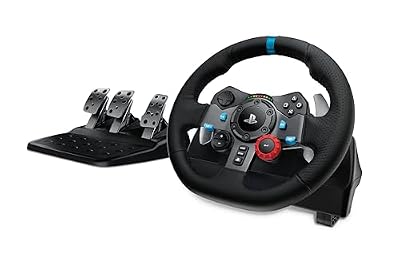
Daytona USA and Sega Rally were built for a force feedback wheel, and the G29 is the dependable default: dual-motor feedback, a 900-degree range you can limit for arcade steering, and pedals in the box.
Specs:
– Dual-motor force feedback with helical gearing
– 900-degree lock-to-lock rotation
– Stainless steel paddle shifters, leather-wrapped rim
– Separate pedal unit with accelerator, brake and clutch
– Works with PlayStation consoles and PC
HORI Fighting Stick Alpha (Xbox Version)

Virtua Fighter 2 and 3 reward a real lever. The Alpha uses HORI’s own Hayabusa stick and buttons in a Noir layout, and the case opens for artwork swaps and maintenance.
Specs:
– HAYABUSA lever and buttons
– Chassis opens for easy customisation and part swaps
– Key lock mode and assignable buttons
– Cable length around 3 metres
– Model AB11-001U, for Xbox Series X|S, Xbox One and PC
Mayflash F500 Elite Arcade Stick

The F500 Elite ships with genuine Sanwa Denshi parts, the same supplier as classic Japanese cabinets, in a heavy metal-panel case that stays put during Virtua Fighter sessions.
Specs:
– Sanwa Denshi joystick and buttons
– Metal top and bottom panels for weight and stability
– Switchable square and octagonal restrictor gate
– Wide wired compatibility across consoles and PC
– Case size about 41.5 by 28.2 by 14.4 cm, weight about 3 kg
8BitDo Pro 2 Bluetooth Controller (Hall Effect)
For the pad-friendly half of both libraries, and for navigating frontends from the sofa, the Pro 2 pairs hall-effect sticks with strong remapping software and multiple stored profiles.
Specs:
– Hall-effect analogue sticks
– Bluetooth and USB-C wired connection
– Two remappable back buttons
– Multiple stored profiles
– Works with PC, Switch and mobile
Samsung T7 Portable SSD 1TB

Arcade libraries are small per game but the full Model 2 and Model 3 sets, plus artwork and frontend media, add up. The T7 keeps the whole cabinet library portable between PCs.
Specs:
– 1TB capacity, USB 3.2 Gen 2 interface
– Reads up to 1,050 MB/s, writes up to 1,000 MB/s
– USB-C connection, both cable types included
– Aluminium body, drop resistant to 2 metres
How to Choose
Start with the board your favourite games ran on, because it decides everything else. If your list is Daytona USA, Virtua Fighter 2 and The House of the Dead, you are a Model 2 player: install Model 2 Emulator on Windows, accept its age, and enjoy the most mature route. If your list is Virtua Fighter 3, Daytona USA 2 and Star Wars Trilogy Arcade, Supermodel is your program, and it is worth learning its INI file and picking a frontend early.
Choose controls by genre, not by nostalgia alone. Racers justify a wheel with force feedback; fighters justify a stick; everything else plays well on a pad. Then sanity-check your sets: confirm each dump matches the naming and completeness your emulator build expects before you troubleshoot anything else.
Who Should Skip
Skip Model 2 Emulator if you are not on Windows, since it has no other builds and never will in its current form; MAME is your cross-platform path. Skip both dedicated emulators if you do not own the boards or games in some form, because there is no legal shortcut around the ROM question. And skip Supermodel’s highest settings if your PC relies on an older integrated GPU: the legacy engine at native resolution is the honest version of these games, and it still plays beautifully.
FAQ
Is Model 2 Emulator still safe and usable on modern Windows?
It is the same 1.1a build released in 2014, distributed through long-standing emulation channels, and it still runs on current Windows versions. The real risk is not safety but stagnation: it is closed source and unmaintained, so if a future Windows update breaks it, MAME is the fallback that keeps improving.
Does Supermodel need a MAME ROM set?
Yes, in practice. Supermodel reads Model 3 sets that follow MAME’s naming and structure, and its documentation and frontends point you at the set matching current MAME conventions. The set must still come from your own board; MAME compatibility describes the format, not a source.
Can I play Daytona USA 2 or Virtua Fighter 3 online?
Supermodel includes experimental network board emulation that links instances for a small number of games, and the Supermodel Dojo fork adds delay-based netplay aimed at the fighting games. Treat both as enthusiast features: they work within limits, and rollback netcode remains in development.
Why does my Model 3 game run slowly at high resolution?
Model 3 emulation pushes real 3D through OpenGL, and the new 3D engine at 1080p or higher wants a discrete GPU. Lower the internal resolution first, then try the legacy 3D engine, which exists specifically for weaker graphics hardware.
Final Verdict
Model 2 and Model 3 emulation is a tale of two philosophies. Model 2 Emulator is a finished, frozen tool that still does its one job better than anything else on Windows. Supermodel is a living open-source project that has carried Model 3 from curiosity to a library that mostly plays well. Own your boards, dump them properly, match your controls to the genre, and both halves of Sega’s 1990s 3D golden age are yours on a modern PC.










