1200W Gaming PSU Review 2026
A 1200W power supply sits between the common 1000W tier and the large units aimed at extreme builds. It is the size people reach for when a flagship graphics card, a high-core-count processor and a heavy cooling setup all share one case, or when a system is built to last several upgrade cycles without a PSU swap. This page is a buying guide for the 1200W class. We have not bench-tested the units below, so the advice rests on the product class, the listing above and the specifications a reputable manufacturer should publish.
The hero listing above is the main pick for the query “1200W gaming power supply”, with four alternatives in the same wattage tier. Use the card to confirm the exact model, the revision, the warranty length and the connector set. Listings that appear for one wattage often include older and newer versions of a product family, and the connector and warranty differences matter more than the rated number alone.
When 1200W Makes Sense
Most gaming PCs do not need 1200W. A mainstream build with a current mid-range or high-end card runs well inside an 850W or 1000W unit. The 1200W tier earns its place in a few specific cases. The first is a flagship card that a manufacturer rates for a large system budget, combined with a processor that draws heavily under sustained load. The second is a build with several high-draw devices, such as a large pump, a long chain of drives and extra fans, where the sum of small draws starts to matter. The third is a system you plan to upgrade later without replacing the PSU.
There is a cost to going this high. A larger unit costs more, and a system that never exceeds half of its rating will spend most of its life at a low load. That is not harmful, but it means part of the purchase buys capacity you may never touch. If the card maker recommends a wattage below 1000W for your model and your processor is a mainstream part, a 1000W unit is usually the better value. Our 1000W roundup for RTX 5090 systems covers the step below this tier, and the 850W guide explains the most common choice for a single high-end card.
Specification Checks Before You Buy
Efficiency and Heat Inside the Case
Efficiency matters more at this size because a less efficient unit releases more heat into the chassis. Gold is a reasonable baseline. Platinum and Titanium units waste less power, which means less heat and usually a quieter fan at the same load. Verify the 80 Plus rating on the spec sheet rather than trusting a marketing phrase. Certified tiers are measured at defined load points, which makes them the best basis for comparison.
Cables and the 12V-2×6 Connector
Current high-end RTX 50 series cards use the 12V-2×6 connector. A native 12V-2×6 cable is simpler and safer than stacking adapters, and it reduces the chance of a poorly seated connection at the card. Count the other PCIe outputs too, because a card and a second device can need several cables. A large unit that ships with fewer cables than your build needs will push you to buy extras, so check the cable count before you add it to the cart.

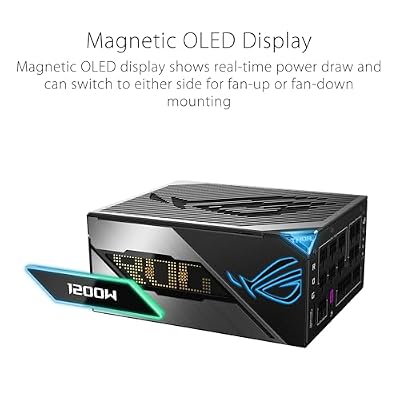
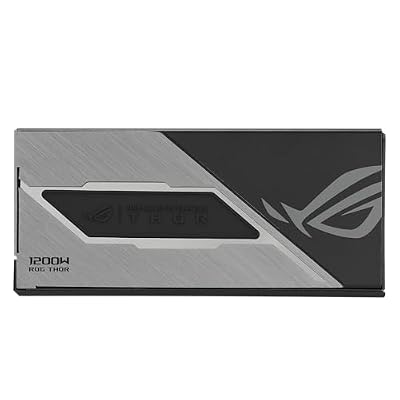
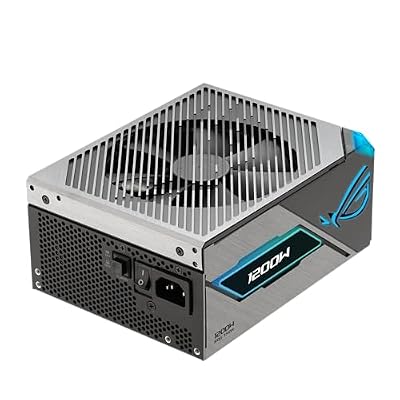
ASUS ROG Thor 1200W Platinum III Power Supply | 80 PLUS & Cybenetics Platinum, Fully Modular, ATX 3.1, PCIe 5.1, OLED Display, GaN MOSFET, GPU-First IVS, 10-Year Warranty








As an Amazon Associate we earn from qualifying purchases. Product prices and availability are accurate as of the date/time indicated.
Warranty and Protection Features
A unit at this price should list over-voltage, over-current, short-circuit and over-temperature protection in its documentation. Look for a warranty length written clearly on the product page, and treat a vague or missing warranty as a reason to keep looking. Fan behaviour is worth checking in reviews from independent sources, since many units run their fans at low speed under light load and ramp only when needed.
Comparing the 1200W Options
The table compares the hero listing with its four alternatives by role. It does not show prices or ratings, because those change often and differ between sellers. Confirm the numbers on the live listing before you buy.
| Option | Role in this guide | Best for | What to confirm | Price |
|---|---|---|---|---|
| Hero listing | Primary pick for the query | Flagship single GPU with heavy CPU load | Efficiency tier, cable set, warranty | Check current price |
| Alternative 1 | Same wattage, different brand | Buyers comparing value across makers | Fan curve and protection list | Check current price |
| Alternative 2 | Same wattage, newer revision | Builders who want the latest connector set | 12V-2×6 cable included | Check current price |
| Alternative 3 | Same wattage, longer warranty focus | Systems meant to last several upgrades | Warranty length in writing | Check current price |
| Alternative 4 | Same wattage, cable-length focus | Large cases with rear routing space | Cable length and modularity | Check current price |
The honest way to read this table is as a checklist. Two units with identical wattage can differ in cable length, fan noise and warranty, and those are the details that decide whether a unit fits your case and keeps working in year four.
Who Should Skip 1200W
If your system draws well under 800W at peak, a 1200W unit adds cost without benefit. The same applies to a build with a mid-range card, a mainstream processor and a modest drive count. In those cases, the power supply roundup points to smaller units that cover the load with margin and cost less. A PSU also operates in a comfortable middle band of its load range, and a very oversized unit spends most of its time near the bottom of that range. Oversizing is not dangerous, but it is rarely the best use of a budget.
On the other hand, a builder who plans an RTX 5090 class card, a custom loop and a high-end processor in the same chassis should treat 1200W as a reasonable ceiling for the wattage tier. The RTX 5090 review explains the board power of that card, and the CPU cooler guide for RTX 5090 builds shows how the thermal side changes the parts list.
Practical Steps for Buying a 1200W Unit
Calculate the Realistic Peak
Add the rated draw of the graphics card to the processor, memory, storage and cooling, and compare the total with the unit’s rating. If the sum sits comfortably below the rating, you have the margin you need. If it sits close to the rating, the unit is working near its limit, which is the situation to avoid.
Measure the Case Before You Order
Large units are longer than smaller ones, and some cases have limited space behind the motherboard tray. Check the PSU length listed for your case, then check the depth available for the cables. The complete buying guide walks through the order in which to lock in the case, the motherboard and the power supply.
Plan the Build Around the PSU
A 1200W unit is one part of a larger system. Our step-by-step build guide explains the assembly order, and the gaming PC buying guide helps you decide whether a 1200W unit fits the rest of your plan.
Frequently Asked Questions
Is 1200W overkill for most gaming PCs?
For most mainstream builds, yes. A 1200W unit is generally justified only when the graphics card, processor and extra components combine to a high sustained draw, or when you intend to keep the PSU through several upgrades.
Does a 1200W PSU waste more power at idle?
A PSU only draws what the system asks for, so the rated wattage does not force extra consumption. Efficiency at very low loads can vary between units, which is one reason to compare efficiency tiers rather than wattage alone.
Do I need a 12V-2×6 cable with a 1200W unit?
If your graphics card uses the 12V-2×6 connector, yes, you need a cable that plugs into that port. Check whether the unit ships with a native cable or only an adapter, and prefer the native option where you can.
Can a 1200W PSU replace a 1000W unit later?
Yes, provided the physical length fits your case and the connector count matches your components. Check both before you buy, because the mounting and cable clearance are the usual reasons a swap fails.