As an Amazon Associate we earn from qualifying purchases.
Choosing between an X670 vs B650 motherboard is one of the first decisions in an AM5 gaming build, and it is also one of the most misunderstood. Both chipsets use the same AM5 socket, both run DDR5 memory, and both support the same Ryzen 7000, 8000 and 9000 series desktop processors. A B650 board does not lock you out of high-end gaming, and an X670 board does not make a mid-range graphics card faster.
The real difference sits underneath the surface, in the number of PCIe lanes the chipset provides, the number of M.2 slots and USB ports a board can wire up, and the headroom a board leaves for extra drives, capture cards and future upgrades. This guide explains the decisive differences in plain language, names the fitting configuration for each choice, and covers the compatibility limits that catch first-time builders out.
X670 vs B650 at a Glance
| Feature | X670 and X670E | B650 and B650E |
|---|---|---|
| Socket | AM5 | AM5 |
| Memory | DDR5, 4 DIMM slots on ATX boards | DDR5, 4 DIMM slots on ATX boards |
| CPU support | Ryzen 7000, 8000 and 9000 series | Ryzen 7000, 8000 and 9000 series |
| Chipset PCIe lanes | More lanes from two chipset dies | Fewer lanes from one chipset die |
| Graphics slot | PCIe 5.0 on X670E, PCIe 4.0 on X670 | PCIe 4.0 on B650, PCIe 5.0 on B650E |
| M.2 slots on typical ATX boards | Four or five | Three |
| USB ports | More rear and front USB ports | Fewer rear and front USB ports |
| SATA ports | Up to six or eight | Up to six |
| Best fit | Multi-drive builds, capture and expansion cards, heavy USB use | Single graphics card, one or two NVMe drives, focused gaming builds |
What X670 and B650 Actually Are
AMD builds the AM5 platform around a single processor socket and a family of chipsets that differ mainly in connectivity. X670 uses two chipset dies working together, which gives board makers more PCIe lanes and more USB ports to distribute around the board. B650 uses one chipset die, so it offers fewer chipset lanes and fewer ports. The processor itself supplies the main graphics slot and the first M.2 slots on both chipsets, which is why the core gaming experience feels so similar.
X670E is the full version of X670. The E stands for Extreme, and it means PCIe 5.0 support for both the graphics slot and at least one M.2 slot. Plain X670 keeps PCIe 5.0 for storage but steps the graphics slot down to PCIe 4.0.
Socket, CPU and BIOS Compatibility
Both chipsets share the AM5 socket, an LGA1718 socket for AMD Ryzen 7000, 8000 and 9000 series desktop processors. That shared socket is the single most important fact in this comparison. A Ryzen 7 7800X3D, a Ryzen 9 7950X and a Ryzen 7 9700X all fit either chipset, and none of them is restricted to one side of the divide.
BIOS support is where the shared socket needs a closer look. AM5 boards launched with Ryzen 7000 support, and Ryzen 8000 and 9000 support arrived through BIOS updates. A board that has sat in a warehouse since launch may ship with an older BIOS that does not recognise a Ryzen 9000 processor until it is updated.
Memory Slots, Capacity and Limits
A standard ATX board on either chipset has four DDR5 DIMM slots in a dual-channel layout. The capacity ceiling differs by board rather than by chipset. The X670E example board in this guide lists a maximum of 192GB of DDR5, while the B650 example board lists a maximum of 256GB.
For gaming, the capacity question is straightforward. Two sticks of 16GB, giving 32GB in total, cover current games and leave room for background applications. Two sticks of 32GB, giving 64GB in total, suit builders who also edit video, run virtual machines or keep large creative projects open alongside a game. Filling all four slots can limit the top memory speed a system reaches, because four sticks place a heavier load on the memory controller than two.
Storage: M.2 Slots and SATA Ports
Storage is where X670 earns its keep. A typical ATX X670E board carries four or five M.2 slots, while a typical ATX B650 board carries three. The X670E example board lists five M.2 slots in total, including one on a PCIe 5.0 M.2 card, plus six SATA ports.
Bandwidth sharing is the limit to watch on either chipset. On many boards, one M.2 slot shares bandwidth with a PCIe expansion slot, so filling both at once drops one of them to a lower speed. The B650 example board states this plainly in its specification: the third M.2 slot and the second PCIe x16 slot share bandwidth, and both run at x2 speed when devices sit in both.
PCIe Slots, USB and Networking
The graphics slot is the slot most builders care about, and here the two chipsets are closer than the marketing suggests. X670E gives you a PCIe 5.0 x16 graphics slot. Plain X670 and B650 give you a PCIe 4.0 x16 graphics slot. B650E gives you PCIe 5.0. A current graphics card runs on PCIe 4.0 x16 without a meaningful loss in most games, because even high-end cards rarely saturate that link. The PCIe generation of the graphics slot should not decide your chipset choice on its own.
What differs is the second and third slots. X670 boards usually carry two full-length PCIe x16 slots plus a smaller x1 slot, giving you room for a capture card, a network card or a second device alongside the graphics card. B650 boards usually carry two full-length slots and one x1 slot as well, but the second slot runs at a lower speed and shares bandwidth with a storage slot.
USB is the second place X670 shows its extra lanes. The X670E example board lists twelve rear USB ports, including two USB4 ports, one USB 3.2 Gen 2×2 port and nine USB 3.2 Gen 2 ports, plus a front USB 3.2 Gen 2×2 connector that supports up to 60W power delivery. The B650 example board lists fewer rear USB ports, with a 20Gb/s USB-C port among them. Count your devices before you choose: keyboard, mouse, headset, controller, webcam, microphone, external drive, phone cable and VR headset add up fast, and a board with too few rear ports forces you onto a hub.
Who Should Choose X670
Choose X670, and X670E in particular, when your build needs breadth. The fitting configuration is a Ryzen 9 processor or a high-end Ryzen 7, a current graphics card, 32GB or 64GB of DDR5 memory, three or more NVMe drives, and at least one extra add-in card such as a capture card or a high-speed network card. Add a USB4 device or a large set of USB peripherals, and the case for X670 gets stronger. Content creators who record, stream and edit on the same machine belong here, because their storage and connectivity needs grow past what three M.2 slots and a single spare expansion slot can hold.
Who Should Choose B650
Choose B650 when your build is focused. The fitting configuration is a Ryzen 5 or Ryzen 7 gaming processor, a single current graphics card, 32GB of DDR5 memory, one or two NVMe drives, and a standard set of USB peripherals. That configuration covers the overwhelming majority of gaming PCs, and a B650 board runs it without compromise. A B650 board is also the right pick when the money saved goes into a better graphics card, a larger NVMe drive or a better monitor, because those parts change the gaming experience directly. See our guide to best X670 motherboards if you want to compare the X670 side in more depth before you decide.
The Two Example Boards

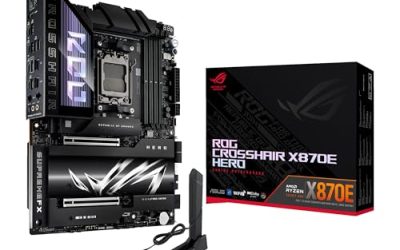
The ASUS ROG Crosshair X670E Hero is the X670E example in this comparison: a flagship ATX board with PCIe 5.0 graphics and storage, five M.2 slots, USB4 ports and an 18 plus 2 power stage design.
Specs
- Socket: AM5, AMD Ryzen 9000, 8000 and 7000 series desktop processors
- Chipset: AMD X670E
- Form factor: ATX
- Memory: 4 x DIMM, DDR5 up to 8000 plus OC, maximum 192GB, dual channel, AMD EXPO support
- Storage: 5 x M.2 slots and 6 x SATA 6Gb/s ports
- Graphics slots: 2 x PCIe 5.0 x16 slots, 2 x PCIe 4.0 x16 slots, 1 x PCIe 4.0 x1 slot
- USB: 2 x USB4 ports, 1 x USB 3.2 Gen 2×2 port, 9 x USB 3.2 Gen 2 ports on the rear, front USB 3.2 Gen 2×2 connector with up to 60W power delivery
- Networking: Intel 2.5Gb Ethernet, Wi-Fi 6E, Bluetooth 5.3
- Display outputs: 1 x HDMI 2.1 port, 2 x USB4 ports supporting USB Type-C display output
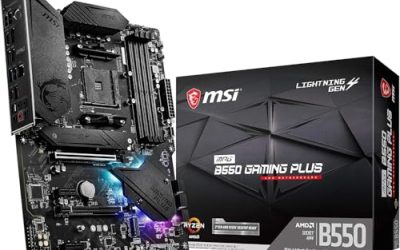
The MSI MAG B650 Tomahawk WiFi is the B650 example in this comparison: an ATX board with a PCIe 4.0 graphics slot, three M.2 slots, Wi-Fi 6E, 2.5Gb Ethernet, a BIOS flashback button and a 14 plus 2 plus 1 phase power design.
Specs
- Socket: AM5, AMD Ryzen 9000, 8000 and 7000 series desktop processors
- Chipset: AMD B650
- Form factor: ATX
- Memory: 4 x DIMM, DDR5 up to 7600 plus OC, maximum 256GB, dual channel, AMD EXPO support
- Storage: 3 x M.2 slots, PCIe 4.0 x4 each, 6 x SATA 6Gb/s ports
- Graphics slots: 1 x PCIe 4.0 x16 slot, 1 x PCIe 4.0 x2 slot, 1 x PCIe 3.0 x1 slot
- USB: Rear USB including a 20Gb/s USB-C port, front USB headers for additional ports
- Networking: Realtek 2.5Gb Ethernet, Wi-Fi 6E, Bluetooth 5.3
- Display outputs: 1 x HDMI 2.1 port, 1 x DisplayPort 1.4 port
- Audio: Realtek ALC4080 codec, 7.1-channel audio
Common Mistakes and Compatibility Limits
The most common mistake is buying DDR4 memory for an AM5 board. Both chipsets use DDR5 only, and DDR4 sticks do not fit the slots. Check the memory type on the kit before you order, and confirm it is on the board memory support list when you can. The second mistake is ignoring the BIOS version: a board that shipped before Ryzen 9000 launched may need a BIOS update before it recognises a Ryzen 9000 processor, so use a board with BIOS flashback and confirm the required version on the manufacturer support page. The third mistake is filling every slot without reading the sharing notes. On the B650 example board, the third M.2 slot shares bandwidth with the second PCIe slot, and on the X670E example board, the PCIe 5.0 M.2 card shares bandwidth with the graphics slot. The fourth mistake is judging a board by its chipset alone: two B650 boards can differ more than a B650 and an X670 board from the same maker, because power delivery, USB count, M.2 count and BIOS features vary by model. Compare the specification sheet of the exact board you plan to buy, not just the chipset name on the box.
Frequently Asked Questions
Does an X670 motherboard make games run faster than a B650 motherboard?
No, not on its own. Both chipsets use the same AM5 socket and the same processors, so gaming performance comes from the processor, the graphics card and the memory.
Can a B650 motherboard run a Ryzen 9 processor?
Yes, with the right board and BIOS. The B650 example board in this guide lists support for Ryzen 9000, 8000 and 7000 series processors, including high-core-count models, and its power design is built for sustained loads.
How many M.2 drives can I install on each chipset?
It depends on the board, not only the chipset. A typical ATX X670E board carries four or five M.2 slots, while a typical ATX B650 board carries three.
Should I pick X670E or B650 for a first gaming PC?
Pick B650 for a focused first build with one graphics card, 32GB of memory and one or two NVMe drives. Pick X670E when you also need several NVMe drives, a capture card, USB4 ports, or room for frequent upgrades.
Conclusion
X670 vs B650 motherboard is a question about connectivity, not about gaming speed. Both chipsets share the AM5 socket, DDR5 memory and the same Ryzen processors. X670 gives you more PCIe lanes, more M.2 slots, more USB ports and more room to expand.