

Hotel lobbies, airport lounges, and coffee shops all offer free Wi-Fi, and cloud gaming makes it tempting to start a game the moment you sit down. The stream runs in a distant data center, so your device only needs a steady connection. That convenience hides a trade-off: a shared network is a shared space, and strangers on it sit closer to your traffic than you would like.
Public Wi-Fi does not have to end cloud gaming entirely. A few checks before you play and a small piece of travel gear can keep a session short, your connection private, and your accounts far harder to reach. This guide covers the risks, what to check, and five travel routers that put a private network between you and the hotel Wi-Fi.
As an Amazon Associate, we earn from qualifying purchases.
Quick Answer
Cloud gaming on public Wi-Fi is usable for casual sessions when the network is genuine, your connection is encrypted, and your accounts use strong sign-in protection. Avoid open networks with no sign-in page, never enter payment details on shared Wi-Fi, and use a travel router or your phone hotspot when the network looks crowded or untrusted. If the stream stutters badly, stop and wait for a better connection.
The Risks of Playing on Shared Wi-Fi
The first risk is the network itself. A public hotspot can be set up by anyone, and a fake network with a plausible name is one of the oldest tricks around. Join the wrong one and your traffic passes through hardware you do not control. Even a genuine hotel network shares its airwaves with dozens of strangers.
The second risk is what travels in the open. Cloud gaming services encrypt their streams, but not every launcher page or in-game store is fully encrypted. A captive portal, the hotel sign-in page, can also be a weak point: it may ask for a room number, an email address, or payment details before your encrypted session begins.
The third risk is the account, not the stream. A cloud session signs you into a platform account, a game store, and often a linked payment method. If someone captures a session token, the damage lasts long after the game ends. The stream is rarely the target; the account behind it is.
What to Check Before You Play
Start with the network name. Ask staff for the exact name of the official network and confirm the spelling before you join. If two networks have similar names, pick the one staff confirmed and forget the other one.
Next, look at the sign-in page. A genuine captive portal usually shows the hotel or venue brand and a way to connect without demanding card details for basic access. If a portal asks for a full card number just to reach the internet, ask at the desk whether that is really required.
Then check your own device. Make sure your operating system and browser are up to date, turn off automatic connection to open networks, and turn off file sharing and network discovery while you travel. Finally, load a game and watch the first minute. If the picture holds steady, the network can carry a casual session.
Practical Safety Steps That Actually Help
The most useful habit is keeping your own private network between your devices and the public one. A travel router connects to the hotel Wi-Fi once, then creates a fresh private network that only your devices join. Your devices never touch the shared network directly. A phone hotspot does the same job with mobile data.
A virtual private network is one more layer you can add on top, and many travel routers support one directly, but it is only one option among several. It does not fix a fake network, a weak password, or a device that is out of date.
Keep sessions short and purposeful on public networks. Play the game you planned, save your progress, and sign out of the store and the cloud service when you finish. Use strong, unique passwords and turn on two-factor sign-in before you travel. If anything feels off, disconnect and ask staff.
GL.iNet Slate Plus Travel Router

The Slate Plus is the balanced pick and the one most travelers should start with. This pocket-sized travel router handles hotel captive portals directly, so you sign in once and your devices stay behind its private network. GL.iNet rates it at up to 170 Mbps over WireGuard and 28 Mbps over OpenVPN, which leaves room for a cloud stream plus a second device browsing lightly.
Specs
| Spec | Detail |
|---|---|
| Model | Slate Plus |
| Wi-Fi | Dual-band, 400 Mbps at 2.4 GHz plus 867 Mbps at 5 GHz |
| Wired ports | Three gigabit Ethernet ports |
| Encrypted throughput | Up to 170 Mbps WireGuard, up to 28 Mbps OpenVPN |
| Weight | 181 grams |
GL.iNet Opal Travel Router

The Opal is the budget pick, and it covers the basics well. This small dual-band router supports the same captive-portal workflow as its larger siblings, so one sign-in covers every device behind it. The trade-off is encrypted speed: GL.iNet rates the Opal at up to 65 Mbps over WireGuard and 12 Mbps over OpenVPN, enough for a single cloud stream on a modest connection.
Specs
| Spec | Detail |
|---|---|
| Model | Opal |
| Wi-Fi | Dual-band AC1200, 300 Mbps at 2.4 GHz plus 867 Mbps at 5 GHz |
| Wired ports | One gigabit WAN port and two gigabit LAN ports |
| Encrypted throughput | Up to 65 Mbps WireGuard, up to 12 Mbps OpenVPN |
| USB port | One USB 2.0 port |
| Weight | 145 grams |
TP-Link AC750 Travel Router
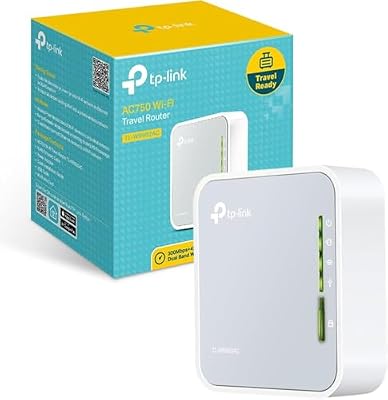
The TP-Link AC750 is the simplest device in this group, and that is its appeal. This pocket-sized nano router works in router, hotspot, bridge, range extender, access point, and client modes. TP-Link rates the combined wireless throughput at up to 733 Mbps, workable for cloud gaming when the hotel connection itself is the real limit. It has no built-in support for an encrypted tunnel, so pair it with the encrypted connection in your browser or game client.
Specs
| Spec | Detail |
|---|---|
| Model | AC750 travel router |
| Wi-Fi | Dual-band AC750, combined throughput up to 733 Mbps |
| Modes | Router, hotspot, bridge, range extender, access point, client |
| USB port | One USB 2.0 port |
GL.iNet Mango Travel Router

The Mango is the smallest and lightest router here, and it suits travelers who pack light and play on a single device. This single-band pocket router supports OpenWrt with OpenVPN and WireGuard, so it can still put a private, encrypted layer between your device and the hotel network. The limits are honest ones: single-band 2.4 GHz Wi-Fi and a small processor mean this is a router for one stream at a time.
Specs
| Spec | Detail |
|---|---|
| Model | Mango |
| Wi-Fi | Single-band 2.4 GHz |
| Wired ports | Two Ethernet ports |
| USB port | One USB 2.0 port |
| Memory | 128 MB |
ASUS RT-BE58 Go Travel Router

The RT-BE58 Go is the premium pick, and the one to choose when you want the newest wireless standard in a travel-sized box. This dual-band Wi-Fi 7 travel router is rated at up to 3600 Mbps, with a 2.5 gigabit port, two external antennas, and a public Wi-Fi mode built for hotel and venue networks. It also supports 4G and 5G mobile tethering, so a phone connection becomes a backup path when the hotel network fails.
Specs
| Spec | Detail |
|---|---|
| Model | RT-BE58 Go |
| Wi-Fi | Dual-band Wi-Fi 7, up to 3600 Mbps |
| Wired port | One 2.5 gigabit port |
| Antennas | Two external antennas |
| Mobile tethering | 4G and 5G mobile tethering |
| Public Wi-Fi mode | Yes, built for hotel and venue networks |
| Weight | 232 grams |
How to Choose
Start with the network you actually use. If you mostly play in hotels with a wired port, pick a router with gigabit Ethernet and use the cable. If you mostly play in lobbies and airports, pick one that handles captive portals well. Next, match encrypted throughput to your habits: one casual stream needs far less than several devices at once, so the Opal or the Mango can be enough for one player, while the Slate Plus or the RT-BE58 Go suits a traveler who plays while a partner streams video nearby. Finally, think about size and power: a wall-outlet router is fine in a hotel room but awkward in an airport lounge.
Who Should Skip
Skip the travel-router route entirely if you only play at home on a network you control. A home router with a strong password and up-to-date firmware already does this job. Skip it too if your trips are short and you can wait for a trusted network before you play, since the safest session is the one you never start. Players with very old devices should also pause: a travel router cannot fix a laptop or phone that no longer receives security updates. Competitive players should also skip public Wi-Fi regardless of gear.
FAQ
Is cloud gaming safe on hotel Wi-Fi?
It can be safe enough for casual play when you take basic precautions, and risky when you do not. Join only the network staff confirm, keep your devices behind a travel router or a phone hotspot, protect your accounts with two-factor sign-in, and never enter payment details on shared Wi-Fi.
Do I need a travel router to play cloud games in a hotel?
No, but it helps a lot. A travel router gives your devices a private network and handles the captive portal once, instead of exposing every device to the shared network. A phone hotspot is a good alternative when mobile data is available.
Why does cloud gaming lag so much on public Wi-Fi?
Shared networks carry many users at once, and hotels often shape or limit traffic during busy hours. Other guests streaming video, a weak signal from your room, and interference from nearby networks all add delay and jitter that cloud gaming feels at once.
Should I use a virtual private network for cloud gaming on public Wi-Fi?
A virtual private network can add encryption on an untrusted network, and several travel routers support one directly, but it is not a complete safety plan by itself. It does not verify that the network is genuine, and it can add delay to a stream that is already sensitive to lag.
Final Verdict
Public Wi-Fi and cloud gaming can mix, but only with a little discipline. Check the network before you join it, keep your devices behind your own private network, keep sessions short, and keep payment details and account changes for a network you trust. The gear here does one job well: it puts a small, private network between you and a shared one. For most travelers, the Slate Plus is the right balance of speed, ports, and size. The Opal and the Mango suit lighter bags, the TP-Link AC750 suits simple setups, and the RT-BE58 Go suits travelers who want Wi-Fi 7.







