

- Top Pick: Lamicall Gooseneck Phone Holder
- Runner-up: Nulaxy A4 Dual Folding Phone Stand
- Also consider: ULANZI ST-06S Phone Tripod Mount
Cloud gaming turns a phone into a console, but holding that phone for a full session is the weak link. Arms tire, the screen drifts, and a phone propped against a mug slides at the worst moment. A mount fixes that: it holds the phone still at eye level so your hands stay free for a controller.
A mount is not a controller grip, and this guide covers mounts only. A grip wraps around the phone and adds handles and buttons, and this site already covers those in its grip guides. Every pick below holds the phone as a second screen or a standalone display, and none adds controls.
As an Amazon Associate, we earn from qualifying purchases.
Quick answer
The best phone mount for cloud gaming depends on where you play. These are mounts, not controller grips: they hold the phone as a screen while a controller handles input. A folding stand suits a desk, a gooseneck suits a couch or bed, a tripod mount suits travel, a car mount suits passengers, and a magnetic stand suits MagSafe iPhones. Pick the mount for your spot and check the fit.
Lamicall Gooseneck Phone Holder

The Lamicall gooseneck is the pick for playing away from a desk. Its clamp grips a desk edge, a bed frame, or a headboard, and the long arm bends so the phone hangs at viewing height. The arm is built around an aluminum-magnesium alloy core, which keeps a heavy phone from drooping, and the holder rotates 360 degrees between portrait and landscape.
This is a viewing mount, and the listing is honest about its limits. Lamicall notes that the flexible arm can wobble while typing on the phone, so treat it as a hands-off display. That fits cloud gaming well, since the phone is a screen and the controller is in your hands. Set the arm beside you rather than directly overhead, bend it into a stable curve, and leave it alone once the angle is right.
Specs
| Specification | Detail |
|---|---|
| Mount type | Clamp mount with gooseneck arm |
| Arm length | 33.4 inches |
| Clamp opening | 0 to 2.36 inches |
| Phone fit | 4 to 7 inches |
| Arm material | Aluminum-magnesium alloy core |
| Rotation | 360 degrees |
| Weight | not stated |
Nulaxy A4 Dual Folding Phone Stand

The Nulaxy A4 is the simplest mount in this guide, and for desk play that is a strength. It is a folding aluminum stand that holds the phone upright at an adjustable angle beside a keyboard or controller. Two hinges work independently, one for height and one for viewing angle, so changing the tilt does not shift the height. Rubber pads keep the phone from sliding and protect it from scratches.
The hook is 19 mm wide, so most phones stay in the stand with a case on, as long as the cased phone is no thicker than 19 mm. The stand fits phones from 4 to 8 inches, and it folds flat when the session ends. It has no clamp and no suction, so it needs a flat surface. It is the budget pick, and it earns that spot by doing one job well.
Specs
| Specification | Detail |
|---|---|
| Mount type | Folding desktop stand |
| Material | Aluminum |
| Phone fit | 4 to 8 inches |
| Hook width | 19 mm |
| Dimensions | 3.54 by 3.07 by 4.13 inches |
| Adjustment | Dual hinge for height and angle |
| Weight | not stated |
ULANZI ST-06S Phone Tripod Mount

The ULANZI ST-06S is not a stand by itself. It is a clamp adapter that screws onto a tripod, a monopod, or a camera cold shoe, and it turns that support into a phone mount. That makes it the pick for anyone who already owns a tripod or wants the phone at eye level where there is no desk.
The clamp opens from 2.36 to 3.54 inches wide and grips the phone with silicone pads, and a one-key press button expands the clamp for quick loading. The mount rotates a full 360 degrees between portrait and landscape, and a Z-axis pitch joint adjusts the viewing angle without a separate ball head. Two cold shoe slots accept a microphone or a small light for streaming. At 51 grams it adds almost nothing to a travel bag, but a tripod is not included, so check that yours uses the standard 1/4 inch thread.
Specs
| Specification | Detail |
|---|---|
| Mount type | Tripod mount adapter |
| Material | Plastic |
| Clamp range | 2.36 to 3.54 inches wide |
| Weight | 51 grams |
| Rotation | 360 degrees with Z-axis pitch adjustment |
| Extras | 2 cold shoe mounts and 1/4 inch thread |
| Tripod included | No |
iOttie Easy One Touch 5 Dash and Windshield
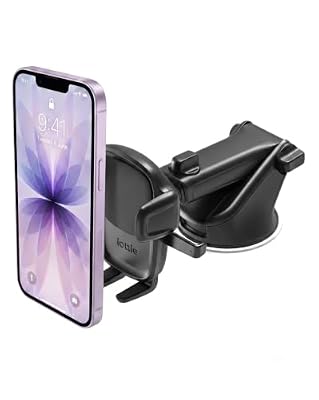
The iOttie Easy One Touch 5 is the car pick, with one firm condition: it is for passengers, or for playing while parked. The driver should never play a cloud game while driving. For a passenger on a long ride, a phone mounted on the dashboard or windshield beats a phone held in the lap.
A suction cup base sticks to the dashboard or windshield, and a telescopic arm extends the phone toward the passenger. The one-touch mechanism locks the phone in place and releases it with a single-handed motion, so loading the phone takes seconds. The cradle adjusts to portrait or landscape. There is no charger built in, so bring a cable and a car charger, since cloud gaming drains a battery fast.
Specs
| Specification | Detail |
|---|---|
| Mount type | Dashboard and windshield car mount |
| Attachment | Suction cup base with telescopic arm |
| Locking | One-touch lock and release |
| Phone fit | Universal smartphones |
| Orientation | Portrait and landscape |
| First available | April 15, 2020 |
| Charging | None built in |
OMOTON MS04 Magnetic Phone Stand

The OMOTON MS04 is the desk stand for iPhone owners who want the phone to snap on and off with one hand. It is a magnetic stand made for MagSafe, so a MagSafe iPhone or a phone in a MagSafe case clicks onto the head of the stand and holds there while you play. There is no clamp to open and no cradle to adjust, which makes it the fastest to load and unload.
The stand is made of aluminum and folds for travel, and the head rotates a full 360 degrees for portrait or landscape play. Height adjusts for a comfortable viewing level, and a non-slip base keeps the stand in place. It is a mount only: it does not charge the phone, and no charger is included. The limitation is compatibility. It is built for MagSafe iPhones, meaning iPhone 12 and newer, and for phones in MagSafe cases. Other phones need a magnetic case, which the maker does not include.
Specs
| Specification | Detail |
|---|---|
| Mount type | Magnetic desk stand |
| Compatibility | MagSafe iPhones and MagSafe cases |
| Material | Aluminum |
| Rotation | 360 degrees |
| Adjustment | Height adjustable and foldable |
| Base | Non-slip base |
| Charger included | No |
How to choose
Start with where you play, because that decides the mount type: a desk player needs a desktop or magnetic stand, a couch or bed player needs a clamp gooseneck, a traveler needs a tripod adapter, and a car passenger needs a suction mount.
Next, check the fit numbers against your cased phone. Measure its width and thickness, then compare them with the clamp range or hook width in the spec table. A phone too wide for a clamp will not seat properly, and a thick rugged case can defeat a magnetic stand made for a bare phone or a slim MagSafe case.
Then weigh adjustability against stability. A gooseneck reaches anywhere but can wobble if touched, a folding stand is rock solid but needs a flat surface, and a tripod adapter is only as steady as the tripod under it. For cloud gaming, stability matters more than reach, because the phone is a screen you watch rather than a device you tap. Finally, think about charging: cloud gaming drains a battery quickly, and none of these mounts charges the phone, so keep a cable routed to the mount and check that the charging port stays accessible in landscape mode.
Who should skip
Skip a phone mount entirely if you play mostly with a controller grip, since a grip already holds the phone and adds controls. Owning both for the same phone is redundant unless you switch between handheld play and a separate controller.
Skip the magnetic stand if your phone has no magnets and you do not want a magnetic case. Skip the tripod adapter if you do not own a tripod, since it is an adapter rather than a complete stand. Skip the gooseneck clamp if your furniture has no edge it can grip, and skip the car mount if you are the driver. If a mount does not fit your spot, your phone, or your habits, spend the money on a controller or a longer charging cable instead.
FAQ
Is a phone mount enough for cloud gaming, or do I need a controller too?
A mount holds the screen, and a controller handles the input. Touch controls work for some games, but most cloud games play far better with a Bluetooth controller, so plan on both.
Can I use these mounts with a phone case on?
Most of them, yes, as long as the case fits. Clamp and cradle mounts list a width or thickness limit, so check your cased phone against it. Magnetic mounts need a MagSafe phone or case.
Will a gooseneck mount hold a heavy phone steady?
A gooseneck holds a phone steady for viewing, but the arm can wobble if you tap the screen. For cloud gaming that is usually fine, because the controller is in your hands and the phone is only a display. Bend the arm into a short, stable curve.
Do any of these mounts charge the phone?
No. All five are mounts only, with no charging built in. Cloud gaming uses the battery quickly, so run a charging cable to the phone and confirm the charging port stays open in landscape mode.
Final verdict
The best phone mount for cloud gaming is the one that matches where you actually play. The Lamicall gooseneck is the most flexible pick for couch and bed sessions, the Nulaxy A4 is the best value for a desk, and the ULANZI ST-06S is the right choice if you already own a tripod. The iOttie Easy One Touch 5 covers car passengers, and the OMOTON MS04 is the cleanest desk option for MagSafe iPhones. Pick the mount type first, check the fit numbers second, and keep a charging cable within reach.










