

- Top Pick: Thrustmaster T.16000M FCS Flight Stick
- Runner-up: Thrustmaster TWCS Throttle
- Also consider: Thrustmaster TFRP Flight Rudder Pedals
Star Citizen is the space sim Linux players ask about most, and the honest answer is two-sided. Cloud Imperium Games publishes no native Linux build and offers no official Linux support, yet a large, organised community keeps the game playable through Wine. The Star Citizen Linux Users Group, known as the LUG, maintains the wiki and tooling that make it work, and its in-game org passed five thousand members in 2026, per the group’s own wiki.
That community route is real, but it is not a Steam-style one-click install. Whether the game runs for you depends on a community Wine setup, an anti-cheat configuration that has to be applied correctly, and the current patch behaving itself. This status report covers where things stand right now: the official position, the Easy Anti-Cheat situation, the documented install routes, the breakages the LUG is currently tracking, and the hardware expectations and flight gear that matter once you are in.
As an Amazon Associate, we earn from qualifying purchases.
Quick answer
Yes, with effort. Star Citizen has no native Linux build and no official support, but the Star Citizen Linux Users Group keeps it playable through Wine: its LUG Helper plus Lutris install the RSI Launcher, apply the documented anti-cheat configuration and tune your system. ProtonDB’s community rates it Silver, and major patches can break installs until the community catches up.
The official position: Windows only
Start with what Roberts Space Industries itself documents, because everything else is built on top of it. The game’s published system requirements list Windows as the operating system, with a quad-core CPU that supports AVX instructions and 16 GB of RAM as the floor. The RSI knowledge base states that, for the purpose of playing Star Citizen, Easy Anti-Cheat is compatible with the latest service packs for Windows 10 and 11, and describes those as the only operating system versions the game supports.
There is no Linux version to buy, and RSI customer support will not troubleshoot a Linux install. None of that makes the community route illegitimate; players are running a game they own through a compatibility layer. It does mean every fix and status update comes from the community rather than the developer, which is the most important thing to understand before you commit to this path.
Anti-cheat status: EAC is present, but it is not a hard wall
Anti-cheat is where many multiplayer games simply end on Linux, so it deserves a precise answer. Cloud Imperium announced Easy Anti-Cheat in November 2021, and its knowledge base describes the rollout that followed. EAC is active in the live game and will block modified game files, which matters if you run UI or localisation mods.
The documented position today is that EAC does not amount to a blanket Linux block for this title. GamingOnLinux’s anti-cheat compatibility list records Star Citizen as working with Easy Anti-Cheat, with the note that some manual steps are still needed to make the game run. Community trackers generally class the game as running rather than officially supported, which matches the picture: the anti-cheat lets correctly configured Linux installs play online, but nobody at the developer is guaranteeing that stays true.
In practice, the LUG Helper includes a documented function that applies the community’s EAC configuration as part of its setup and maintenance flow, which is why following the LUG route matters instead of improvising your own Wine prefix. Treat the anti-cheat status as a snapshot, not a promise: an EAC update or a game patch can change it, and the LUG wiki is where a change would be documented first.
How Linux players install it today
Star Citizen is not sold on Steam, so there is no Proton toggle to flip. The game arrives through the RSI Launcher, and the Linux community runs that launcher inside Wine. Two documented routes dominate.
The first is the community install script on Lutris. You install Lutris, find Star Citizen in its database and run the script, which downloads a compatible Wine build, creates a prefix with DXVK configured, and walks you through installing the RSI Launcher. The launcher then downloads the game itself, exactly as it does on Windows.
The second route is the LUG Helper, the Linux Users Group’s own tool, built around the Lutris-based install. Its documented functions are a preflight check, the game install, Wine runner management, DXVK updates and a maintenance menu. The preflight check is worth knowing about before you start: it verifies at least 16 GB of RAM or 40 GB of combined memory and swap, confirms your CPU supports AVX, checks that the kernel’s vm.max_map_count is raised to the level the game needs, and checks your file descriptor limit, offering to fix the system settings it can. The helper also manages the group’s own Wine builds, because the launcher is sensitive to its Wine version; swapping runners outside the managed setup is a documented way to break an install.
Whichever route you take, read the LUG wiki’s quick-start guide and follow it closely. Community compatibility summaries rate the game Silver on ProtonDB, with workarounds the norm rather than the exception.
What breaks, and how often
The defining feature of Star Citizen on Linux is maintenance. The game is an in-development alpha with frequent, large patches, and major updates periodically break Linux installs until the community publishes updated guidance. Checking the LUG wiki before you update, and again before your first launch on a new patch, is the standing advice.
The wiki’s current news shows what that looks like in practice. As of November 2026, the LUG documents a known issue with RSI Launcher version 2.19.1, where file verification can loop indefinitely on Linux; the wiki notes the developer is aware and working on it, and advises pressing install instead of verifying, or cancelling a verification once it has completed a full pass. The same wiki tracks a long-running mouse cursor problem in interaction mode, at kiosks and on ship displays, with documented workarounds that include switching to the group’s Wine Wayland build and turning off the launcher’s notification overlay.
Performance is the other variable. The game is demanding on Windows and remains demanding through Wine: frame rates vary noticeably by location, patch and hardware, and the big landing zones are consistently the heaviest areas in community reports. Community guides treat 32 GB of RAM as the sensible target even though 16 GB is the stated minimum, and the game streams assets constantly, so fast SSD storage is effectively part of the platform requirements. Compatibility work also continues upstream: a November 2026 GE-Proton release shipped Star Citizen-specific fixes, including restored DLSS behaviour on NVIDIA hardware, which is a good sign of how actively the wider Wine community maintains this title.
Gear Linux captains actually use
Because the game treats your controllers as standard USB devices, flight hardware is the one part of the setup that behaves the same on Linux as anywhere else. These are the pieces this audience reaches for.
Thrustmaster T.16000M FCS Flight Stick

The default starting stick for space sims, and the one the LUG crowd recommends first. Its magnetic sensors avoid the potentiometer wear that makes cheaper sticks drift.
Specs:
– H.E.A.R.T Hall-effect sensors with 16-bit resolution on pitch and roll
– 4 axes, including a twist rudder axis
– 16 action buttons and an 8-way point-of-view hat
– Ambidextrous design with interchangeable rests
– USB connection, standard HID device
Thrustmaster TWCS Throttle

The matching left-hand unit, built for exactly the strafe-and-throttle control scheme a space sim wants. It also acts as the hub for the rudder pedals below.
Specs:
– S.M.A.R.T sliding-rail throttle travel
– 14 action buttons plus a mini-stick with push button
– 8 axes in total, including 3 reserved for connected rudder pedals
– RJ12 port for the TFRP pedals, USB to the PC
– Mounting points for cockpit and desk setups
Thrustmaster TFRP Flight Rudder Pedals
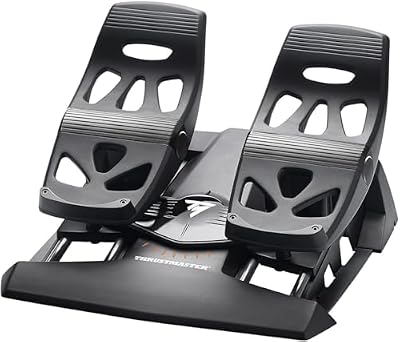
Pedals free up the twist axis and give you a dedicated yaw or strafe control. On Linux they appear as a standard USB device, or through the TWCS throttle.
Specs:
– S.M.A.R.T system with 4 industrial-grade aluminium slide rails
– Two differential brake pedals, 10 inches long
– Self-centring rudder axis
– USB connection, or RJ12 through the TWCS throttle
– Removable heel rests
Thrustmaster HOTAS Warthog
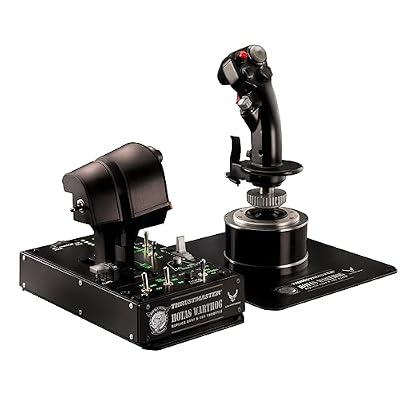
The premium step up: a heavy metal stick and a dual throttle modelled on the A-10C. Its programming editor is Windows software, so Linux players map it in-game, where it works as a standard USB device.
Specs:
– Metal joystick and dual-throttle unit
– H.E.A.R.T Hall-effect sensors on the stick
– Replica A-10C controls with metal switches
– Detachable stick handle on a solid base
– USB connection
WD_BLACK SN850X 2TB NVMe SSD

The game and its patches are large, downloads are frequent, and asset streaming punishes slow storage. A fast Gen4 drive with room to spare is the quiet quality-of-life upgrade.
Specs:
– 2 TB capacity, M.2 2280 form factor
– PCIe Gen4 NVMe interface
– Maker-rated sequential reads up to 7,300 MB/s
– Model WDS200T2X0E
– Optional heatsink variant also listed
How to choose
Choose your route first. If you already live in Lutris, the install script alone may be enough; if you want the preflight checks, managed Wine runners and maintenance tools, use the LUG Helper and follow the LUG wiki as your single source of truth. Choose your timing second: installing just after a major patch, before the community has confirmed the new build, is how people end up reinstalling. Choose hardware last. A single T.16000M is a complete starting point, the TWCS and pedals turn it into a full HOTAS setup, and the Warthog is for players who already know the game runs well on their system.
Who should skip
Skip this entirely if you need official support, because there is none for Linux and there may never be. Skip it if patch-day downtime would genuinely upset you; some evenings the correct move is simply to wait for a LUG fix. Skip it on a 16 GB machine that cannot be upgraded, since community guidance is clear that memory pressure causes real problems in busy areas. And skip it if you expected a Steam Deck-style verified experience: this is a hobbyist setup that rewards patience.
FAQ
Is Star Citizen officially supported on Linux?
No. Roberts Space Industries documents Windows 10 and 11 as the supported operating systems, publishes no Linux build, and its support team does not troubleshoot Linux installs. Everything that makes the game run on Linux is community work.
Does Easy Anti-Cheat stop Linux players from playing online?
Not as a hard block, based on current public documentation. Compatibility trackers list the game as working with Easy Anti-Cheat provided some manual steps are done, and the LUG Helper applies the community’s documented anti-cheat configuration during setup. The status can change with game or anti-cheat updates.
Can I install Star Citizen through Steam and Proton?
No. The game is not sold on Steam and cannot be installed through it. The documented Linux route runs the RSI Launcher inside Wine, managed either by the community Lutris install script or by the LUG Helper.
Will a game patch break my Linux install?
It can. Major patches periodically break community installs, and even launcher updates cause documented issues, such as the verification loop the LUG wiki currently tracks. Check the wiki after every patch before assuming your setup is at fault.
Final verdict
Star Citizen on Linux is community-supported in the truest sense: no native build, no official help, an anti-cheat that currently permits play when configured the documented way, and a volunteer group whose helper tool and wiki carry the experience. If you are comfortable following the LUG’s guidance and accepting patch-day friction, it runs today and is actively maintained. If you want certainty, keep a Windows install for this one game.










