Sim racing is the corner of Linux gaming where the game is only half the question. The other half is a steering wheel: a niche force feedback device that needs a kernel driver before any sim can use it, and each brand solves that problem differently. Logitech ships wheels the kernel already knows, Thrustmaster relies on community drivers for force feedback, Fanatec has no mainline driver at all, and Moza has recently moved into the kernel itself.
This guide maps that support as the driver projects and vendors document it: which wheel bases work on Linux, how they work, what force feedback through Proton really delivers, and which sim titles run at the end of it. The short version is that Linux sim racing is viable, but the wheel you own decides how much setup stands between you and the track.
As an Amazon Associate, we earn from qualifying purchases.
Quick answer
Most mainstream wheels work on Linux, but the driver decides how well. Logitech wheels and newer Moza bases run on in-kernel drivers, Thrustmaster force feedback needs the community hid-tmff2 driver, and Fanatec bases need hid-fanatecff. Through Proton, Assetto Corsa, Automobilista 2 and rFactor 2 run with force feedback, while EA anti-cheat titles stay blocked.
Three driver tiers decide everything
Every wheel on Linux falls into one of three tiers. In the first, the driver ships inside the kernel itself, so the wheel works on any current distribution with no extra software. In the second, the driver is a community project installed out of tree, usually through DKMS, which rebuilds it against each new kernel and asks you to enroll a signing key if Secure Boot is enabled. In the third tier, the wheel is merely recognized: it enumerates as a gamepad, but no driver provides force feedback.
Above all three sits the configuration layer. Oversteer, the steering wheel manager maintained by berarma, sets rotation range, profiles and pedal behaviour for supported wheels, but as its own documentation stresses, it provides no hardware support itself: a driver module still has to enable the wheel underneath it. Moza owners get the equivalent tool in Boxflat. Neither app can rescue a wheel whose driver tier is wrong.
Logitech: in the kernel, with fine print
Logitech is the easy tier. The in-kernel Logitech driver family covers the G29, G920, G25, G27 and the older Driving Force line, so these wheels plug in and work as input devices on any distro. The fine print is force feedback depth: the stock driver plays a limited set of effects, and the ComputingForGeeks driver survey describes it as constant force only on the G29. The community new-lg4ff module, from the same maintainer as Oversteer, replaces the stock driver on PlayStation-side models such as the G29 and G27 and adds more effects and features.
The two G923 editions split across tiers. The Xbox edition is supported by the in-kernel HID++ driver since Linux 6.3, after a one-time USB mode switch into PC mode. The PlayStation edition instead relies on new-lg4ff for full support. Either way, no Logitech wheel needs the vendor’s Windows software to function, though firmware and TRUEFORCE tuning extras remain Windows-side concerns.
Thrustmaster: the kernel opens the door, the community walks through
Thrustmaster wheels first appear as a generic device named Thrustmaster FFB Wheel, with limited functionality. An in-kernel driver, hid-thrustmaster, recognizes models including the T150 RS, T300 RS and T248 and sends a model-specific initialization sequence that switches the wheel into its real identity. That gets the hardware properly enumerated, but not force feedback.
Force feedback comes from community drivers installed out of tree: hid-tmff2 covers the T300 RS, T248 and TS-XW Racer, while the t150_driver project covers the T150 and TMX. Both mean DKMS rebuilds after kernel updates and a Secure Boot signing step on locked-down systems. The T248 also needs a firmware update, performed on Windows, before its force feedback works, and only in PC mode. At the bottom of the range, the T500 RS, TX and T80 are recognized by configuration tools but have no force feedback driver support, which makes them poor Linux buys despite working as basic controllers.
Fanatec and Moza: two different community stories
Fanatec has no mainline kernel driver at all: no stock module matches its hardware. The gap is filled by hid-fanatecff, a community DKMS driver that supports the CSL Elite bases, the ClubSport V2 and V2.5, the Podium DD1 and DD2, and the CSL DD and GT DD Pro. As the project documents it, the driver delivers force feedback plus rim LEDs and display output, with settings managed through Oversteer or system files. The catches are structural: the driver is yours to maintain across kernel updates, and Fanatec’s own configuration software and firmware updates remain Windows-only, so a Windows machine is still part of owning the base. Fanatec is now owned by Corsair.
Moza shows where this is heading. Its bases speak the standard USB PID force feedback protocol, and the universal pidff driver that handles them reached the mainline kernel in the 6.15 series, with backports to maintained stable kernels. On a current distro, an R5 or R9 base therefore works with the stock kernel, no DKMS required, and Boxflat replaces the Windows-only Pit House software for settings.
Force feedback through Proton
A working driver is not the finish line, because Windows sims reach the wheel through Proton’s input translation. Recent Proton versions read Fanatec bases over the hidraw interface by default, which the hid-fanatecff project describes as the better path, but its compatibility table still lists per-game fixes for titles such as rFactor 2 and DiRT Rally 2.0. Effects can also arrive reduced: a game asking for the full effect vocabulary gets only what the driver underneath can play, which is why the stock Logitech driver’s limits matter in practice. The documented pattern is that force feedback works in the major sims, with the last layer of polish varying by title.
Which sim titles actually run
The title layer divides into four groups. Native Linux builds exist for Euro Truck Simulator 2 and American Truck Simulator, which support wheels directly. The Proton group is where most sim racers live: Assetto Corsa, Assetto Corsa Competizione, Automobilista 2, rFactor 2 and DiRT Rally 2.0 are the established names, all running through Proton with wheel support riding on the driver tiers above.
iRacing sits in its own experimental category: it has no official Linux support, and community ProtonDB reports are sparse and sit at a low Bronze tier, so treat it as test-first rather than a reason to delete a Windows partition. The blocked group is defined by anti-cheat, not graphics: EA Sports WRC ran at launch, then the EA Javelin kernel-level anti-cheat added in its 1.9.0 update broke Linux play, and F1 24 and F1 25 ship with the same anti-cheat and are listed as broken for Linux and Steam Deck. Kernel-level anti-cheat cannot run inside Proton’s user-space model, so these titles stay Windows-only unless EA changes policy.
The wheels behind the tiers
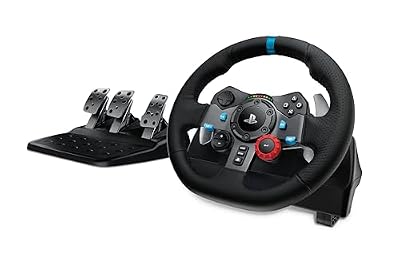
Logitech G29 Driving Force
The default used-market and starter pick, fully in-kernel, with new-lg4ff available when you want deeper effects.
- Drive: gear-driven, dual-motor force feedback
- Rotation: 900 degrees
- Pedals: three-pedal set included
- Linux path: in-kernel driver; optional new-lg4ff module
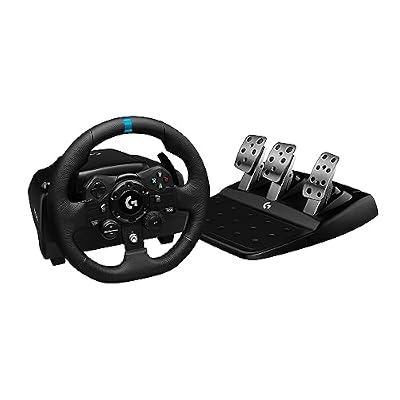
Logitech G923 for Xbox and PC
The newer gear-driven option whose Xbox edition is the one with mainline kernel support since Linux 6.3.
- Drive: gear-driven with TRUEFORCE feedback
- Rotation: 900 degrees
- Pedals: three-pedal set included
- Linux path: in-kernel HID++ driver after a one-time USB mode switch
Thrustmaster T300 RS GT Edition
The belt-driven step up, and one of the wheels the hid-tmff2 maintainer tests against, which shows in its support quality.
- Drive: brushless belt-driven force feedback
- Rotation: up to 1080 degrees
- Pedals: T3PA-GT three-pedal set included
- Linux path: in-kernel init driver plus hid-tmff2 via DKMS
MOZA R5 Bundle
The direct drive starter bundle that now rides the mainline universal pidff driver on current kernels.
- Drive: direct drive, 5.5 Nm
- Wheel: 11-inch ES racing wheel
- Pedals: SR-P Lite two-pedal set and desk clamp included
- Linux path: in-kernel universal pidff driver; Boxflat for settings
Fanatec CSL DD QR2 Wheel Base (5 Nm)

The entry point to the deepest rim and pedal catalogue, bought as a base only, and the clearest example of the DKMS tier.
- Drive: direct drive, 5 Nm
- Quick release: QR2 system
- Pedals: none included; base only
- Linux path: hid-fanatecff via DKMS; firmware updates need Windows
How to choose
Choose by the driver tier you are willing to own. Casual and first-time sim racers should stay in the kernel: a G29, the Xbox edition of the G923, or a Moza bundle on a current distro, all of which work without module maintenance. Drivers who want belt-driven feel and accept a DKMS routine after kernel updates are the T300 RS audience. Committed racers building an ecosystem of rims and pedals are the Fanatec audience, and they should budget the small ongoing effort of an out-of-tree driver plus occasional Windows access for firmware. In every tier, confirm your must-play titles are in the native or Proton groups before spending anything.
Who should skip this
Skip the Linux move if your racing life is iRacing leagues, the current Formula 1 games, or EA Sports WRC: the first is unofficial and thinly reported, the others are blocked outright. Skip it if you own a T500 RS, TX or T80 and expect force feedback, and skip it if Secure Boot with no interest in key enrollment describes your PC, because the out-of-tree drivers will not load until that is resolved.
FAQ
Does force feedback work on Linux at all?
Yes. Force feedback is a driver feature, not a Proton feature: in-kernel drivers cover Logitech and Moza hardware, hid-tmff2 covers the main Thrustmaster bases, and hid-fanatecff covers Fanatec. What varies is effect depth, with the stock Logitech driver limited to basic effects unless new-lg4ff replaces it.
Do I need Windows for anything if I race on Linux?
For Logitech and Moza wheels, generally no. Thrustmaster’s T248 needs a one-time firmware update on Windows to unlock force feedback, and Fanatec firmware updates and the Fanatec configuration app are Windows-only, so Fanatec owners should keep occasional Windows access available.
Can I play iRacing on Linux?
Not officially. iRacing has no Linux support from its developer, and community Proton reports are sparse and low-rated. Some users get it running through Proton, but it belongs in a test-first category, and a Windows partition remains the reliable route for league racing.
Why did EA Sports WRC stop working on Linux?
It worked at launch. In June 2024 its 1.9.0 update added EA’s kernel-level anti-cheat, now called EA Javelin, which cannot operate inside Proton. The same anti-cheat is why F1 24 and F1 25 do not run on Linux either.
Final verdict
Sim racing on Linux is real, and its map is drawn by drivers rather than games. Logitech and Moza wheels on in-kernel drivers make the platform nearly plug and play, Thrustmaster asks for one community driver, and Fanatec asks for that plus a maintenance habit. Pick the wheel whose tier matches your patience, verify your titles against the anti-cheat wall, and Linux is a perfectly serious place to race.