1000W Gaming PSU Review 2026
A 1000W power supply is the step most builders take when a single high-end graphics card and a high-core-count processor share the same case. It gives a flagship GPU a real margin, keeps the unit out of its hardest working range during long sessions, and leaves room for a bigger pump, more drives or a later upgrade. This page is a buying guide for the 1000W class. We have not bench-tested any of these units, and the guidance below relies on the product class, the listing above and the published specifications that a reputable unit should show.
The hero listing above is the primary pick for the query “1000W gaming power supply”, with four alternatives in the same tier. The card is the place to confirm the exact model, revision, warranty and cable set. Search results for a wattage often combine older and newer revisions of the same line, and the differences in connectors and warranty can matter more than the headline number.


Why Choose 1000W Instead of 850W
The honest answer is headroom. A current high-end card can draw a large share of the system budget under load, and a processor running a heavy game or a streaming workload can add a substantial amount on top. An 850W unit covers that combination in most systems, but it runs close to its comfortable range when everything works hard together. A 1000W unit spreads the same load across a larger capacity, which usually means lower fan speed and a more stable output under sustained demand.
The step up is not free. A larger unit costs more, and if your build is a mid-range system with a mid-range card, most of the extra capacity will sit unused. Before you buy, compare your planned parts against the wattage guidance printed by the graphics card maker. If the card is in the RTX 5080 class and your processor is a mainstream part, 850W may still be enough. For the largest cards and for builds with several demanding components, the 1000W tier is the safer default. Our 850W guide explains the other side of that trade-off.
Spec Sheet Checks for a 1000W Unit
Efficiency Tier and Real-World Heat
At 1000W the efficiency rating affects heat more than at smaller wattages, because a unit that wastes more power converts the difference into heat inside your case. Gold is the common baseline, and Platinum or Titanium ratings reduce the waste further. Check that the rating is certified and listed in the spec sheet, not just promised in marketing copy. The 80 Plus program sets minimum efficiency at fixed load points, so a certified rating is the number to trust.
Connectors for Modern Graphics Cards
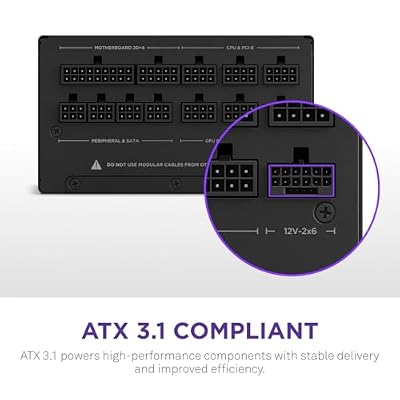
Current RTX 50 series cards use the 12V-2×6 connector. A 1000W unit with a native 12V-2×6 cable avoids the adapter mistakes that cause connector damage. Count the PCIe outputs as well, because a large card and a second device can require several cables. Native cables are easier to route and generally a safer choice than stacking adapters.
Protections, Fan Behaviour and Warranty
A unit at this wattage should list over-voltage, over-current, short-circuit and over-temperature protection clearly. Fan behaviour matters because many 1000W units run their fan at low speed under light load and ramp up only when the temperature rises. Look for a stated warranty of a reasonable length and read how the manufacturer describes it. A short or vague warranty is a warning sign at this price.
Comparing the 1000W Options
The table compares the hero listing with the four alternatives by role rather than by price. Prices and ratings change often and differ between sellers, so use the live listing for those numbers.
| Option | Role in this guide | Best for | What to confirm | Price |
|---|---|---|---|---|
| Hero listing | Primary pick for the query | High-end single GPU builds | Revision, warranty, cable set | Check current price |
| Alternative 1 | Same wattage, different brand | Buyers comparing value | Efficiency rating and fan curve | Check current price |
| Alternative 2 | Same wattage, different revision | Builders who want the newest connector set | 12V-2×6 cable included | Check current price |
| Alternative 3 | Same wattage, longer warranty focus | Long-term builds | Warranty length in writing | Check current price |
| Alternative 4 | Same wattage, compact-friendly layout | Smaller cases with limited cable space | Cable length and modularity | Check current price |
The table is a checklist more than a ranking. Two units with the same wattage can differ widely in cable length, fan noise and warranty, and those are the details that decide whether a unit fits your case and lasts.
NZXT C1000 Gold ATX 3.1 - 1000W Fully Modular Power Supply | 1000W 80 PLUS Gold ATX 3.1 PSU, fully modular and quiet. PCIe 5 ready for modern GPUs, backed by a 10-year warranty.



As an Amazon Associate we earn from qualifying purchases. Product prices and availability are accurate as of the date/time indicated.
When a 1000W Unit Is Overkill
Buying 1000W for a system that never draws more than 500W is money spent on headroom you will not use. If your build is a 1080p or 1440p system with a mid-range card and a mainstream processor, the wattage guides for lower tiers will serve you better. A PSU operates most efficiently in a middle band of its load range, so an oversized unit can run at a very low load and still cost you in price. The sensible rule is to size for the realistic peak of your parts plus a moderate margin, then stop.
On the other hand, if your plan includes an RTX 5090 class card, a large custom loop, several storage devices and a high-end processor, a 1000W unit is a reasonable starting point. Our RTX 5090 review covers the board power of that card, and the RTX 5090 PSU roundup compares wattage choices for that exact build.
Practical Buying Steps
Start From the Graphics Card
Look up the recommended system wattage for the card you intend to buy, then add the processor, memory, storage and cooling draw. If the total sits comfortably below the unit’s rating, you are in the right band. If it sits near the rating, step up. Our broader power supply unit roundup and the PSU picks for gaming page both show how the same logic applies across wattage tiers.
Plan the Cable Layout Before Ordering
Fully modular units are easier to route in a compact case because you connect only the cables you need. Measure your case clearance behind the motherboard tray before choosing a unit with long, stiff cables. A tidy installation also helps airflow, which keeps the unit quieter over time.
Check the Build Plan Against the Rest of the System
A 1000W PSU is one part of the system. The 2000 dollar gaming PC build shows how a high-end budget spreads across the parts, and the CPU cooler guide for RTX 5090 builds covers the thermal side of the same class of system. For the full order of decisions, the gaming PC buying guide and the complete buying guide are the best starting points.
Frequently Asked Questions
Is a 1000W PSU enough for an RTX 5090?
For most builds, a 1000W unit is the recommended starting point for an RTX 5090 class card, according to the wattage guidance published for that card. Check the board partner’s recommendation for your exact model, and leave margin for the rest of your system.
Is 1000W too much for an RTX 5080 build?
It can be. An RTX 5080 class system with a mainstream processor often fits comfortably within an 850W unit. A 1000W unit is a good choice if you expect to upgrade the card or run a heavier processor later.
Does a higher wattage PSU use more power?
No. A PSU only draws what the system demands. A larger unit running at a lower load can be more efficient in its middle range, although it costs more to buy.
What efficiency rating should I choose for 1000W?
Gold is a solid baseline for most gaming systems. Platinum or Titanium is worth considering if you run the PC for many hours a day or want the lowest possible heat output inside the case.