As an Amazon Associate we earn from qualifying purchases.
Ultrawide vs 4K is one of the most common monitor decisions in gaming, and one of the easiest to get wrong. Both can look superb with the right graphics card, and both can disappoint with the wrong hardware or games. The choice is about which trade-offs fit how you play, your games, your desk, and your graphics card. This guide compares them across size, panel, resolution, refresh rate, variable refresh rate, ports, graphics demand, and game support, with two real monitor examples from their Amazon product pages.
The Short Answer
If you want the widest field of view and a single screen that can replace two standard monitors for work, choose ultrawide. A 34-inch ultrawide at 3440 by 1440 gives extra horizontal space for racing games, flight simulators, strategy games, and open-world adventures, plus room for two windows side by side without a center bezel.
If you want the sharpest image and the most consistent support across games, consoles, and streaming services, choose 4K. A 27-inch 4K monitor at 3840 by 2160 packs far more pixels into a smaller area, so edges look cleaner and text stays readable. The wrong choice is the one that fights your graphics card: ultrawide needs less power than 4K, which pushes more than eight million pixels every frame.
Ultrawide vs 4K at a Glance
| Factor | Ultrawide | 4K |
|---|---|---|
| Common size | 34 inch, 21 by 9 | 27 or 32 inch, 16 by 9 |
| Resolution | 3440 by 1440 | 3840 by 2160 |
| Pixels | About 4.95 million | About 8.29 million |
| Sharpness | About 110 pixels per inch | About 140 to 163 pixels per inch |
| Graphics demand | High | Very high |
| Game support | Most modern games | Near universal |
| Multitasking | Two full windows side by side | One large window, or four smaller windows |
| Best for | Immersion, racing, simulation, strategy | Detail, story games, console play |
Ultrawide trades pixel density for width. 4K trades width for pixel density. Everything else in this guide follows from that exchange.
What Ultrawide Really Means
An ultrawide gaming monitor is usually a 21 by 9 panel, most often 34 inches, at 3440 by 1440. The extra width changes how a game feels. In a racing game, you see more track ahead and more cars beside you. In a flight simulator, the cockpit and horizon stretch further into your peripheral vision. In a strategy game, you see more of the map without scrolling. The effect is strongest on curved panels, where the screen wraps slightly around your view, and weakest in games that do not support 21 by 9 at all.
The limits are real: some older games, console ports, and competitive titles lock the aspect ratio to 16 by 9, leaving black bars, and some cutscenes switch back to 16 by 9. Before you buy, check the games you play most.
What 4K Really Means
A 4K gaming monitor is a 16 by 9 panel at 3840 by 2160, most often 27 or 32 inches. The 27-inch size gives the sharpest image, at about 163 pixels per inch, while a 32-inch panel sits at about 140 pixels per inch and gives a larger image with slightly less density.
The advantage of 4K is density: more pixels in the same area means finer detail, cleaner edges, and sharper text. At a normal desk distance, a 27-inch 4K panel makes individual pixels very hard to see, which shows most in slow, detailed games such as story-driven adventures and open-world exploration.
The advantage of 4K is also compatibility: 16 by 9 is the default for games, consoles, and streaming video, so no special mode is needed to fill the screen. The cost is graphics power: at 3840 by 2160, a card renders about 68 percent more pixels than at 3440 by 1440, so it may need lower settings or upscaling to hold the same frame rate.
Panel Types
Panel type decides contrast, color, viewing angles, and motion handling, and it matters as much as resolution. VA panels are common in ultrawide monitors, including the Samsung example below. VA delivers deep blacks and strong contrast, which helps in dark games, though some VA panels show smearing behind fast-moving dark objects. Choose VA when contrast matters most.
IPS panels are common in 4K monitors, including the LG example below. IPS delivers wide viewing angles and consistent color, though blacks look more grey than on VA or OLED in a dark room. Choose IPS when color accuracy and viewing angles matter most.
Resolution and Sharpness
Sharpness depends on pixel density, not resolution alone. A 34-inch ultrawide at 3440 by 1440 has about 110 pixels per inch. A 27-inch 4K monitor has about 163, and a 32-inch 4K monitor about 140. The 4K options are sharper, and the difference is visible in text, fine textures, and the edges of small objects. It matters most when you sit close, read a lot of text, or play games with fine detail.
Refresh Rate, Response Time, and VRR
Refresh rate is how many times per second a monitor can draw a new image, measured in hertz. Response time is how quickly a pixel can change color, measured in milliseconds. Common gaming refresh rates are 144Hz, 165Hz, 180Hz, and 240Hz. A 165Hz ultrawide and a 144Hz 4K monitor are both smooth in normal play, but the 4K monitor needs far more graphics power to reach 144 frames per second.
For competitive games, refresh rate and response time matter more than resolution. For slow, cinematic games, resolution matters more. Response time is published in different ways, grey-to-grey or moving picture response time, which are not the same measurement, so do not compare them directly across brands.
Variable refresh rate, or VRR, lets a monitor match its refresh rate to the frame rate from the graphics card, reducing tearing and stutter. The two common systems are AMD FreeSync and NVIDIA G-Sync; the Samsung below lists FreeSync Premium, while the LG lists G-Sync compatibility and FreeSync. DisplayPort is the most reliable VRR connection on PC, while HDMI 2.1 also supports it.
Ports and Connectivity
DisplayPort is the standard PC gaming connection: it can carry 4K at 144Hz and ultrawide at 165Hz in most cases, and it supports VRR reliably. HDMI is the standard console connection, and HDMI 2.1 can carry 4K at 120Hz or higher. Older HDMI versions are limited to lower refresh rates at 4K, so check the HDMI version on the product page.
The Samsung ultrawide below lists HDMI and DisplayPort, and the LG 4K monitor lists DisplayPort and HDMI, with one USB 3.0 port.
Graphics Card Demand and Game Support
A 4K monitor asks the graphics card to render about 68 percent more pixels per frame than a 34-inch ultrawide, and the frame rate falls unless the card is strong enough. A card that holds a smooth frame rate at ultrawide may need lower settings or upscaling at 4K, which can soften fine detail. If you want native 4K at high settings and a high frame rate, budget for a high-end graphics card.
Ultrawide is the middle ground: more power than standard 1440p, far less than 4K. Game support is where 4K wins on breadth and ultrawide wins on depth. Almost every modern game supports 4K at 16 by 9, while ultrawide support is common in modern PC games but not universal. Racing, flight simulator, open-world, and strategy games are the strongest ultrawide genres.
Older games, console ports, and some indie titles are the weakest ultrawide genres, and console and streaming support also favor 4K, since most console games and video services are built for 16 by 9.
Product Example: Ultrawide
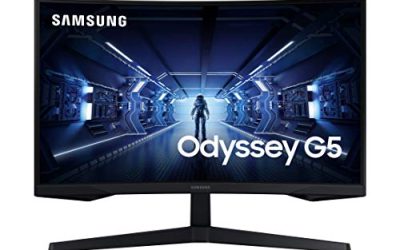
SAMSUNG 34-Inch Odyssey G5 Ultra-Wide Gaming Monitor

The Samsung Odyssey G5 is a 34-inch ultrawide gaming monitor with a 1000R curved VA panel, 3440 by 1440 resolution, a 165Hz refresh rate, and a 1ms moving picture response time, according to its Amazon product page. It supports AMD FreeSync Premium, lists HDR10, and connects over HDMI and DisplayPort, with a DisplayPort cable included. The product page states that the monitor has no speakers, so plan for headphones or external speakers.
The 1000R curve matches the width, the 165Hz refresh rate gives smooth motion when the graphics card can deliver enough frames, and the VA panel gives deep blacks in dark games.
Specs:
– Screen size: 34 inches
– Resolution: 3440 by 1440, Ultra WQHD
– Aspect ratio: 21 by 9
– Panel: VA, curved, 1000R
– Refresh rate: 165Hz
– Response time: 1ms moving picture response time
– Adaptive sync: AMD FreeSync Premium
– HDR: HDR10
– Connectivity: HDMI, DisplayPort
– Cable included: DisplayPort
– Speakers: None listed on the product page
– Model: LC34G55TWWNXZA
– ASIN: B08MVBYWGQ
Product Example: 4K
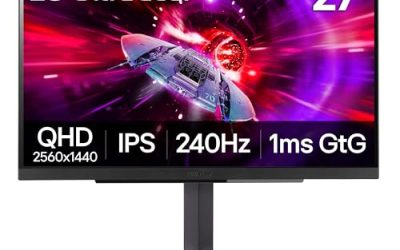
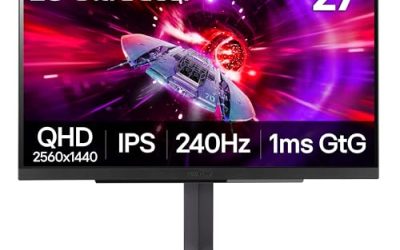
LG 27-Inch UltraGear 4K Gaming Monitor 27GR93U
The LG UltraGear 27GR93U is a 27-inch 4K gaming monitor with an IPS panel, 3840 by 2160 resolution, a 144Hz refresh rate, and a 1ms grey-to-grey response time, according to its Amazon product page. It supports NVIDIA G-Sync compatibility and AMD FreeSync, lists HDR10, and connects over DisplayPort and HDMI. The product page states that it can run 4K at up to 144Hz from its HDMI 2.1 connection on PC games, and up to 120Hz on next-generation consoles, and it lists one USB 3.0 port.
The 27-inch size gives the highest pixel density of the common 4K sizes, at about 163 pixels per inch, so text and textures look very sharp. The IPS panel gives wide viewing angles and consistent color, and the 144Hz refresh rate gives smooth motion when the graphics card can deliver enough frames at 4K. HDMI 2.1 makes it flexible for a desk that holds both a PC and a console.
Specs
- Screen size: 27 inches
- Resolution: 3840 by 2160, 4K UHD
- Panel: IPS
- Refresh rate: 144Hz
- Response time: 1ms grey-to-grey
- Adaptive sync: NVIDIA G-Sync Compatible, AMD FreeSync
- HDR: HDR10
- Connectivity: DisplayPort, HDMI 2.1
- USB: 1 USB 3.0 port
- Model: 27GR93U-B
Head-to-Head: The Two Examples
| Factor | Samsung Odyssey G5 Ultrawide | LG UltraGear 27GR93U 4K |
|---|---|---|
| Size | 34 inch | 27 inch |
| Resolution | 3440 by 1440 | 3840 by 2160 |
| Panel | VA, curved 1000R | IPS, flat |
| Refresh rate | 165Hz | 144Hz |
| Adaptive sync | AMD FreeSync Premium | G-Sync Compatible, AMD FreeSync |
| Ports | HDMI, DisplayPort | HDMI 2.1, DisplayPort, USB 3.0 |
| Pixel density | About 110 pixels per inch | About 163 pixels per inch |
| Graphics demand | High | Very high |
For more context on how the two formats can meet in a single panel, see our guide to the best 4K ultrawide gaming monitor for model picks that combine the two formats.
Who Should Choose Ultrawide
Choose ultrawide if you play racing games, flight simulators, open-world adventures, or strategy games most of the time. Choose ultrawide if your graphics card can drive 3440 by 1440 smoothly but cannot drive 4K at the frame rate you want.
Who Should Choose 4K
Choose 4K if you want the sharpest image and the most consistent support across games, consoles, and video, including story-driven and role-playing games. Choose the 27-inch size for the sharpest image, or the 32-inch size for a larger image with slightly less density.
Frequently Asked Questions
Is ultrawide better than 4K for gaming?
Ultrawide is better for immersion and multitasking, while 4K is better for sharpness and compatibility. The better choice depends on your graphics card, games, and desk.
Does ultrawide need a stronger graphics card than 4K?
No, ultrawide at 3440 by 1440 needs less graphics power than 4K at 3840 by 2160, because it renders about 40 percent fewer pixels per frame. Ultrawide still needs more power than standard 1440p, so check your graphics card before you buy.
Do all games support ultrawide monitors?
No, most modern PC games support 21 by 9, but some older games, console ports, and competitive titles lock the aspect ratio to 16 by 9. Those games show black bars on an ultrawide panel, so check the games you play most before you buy.
Is a 27-inch 4K monitor sharp enough for text and detail?
Yes, a 27-inch 4K monitor has about 163 pixels per inch, which makes text and textures very sharp at a normal desk viewing distance.
Conclusion
Ultrawide vs 4K is a choice between width and density. Ultrawide gives a wider field of view and stronger immersion, at a lower pixel density and with narrower game support. 4K gives a sharper image and near-universal compatibility, at a higher graphics card demand. Check your graphics card first, then your games, then your desk, and choose the format that fits the way you actually play.