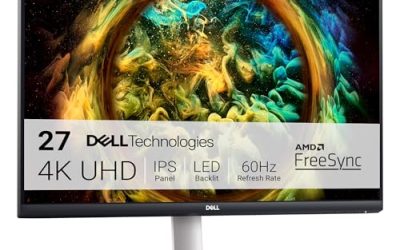
The RTX 4070 is a 1440p graphics card at heart. NVIDIA built it around 12GB of GDDR6X memory and DLSS 3 Frame Generation, and that points to one clear monitor strategy: a 27-inch 2560 x 1440 panel with a high refresh rate and variable refresh support. Go much beyond that resolution and the card leans on upscaling; stay at 1440p and it delivers the high-frame-rate experience it was designed for.


As an Amazon Associate we earn from qualifying purchases
This guide picks five monitors that fit what the RTX 4070 can drive. Three are 27-inch 1440p models at 180Hz and 240Hz, in IPS and OLED. One is a 34-inch ultrawide for players who accept extra pixels for a wider field of view. The last is a 4K monitor, included with an honest explanation of the compromises involved. Every specification below comes from the manufacturer or the Amazon listing for that model, and sync certifications are stated as the makers publish them. If you run the laptop version of this GPU instead, our guide to the best gaming laptops with an RTX 4070 covers machines that pair it with high-refresh built-in displays.
What an RTX 4070 Can Actually Drive
Resolution decides everything here, because pixel count sets the workload. A 2560 x 1440 screen has about 3.69 million pixels. A 3440 x 1440 ultrawide has about 4.95 million, roughly 34 percent more. A 3840 x 2160 4K screen has about 8.29 million, two and a quarter times the 1440p load. The RTX 4070 handles the first figure comfortably at high settings in most current games, especially with DLSS Super Resolution enabled. At ultrawide it stays playable in demanding titles with DLSS helping. At native 4K, heavy games need upscaling and reduced settings to stay smooth, which is why the 4K pick here is a sharpness-first choice.
Refresh rate works the same way. A 240Hz monitor only shows its advantage when the card renders frames at that pace, which at 1440p happens in esports and lighter titles rather than the heaviest releases. That is no reason to avoid 240Hz panels: variable refresh keeps motion smooth below the maximum, and the headroom exists for games that can use it. TechPowerUp’s GPU hierarchy positions the RTX 4070 as a strong 1440p card and a borderline 4K card, and the picks below follow that positioning.
1. LG UltraGear 27GR83Q-B: The 1440p Sweet Spot
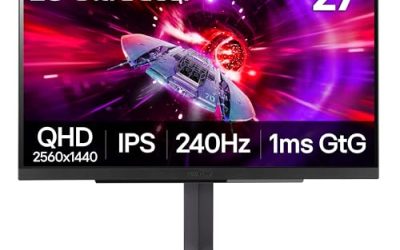
The 27GR83Q-B is the most direct match for an RTX 4070. Its 27-inch IPS panel runs at 2560 x 1440 and 240Hz, the exact combination this card feeds best, and LG includes HDMI 2.1 and DisplayPort 1.4 inputs that each support the full 240Hz at this resolution, so there is no port lottery. It is officially validated by NVIDIA as G-SYNC Compatible and also carries AMD FreeSync Premium, so tear-free variable refresh with a GeForce card is a certified feature rather than a hopeful one.
Specs (manufacturer-published):
- Size and panel: 27-inch IPS
- Resolution: 2560 x 1440
- Refresh rate: 240Hz
- Response time: 1ms GtG
- Variable refresh: NVIDIA G-SYNC Compatible, AMD FreeSync Premium
- HDR and colour: VESA DisplayHDR 400, DCI-P3 95% (typical)
- Ports: HDMI 2.1, DisplayPort 1.4, USB hub, 4-pole headphone output with DTS Headphone:X
- Stand: tilt, height and pivot adjustment
View the LG UltraGear 27GR83Q-B on Amazon
2. Samsung Odyssey OLED G6 (G61SD): The OLED Upgrade
The Odyssey OLED G6 G61SD keeps the same 27-inch 1440p format but swaps IPS for a QD-OLED panel. Samsung rates response time at 0.03ms GtG, far below any LCD figure, and OLED pixels produce true black levels that make dark scenes look deeper than on the IPS picks here. The 240Hz refresh rate suits the RTX 4070 well: competitive titles can approach it, and everything else benefits from OLED motion clarity at whatever frame rate the card sustains.
One certification detail matters for GeForce owners. Samsung lists AMD FreeSync Premium Pro for this model and does not publish an NVIDIA G-SYNC Compatible certification for it, so the certified sync badge sits on the AMD side. It also supports HDR10+ Gaming and includes two HDMI 2.1 ports alongside DisplayPort 1.4, making it a good shared screen for a PC and a console.
Specs (manufacturer-published):
- Size and panel: 27-inch QD-OLED
- Resolution: 2560 x 1440
- Refresh rate: 240Hz
- Response time: 0.03ms GtG
- Variable refresh: AMD FreeSync Premium Pro (no NVIDIA G-SYNC Compatible certification published by Samsung)
- HDR: HDR10+ Gaming
- Brightness: 250 cd/m2 typical
- Ports: 2x HDMI 2.1, 1x DisplayPort 1.4, USB 3.0 hub
View the Samsung Odyssey OLED G6 (G61SD) on Amazon
3. Alienware AW2725DM: Refresh Rate Matched to the Card
Not every RTX 4070 owner needs 240Hz. The Alienware AW2725DM runs its 27-inch Fast IPS panel at 180Hz, a ceiling the card reaches in a wider range of games at 1440p, and it is certified for NVIDIA G-SYNC and AMD FreeSync with VESA AdaptiveSync. Dell rates brightness at 400 nits, the panel covers 95% of DCI-P3, and the stand adjusts for height, pivot, swivel and tilt.
One connection caveat is worth knowing: Dell specifies that the two HDMI ports top out at 144Hz at this resolution, so the full 180Hz requires DisplayPort 1.4. For a single-PC desk that is a non-issue, since DisplayPort is the natural choice for a GeForce card anyway.
Specs (manufacturer-published):
- Size and panel: 27-inch Fast IPS
- Resolution: 2560 x 1440
- Refresh rate: 180Hz over DisplayPort, up to 144Hz over HDMI
- Response time: 1ms GtG
- Variable refresh: NVIDIA G-SYNC Compatible, AMD FreeSync, VESA AdaptiveSync
- HDR and colour: VESA DisplayHDR 400, DCI-P3 95%
- Brightness: 400 nits
- Ports: 2x HDMI, 1x DisplayPort 1.4, USB hub
- Stand: height, pivot, swivel and tilt adjustment
View the Alienware AW2725DM on Amazon
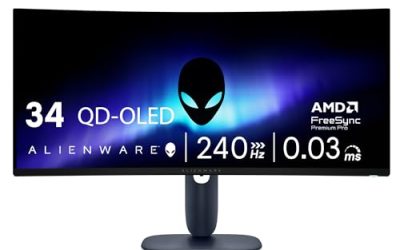
4. LG UltraGear 34GS95QE-B: The Ultrawide Option

The 34GS95QE-B stretches the format to a 34-inch curved OLED with 3440 x 1440 resolution and an aggressive 800R curve. It runs at 240Hz with a 0.03ms GtG response time as rated by LG, is officially validated as NVIDIA G-SYNC Compatible, and adds AMD FreeSync Premium Pro. LG publishes brightness at 275 nits typical with a 1300-nit peak, and the panel carries VESA DisplayHDR True Black 400 certification with 98.5% DCI-P3 coverage.
The honest caveat is workload. The extra pixels, about a third more than standard 1440p, push the RTX 4070 harder, so demanding games rely on DLSS to hold high frame rates. Racing and flight titles, strategy games and anything that benefits from peripheral vision make the trade worthwhile; players chasing maximum frame rates in shooters should stay with a 16:9 pick.
Specs (manufacturer-published):
- Size and panel: 34-inch OLED, 800R curve, 21:9
- Resolution: 3440 x 1440
- Refresh rate: 240Hz
- Response time: 0.03ms GtG
- Variable refresh: NVIDIA G-SYNC Compatible, AMD FreeSync Premium Pro
- HDR and colour: VESA DisplayHDR True Black 400, DCI-P3 98.5%
- Brightness: 275 nits typical, 1300 nits peak
- Ports: 2x HDMI 2.1, 1x DisplayPort 1.4, USB hub
- Stand: tilt, height and swivel adjustment
View the LG UltraGear 34GS95QE-B on Amazon
5. Gigabyte M28U: The 4K Choice, With Eyes Open

The M28U is the pick for players who value sharpness over frame rate. Its 28-inch SuperSpeed IPS panel runs at 3840 x 2160 and up to 144Hz, with two HDMI 2.1 ports that make it console-friendly at 4K 120Hz. Gigabyte rates brightness at 300 cd/m2 typical and colour coverage at 94% DCI-P3, and a KVM switch plus USB-C input suit a desk shared between a gaming PC and a laptop.
Be clear about what the RTX 4070 does here. Native 4K in demanding games is beyond its comfortable range, so realistic play means DLSS upscaling from a lower internal resolution, which still looks sharp on a 28-inch 4K panel, plus settings adjustments in the heaviest titles. Variable refresh comes from AMD FreeSync Premium Pro across a 48 to 144Hz range; Gigabyte does not list an NVIDIA G-Sync certification for this model. Treat 144Hz as headroom for lighter games and desktop smoothness, not a target for new releases.
Specs (manufacturer-published):
- Size and panel: 28-inch SuperSpeed IPS
- Resolution: 3840 x 2160
- Refresh rate: 144Hz (120Hz for consoles over HDMI 2.1)
- Response time: 1ms GTG, 2ms MPRT
- Variable refresh: AMD FreeSync Premium Pro (no NVIDIA G-Sync certification listed by Gigabyte)
- HDR and colour: VESA DisplayHDR 400, 94% DCI-P3, 120% sRGB
- Brightness: 300 cd/m2 typical
- Ports: 2x HDMI 2.1, 1x DisplayPort 1.4 with DSC, USB Type-C, USB 3.0 hub, KVM switch
- Speakers: 2x 3W built in
View the Gigabyte M28U on Amazon
Comparison Table
| Monitor | Size and panel | Resolution | Refresh | Sync certification | Key ports |
|---|---|---|---|---|---|
| LG UltraGear 27GR83Q-B | 27-inch IPS | 2560 x 1440 | 240Hz | G-SYNC Compatible, FreeSync Premium | HDMI 2.1, DP 1.4 |
| Samsung Odyssey OLED G6 (G61SD) | 27-inch QD-OLED | 2560 x 1440 | 240Hz | FreeSync Premium Pro | 2x HDMI 2.1, DP 1.4 |
| Alienware AW2725DM | 27-inch Fast IPS | 2560 x 1440 | 180Hz | G-SYNC Compatible, FreeSync | 2x HDMI (144Hz), DP 1.4 |
| LG UltraGear 34GS95QE-B | 34-inch OLED ultrawide | 3440 x 1440 | 240Hz | G-SYNC Compatible, FreeSync Premium Pro | 2x HDMI 2.1, DP 1.4 |
| Gigabyte M28U | 28-inch IPS | 3840 x 2160 | 144Hz | FreeSync Premium Pro | 2x HDMI 2.1, DP 1.4, USB-C |
Verdict: Which One Should You Buy?
Most RTX 4070 owners should buy the LG UltraGear 27GR83Q-B: the card’s best resolution, a 240Hz ceiling, official G-SYNC Compatible validation, and full refresh over either modern input. Choose the Samsung Odyssey OLED G6 if picture quality matters more than certification paperwork. Take the Alienware AW2725DM when 180Hz is enough, which for this GPU is often the case; its brighter panel and full ergonomic stand make it an easy desk companion. Go ultrawide with the LG 34GS95QE-B if immersion is the priority and you accept DLSS assistance in heavy games. Pick the Gigabyte M28U only if 4K sharpness for mixed gaming and desktop work outweighs frame rate.
FAQ
Is 1440p or 4K better for an RTX 4070?
1440p is the better match. The card was designed for high-refresh 1440p play, while 4K has two and a quarter times the pixels and pushes it into upscaling and reduced settings in demanding games. A 4K monitor still makes sense for mixed desktop and gaming use, as the M28U section explains.
Can an RTX 4070 use a 240Hz monitor properly?
Yes, with realistic expectations. Esports and lighter titles reach very high frame rates at 1440p, and variable refresh keeps heavier games smooth below 240 frames per second. The ceiling does not need to be hit constantly for the purchase to make sense.
Do FreeSync monitors work with an RTX 4070?
GeForce cards support variable refresh over DisplayPort on Adaptive Sync monitors, and models validated as G-SYNC Compatible, like the LG and Alienware picks here, are the guaranteed route. Where a maker lists only FreeSync certification, as Samsung and Gigabyte do, that is stated plainly in the specs above.
Which cable should I use with these monitors?
Use DisplayPort 1.4 for a PC connection in almost every case; it delivers the full refresh rate on all five picks. The exception to remember is the Alienware AW2725DM, whose HDMI ports are specified up to 144Hz, so its 180Hz mode is DisplayPort only.
Product and ASIN Reference
| Product | ASIN |
|---|---|
| LG UltraGear 27GR83Q-B | B0C63HDHPR |
| Samsung Odyssey OLED G6 (G61SD) | B0DHJD894W |
| Alienware AW2725DM | B0F146MYKD |
| LG UltraGear 34GS95QE-B | B0CV27X9K7 |
| Gigabyte M28U | B094NX6C8R |