As an Amazon Associate we earn from qualifying purchases.
Contrast is the quiet spec that decides whether a dark scene looks deep and detailed or flat and grey. Brightness gets the headlines and refresh rate gets the esports crowd, but contrast is what makes a monitor look rich instead of washed out. This guide explains the best contrast level and shows five monitors sold on Amazon US.
What Contrast Ratio Really Means
Contrast ratio is the difference between the brightest white and the darkest black a screen can show at the same time. A monitor listed at 1000:1 can show a white area one thousand times brighter than its darkest black. A monitor listed at 3000:1 can show a white area three thousand times brighter than its darkest black, which means deeper blacks and more visible detail in dark tones.
The figure in a listing is the static contrast ratio unless the listing says otherwise. Static contrast describes the panel itself. Dynamic contrast describes how much the backlight can dim and brighten across a whole scene, and those numbers are often far larger because they are measured across different moments rather than within one frame. Compare static contrast only.
A higher static contrast ratio is generally better for image depth, but it is not the only thing that matters. A monitor with strong contrast and poor colour accuracy will still look wrong, and one with a dim backlight can still look dull in a bright room. Contrast works with brightness, panel type, and room lighting, so the best choice is a balance.
The Best Contrast Level by Panel Type
IPS panels are the most common choice for gaming monitors. A typical IPS panel is listed at a 1000:1 static contrast ratio. IPS panels are known for wide viewing angles and consistent colour, and they handle fast motion well at high refresh rates. Their weakness is black level. On an IPS screen, black tends to look like a very dark grey, especially in a dark room, because the backlight leaks through the liquid crystal layer. In a lit room that weakness is easy to miss; at night, in dark games, you will notice it.
VA panels are the contrast specialists of the LCD world. A typical VA panel is listed at a 3000:1 static contrast ratio, three times the figure of a typical IPS panel. VA panels produce noticeably deeper blacks and stronger detail in dark tones, which makes dark scenes look richer. Their trade-off is viewing angle and, on older VA designs, slower dark-to-light transitions.
OLED panels work differently again. An OLED screen has no backlight. Each pixel produces its own light and can switch fully off, so a black pixel emits almost no light at all. That gives OLED a black level LCD panels cannot match, plus fast pixel response. The trade-offs are a higher purchase cost and the need to manage static on-screen elements over long sessions.
A 1000:1 IPS panel is a solid all-round choice with good colour and motion. A 3000:1 VA panel is the best contrast level for monitor buyers who want deep blacks without paying for OLED. An OLED panel is the best contrast level overall, for buyers willing to pay for the deepest blacks.
Static Contrast Versus Dynamic Contrast
Static contrast is the ratio between the brightest and darkest parts of one image. Dynamic contrast is the ratio between the brightest image a screen can show and the darkest image it can show at different times, with the backlight dimming between them. A dynamic contrast figure can reach into the millions, and it tells you almost nothing about how a single frame will look.
When you shop, look for the words static or typical next to the contrast figure. A monitor listed only with a dynamic contrast figure in the millions is not giving you a comparable number. If a listing gives no static figure at all, check the panel type instead.
How to Set Contrast on Your Monitor
Start with the standard or custom picture mode rather than a vivid or dynamic mode, because vivid modes often push brightness and saturation past the point where dark detail survives. Then set brightness to match your room. In a dim room, a lower brightness setting keeps blacks deep. In a bright room, a higher brightness setting keeps the image from looking washed out.
Set contrast near the middle of its range, then raise it in small steps while watching a dark scene. If dark areas turn into solid black blocks, the contrast is too high. If they look grey and flat, it is too low. Gamma controls how mid-tones spread between black and white, and a setting near the standard value keeps shadow detail visible.
Use a black stabiliser or black equaliser feature sparingly. It lifts dark areas so you can see enemies hiding in shadows, but it also lifts the black level. Turn it on for competitive play and off for story-driven games. HDR adds contrast only when the game is actually sending an HDR signal and the monitor is in HDR mode.
What Else to Compare Besides Contrast
A 27-inch screen at 2560 x 1440, known as QHD, is the sweet spot for most gaming desks, because it gives a clear step up from Full HD without demanding the graphics power of 4K. A 32-inch screen at the same resolution is a little less sharp but more immersive.
A 165Hz or 170Hz panel is a large step up from a 60Hz screen and suits most gamers well. A 180Hz panel adds a little more smoothness, and a 240Hz panel is aimed at competitive players. If refresh speed matters as much as contrast for your games, see our 240Hz gaming monitor guide for models built around high refresh rates.
Look for at least one DisplayPort input and one HDMI input, because DisplayPort is the usual route to the highest refresh rate at QHD resolution on a PC, while HDMI is the port your console uses. VRR, or variable refresh rate, keeps the monitor refresh in step with your graphics card output. AMD FreeSync and NVIDIA G-SYNC Compatible are the two names you will see most often, and VRR reduces tearing and stutter when your frame rate moves up and down.
Five Monitors That Cover the Contrast Choices
The five monitors below are all sold on Amazon US: two VA panels with a 3000:1 static contrast ratio, and three IPS panels with a 1000:1 static contrast ratio.
1. Samsung Odyssey G5 G51F

The Samsung Odyssey G5 G51F is the strongest contrast pick in this group. Its VA panel is listed at a 3000:1 static contrast ratio, which shows up as deeper blacks in dark scenes. The 27-inch QHD screen pairs that contrast with a 180Hz refresh rate, the fastest in this group.
Specs
- Screen: 27 inches, VA panel, flat
- Resolution: 2560 x 1440 (QHD), 16:9
- Refresh rate: 180Hz, 1ms response time as listed
- Contrast ratio: 3000:1 static, as listed
- Brightness: HDR10 support as listed
- VRR: AMD FreeSync as listed
- Ports: DisplayPort and HDMI as listed, plus headphone output
- Stand: Height adjustable, with tilt and swivel as listed
- Features: Black Equalizer and Virtual Aim Point as listed
2. Dell S2722DGM
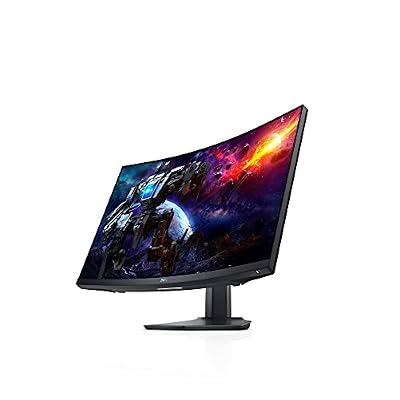
The Dell S2722DGM is a curved VA monitor that takes the same 3000:1 contrast idea and wraps it in a 1500R curve. The curve pulls the edges slightly toward you, which suits a single-monitor desk. The 27-inch QHD screen runs at 165Hz.
Specs
- Screen: 27 inches, VA panel, 1500R curved
- Resolution: 2560 x 1440 (QHD), 16:9
- Refresh rate: 165Hz, 1ms response time as listed
- Contrast ratio: 3000:1 static, as listed
- Brightness: 350 cd/m2 typical, as listed
- VRR: AMD FreeSync Premium as listed
- Ports: DisplayPort and HDMI as listed, plus headphone output
- Stand: Height and tilt adjustable as listed
- Features: Curved screen, narrow borders as listed
3. LG UltraGear 27GP850-B

The LG UltraGear 27GP850-B is the IPS pick for buyers who value colour and viewing angle over black level. Its Nano IPS panel is listed at a 1000:1 static contrast ratio, the standard IPS figure, and it makes up for that with wide colour coverage of 98 percent of DCI-P3 as listed. Colours look rich, and the image holds up well from an angle.
Specs
- Screen: 27 inches, Nano IPS panel, flat
- Resolution: 2560 x 1440 (QHD), 16:9
- Refresh rate: 165Hz, 1ms response time as listed
- Contrast ratio: 1000:1 static, as listed
- Brightness: 400 cd/m2 typical, as listed
- VRR: NVIDIA G-SYNC Compatible and AMD FreeSync Premium as listed
- Ports: DisplayPort and HDMI as listed
- Stand: Tilt, height, and pivot adjustable as listed
- Features: HDR10 support as listed
Availability of this model can change, so confirm the listing before ordering.
4. ASUS TUF Gaming VG27AQ1A

The ASUS TUF Gaming VG27AQ1A runs at 170Hz, a small step above the 165Hz of the LG above, and it includes built-in speakers and an Extreme Low Motion Blur feature that ASUS lists for reducing blur in fast motion. Its IPS panel is listed at a 1000:1 static contrast ratio, and its colour gamut is listed at 130 percent of sRGB.
Specs
- Screen: 27 inches, IPS panel, flat
- Resolution: 2560 x 1440 (QHD), 16:9
- Refresh rate: 170Hz, 1ms response time as listed
- Contrast ratio: 1000:1 static, as listed
- Brightness: HDR10 support as listed
- VRR: NVIDIA G-SYNC Compatible as listed
- Ports: DisplayPort and HDMI as listed
- Stand: Tilt, height, swivel, and pivot adjustable as listed
- Features: Built-in speakers, Extreme Low Motion Blur as listed
5. Acer Nitro XV272U Vbmiiprx

The Acer Nitro XV272U Vbmiiprx is a fast IPS monitor with a 170Hz refresh rate that can be overclocked further, as listed. Its IPS panel is listed at a 1000:1 static contrast ratio, and its colour coverage is listed at 95 percent of DCI-P3. It carries VESA DisplayHDR 400 certification as listed, a step above basic HDR10 support.
Specs
- Screen: 27 inches, IPS panel, flat
- Resolution: 2560 x 1440 (QHD), 16:9
- Refresh rate: 170Hz with overclock as listed, 0.5ms response time as listed
- Contrast ratio: 1000:1 static, as listed
- Brightness: VESA DisplayHDR 400 as listed
- VRR: AMD FreeSync Premium as listed
- Ports: DisplayPort and HDMI as listed
- Stand: Tilt, height, swivel, and pivot adjustable as listed
- Features: Zero-frame design as listed
Contrast Compared at a Glance
| Monitor | Panel | Size | Resolution | Refresh rate | Static contrast |
|---|---|---|---|---|---|
| Samsung Odyssey G5 G51F | VA | 27 inches | 2560 x 1440 | 180Hz | 3000:1 |
| Dell S2722DGM | VA curved | 27 inches | 2560 x 1440 | 165Hz | 3000:1 |
| LG UltraGear 27GP850-B | Nano IPS | 27 inches | 2560 x 1440 | 165Hz | 1000:1 |
| ASUS TUF Gaming VG27AQ1A | IPS | 27 inches | 2560 x 1440 | 170Hz | 1000:1 |
| Acer Nitro XV272U Vbmiiprx | IPS | 27 inches | 2560 x 1440 | 170Hz | 1000:1 |
The VA monitors win on contrast by a factor of three. The IPS monitors win on viewing angle and colour coverage. All five share the same QHD resolution.
Frequently Asked Questions
What is the best contrast ratio for a gaming monitor?
A 3000:1 static contrast ratio from a VA panel is the best widely available contrast level for a gaming monitor without moving to OLED. A 1000:1 IPS panel is a solid all-round choice.
Is a higher contrast ratio always better?
A higher static contrast ratio is generally better for image depth, because it means deeper blacks and more visible detail in dark tones. It is not the only factor, though. Colour accuracy, brightness, viewing angle, and refresh rate all affect the final image.
Does contrast ratio matter more than resolution?
Contrast and resolution do different jobs. Resolution sets sharpness and detail, while contrast sets depth and the difference between light and dark. A sharp image with weak contrast looks flat, and a deep image with low resolution looks soft.
How do I improve contrast on a monitor I already own?
Use the standard or custom picture mode, set brightness to match your room, and set contrast near the middle of its range, raising it in small steps while watching a dark scene. Reduce room light falling on the screen, and make sure HDR is switched on in both your operating system and your game before judging HDR content.
Conclusion
The best contrast level for monitor gaming is a 3000:1 static contrast ratio from a VA panel for most buyers, with a 1000:1 IPS panel as the solid all-round alternative and OLED as the premium choice. Match the panel to your room and your games before you buy.