A curved ultrawide replaces the bezel gap of a dual-monitor setup with one continuous screen that wraps into your peripheral vision. The five monitors below are all curved, all sold on Amazon US, and split across the two shapes that matter: 34-inch 21:9 panels at 3440×1440, which behave like a wider 1440p monitor, and 49-inch 32:9 panels at 5120×1440, which put two 1440p screens side by side with no seam. Every pick supports variable refresh rate, and every response-time figure quoted is a manufacturer claim unless it is labelled as measured.
As an Amazon Associate we earn from qualifying purchases.
If you want the full ultrawide landscape, including flat panels and larger 21:9 models, our broader roundup of the best gaming monitors in ultrawide format covers that ground; this guide narrows the field to curved models only, and ranks them for PC gaming first.
Quick Comparison
| Monitor | Size / Shape | Panel | Resolution | Curve | Refresh | VRR | Ports |
|---|---|---|---|---|---|---|---|
| Alienware AW3425DW | 34.2″ / 21:9 | QD-OLED | 3440×1440 | 1800R | 240Hz | FreeSync Premium Pro, G-Sync Compatible | 2× HDMI 2.1, 1× DP 1.4, USB hub |
| LG UltraGear 34GS95QE | 34″ / 21:9 | WOLED | 3440×1440 | 800R | 240Hz | FreeSync Premium Pro, G-Sync Compatible | HDMI 2.1, DP 1.4 |
| Samsung Odyssey G5 34″ | 34″ / 21:9 | VA | 3440×1440 | 1000R | 165Hz | FreeSync Premium | 1× HDMI 2.0, 1× DP 1.4 |
| Samsung Odyssey OLED G9 (G95SC) | 49″ / 32:9 | QD-OLED | 5120×1440 | 1800R | 240Hz | FreeSync Premium Pro, G-Sync Compatible | HDMI 2.1, Micro HDMI, DP 1.4, USB hub |
| Samsung Odyssey OLED G9 (G91SD) | 49″ / 32:9 | QD-OLED | 5120×1440 | 1800R | 144Hz | FreeSync Premium Pro, G-Sync Compatible | HDMI 2.1, DP, Mini DP |
How to Read Curve Radius, Size and Panel Type
Curve radius. The R number is the radius, in millimetres, of the circle the panel would form if extended. Smaller means a tighter wrap: the LG’s 800R curve bends noticeably more than the 1800R curve on the QD-OLED models, with Samsung’s 1000R VA panel in between. On a 34-inch screen the difference is a matter of taste and viewing distance. On a 49-inch screen a curve stops being cosmetic — the far edges of a flat 32:9 panel would sit much farther from your eyes than the centre, so every 49-inch pick here is curved by design.
Pixel load. A 3440×1440 panel renders about 4.95 million pixels, roughly a third more than a standard 2560×1440 monitor, so a GPU that handles 1440p well usually handles 21:9 with a modest frame-rate cost. A 5120×1440 panel renders about 7.37 million pixels, close to 4K territory, and needs a high-end card to hold high frame rates at native resolution in demanding games.
Panel type. QD-OLED and WOLED panels switch pixels almost instantly and produce true blacks, which is why four of the five picks are OLED. The trade-offs are lower full-screen brightness than LCD and the long-term risk of burn-in from static elements, mitigated by built-in panel-care routines and, on the Alienware, a warranty that covers burn-in. The VA pick gives up that speed and contrast for a much lower cost of entry and no burn-in concern at all.
The console caveat. Neither PlayStation 5 nor Xbox Series X|S outputs a 21:9 or 32:9 image. Consoles send a 16:9 signal, so on any monitor here a console game appears pillarboxed, with black bars at the sides and only the centre portion of the panel in use. These are PC-first displays; buy one for a console only if you accept that limitation.
Alienware AW3425DW — Best 34-Inch Curved Ultrawide Overall
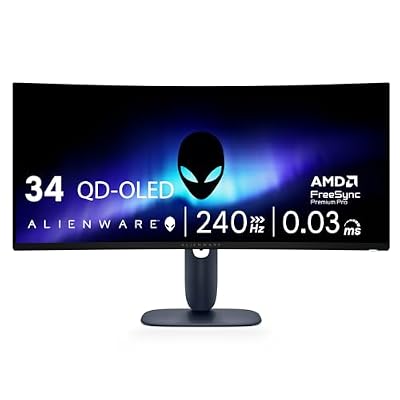
Dell’s AW3425DW is the most complete 21:9 package in this list: a 34.2-inch QD-OLED panel at 3440×1440 with a gentle 1800R curve, a 240Hz refresh rate and support for both major VRR standards, so it pairs cleanly with AMD and NVIDIA cards alike. The 1800R bend is subtle enough that desktop work still looks natural, which makes this the easiest curved ultrawide to live with as an only monitor.
Specs
- Size / shape: 34.2-inch, 21:9
- Panel: QD-OLED, 1800R curve
- Resolution: 3440×1440
- Refresh rate: 240Hz
- Response time: 0.03ms GtG (manufacturer claim)
- VRR: AMD FreeSync Premium Pro, NVIDIA G-Sync Compatible
- HDR: VESA DisplayHDR True Black 400; 99.3% DCI-P3; Dell rates peak brightness at 1,000 nits
- Ports: 2× HDMI 2.1, 1× DisplayPort 1.4, USB hub (USB-C port provides 15W charging, not video input)
- Warranty: 3 years, including OLED burn-in coverage per Dell
View the Alienware AW3425DW on Amazon
LG UltraGear 34GS95QE — Best for a Deep, Wrapping Curve

LG’s 34GS95QE uses a WOLED panel with the tightest curve in this guide: 800R. Sitting at a normal desk distance, the edges of the screen pull noticeably toward you, which sim racers and flight sim players tend to love and spreadsheet users tend to tolerate rather than enjoy. Under the curve it matches the Alienware on the headline numbers — 3440×1440, 240Hz, both VRR standards — so the choice between them is mostly curve preference and panel flavour: WOLED here versus QD-OLED there.
Specs
- Size / shape: 34-inch, 21:9
- Panel: WOLED (OLED), 800R curve
- Resolution: 3440×1440
- Refresh rate: 240Hz
- Response time: 0.03ms GtG (manufacturer claim)
- VRR: AMD FreeSync Premium Pro, NVIDIA G-Sync Compatible
- HDR: VESA DisplayHDR True Black 400; 98.5% DCI-P3 (manufacturer figure)
- Ports: HDMI 2.1 and DisplayPort 1.4 inputs
- Stand: tilt, swivel and height adjustment
View the LG UltraGear 34GS95QE on Amazon
Samsung Odyssey G5 34″ — Best Budget Curved Ultrawide

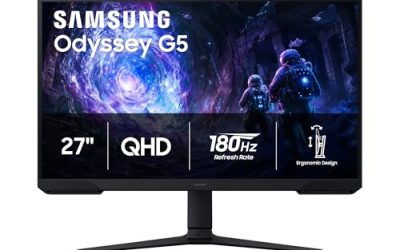
The Odyssey G5 is the value route into curved ultrawide gaming. Its 34-inch VA panel runs 3440×1440 at up to 165Hz over DisplayPort with a deep 1000R curve, and VA technology delivers strong native contrast for an LCD. What you give up versus the OLED picks is pixel response speed, HDR impact — its HDR10 support has no local dimming behind it — and stand flexibility, since the included stand is tilt-only. For a first ultrawide, or a second rig, those are sensible trade-offs.
Specs
- Size / shape: 34-inch, 21:9
- Panel: VA, 1000R curve
- Resolution: 3440×1440
- Refresh rate: 165Hz (DisplayPort)
- Response time: 1ms MPRT (manufacturer claim)
- VRR: AMD FreeSync Premium
- HDR: HDR10 (no local dimming)
- Ports: 1× HDMI 2.0, 1× DisplayPort 1.4
- Stand: tilt only; VESA 75×75 mounting supported
View the Samsung Odyssey G5 34-inch on Amazon
Samsung Odyssey OLED G9 (G95SC) — Best 49-Inch Flagship

The G95SC is the full-fat 32:9 experience: 49 inches of QD-OLED at 5120×1440, a 240Hz refresh rate and an 1800R curve, with Samsung’s smart TV platform and Gaming Hub built in, plus built-in speakers. It is effectively two 27-inch 1440p monitors fused into one panel, and in supported games the uninterrupted peripheral view is something a 21:9 screen cannot replicate. The costs are desk space — the panel alone is about 47 inches wide — and GPU load, since 7.37 million pixels at 240Hz is a serious ask outside esports titles.
Specs
- Size / shape: 49-inch, 32:9
- Panel: QD-OLED, 1800R curve
- Resolution: 5120×1440 (Dual QHD)
- Refresh rate: 240Hz
- Response time: 0.03ms GtG (manufacturer claim)
- VRR: AMD FreeSync Premium Pro, NVIDIA G-Sync Compatible
- HDR: VESA DisplayHDR True Black 400, HDR10+ Gaming; typical brightness 250 nits (manufacturer figure)
- Ports: HDMI 2.1, Micro HDMI, DisplayPort 1.4, USB hub
- Extras: Tizen smart TV apps, Samsung Gaming Hub, built-in speakers
View the Samsung Odyssey OLED G9 (G95SC) on Amazon
Samsung Odyssey OLED G9 (G91SD) — Best 49-Inch Value

The G91SD keeps the same 49-inch QD-OLED canvas, resolution and 1800R curve as the flagship but trims the refresh rate to 144Hz and drops the smart TV platform, which is exactly the right place to cut for buyers who only want a monitor. A 144Hz ceiling still outruns what most GPUs can feed at 5120×1440 in demanding games, and the ergonomic stand and three-year warranty make it the easier 32:9 panel to own day to day.
Specs
- Size / shape: 49-inch, 32:9
- Panel: QD-OLED, 1800R curve
- Resolution: 5120×1440 (Dual QHD)
- Refresh rate: 144Hz
- Response time: 0.03ms (manufacturer claim)
- VRR: AMD FreeSync Premium Pro, NVIDIA G-Sync Compatible
- Ports: HDMI 2.1, DisplayPort, Mini DisplayPort
- Stand: ergonomic, height adjustable
- Warranty: 3 years
View the Samsung Odyssey OLED G9 (G91SD) on Amazon
Verdict: Who Should Pick What
Most PC gamers should start with the Alienware AW3425DW: it combines the manageable 21:9 format with a 240Hz QD-OLED panel, both VRR standards and burn-in warranty coverage. Choose the LG UltraGear 34GS95QE instead if you specifically want the deep 800R wrap for sim racing or flight sims. On a tighter budget, the Samsung Odyssey G5 34″ delivers the curved ultrawide shape and a 165Hz refresh rate for far less, accepting VA response times and basic HDR. If you want the maximum field of view and your GPU can feed 5120×1440, the Odyssey OLED G9 (G91SD) is the sensible 32:9 buy, while the Odyssey OLED G9 (G95SC) justifies its flagship spot with 240Hz and smart TV features for those who will use them. Console-only players should look at 16:9 monitors instead, for the pillarboxing reason explained above.
Product and ASIN Reference
| Product | ASIN |
|---|---|
| Alienware AW3425DW 34.2-inch QD-OLED Curved Gaming Monitor | B0F6724X5N |
| LG UltraGear 34GS95QE 34-inch OLED Curved Gaming Monitor | B0CV27X9K7 |
| Samsung Odyssey G5 34-inch Curved Ultrawide Monitor (LC34G55TWWNXZA) | B08MVBYWGQ |
| Samsung Odyssey OLED G9 G95SC 49-inch Curved Gaming Monitor (LS49CG954SNXZA) | B0C48D7Q22 |
| Samsung Odyssey OLED G9 G91SD 49-inch Curved Gaming Monitor (LS49DG910SNXZA) | B0DSGJRKCR |
FAQ
Can I use a curved ultrawide monitor with a PS5 or Xbox?
You can connect one, but neither console outputs 21:9 or 32:9. The console sends a 16:9 image, so games appear in the centre of the panel with black bars on both sides. Curved ultrawides are best treated as PC monitors.
Should I choose 21:9 or 32:9?
Choose 21:9 (3440×1440) for the widest game support, a manageable GPU load and a screen that still works well for everyday desktop use. Choose 32:9 (5120×1440) for sim racing, flight sims and maximum immersion, accepting that some games need tweaks to fill the screen and that you need a high-end GPU.
What GPU do I need for a curved ultrawide?
For 3440×1440, a card that plays comfortably at 1440p is the baseline, since the panel pushes about a third more pixels. For 5120×1440 at high refresh rates, plan on a high-end GPU and expect to use DLSS or FSR upscaling in demanding titles; the pixel count is close to 4K.
Does the curve radius matter — 800R, 1000R or 1800R?
It changes how wrapped the image feels, not the picture quality. 800R (the LG) curves the most and suits close, single-player or sim setups; 1800R (the QD-OLED picks) is gentler and easier to share or use for work; 1000R (the Odyssey G5) sits between the two. At 49 inches, some curve is close to essential for comfortable viewing.