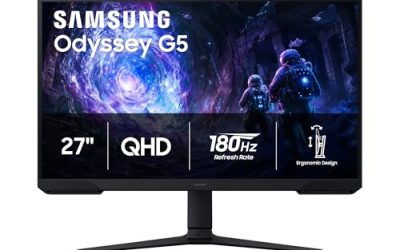
The real decision here is not which monitor looks sharpest on a spec sheet, but which screen size still looks clean from the exact spot your chair sits in. Move a large, low-resolution panel too close and individual pixels, jagged HUD text, and constant head-turning give the game away. Push a small screen too far back and you lean forward, squint at minimaps, and lose the peripheral detail you paid for. Size, resolution, and seat distance have to be chosen together, as one measurement.
This guide serves four kinds of buyers: competitive players at shallow desks, everyday gamers at a standard desk, players who lean back with a controller, and sim racers building a wraparound view. Each pick below is assigned to the distance band where its size and pixel density hold up, and every model was selected from the name and specifications published on its Amazon product page, so the numbers quoted here are the ones you can verify before ordering.
Quick Picks
As an Amazon Associate we earn from qualifying purchases.
| Product | Best for | Key spec from title |
|---|---|---|
| ASUS TUF Gaming VG249QL3A | Sitting close at a shallow desk, roughly 50 to 70 cm away | 23.8-inch Full HD Fast IPS, 180Hz |
| LG UltraGear 27GP850-B | A standard desk distance of roughly 60 to 90 cm | 27-inch QHD Nano IPS, 165Hz |
| LG UltraGear 34GP63A-B | A wider field of view from roughly 70 to 100 cm | 34-inch curved UWQHD VA, 160Hz |
| GIGABYTE MO32U | Leaning back at a deep desk, roughly 80 to 110 cm | 32-inch UHD QD-OLED, 165Hz |
| Samsung Odyssey G9 G91F | Sim rigs and lean-back setups, roughly 90 to 130 cm | 49-inch DQHD 32:9 curved VA, 144Hz |
How to Choose
Match screen size to the distance you actually sit
Measure from your eyes to the screen surface, not to the desk edge, because a deep stand or a wall mount can move the panel 15 cm without you noticing. As a working rule, a 24-inch screen suits roughly 50 to 70 cm, a 27-inch suits 60 to 90 cm, and anything 32 inches or wider wants 80 cm or more. Ultrawides bend the rule slightly, since their extra width fills peripheral vision rather than demanding a closer seat. The monitors in our reviewed and compared gaming monitor guide follow the same bands, so cross-check your measurement against both lists before committing.
Resolution and pixel density at your seat
Pixel density decides how close you can sit before the image breaks into a visible grid. A 24-inch 1080p panel lands near 92 pixels per inch, which looks fine at arm’s length but coarse any closer. Stepping to 1440p at 27 inches raises that to about 109 PPI, and 4K at 32 inches reaches roughly 140 PPI, which stays smooth even when you lean in during a tense round. Ultrawides sit between those points: the 34-inch pick below spreads 1440p over a wider frame for about 110 PPI, while the 49-inch model matches a pair of 27-inch 1440p screens side by side.
Panel type and refresh rate for your games
Fast IPS panels remain the safe default for mixed gaming, pairing wide viewing angles with quick pixel transitions at 165Hz and above. VA panels trade a little motion clarity for much deeper contrast, which suits dark single-player games and curved ultrawide designs, though fast pans can smear on cheaper VA implementations. QD-OLED answers almost instantly and delivers perfect blacks, but it asks for varied content and sensible brightness habits. Refresh rate interacts with distance too: at a close esports seat, 180Hz motion clarity is easy to appreciate, while from a metre away the jump from 144Hz to 165Hz is far harder to spot.
Ports and VRR support for your hardware
Connect with DisplayPort where possible, because several monitors only reach their full refresh rate over DP while the HDMI inputs cap lower. Console players should look for HDMI 2.1, which is what allows high-refresh 1440p or 4K signals from a PlayStation 5 or Xbox Series X. Variable refresh rate support matters at every distance: FreeSync Premium and G-SYNC Compatible modes keep frame pacing smooth when your GPU cannot hold the panel’s maximum rate. Finally, check the stand and VESA mount, since a height-adjustable stand or an arm is often what actually sets your final viewing distance.
The 5 Best Options
ASUS TUF Gaming VG249QL3A

This is the pick for players whose chair practically touches the desk. At 23.8 inches, the Full HD panel keeps its roughly 92 PPI density presentable from about 50 to 70 cm, and the 180Hz Fast IPS screen gives competitive shooters the motion clarity they sit close to exploit. The height-adjustable stand is the detail that matters most at this range, because small changes in eye level are obvious when the screen fills so much of your view. Built-in speakers and both FreeSync Premium and G-SYNC Compatible support round out a focused close-range package.
Specs
- 23.8-inch viewable Full HD (1920 x 1080) Fast IPS panel
- 180Hz refresh rate with 1ms (GTG) response time
- AMD FreeSync Premium and NVIDIA G-SYNC Compatible
- ASUS ELMB (Extreme Low Motion Blur) and 99% sRGB coverage
- DisplayPort and HDMI inputs, built-in speakers
- Height-adjustable stand
Best for: Esports and competitive players at shallow desks, sitting 50 to 70 cm from the screen.
Watch out for: Confirm you are ordering the VG249QL3A variant, since the near-identical VG249Q3A name belongs to a different stand configuration.
ASIN: B0CHN4JZT8
LG UltraGear 27GP850-B

For the classic desk setup, where your eyes rest somewhere between 60 and 90 cm from the panel, this 27-inch QHD model hits the balance most players end up keeping for years. The Nano IPS screen runs at 165Hz, or 180Hz overclocked, and its roughly 109 PPI density keeps text and crosshairs crisp without demanding a flagship GPU the way 4K does. Colour coverage is strong enough for photo work between matches, and the stand adjusts for height, tilt, and pivot, which helps dial in the exact distance instead of accepting whatever the desk gives you.
Specs
- 27-inch QHD (2560 x 1440) Nano IPS panel
- 165Hz refresh rate (180Hz overclock) with 1ms (GtG) response time
- NVIDIA G-SYNC Compatible and AMD FreeSync Premium
- VESA DisplayHDR 400 with 98% DCI-P3 colour gamut
- HDMI and DisplayPort inputs
- Tilt, height, and pivot adjustable stand
Best for: All-round PC gaming at a standard desk distance of 60 to 90 cm.
Watch out for: Use the DisplayPort input to reach the full refresh rate, because the HDMI inputs top out lower.
ASIN: B093MTSTKD
LG UltraGear 34GP63A-B
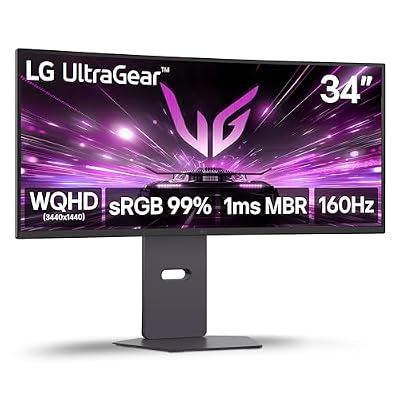
An ultrawide changes the distance equation, because the extra width wraps into your peripheral vision instead of asking you to sit nearer. This curved 34-inch VA panel works best from about 70 to 100 cm, where the 3440 x 1440 image, at roughly 110 PPI, stays sharp across the centre while the edges fill with cockpit, dashboard, or minimap. The 160Hz refresh rate and FreeSync Premium keep fast games fluid, and HDR 10 support plus VA contrast give night scenes real depth. Built-in speakers simplify a clean racing or flight setup with fewer boxes on the desk.
Specs
- 34-inch curved VA panel with UWQHD (3440 x 1440) resolution, 21:9 aspect ratio
- 160Hz refresh rate with 1ms response time
- HDR 10 compatibility and 99% sRGB coverage
- AMD FreeSync Premium
- HDMI and DisplayPort inputs, built-in speakers
- Tilt and height adjustable stand
Best for: Immersive single-player, racing, and flight games from 70 to 100 cm away.
Watch out for: Check that your graphics card can drive 3440 x 1440 at high frame rates, since the wider resolution is noticeably heavier than standard 1440p.
ASIN: B0B928B6BC
GIGABYTE MO32U
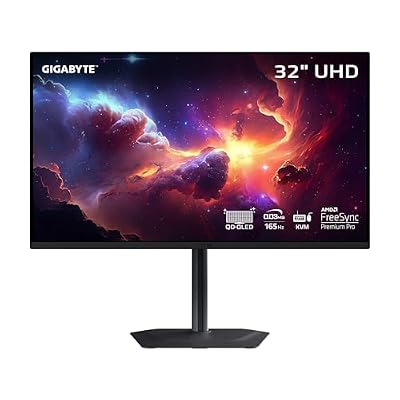
Once your seat moves past 80 cm, a 32-inch 4K panel stops feeling oversized and starts feeling precise. The QD-OLED screen here packs roughly 140 PPI, so menus, subtitles, and distant targets stay legible from 80 to 110 cm, and its 165Hz refresh with a 0.03ms GTG rating keeps motion clean even when you lean back with a controller. Perfect blacks reward cinematic games played in a dim room. The Type-C KVM is a practical bonus for a deep desk shared with a work laptop, switching display and peripherals over one cable.
Specs
- 32-inch QD-OLED panel with UHD (3840 x 2160) resolution
- 165Hz refresh rate with 0.03ms GTG response time
- AMD FreeSync Premium Pro
- Built-in Type-C KVM switch
- HDMI, DisplayPort, and USB Type-C inputs
- Height-adjustable stand
Best for: Deep-desk and lean-back 4K gaming from 80 to 110 cm, including mixed work use.
Watch out for: Read the burn-in warranty terms before buying, because static HUD elements and taskbars sit on an OLED screen for hours at a time.
ASIN: B0DVCD7X5X
Samsung Odyssey G9 G91F

The 49-inch option is really two 27-inch 1440p monitors fused into one curved sheet, and it only makes sense once you sit 90 to 130 cm away, where the 1000R curve can wrap the full 32:9 width around your view. From that distance the roughly 109 PPI density matches the 27-inch pick above, while the VA panel’s DisplayHDR 600 contrast keeps dark scenes convincing. A 144Hz refresh rate and FreeSync Premium Pro cover fast driving and flight titles, and picture-by-picture lets the same screen host a PC and a console side by side on a rig.
Specs
- 49-inch curved VA panel with 1000R curvature and 32:9 aspect ratio
- Dual QHD (5120 x 1440) resolution
- 144Hz refresh rate with 1ms (GtG) response time
- VESA DisplayHDR 600 and HDR10 support
- AMD FreeSync Premium Pro
- 2 x HDMI 2.1, 1 x DisplayPort 1.4, and a USB hub
- Height-adjustable ergonomic stand
Best for: Sim racing and flight rigs, plus lean-back panoramic gaming from 90 to 130 cm.
Watch out for: Measure your desk width and depth first, and confirm the return window, because a 49-inch curved panel is genuinely awkward to repack and send back.
ASIN: B0DWT9XN4D
Which One Fits Your Situation
A shallow desk in a small room
Choose the ASUS TUF Gaming VG249QL3A. When the wall, a shelf, or a roommate’s furniture fixes your seat close to the screen, its 23.8-inch panel and height-adjustable stand keep 1080p looking tidy at 50 to 70 cm, and the 180Hz refresh serves competitive games without needing a deeper desk you do not have.
One monitor for work and play at a normal desk
Choose the LG UltraGear 27GP850-B. Most desks place your eyes 60 to 90 cm from the screen, exactly where its 1440p Nano IPS panel balances sharp text for documents against fast, tear-free gaming. If that same desk is wide and you crave peripheral immersion, the 34-inch 34GP63A-B is the alternative within this list.
A deep desk or a controller-first setup
Choose the GIGABYTE MO32U. Leaning back with a gamepad pushes your eyes towards a metre away, where smaller screens make subtitles and HUD elements shrink. Its 32-inch 4K QD-OLED panel keeps everything legible at that range, and the KVM switch means the same deep desk can host a work laptop during the day.
A dedicated sim racing or flight rig
Choose the Samsung Odyssey G9 G91F. A wheel or yoke fixes your seating position further back than a keyboard ever would, and from 90 to 130 cm the 49-inch curved screen fills the view a cockpit demands. The LG 34GP63A-B is the fallback if your rig’s mounting space stops well short of 49 inches.
Common Mistakes
- Buying by diagonal size alone, without measuring the actual eye-to-screen distance at the finished setup.
- Pairing a big screen with a low resolution, then sitting close enough to see the pixel grid in every menu.
- Plugging into HDMI and never noticing the refresh rate capped below the panel’s advertised maximum.
- Ignoring stand depth, so the new monitor sits 15 cm closer than the old one and ruins the plan.
- Forgetting VRR support, then blaming the GPU for tearing that a FreeSync or G-SYNC Compatible mode would have removed.
Frequently Asked Questions
How far should I sit from a 27-inch gaming monitor?
Most players are comfortable between 60 and 90 cm from a 27-inch screen. At 1440p, that range keeps pixel density high enough that text stays clean while the whole panel remains visible without turning your head. Sit nearer for competitive play if you prefer a fuller view, and further back for relaxed single-player sessions.
Is a 32-inch monitor too big for a desk?
Not if the desk is deep enough. A 32-inch 4K monitor works well from about 80 cm away, a distance many desks allow once the stand’s depth is counted. It only feels too big when a shallow desk forces you inside roughly 60 cm, where the corners leave your comfortable field of view.
Does resolution matter more than size at my distance?
They work as a pair. Doubling resolution lets you sit closer or go larger without seeing individual pixels, which is why 4K suits a 32-inch screen and 1080p suits a 24-inch one. Pick the size your distance demands first, then choose the resolution that keeps density near or above 100 PPI at that seat.
Can I sit closer to a curved ultrawide than a flat screen?
Slightly, yes. The curve brings the edges of an ultrawide closer to your eyes and evens out the viewing distance across the panel, so a 34-inch curved model stays comfortable a little nearer than a flat screen of similar width. The centre of the screen should still sit at least 70 cm away for relaxed focus.