OLED wins for most gamers who play in a dim room and want the deepest blacks and the fastest pixel response, while QLED wins for bright rooms and long sessions with static on-screen elements. The gap is simple: OLED lights every pixel on its own, so dark scenes stay truly black and motion stays crisp, while QLED pairs a bright backlight with quantum dots for punchier highlights and zero burn-in worry. Pick OLED for cinematic single-player games and competitive shooters in a dark room; pick QLED for a sunny desk, daily work mixed with play, and marathon sessions.


This guide is for PC gamers choosing a first serious monitor, players upgrading from a basic screen, and anyone torn between the two panel types. Every monitor below is a real model with a live Amazon listing, chosen from the names and specs on its Amazon product page, so you can match the panel to your room, your games, and your habits.
Quick Picks
As an Amazon Associate we earn from qualifying purchases
| Product | Best for | Key spec from title |
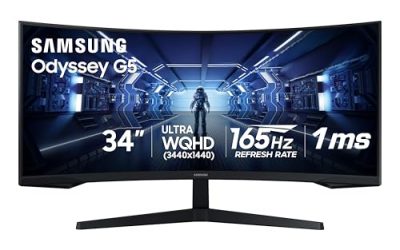
| Samsung Odyssey G5 27″ QLED | Bright-room gaming on a budget | 27-inch QHD, 165Hz, 1000R curved |
| Samsung Odyssey Neo G7 32″ QLED | 4K HDR gaming in a bright room | 32-inch 4K, 165Hz, Quantum Mini LED |
| Alienware AW3423DWF QD-OLED | Immersive ultrawide gaming | 34-inch QD-OLED, 165Hz, 0.1ms |
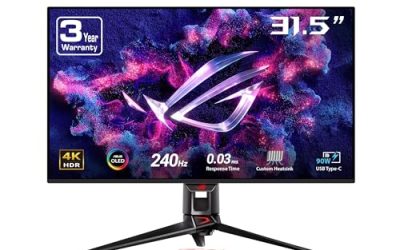
| ASUS ROG Swift OLED PG27AQDM-R | Fast competitive play in a dark room | 27-inch QHD OLED, 240Hz, 0.03ms |
How to Choose
Room light decides the panel
Start with your room, not the spec sheet, because light is the one factor no setting can fix. A bright room with windows behind or beside the desk favors QLED, since its backlight pushes through daylight and keeps colors vivid when the sun is up. A dark or dim room favors OLED, since its perfect blacks only show their full effect when ambient light is low. If you game at night with the lights off, OLED looks dramatically better; if you game at noon next to a window, QLED holds up far better.
Contrast and HDR: what your eyes actually notice
Contrast is the difference between the darkest black and the brightest white a screen can show at the same time, and it shapes how every game looks. OLED turns each pixel fully off, so night scenes, space games, and horror titles gain real depth, while QLED relies on dimming zones that can leave a faint glow around bright objects on dark backgrounds. For HDR, QLED Mini LED models reach higher peak brightness, which makes explosions and sunlight pop, while OLED delivers cleaner HDR in dark scenes with no blooming at all.
Motion speed and refresh rate
Refresh rate and pixel response decide how smooth fast movement feels, and this is where OLED pulls ahead clearly. OLED pixels switch almost instantly, so a 165Hz OLED monitor shows less smearing in shooters and racing games than a QLED panel at the same refresh rate. QLED monitors still offer high refresh rates such as 165Hz, which is plenty for most players, but their slower pixel transitions can leave faint trails behind fast-moving objects. If you play competitive shooters daily, the motion edge of OLED is hard to ignore.
Burn-in risk and daily habits
Burn-in is the one real drawback of OLED, and it comes down to how you use the screen. Static elements such as health bars, minimaps, and taskbars can leave a faint ghost image if they sit in the same place for many hours every day. QLED has no such risk, so it suits players who leave a game open all day, run the same title for months, or use the monitor for office work between sessions. Modern OLED monitors include pixel shifting and screen care features that lower the risk, but the safest habit is to vary your content and hide static desktop elements.
The 4 Best Options
Samsung Odyssey G5 27″ QLED
The Odyssey G5 is the sensible entry point into QLED gaming, offering a curved 27-inch QHD screen that feels immersive without demanding a flagship graphics card. Its 165Hz refresh rate keeps shooters and racing games smooth, while the 1000R curve pulls the edges of the screen toward you for a wrap-around feel. This is the monitor for a gamer who wants a bright, punchy screen for a sunny room and does not want to worry about burn-in during long sessions.
Specs
- 27-inch QHD display, 2560 x 1440 resolution
- 165Hz refresh rate, 1ms response time
- 1000R curved VA panel
- HDR10 support
- AMD FreeSync
- HDMI connection
Best for: Bright-room gaming on a budget with a curved, immersive screen.
Watch out for: Check that your desk has room for the curved stand, and confirm your graphics card can drive QHD at 165Hz before you buy.
Samsung Odyssey Neo G7 32″ QLED
The Neo G7 is the QLED answer to OLED contrast, using a Mini LED backlight with a large number of dimming zones to get far closer to true blacks than ordinary QLED. Its 4K resolution and 165Hz refresh rate make it a strong match for a powerful PC, and the 1000R curve wraps a large 32-inch screen around your view. This is the monitor for a gamer who wants the brightest, most dramatic HDR possible without giving up the peace of mind that comes with a panel that cannot burn in.
Specs
- 32-inch 4K UHD display, 3840 x 2160 resolution
- 165Hz refresh rate, 1ms response time
- Quantum Mini LED backlight with 1,196 dimming zones
- Quantum HDR2000
- 1000R curved panel
- NVIDIA G-Sync and AMD FreeSync Premium Pro
- 2 HDMI 2.1 ports, DisplayPort 1.4, 2 USB 3.0 ports, 3.5mm headphone jack
- Height adjustable stand
Best for: 4K HDR gaming in a bright room where maximum brightness matters most.
Watch out for: A 4K 165Hz screen needs a strong graphics card, so confirm your GPU can keep up before choosing this size and resolution.
Alienware AW3423DWF QD-OLED

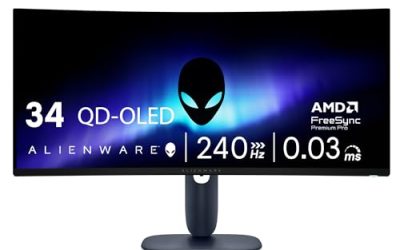
The AW3423DWF is the ultrawide OLED that makes story-driven games feel like a cinema screen, with a wide 21:9 panel that stretches your field of view in racing, role-playing, and open-world titles. Its QD-OLED panel combines the perfect blacks of OLED with quantum-dot color, so sunsets, neon cities, and dark dungeons all look rich and deep. The 165Hz refresh rate and near-instant pixel response keep motion clean, while the curved ultrawide shape pulls you into the game world.
Specs
- 34-inch QD-OLED display, 3440 x 1440 resolution
- 165Hz refresh rate, 0.1ms response time
- 21:9 ultrawide curved display
- Wide DCI-P3 color gamut
- VESA DisplayHDR True Black 400
- AMD FreeSync Premium Pro
Best for: Immersive ultrawide gaming with the deepest blacks and widest color.
Watch out for: An ultrawide 21:9 screen needs a wide desk, and some older games do not support the ultrawide aspect ratio, so check your favorite titles first.
ASUS ROG Swift OLED PG27AQDM-R

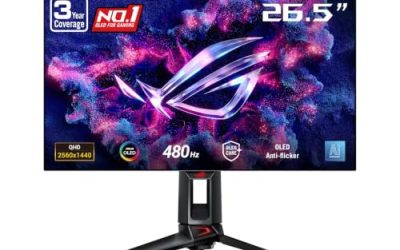
The PG27AQDM-R is the competitive gamer’s OLED, built around a 240Hz QHD panel with a 0.03ms response time that makes fast movement look almost perfectly clean. Its 26.5-inch viewable screen keeps the whole game inside your field of vision, which suits shooters where spotting an enemy a fraction of a second earlier matters. The included monitor arm frees up desk space, and the anti-glare coating keeps reflections down during long evening sessions.
Specs
- 27-inch OLED display, 26.5-inch viewable, QHD 2560 x 1440 resolution
- 240Hz refresh rate, 0.03ms response time
- G-SYNC Compatible
- Wide DCI-P3 color gamut
- True 10-bit color
- Anti-glare micro-texture coating
- Monitor arm included
- 3 year warranty
Best for: Fast competitive play in a dark room where motion clarity wins games.
Watch out for: This is a 240Hz panel, so pair it with a graphics card that can push high frame rates at QHD, and vary your content to protect the OLED panel.
Which One Fits Your Situation
You play in a bright, sunny room
Choose the Samsung Odyssey Neo G7 if your desk sits near a window and you want the brightest HDR possible, since its Mini LED backlight cuts through daylight. If you want to spend less, the Samsung Odyssey G5 gives you the same bright QLED character in a smaller curved 27-inch screen. Both shrug off sunlight and never risk burn-in, which is exactly what a bright room demands.
You play story games in a dark room
Choose the Alienware AW3423DWF, because its ultrawide QD-OLED panel turns dark scenes into true black and stretches cinematic games across your whole field of view. The wide color and clean HDR make open-world and horror titles look their best, and the 165Hz refresh rate keeps motion smooth. It is the most immersive pick in this guide.
You compete in fast shooters
Choose the ASUS ROG Swift OLED PG27AQDM-R, since its 240Hz refresh rate and 0.03ms response time give you the cleanest motion of any monitor here. The 27-inch size keeps every corner of the screen in view, and the anti-glare coating helps during long sessions. If your graphics card cannot reach high frame rates at QHD, the Alienware AW3423DWF is the next best option.
You work and game on the same screen
Choose a QLED model, either the Samsung Odyssey G5 or the Neo G7, because static taskbars and document windows pose no burn-in risk on a QLED panel. You can leave the same apps open all day, then switch to games in the evening without worrying about ghost images. Pick the G5 for a smaller desk and the Neo G7 if you want 4K sharpness for text and spreadsheets.
Common Mistakes
- Buying OLED for a sunny desk, then wondering why the screen looks dim at noon.
- Choosing a 4K 165Hz monitor without a graphics card strong enough to drive it.
- Ignoring burn-in habits on OLED, such as leaving the same game HUD on screen for hours every day.
- Picking a 32-inch or ultrawide screen for a desk that is too small, leaving no room for a keyboard and mouse.
- Focusing only on refresh rate and forgetting contrast, which shapes how every game actually looks.
Frequently Asked Questions
Is OLED better than QLED for gaming?
OLED is better for dark rooms, contrast, and motion, since each pixel lights on its own and switches almost instantly. QLED is better for bright rooms and worry-free daily use, since its backlight goes brighter and cannot burn in. Neither wins everywhere, so match the panel to your room and your habits rather than chasing one winner.
Does OLED burn-in matter for gaming monitors?
It can matter if the same static elements sit on screen for many hours every day, such as a fixed HUD, a minimap, or a taskbar. Varying your games, hiding desktop icons, and using the panel care features built into modern OLED monitors lower the risk a lot. If you play one title for months or use the screen for office work, QLED is the safer choice.
Is QLED good enough for HDR gaming?
Yes, especially Mini LED QLED models such as the Neo G7, which reach high peak brightness and use many dimming zones for strong contrast. HDR highlights such as sunlight and explosions look punchier on a bright QLED panel than on most OLED screens. OLED still wins for dark-scene HDR with zero blooming, so the best HDR choice depends on the games you play most.
Which panel type lasts longer for daily gaming?
QLED lasts longer under heavy daily use with static content, because its LCD panel has no burn-in mechanism at all. OLED can last many years too when used with varied content and sensible brightness, but a screen that shows the same HUD for eight hours a day will age faster. For mixed work and play on one screen, QLED is the longer-lived pick.