Our Short List of 3

- Tenkeyless layout with rotary knob
- QMK and VIA remapping support
- Hot-swappable K Pro Brown switches
- Wired USB-C connection

- Connectivity: Bluetooth wireless and USB-C wired
- Joysticks: TMR electromagnetic, anti-drift design
- Triggers: Hall effect, with mode switching
- Extras: two remappable back buttons, motion control

- Connectivity: Xbox Wireless and Bluetooth
- Port: USB-C for wired play
- Controls: hybrid D-pad, dedicated Share button
- Power: AA batteries or optional rechargeable pack
All 5 Picks at a Glance
| Product | Specs | Action |
|---|---|---|
| Keychron V3 |
| Check price on Amazon |
| 8BitDo Ultimate 2 Bluetooth Controller |
| Check price on Amazon |
| Xbox Wireless Controller, Carbon Black |
| Check price on Amazon |
 Logitech G502 HERO |
| Check price on Amazon |
 Samsung T9 Portable SSD 2TB |
| Check price on Amazon |
Train Mechanic Simulator 2017 is a small 2017 workshop sim from Si7 Studio, published by Atomic Jelly and PlayWay S.A., in which you inspect, repair and restore locomotives part by part. Linux players searching for it usually want one plain answer: does a native Linux version exist, and if not, what does the Windows build do under Proton?
The short version is that Steam’s record for app 538810 is Windows-only at every layer that can be checked, and the game has sat untouched on its 2017 build ever since. The longer version below walks through each layer of that record, because this is one of the rare cases where nothing on the page pretends otherwise — and where Proton’s own community record is quietly excellent.
As an Amazon Associate, we earn from qualifying purchases.
Quick answer
No. Train Mechanic Simulator 2017 has no native Linux build: Steam’s platform flags read Windows true, Mac false and Linux false, the only content depot is the Windows one, and there is no Linux requirements tab, launch entry or client icon. The practical route is the Windows build under Proton, which ProtonDB settles at Platinum across five reports. Valve has never published a Steam Deck verdict for the game.
The record, layer by layer
Start with the flags, because everything else agrees with them. The appdetails record for app 538810 lists the game as Train Mechanic Simulator 2017, developed by Si7 Studio, released 23 March 2017, and still on sale. Its platform block reads windows true, mac false, linux false. That single line already answers the native question, but the rest of the record is worth reading because it shows how complete the absence is.
The requirements fields make the same point by omission. The Windows tab is fully populated — Windows 7, a Pentium Core 2 Duo, 4 GB of RAM, a GeForce GT560, DirectX 11 and 5 GB of storage, with a note that mobile GPUs are not officially supported. The mac requirements field and the linux requirements field are both empty lists. These are absent fields, not the populated-but-empty shells seen on other records in this series: there are no Minimum or Recommended headings waiting over blank lists, just nothing at all. No Linux port was ever specced, even on paper.
SteamDB’s depot table closes the question. The record holds exactly one content depot, 538811, labelled Windows Train Mechanic Simulator 2017 Content at 1.93 GiB, and the public branch still sits on build 1731630, dated 3 April 2017 — eleven days after launch. A private baseline branch from September 2017 exists on the record but was never promoted to public. The registered library assets are clienticon, clienttga, icon, logo and logo_small. There is no LinuxClientIcon in any form, fossil or otherwise, and no Mac clienticns either, which matches the false Mac flag. SteamDB’s detected technologies are the Unity Engine and the Mono SDK, the standard plumbing for a Unity game of this era shipping one Windows executable.
Two more silences on the record are worth naming because they shape the rest of this article. The appdetails response carries no DLC array at all — the game never received add-on content on Steam, so there are no DLC flags to read and no soundtrack app that could confuse the platform picture. And the record carries no controller-support field and no controller category: its store categories are Single-player, Steam Trading Cards and Family Sharing only. Any pad use on Linux is therefore a Steam Input mapping exercise, not a feature the record promises, and the gear section below is written on exactly that basis.
The Proton route: a small, unanimous file
With no native build, the Linux question becomes a Proton question, and here the news is genuinely good — with one honest caveat about sample size. ProtonDB’s summary for app 538810 reads settled Platinum, best-reported Platinum and trending Platinum across five reports, with a confidence rating of low. Five filings is a thin file, and the article treats it as such: the signal is unanimous, but it is not a consensus built on hundreds of machines.
The report colour supports the tier. Filings span the Proton 5.13 era through a custom GE-Proton7-9 build, which tells you the game has been carried along by several Proton generations without the reports turning. One reporter notes an occasional crash when exiting the workshop and a performance drop that lingers after re-entering it, while still rating the game playable; another, on Linux Mint with an older NVIDIA driver, complains only that loading takes a long time. Nothing in the file describes a launch failure, a broken save system or a missing feature, which is what a Platinum tier on a single-player Unity title usually means in practice: the Windows executable runs, and the friction lives at the edges.
One check on that page does need correcting. ProtonDB’s game page renders in full and carries the stray “Natively Supports:” heading above its requirements block. Steam’s record contradicts that heading on every layer — flags, depots, requirements, icons — so this article follows Steam: the heading is wrong, and the Platinum tier describes the Windows build running under Proton, not a native port hiding somewhere.
Steam Deck: no verdict on file
Valve’s own compatibility endpoint returned empty responses throughout this session, so the Deck position here is read from ProtonDB’s republication of Valve’s data, and that republication shows the game’s Deck status as Unknown. In Valve’s terms that means the title has not been through the Deck review programme: there is no Verified, Playable or Unsupported rating, no test date and no tested build to compare against the current public build 1731630.
This article therefore claims no Deck verdict at all. The honest summary is narrower: the game is a mouse-driven workshop sim with no controller support on its record, its Proton file is Platinum, and Valve has simply never graded it for the handheld. Anyone determined to try it on a Deck is in mouse-and-keyboard emulation territory, and the sensible reading of an Unknown status is “untested”, not “broken” and not “approved”.
Anti-cheat and GOG: two short answers
There is no anti-cheat layer to clear. Steam’s record names no anti-cheat and carries no DRM notice, the game is single-player only, and the AreWeAntiCheatYet database — read in full at its current 1,167 entries — holds no entry for Train Mechanic Simulator 2017 in either direction. For a single-player repair sim that absence is exactly what you would expect, and it is stated here as an absence of documentation rather than a clearance, which is all the record supports.
GOG sells no edition of the game. The natural GOG product address redirects to the general games catalogue, and GOG’s catalogue records return only unrelated titles for the name. The ruling rests on the absent product page plus those records, not on search silence. Steam is the only storefront in this picture.
How to choose your setup
Because there is no Deck verdict and no controller support on the record, the natural home for this game on Linux is a desktop or laptop running the Windows build through Proton. The picks below are framed for that desk setup: a keyboard you can remap for the workshop’s many small inputs, a precise mouse for part inspection, pads only as Steam Input devices for anyone who insists, and fast portable storage for moving a small library between machines.
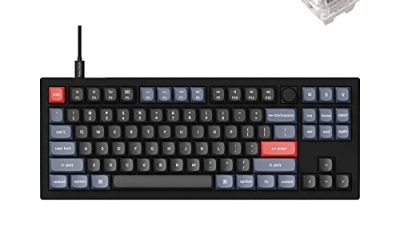
Keychron V3
- Tenkeyless layout with rotary knob
- QMK and VIA remapping support
- Hot-swappable K Pro Brown switches
- Wired USB-C connection
The keyboard pick for desktop sessions: a tenkeyless board with QMK and VIA support lets you remap keys at the keyboard level, which keeps working across every Linux install you plug it into.
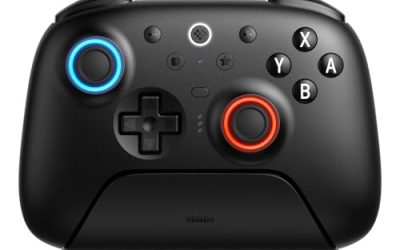
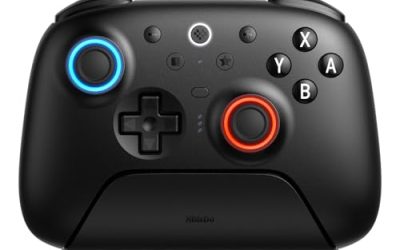
8BitDo Ultimate 2 Bluetooth Controller
- Connectivity: Bluetooth wireless and USB-C wired
- Joysticks: TMR electromagnetic, anti-drift design
- Triggers: Hall effect, with mode switching
- Extras: two remappable back buttons, motion control
Steam’s record promises no controller support for this game, so treat any pad as a Steam Input mapping project. If you still want one on the desk, this is the modern option, with back buttons you can bind to the confirm and camera inputs the workshop repeats.
Xbox Wireless Controller, Carbon Black
- Connectivity: Xbox Wireless and Bluetooth
- Port: USB-C for wired play
- Controls: hybrid D-pad, dedicated Share button
- Power: AA batteries or optional rechargeable pack
The alternative pad for Steam Input mapping: support for this controller is the most universal in PC gaming, and its glyphs are the ones most interfaces assume. It will not change the fact that the game itself was built for a mouse.
Logitech G502 HERO
- HERO optical sensor, up to 25,600 DPI
- 11 programmable buttons
- Adjustable weight system
- Wired USB connection
The control the game was actually designed around. Inspecting an engine bay is pointer work — small parts, context menus, repeated confirm and cancel clicks — and a precise wired mouse with spare buttons for those repeated inputs is the single most useful upgrade here.
Samsung T9 Portable SSD 2TB
- Capacity: 2 TB portable SSD
- Interface: USB 3.2 Gen 2×2, USB-C connector
- Maker-rated speeds: up to 2,000 MB per second read, 1,950 MB per second write
- Features: Dynamic Thermal Guard, maker-rated drop resistance
The game itself is under 2 GiB, so this pick is about the library around it: a fast USB-C drive makes moving a Linux game collection between a desktop and a laptop painless. The headline speed needs a Gen 2×2 host port; on a lesser port the drive runs at that port’s ceiling instead.
Who should skip it
Skip this one if you only buy games with a native Linux build as a matter of policy — there is none here, and the frozen 2017 record gives no reason to expect one. Skip it if you want a living game: no DLC ever arrived, the public build has not moved since April 2017, and the developer’s attention is clearly elsewhere. Skip it if you want to play on Steam Deck with an official verdict behind you, because Valve has never graded it. And skip it if the workshop loop of diagnosing and swapping parts sounds like a chore rather than the point — that loop is the entire game.
FAQ
Is Train Mechanic Simulator 2017 native on Linux?
No. Steam’s flags read Windows only, the single content depot is the Windows build, and the record holds no Linux requirements, launch entry or client icon. Linux play means the Windows build under Proton.
How well does it run under Proton?
ProtonDB settles it at Platinum — settled, best-reported and trending tiers all Platinum — across five reports at low confidence. The reported friction is minor: an occasional crash leaving the workshop in one filing and slow loading in another.
Is it Steam Deck Verified?
Valve has published no verdict. ProtonDB’s republication of Valve’s data shows the Deck status as Unknown, which means untested rather than failed. The game also has no controller support on its record, so Deck play would lean on Steam Input mouse emulation.
Can I buy it on GOG instead?
No. GOG’s catalogue holds no product for the game; the natural product address redirects to the general catalogue. The Steam version is the only edition, and on Linux it runs through Proton.
Final verdict
Train Mechanic Simulator 2017 is one of the cleanest “no” answers in this series: not native, never ported, and not pretending otherwise anywhere on its record. What saves it for Linux players is the other half of the file — a unanimous Platinum Proton record on a lightweight single-player Unity game with no anti-cheat, no DRM notice and no DLC maze to untangle. Play it at a desk, through Proton, with a mouse in hand, and the 2017 workshop sim behaves exactly as its small but consistent report file says it does.
Product and ASIN Reference
| Product | ASIN |
|---|---|
| Keychron V3 | B0B2DMMMG2 |
| 8BitDo Ultimate 2 Bluetooth Controller | B0F194QFT2 |
| Xbox Wireless Controller, Carbon Black | B08DF248LD |
| Logitech G502 HERO | B07GBZ4Q68 |
| Samsung T9 Portable SSD 2TB | B0CHFS9K14 |