Our Short List of 3

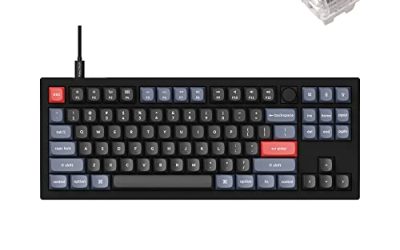
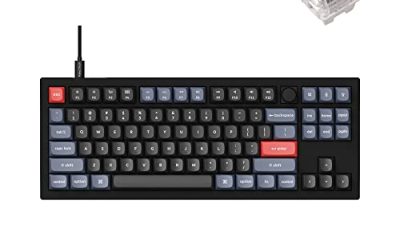
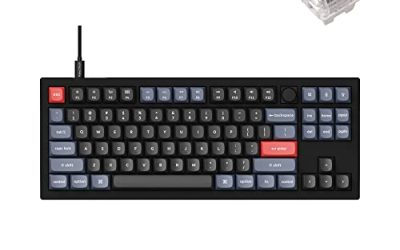
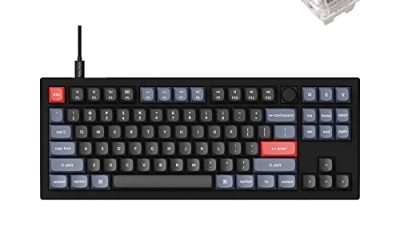
- Tenkeyless layout with rotary knob
- QMK and VIA remapping support
- Hot-swappable K Pro Brown switches
- Wired USB-C connection

- HERO optical sensor, up to 25,600 DPI
- 11 programmable buttons
- Adjustable weight system
- Wired USB connection

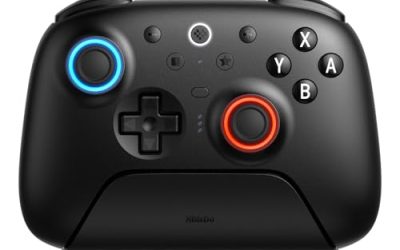
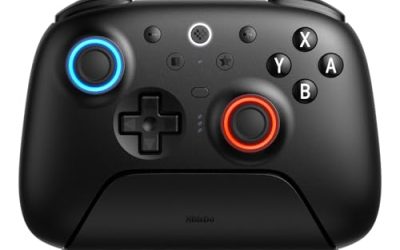
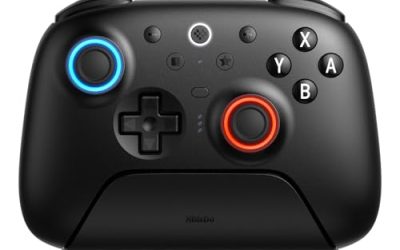
- Connectivity: Bluetooth wireless and USB-C wired
- Joysticks: TMR electromagnetic, anti-drift design
- Triggers: Hall effect, with mode switching
- Extras: two remappable back buttons, motion control
All 5 Picks at a Glance
| Product | Specs | Action |
|---|---|---|
| Keychron V3 |
| Check price on Amazon |
| Logitech G502 HERO |
| Check price on Amazon |
| 8BitDo Ultimate 2 Bluetooth Controller |
| Check price on Amazon |
 Xbox Wireless Controller, Carbon Black |
| Check price on Amazon |
 Samsung T9 Portable SSD 2TB |
| Check price on Amazon |
StarDrive 2 is a turn-based 4X strategy game from Zero Sum Games, published by Iceberg Interactive and released on 9 April 2015. Linux players asking whether it runs natively get a better answer than most games of its age give: Steam’s record carries a genuine Linux build, with its own content depot, its own launch entry and published Linux system requirements. This is not a Proton-only title wearing a penguin badge it never earned.
The honest version has a second half, though. The native build is real but frozen, and player reports on ProtonDB say it sits a version behind the Windows build and fails to recognise purchased expansions. This article works through the record layer by layer — flags, depots, launch entries, the DLC records, the ProtonDB file and the Deck paperwork — so you can pick the native route, the Proton route or neither.
As an Amazon Associate, we earn from qualifying purchases.
Quick answer
Yes. StarDrive 2 ships a real native Linux build on Steam: the record carries a dedicated Linux depot, a Linux launch entry and published Ubuntu requirements, and both expansions flag Linux too. Two caveats matter: player reports put the native build a version behind Windows and say it ignores purchased DLC, and Valve has never Deck-tested the game.
What the Steam record shows
Start with the store record itself. The platform flags on app 252450 read true for Windows, Mac and Linux alike, and the Linux requirements block is populated rather than empty: Ubuntu 12.04 in 64-bit as the minimum operating system, a 2.5 GHz quad-core class processor, 4 GB of RAM and a 1 GB GeForce GT 460 or equivalent. A record that never shipped a Linux build does not usually keep a requirements list that specific.
The depot table on SteamDB backs the flags with delivered files. Depot 252451 holds the Windows content at 3.22 GiB, depot 252453 holds the Mac build at 2.75 GiB, and depot 252454, labelled StarDrive 2 Linux, holds 3.07 GiB — a full build, not a stub or an empty placeholder.
The launch configuration completes the picture: three launch entries — SD2.exe for Windows, SD2.App for macOS, and SD2.x86_64 for Linux, a native 64-bit Linux executable Steam starts directly, with no compatibility layer in the chain. The asset list also includes a registered LinuxClientIcon. Flags, requirements, depot, launch entry and icon all point the same way, which is what a clean native record looks like.
One more date matters: the public branch was last built on 16 March 2021. The build received updates years after release, but it has not moved since — and the version drift below follows from that freeze.
The catch: a native build a step behind
A native build existing and a native build being current are different claims, and StarDrive 2 separates them. The most detailed ProtonDB report on file, from a player with 154 hours logged, states that the native version is 1.4 while the version running through Proton is 1.5h, and that the native build does not recognise purchased DLC while the Proton build sees it. That is one player’s report rather than an official changelog — but it is specific, recent and consistent with the March 2021 build freeze.
The same reports describe a second quirk affecting both builds equally: the game closes itself shortly after launch if it can reach four Unity telemetry subdomains, and blocking or redirecting those domains is the workaround reporters describe. It is reported on the Windows build too, so it is not a Linux defect — just a game tripping over its own always-online assumptions. If StarDrive 2 exits silently on you, that report file is the first place to look.
None of this overturns the native ruling: the build Steam delivers to a Linux install is a native executable with native content behind it. It does mean the native route is the older snapshot of the game, and expansion owners have a concrete reason to consider the Proton route instead.
The two expansions on Linux
The game’s store DLC array holds exactly two entries, both read individually for this article. StarDrive 2: Sector Zero (app 445690, released 8 March 2016) flags Windows, Mac and Linux all true, with a populated Linux requirements block of its own. StarDrive 2 – Shipyards Content Pack (app 494140, released 22 June 2016) reads the same way. On paper, the whole family is native.
The depot table adds one wrinkle. Sector Zero’s depot, 445690, appears in the base game’s depot list marked unused and carrying no size — its content is not delivered as a separate depot the way the base game’s three operating-system depots are. Combined with the report that the native build does not recognise purchased DLC, the fair summary is: the expansions claim Linux on every store layer, but their handling by the native build is exactly where the record and the reports stop agreeing.
Steam Deck: untested, not failed
Valve’s Deck compatibility record returns resolved category 0 with no resolved items, for both the Deck and SteamOS categories. Valve has never reviewed this game for the Deck programme, so there is no Verified, Playable or Unsupported badge to report — and this article claims none in either direction. ProtonDB’s page header agrees, listing the Deck status as Unknown.
That absence shapes the framing here. A mouse-driven 4X with small interface text and no controller support on its record was never a natural handheld candidate, so the gear section below is a desktop set, with the two gamepads framed as library gear rather than input devices this game will use.
What ProtonDB adds
ProtonDB’s summary API returns a full record: a Platinum tier, Platinum as best-reported and trending tier, across 4 reports, with confidence marked low and a score of 0.44. The low confidence is the honest part of that line — four reports is a thin file, and several describe the native build rather than a Proton run at all, which is what a native game’s ProtonDB page often looks like.
The heading check came out clean. The ProtonDB game page rendered in full, classifies the game as Native and carries the “Natively Supports” heading — and for once that heading agrees with Steam’s record instead of contradicting it. The disagreement on this page is not about whether the native build exists; it is the version-and-DLC gap covered above.
Anti-cheat is a non-issue: the game is single-player only, and the AreWeAntiCheatYet games file holds no entry for it.
Buying it outside Steam
There is no GOG edition to fall back on. The game’s natural GOG product address redirects to the general catalogue instead of resolving to a product page, GOG’s catalogue API holds no StarDrive 2 record, and GOG’s store search returns no match. Steam is the only storefront selling the game — and the only place the native Linux build exists.
Gear for a desktop 4X setup
StarDrive 2’s own record lists no controller support at all — no controller field appears on the store record — so this set leads with the keyboard and mouse the game actually uses. The two pads are library gear for the wider collection, not devices this title will read.
Keychron V3
- Tenkeyless layout with rotary knob
- QMK and VIA remapping support
- Hot-swappable K Pro Brown switches
- Wired USB-C connection
The keyboard pick for desktop sessions: a tenkeyless board with QMK and VIA support lets you remap keys at the keyboard level, which keeps working across every Linux install you plug it into.
Specs:
Logitech G502 HERO
- HERO optical sensor, up to 25,600 DPI
- 11 programmable buttons
- Adjustable weight system
- Wired USB connection
A 4X lives by its mouse: fleets, build queues and diplomacy screens are hundreds of small precise clicks, and eleven programmable buttons cover the confirm, cancel and camera inputs a long session repeats.
8BitDo Ultimate 2 Bluetooth Controller
- Connectivity: Bluetooth wireless and USB-C wired
- Joysticks: TMR electromagnetic, anti-drift design
- Triggers: Hall effect, with mode switching
- Extras: two remappable back buttons, motion control
The docked and desktop pad pick for the rest of your library: modern sticks and triggers plus back buttons, in a package that pairs cleanly with a Linux desktop for the games that do read a pad.
Specs:
Xbox Wireless Controller, Carbon Black
- Connectivity: Xbox Wireless and Bluetooth
- Port: USB-C for wired play
- Controls: hybrid D-pad, dedicated Share button
- Power: AA batteries or optional rechargeable pack
The safest guest pad in PC gaming: Steam Input support is universal and the glyphs match what most games display. StarDrive 2 will not use it, but little else in a mixed library will refuse it.
Samsung T9 Portable SSD 2TB
- Capacity: 2 TB portable SSD
- Interface: USB 3.2 Gen 2×2, USB-C connector
- Maker-rated speeds: up to 2,000 MB per second read, 1,950 MB per second write
- Features: Dynamic Thermal Guard, maker-rated drop resistance
For moving a Linux game library between machines, or keeping an offline backup of installers, a fast USB-C drive is the simple answer. The headline figure needs a Gen 2×2 host port; on a lesser port the drive runs at that ceiling instead.
How to choose
The real decision is not whether Linux is supported — it is which of the two Linux routes fits what you own. Base game only, and prefer the cleanest install? Take the native build: a real executable with real content, where the version gap matters least. Own Sector Zero or the Shipyards pack? Weigh the Proton route: the reports say the newer build version and working DLC recognition live there, at the cost of running the Windows executable through the compatibility layer. Either way, budget a few minutes for the telemetry workaround if the game exits after launch.
Who should skip
Skip the native route if the expansions are the point of your purchase and you are unwilling to experiment — the record claims Linux for them, but the only player evidence on file says the native build ignores them. Skip it on Deck expectations: Valve has never reviewed it, its record lists no controller support, and a text-heavy 4X interface is desk territory. And skip it if a frozen 2021 build bothers you on principle; the game is finished and stable in its current shape, but it is not evolving.
FAQ
Is StarDrive 2 native on Linux or does it need Proton?
It is native. Steam’s record carries a dedicated Linux depot of 3.07 GiB, a Linux launch entry running a 64-bit Linux executable, published Ubuntu requirements and a Linux client icon. Proton is an alternative route some players prefer, not a requirement.
Does the native build work with Sector Zero and the Shipyards pack?
Unclear, and the evidence leans cautious. Both expansions flag Linux true on their own records, but the most detailed ProtonDB report says the native build does not recognise purchased DLC while the Proton build does. Expect to use the Proton route.
Why does the game close itself right after launching?
Player reports attribute it to the game reaching four Unity telemetry domains and then exiting, on Windows as well as Linux. Blocking or redirecting those domains is the workaround the reports describe — a reported fix from the player file, not an official patch.
Is StarDrive 2 Steam Deck Verified?
No verdict exists. Valve’s record returns category 0 — untested — for both Deck and SteamOS, so the game carries no badge in either direction.
Final verdict
StarDrive 2 is one of the cleaner native records in this wave: flags, requirements, depot, launch entry and icon all agree, and ProtonDB’s native label agrees with them. The reservations are about currency, not existence — a build frozen in March 2021, reports of a version gap and unrecognised DLC on the native route, and a Deck programme that has never looked at the game. Buy it on Steam as a desktop 4X, pick the route by whether you own the expansions, and it remains a genuinely playable Linux title.
Product and ASIN Reference
| Product | ASIN |
|---|---|
| Keychron V3 | B0B2DMMMG2 |
| Logitech G502 HERO | B07GBZ4Q68 |
| 8BitDo Ultimate 2 Bluetooth Controller | B0F194QFT2 |
| Xbox Wireless Controller, Carbon Black | B08DF248LD |
| Samsung T9 Portable SSD 2TB | B0CHFS9K14 |