Our Short List of 3

- Tenkeyless layout with rotary knob
- QMK and VIA remapping support
- Hot-swappable K Pro Brown switches
- Wired USB-C connection

- Connectivity: Bluetooth wireless and USB-C wired
- Joysticks: TMR electromagnetic, anti-drift design
- Triggers: Hall effect, with mode switching
- Extras: two remappable back buttons, motion control

- Connectivity: Xbox Wireless and Bluetooth
- Port: USB-C for wired play
- Controls: hybrid D-pad, dedicated Share button
- Power: AA batteries or optional rechargeable pack
All 5 Picks at a Glance
| Product | Specs | Action |
|---|---|---|
| Keychron V3 |
| Check price on Amazon |
| 8BitDo Ultimate 2 Bluetooth Controller |
| Check price on Amazon |
| Xbox Wireless Controller, Carbon Black |
| Check price on Amazon |
 Logitech G502 HERO |
| Check price on Amazon |
 Samsung T9 Portable SSD 2TB |
| Check price on Amazon |
Simutrans is a free transport simulation game where players build railways, roads, canals and air routes across a living map, then watch passengers and freight flow through the network they designed. The Steam listing most players meet is “Simutrans – Pak64”, a free entry that bundles the game with its classic 64-pixel graphics set. The question this article answers is narrow and practical: does that listing run natively on Linux, or does it need Proton?
The short version is good news, with one piece of architecture to understand first. The Pak64 listing is not a standalone game: it is a free content pack for the free Simutrans engine, and the engine is what carries the Linux build. This article reads both records and rules on the whole package.
As an Amazon Associate, we earn from qualifying purchases.
Quick answer
Yes. Simutrans Pak64 runs natively on Linux. The Pak64 listing is a free content pack for the free Simutrans engine, and that engine ships a real Linux 64-bit executable depot plus a Linux libraries depot, with a Linux launch entry to match. Steam flags all three platforms, ProtonDB classifies the base game Native, and no Valve Deck verdict has been published.
Verdict table
| Question | Answer |
|---|---|
| Native Linux build? | Yes — real Linux executable and libraries depots |
| Steam flags | Windows, Mac and Linux all true |
| ProtonDB tier | Pending — 4 reports, inadequate confidence, no settled tier |
| Steam Deck verdict | None published — untested |
| GOG edition | None exists |
What the Pak64 app actually is
App 434630 is “Simutrans – Pak64”, developed and published by The Simutrans Team, released 26 May 2016. The appdetails record classifies it as type DLC, not type game. Its SteamDB entry names a DLCForAppID of 434520 and a MustOwnAppToPurchase of the same app, which is the base game “Simutrans”. In plain terms, Pak64 is a free content pack that rides on top of the free engine, and the engine is a separate free app released two days earlier, on 24 May 2016.
That split matters because the two apps carry different evidence. The Pak64 app’s own depot entry is a size-less shell labelled “Unused DLC 434630 pak64”, which decides nothing on its own. The real content lives in the base app’s depot list, where depot 434630 “pak64” holds 18.85 MiB of graphics data. The honest way to judge this listing is to read both records together, which is what this article does.
The engine is also free, so there is no purchase package to inspect for either app; both return an empty package list, the same gap shape seen in other free Steam apps. The ruling rests on the flags, the depots, the launch configuration and the family sweep, which are unanimous.
The depot list, layer by layer
The base engine’s depot list is the decisive layer, and it is unusually complete. It holds a Base Content depot of 8.74 MiB, a Windows 32-bit depot of 10.30 MiB, a Windows 64-bit depot of 11.98 MiB, a macOS depot of 24.82 MiB, and two Linux depots: a Linux 64-bit Executable depot of 8.19 MiB and a Linux 64-bit Libraries depot of 5.99 MiB. Those two Linux depots are real, sized, labelled builds — not shells, not leftovers, not paperwork for a port that never shipped.
The content sets sit alongside the engine depots: Pak64 itself is 18.85 MiB, Pak128 is 407.02 MiB and marked the default set, and Pak192.Comic is 977.43 MiB, with German, British, Japanese and HO-Scale variants in between. An Extra depot of 99.58 MiB and the Windows-only Workshop Tools depot of 17.44 MiB complete the list. The full set totals 2.38 GiB on disk, so the installer lets players pick their graphics set rather than forcing all of them.
Two details deserve a plain statement. The appdetails record carries no requirements object for either app, so there are no system requirement tabs to quote; the depots and launch configuration say what those fields cannot. And the public branch is alive: build 25759753, version 125.0, was built on 6 October 2026, with nightly and extended branches updated on 24 and 25 November 2026.
Launch config and the icon
The launch configuration for the base engine reads exactly as a native game should. It holds three default launch entries, one per platform, each running the same binary under its own path: simutrans.exe on Windows, simutrans on Linux, and the binary inside the Mac application bundle on macOS. Each carries the same logging arguments. A fourth entry launches the Workshop Uploader, a Windows-only tool tied to the Workshop Tools DLC, which is consistent with that DLC being Windows-only.
The icon set tells the same story. The base engine registers a LinuxClientIcon with a real build behind it — the Linux executable depot named above. That is the inverse of the leftover-icon trap, where an icon is registered and no build exists.
The family: seven sets, one Windows-only tool
The base engine’s DLC array holds seven apps, all read individually. Six are flagged for all three platforms: Pak64 itself, Pak192.Comic, Pak128.German, Pak128.Japan, Pak128.Britain and Pak64.German. The seventh, Workshop Tools, is Windows-only, released 4 July 2016 — the one dissent, and a narrow one: a modding upload tool, not the game. No soundtrack or art book app exists, so no all-true trap forms, and no ghost apps surfaced.
ProtonDB: two files, one thin
ProtonDB holds two different files here, and they need to be kept apart. The Pak64 app itself, 434630, has no ProtonDB record at all. Its summary endpoint returns a not-found page, and its game page renders as a bare shell with no game data, so the heading check could not be completed for that app and no tier is claimed for it.
The base engine, 434520, does have a record, and it is thin. The summary reads tier pending, best-reported tier Platinum, trending tier pending, 4 reports, inadequate confidence, with a score of 0.21. Four reports cannot settle a tier, so this article claims none. The page itself classifies the game Native and heads its requirements block “Natively Supports:”, and that heading agrees with Steam’s record at every layer. All four reports are classified Native, and one Deck filing on Proton 8.0-3 describes the game working on SteamOS.
The practical reading is simple: a native build does not need Proton, so few native players bother filing Proton reports.
Steam Deck: no verdict published
Valve has published no Deck verdict for either app. The compatibility endpoint returns an empty result set for both 434630 and 434520, and ProtonDB’s page for the base game shows Deck Verified Status Unknown. With no test on record, this article claims no verdict, and there is nothing to supplement: a retest cannot be requested for paperwork that does not exist yet. That absence shapes the gear section below, which uses the desktop set rather than the Deck set.
GOG: no edition exists
GOG sells no edition of Simutrans. The natural product address redirects to the general catalogue, the embed search returns no products, and the catalogue query returns a single product that is a different game entirely: OpenTTD, a separate transport simulation. No Dreamlist claim is asserted. Players who want Simutrans on Linux should take the free Steam build, which is the supported route.
Anti-cheat and DRM: silence
The record is silent on anti-cheat and DRM, and the silence is reported as silence. Neither app carries a DRM notice or a third-party account notice. The SteamDB detection list for the base engine names only libraries: FluidSynth, Ogg, Opus, SDL, Vorbis and ZStandard. The anti-cheat database was read in full at its new repo-root location — 1,167 entries — and holds no entry for Simutrans.
Gear for a mouse-first transport sim
Simutrans is a mouse-first game. Neither app carries a controller-support field or a controller category, and the free apps carry no package to read a gamepad flag from. Pads below are framed strictly as Steam Input translation devices for a desktop setup. The keyboard and mouse do the real work here, and the drive covers the library.
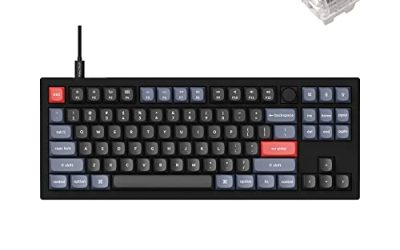
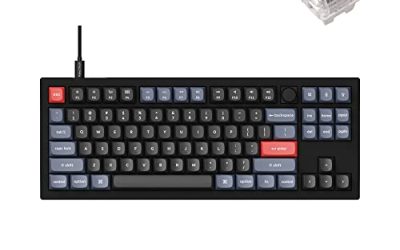
Keychron V3
- Tenkeyless layout with rotary knob
- QMK and VIA remapping support
- Hot-swappable K Pro Brown switches
- Wired USB-C connection
The keyboard pick for desktop sessions: a tenkeyless board with QMK and VIA remapping that keeps working across every Linux install.
8BitDo Ultimate 2 Bluetooth Controller
- Connectivity: Bluetooth wireless and USB-C wired
- Joysticks: TMR electromagnetic, anti-drift design
- Triggers: Hall effect, with mode switching
- Extras: two remappable back buttons, motion control
The spare pad for a second player or a relaxed session, over Bluetooth or wired.
Xbox Wireless Controller, Carbon Black
- Connectivity: Xbox Wireless and Bluetooth
- Port: USB-C for wired play
- Controls: hybrid D-pad, dedicated Share button
- Power: AA batteries or optional rechargeable pack
The safest guest pad in PC gaming: universal Steam Input support, familiar glyphs, Bluetooth or its own wireless standard.
Logitech G502 HERO
- HERO optical sensor, up to 25,600 DPI
- 11 programmable buttons
- Adjustable weight system
- Wired USB connection
The mouse pick for long building sessions: a precise wired mouse for track-laying and station placement, with eleven programmable buttons.
Samsung T9 Portable SSD 2TB
- Capacity: 2 TB portable SSD
- Interface: USB 3.2 Gen 2×2, USB-C connector
- Maker-rated speeds: up to 2,000 MB per second read, 1,950 MB per second write
- Features: Dynamic Thermal Guard, maker-rated drop resistance
For moving a Linux game library between machines, or keeping an offline backup of installers. The headline figure needs a Gen 2×2 host port; on a lesser port the drive runs at that ceiling instead.
How to choose
Pick your graphics set before anything else. Pak64 is the classic set and the one this article covers, but the depot list offers seven sets, and Pak128 is marked the default. Try Pak64 first for the traditional look, then switch sets from the in-game menu. Install only the sets you will play, since the full set totals 2.38 GiB on disk. Play on the native Linux build, not through Proton: the Linux executable depot and launch entry are the supported route. Remember the Workshop Tools limit: the upload tool is Windows-only, so publishing workshop items needs a Windows machine, while playing and subscribing work on Linux.
Who should skip
Players who want a gamepad-first experience should skip this one: there is no controller-support field on either app, and the interface is built around precise mouse placement. Players who want a published Steam Deck verdict should also wait, since Valve has tested neither app. And players who want the newest graphics should look at Pak128 rather than Pak64, the older, smaller-scale set.
FAQ
Is Simutrans Pak64 native on Linux?
Yes. The free engine ships a real Linux 64-bit executable depot and a Linux libraries depot, plus a Linux launch entry. Steam flags all three platforms, and ProtonDB classifies the base game Native.
Do I pay for Simutrans Pak64?
No. Both are free on Steam: the engine is app 434520, and Pak64 is app 434630, a free content pack for that engine.
Why does ProtonDB show no tier for Pak64?
The Pak64 app itself has no ProtonDB record. The base engine’s record reads tier pending with only 4 reports and inadequate confidence, so no settled tier can be claimed.
Is Simutrans Deck Verified?
No verdict has been published. Valve’s endpoint returns an empty result for both apps, and ProtonDB shows Deck Verified Status Unknown. One community filing describes the game working on SteamOS, but that is a single report, not a Valve verdict.
Final verdict
Simutrans Pak64 on Linux is a clean native story with a split identity. The Pak64 listing is a free content pack, and the free engine underneath ships a genuine Linux build: sized executable and libraries depots, a Linux launch entry, a registered Linux client icon with a build behind it, and all-three-platform flags. The only gaps are honest ones — no published Deck verdict, no GOG edition, and a Windows-only workshop upload tool. Install the native build, pick a graphics set, and build.
Product and ASIN Reference
| Product | ASIN |
|---|---|
| Keychron V3 | B0B2DMMMG2 |
| 8BitDo Ultimate 2 Bluetooth Controller | B0F194QFT2 |
| Xbox Wireless Controller, Carbon Black | B08DF248LD |
| Logitech G502 HERO | B07GBZ4Q68 |
| Samsung T9 Portable SSD 2TB | B0CHFS9K14 |