Updated October 2026 — Is a KOTIN PC any good? The KOTIN prebuilt gaming PC with a Ryzen 7 7800X3D and RTX 5060 Ti 8GB is a strong choice for high-refresh 1080p and solid 1440p gaming, because the 7800X3D is one of the best gaming CPUs on the AM5 platform. The trade-offs are the 8GB graphics card and a smaller brand, so no long public track record. We found no independent lab benchmark of this exact model, so this KOTIN PC review relies on the maker’s listing and hardware tier.
Top three picks by exact model name: the KOTIN Prebuilt Gaming PC with Ryzen 7 7800X3D and RTX 5060 Ti 8GB (32GB DDR5), the Skytech Gaming Shadow with Ryzen 7 7800X3D and RTX 5060 Ti 16GB, and the iBUYPOWER Y40 PRO with Ryzen 7 7800X3D and RTX 5060 Ti 8GB.
KOTIN Gaming PC Top Picks at a Glance
- Best 7800X3D value: KOTIN Prebuilt Gaming PC (32GB version) — Ryzen 7 7800X3D · RTX 5060 Ti 8GB · 32GB DDR5-6000 · 1TB PCIe 4.0 SSD
- Best for 1440p with more VRAM: Skytech Gaming Shadow — Ryzen 7 7800X3D · RTX 5060 Ti 16GB · 16GB DDR5 · 1TB Gen4 NVMe
- Best with 32GB RAM from a bigger name: iBUYPOWER Y40 PRO — Ryzen 7 7800X3D · RTX 5060 Ti 8GB · 32GB DDR5
- Best Intel option with Wi-Fi 7: MSI Codex R2 AI — Core Ultra 7 265 · RTX 5060 Ti · 32GB DDR5 · 1TB NVMe
| Model | CPU | GPU | RAM | Watch for | Price tier |
|---|---|---|---|---|---|
| KOTIN Prebuilt (7800X3D, 32GB) | Ryzen 7 7800X3D | RTX 5060 Ti 8GB | 32GB DDR5-6000 | 8GB VRAM; smaller brand | $1,500 to $2,000 |
| Skytech Gaming Shadow | Ryzen 7 7800X3D | RTX 5060 Ti 16GB | 16GB DDR5 | Only 16GB of RAM | $1,500 to $2,000 |
| iBUYPOWER Y40 PRO | Ryzen 7 7800X3D | RTX 5060 Ti 8GB | 32GB DDR5 5200MHz | Slower RAM speed | Over $2,000 |
| MSI Codex R2 AI | Core Ultra 7 265 | RTX 5060 Ti | 32GB DDR5 | Not an X3D chip | $1,500 to $2,000 |
🛒 Best Price Today on Amazon
Prime members get fast, free shipping on everything above, plus member-only deals. New members get a 30-day free trial — cancel anytime.
Top KOTIN Prebuilt Gaming PC Picks for 2026
These are the KOTIN prebuilt gaming PC listings we found, from the 7800X3D builds this review covers to other KOTIN models with different CPUs and graphics cards. Check CPU, GPU and RAM in each title, because the listings differ.
As an Amazon Associate we earn from qualifying purchases at no extra cost to you.


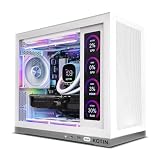


The KOTIN Prebuilt Gaming PC Desktop Computer is an interesting mid-range proposition: it pairs AMD’s gaming-focused Ryzen 7 7800X3D with the NVIDIA GeForce RTX 5060 Ti (8GB) in the $1,500 to $2,000 tier. The standout choice here is the CPU — the 7800X3D is one of the most well-regarded pure gaming chips of its generation, and seeing it at this price level is unusual. This KOTIN review walks through what that pairing actually means for gaming character, what the buyer is getting on the platform side, the build, and the value it offers against more familiar-brand rivals.

33
KOTIN Prebuilt Gaming PC Desktop Computer, Ryzen 7 7800X3D, RTX 5060 Ti 8GB, 32GB DDR5 6000MHz, 1TB PCIe 4.0 SSD, 11.3" Display, 240mm Liquid Cooler, WiFi 7, Windows 11 Home, ARGB White Tower G50W
In Stock


As an Amazon Associate we earn from qualifying purchases. Product prices and availability are accurate as of the date/time indicated.
KOTIN Prebuilt at a Glance
| Component | Specification |
|---|---|
| CPU | AMD Ryzen 7 7800X3D (8 cores, 3D V-Cache) |
| GPU | NVIDIA GeForce RTX 5060 Ti 8GB GDDR7 (Blackwell) |
| RAM | 32GB DDR5-6000 (a 16GB version also exists) |
| Storage | 1TB PCIe 4.0 NVMe SSD (per maker listings) |
| Motherboard form factor | AM5 desktop board (see listing) |
| PSU | 650W 80 Plus Gold on listings that state it |
| Cooling | 240mm liquid cooler on the white tower version |
| Case | White ARGB tower (G50W on one listing) |
| Price tier | $1,500 to $2,000 |
KOTIN Gaming PC Specs: What the Listings Confirm
KOTIN sells several near-identical configurations, and the names are long, so it is easy to compare the wrong ones. Based on the maker’s listings, the 7800X3D line shares these specs:
- AMD Ryzen 7 7800X3D with 3D V-Cache.
- NVIDIA GeForce RTX 5060 Ti with 8GB of GDDR7.
- DDR5-6000 memory in 16GB or 32GB versions.
- 1TB PCIe 4.0 NVMe SSD.
- 240mm liquid cooler on the white tower version.
- 650W 80 Plus Gold power supply on the versions that list it.
- Wi-Fi 7 and Windows 11 Home.
- A small front or top smart display that shows temperatures; listings differ on its size (11.3-inch on some, 9.16-inch on others).
KOTIN 16GB vs 32GB: which version to buy
Buy the 32GB version. Modern games and a browser plus voice chat can use 16GB quickly, and the price gap is small compared with the system price. Also check whether the 16GB version uses one stick or two, since a single stick runs in single-channel mode and lowers memory bandwidth, which matters most with the 7800X3D in some games.
Is the KOTIN PC a good brand?
KOTIN is a smaller prebuilt brand without the long public record of Dell, HP, MSI or Skytech. Its listings state US assembly and a one-year limited warranty with technical support, but we found no independent benchmark review of the 7800X3D model. Treat the specs as the maker’s claims, check the warranty terms before buying, and test the PC with a stress run during your return window.
Are there KOTIN PC reviews on Reddit?
We could not verify Reddit threads, and owner feedback on marketplaces varies. Read recent buyer feedback on the listing for your exact configuration, because KOTIN sells many models under similar names.
CPU & Gaming Performance
The Ryzen 7 7800X3D is the gaming-focused star of this build. It is an 8-core part with AMD’s 3D V-Cache technology, and within its generation it has a strong reputation as one of the best pure-gaming desktop CPUs available — the very large on-chip cache feeds frame-rate-sensitive game engines exceptionally well, and the result in CPU-limited games and high-refresh scenarios is often a clearly higher frame rate than a conventional eight-core part can deliver. Putting it in a system in the $1,500 to $2,000 tier is unusual, because the 7800X3D is normally found in more expensive enthusiast builds. The implication for the owner is real future-proofing on the CPU side: the GPU may need upgrading before the processor ever does. Eight current-generation cores also cover streaming, recording and general productivity comfortably.
GPU & Resolution Targets
The RTX 5060 Ti with 8GB of GDDR7 is a current-generation Blackwell GPU well suited to high-refresh 1080p gaming and a capable 1440p performer. With DLSS 4 and Multi Frame Generation it is a comfortable 1440p choice in many modern titles, though buyers who specifically want maximum-texture 1440p in the very heaviest 2026 games should be aware that 8GB of VRAM can be a constraint there — the 16GB version of the same card has more headroom for those edge cases. For the gaming the 5060 Ti is bought for, though — high-refresh 1080p and confident 1440p — 8GB is fine. The 7800X3D pairing is more CPU than this GPU strictly requires, which is the point: it leaves long-term headroom. For wider context see our RTX 5060 Ti guide.
RAM & Storage Loadout
The 32GB version of the KOTIN lists DDR5-6000 memory (a 16GB version also exists), which is a generous and well-judged loadout — 32GB is the comfortable amount for modern gaming, streaming and multi-tasking, and DDR5-6000 is a sensible speed for the AM5 platform. The maker listings state a 1TB PCIe 4.0 NVMe SSD, and the conventional case layout makes adding more storage straightforward later.
Build Quality & Thermals
KOTIN is a smaller-name brand than the very largest US prebuilt vendors, so the buyer is leaning more on the listing’s component specifications than on a long brand history. The listings describe a white ARGB tower (model G50W on one listing). A 7800X3D is a relatively well-behaved chip thermally for an 8-core current-generation part, and the RTX 5060 Ti is a moderate-power GPU, so the cooling burden is not extreme. Listings name a 240mm liquid cooler on the white tower version; confirm it for your configuration before ordering. As with any prebuilt from a smaller brand, treat the seller’s listing as the authoritative source for the configured components. Reading the listing carefully before ordering, and noting the exact specifications stated for the PSU, the cooler and the SSD, is the most useful single thing a buyer can do at this tier.
KOTIN 7800X3D and RTX 5060 Ti: What Frame-Rate Class to Expect
These are estimates from the hardware tier, not measurements from this KOTIN PC. The Ryzen 7 7800X3D rarely limits frame rates, so the RTX 5060 Ti 8GB sets the ceiling.
| Resolution | Settings class | Notes |
|---|---|---|
| 1080p | High to ultra, 144Hz+ in most games | Esports titles run far above 200fps; CPU strength helps most here |
| 1440p | High with DLSS 4 Quality, 60 to 120fps in demanding games | Lower texture quality in games that use more than 8GB of VRAM |
| 4K | Medium with upscaling | Not the target for this GPU |
Upgrading a KOTIN PC: What Fits and What to Check
The 7800X3D sits on the AM5 socket, so it is rarely the first part to replace. The practical upgrade is the graphics card.
- Check the power supply: a 650W 80 Plus Gold unit covers an RTX 5070, which NVIDIA lists with a 650W recommendation. An RTX 5070 Ti or larger needs a bigger supply, so budget for a new one.
- Check the case clearance: measure the card length your case can fit, since the 240mm radiator and fans sit near the front.
- Add memory in matched pairs: if you buy the 16GB version, add a matching pair instead of a single stick to keep dual-channel mode.
- Add storage: a second NVMe SSD is the cheapest upgrade for a growing game library.
Should you pick the 7800X3D or a newer X3D chip?
The Ryzen 7 9800X3D is the newer AMD gaming chip and is faster, but it costs more and appears in higher-priced KOTIN builds with an RTX 5070. For an RTX 5060 Ti class GPU, the 7800X3D is already more CPU than the card can use, so the cheaper build is the better balance.
First-day checklist for a new prebuilt
- Enable the memory profile (EXPO) in the BIOS if RAM runs below its rated speed.
- Install the latest NVIDIA driver and Windows updates.
- Check fan curves and temperatures during a long game session.
- Confirm the video cable is in the graphics card, not the motherboard.
- Keep the box and receipt until you finish your return window.
Connectivity & Upgrade Path
The KOTIN sits on AM5, which is AMD’s current desktop platform and a future-friendly position — AMD has committed to AM5 for multiple processor generations, so the CPU upgrade path is real, though here the 7800X3D is already strong enough that an upgrade is unlikely to be needed any time soon. The more probable upgrade target is the GPU, where a card swap is straightforward in a conventional tower. Display outputs from the RTX 5060 Ti cover the latest DisplayPort and HDMI standards. Confirm specifics like PSU wattage, WiFi standard and USB layout against the seller listing for your specific unit.
KOTIN PC Alternatives with the Same Class of Hardware
If you want a larger brand or more graphics memory at a similar price, these prebuilts are worth comparing. Specs come from each maker’s listing.
Skytech Gaming Shadow RTX 5060 Ti 16GB — Best for 1440p with more VRAM

Spec line: Ryzen 7 7800X3D · RTX 5060 Ti 16GB · 16GB DDR5 · 1TB Gen4 NVMe SSD
- The same Ryzen 7 7800X3D as the KOTIN.
- RTX 5060 Ti with 16GB of VRAM instead of 8GB.
- 16GB of DDR5 RAM.
- 1TB Gen4 NVMe SSD.
Pros: 16GB of VRAM gives headroom for high textures at 1440p; same gaming CPU. Cons: only 16GB of system RAM; costs more than the 8GB KOTIN builds.
Skip it if you want 32GB of RAM out of the box.
iBUYPOWER Y40 PRO 7800X3D RTX 5060 Ti — Best with 32GB RAM from an established brand

Spec line: Ryzen 7 7800X3D · RTX 5060 Ti 8GB · 32GB DDR5 RGB 5200MHz
- Ryzen 7 7800X3D and RTX 5060 Ti 8GB, matching the KOTIN’s core parts.
- 32GB of DDR5 running at 5200MHz.
- RGB memory and an established brand.
Pros: same core parts with a larger brand; 32GB included. Cons: RAM is slower than DDR5-6000; priced higher than the KOTIN.
Skip it if price is your top priority.
CyberPowerPC Gamer Master 8700F RTX 5060 Ti — Best lower-cost alternative
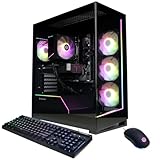
Spec line: Ryzen 7 8700F · RTX 5060 Ti 8GB · 16GB DDR5 · 1TB PCIe 4.0 SSD · Wi-Fi ready
- Ryzen 7 8700F, a good gaming CPU but not an X3D chip.
- RTX 5060 Ti 8GB, the same GPU as the KOTIN.
- 16GB DDR5 and 1TB PCIe 4.0 SSD.
Pros: usually cheaper than the 7800X3D builds; same GPU. Cons: lower CPU gaming performance; 16GB of RAM.
Skip it if you want the best CPU for high-refresh gaming.
MSI Codex R2 AI RTX 5060 Ti — Best Intel option with Wi-Fi 7
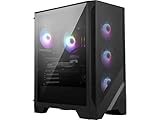
Spec line: Core Ultra 7 265 · RTX 5060 Ti · 32GB DDR5 · 1TB M.2 NVMe SSD · 80+ Gold PSU · Wi-Fi 7
- Intel Core Ultra 7 265 processor.
- RTX 5060 Ti graphics and 32GB of DDR5.
- 80 Plus Gold power supply and Wi-Fi 7.
Pros: well-known brand; 32GB of RAM; Wi-Fi 7. Cons: gaming CPU performance is below the 7800X3D in many games.
Skip it if pure gaming frame rates matter more than brand support.
Best Gaming PC with a 7800X3D by Budget Tier
Best $1,500 to $2,000
KOTIN Prebuilt Gaming PC (32GB) · Skytech Gaming Shadow. What to expect at this tier:
- Ryzen 7 7800X3D paired with an RTX 5060 Ti.
- High-refresh 1080p and strong 1440p with DLSS 4, estimated from the hardware tier.
- 1TB NVMe SSD as standard.
- Choose between 8GB of VRAM with 32GB RAM, or 16GB of VRAM with 16GB RAM.
Best under $1,500
CyberPowerPC Gamer Master 8700F. What to expect at this tier:
- A non-X3D CPU and an 8GB graphics card.
- Good 1080p gaming, careful settings at 1440p.
- 16GB of RAM that you may want to upgrade.
Best over $2,000
iBUYPOWER Y40 PRO. What to expect at this tier:
- Same core parts as cheaper builds, with a bigger brand and more RAM.
- Better value if you step up to an RTX 5070 or 5070 Ti instead.
Who It’s For
The KOTIN is for the buyer who specifically wants the 7800X3D’s gaming character at a sub-$2,000 price. If you game at high-refresh 1080p or 1440p and you recognise that the X3D family is the gaming-focused choice in the current AMD line-up, this is an unusually CPU-rich proposition for the money — and the 32GB version’s DDR5-6000 reinforces that. It is also a sensible buy for a gamer who plans to swap in a stronger GPU in a year or two, because the CPU is already future-proof. It is less suited to the buyer specifically targeting maxed 4K — for that the GPU here is undersized — or to a buyer who prefers a household-name prebuilt brand.
Verdict
In the $1,500 to $2,000 tier the KOTIN prebuilt is an unusually CPU-rich mid-range gaming PC. The 7800X3D is genuine future-proofing for the gaming character of the build, the 32GB of DDR5-6000 is generous, and the RTX 5060 Ti is well matched to high-refresh 1080p and confident 1440p. For the buyer who wants the X3D feel without paying enthusiast money, it is a thoughtfully chosen package. As ever with a smaller-brand prebuilt, confirm the storage, PSU and cooling specifics from the listing. Buyers comparing options should also look at our best prebuilt gaming PCs under $2,000 roundup.
The honest summary is that this is the kind of prebuilt where the headline-grabbing component is unusually generous for the money, and the supporting cast is correspondingly conservative. That trade-off is the right one if you specifically want the 7800X3D’s gaming character, because the CPU is the part that is most expensive to upgrade later, and getting it right at purchase is the most valuable single decision a gamer makes. A more familiar-brand alternative at the same price would almost certainly fit a more conventional non-X3D CPU.
How We Chose These Prebuilts
This guide is research-based. We compared the maker’s listings and retailer spec sheets, then read independent coverage, including editorial deal coverage and a review of another KOTIN configuration. We selected systems with an RTX 5060 Ti and compared CPU, VRAM, RAM, storage, cooling, power supply, connectivity and brand support. Where a listing did not state a part, we said to check it.
Buying a Prebuilt with an RTX 5060 Ti: Thresholds to Use
- VRAM: 8GB suits 1080p and tuned 1440p; choose the 16GB card if you want high textures and ray tracing at 1440p.
- RAM: 32GB is the safe amount; 16GB is a minimum, and confirm it is two sticks for dual-channel.
- Storage: 1TB is the minimum for a game library; look for PCIe 4.0.
- Power supply: 650W 80 Plus Gold is enough for an RTX 5060 Ti; do not accept an unnamed unit.
- Cooling: a 240mm liquid cooler or a good air cooler is enough for a 7800X3D.
- Warranty: look for at least one year and a clear support contact.
KOTIN vs Skytech vs iBUYPOWER: Which Should You Buy?
- Pick the KOTIN for a 7800X3D build with 32GB of fast DDR5-6000 in the mid-range price tier.
- Pick Skytech Gaming Shadow if you play at 1440p with high textures and want 16GB of VRAM.
- Pick the iBUYPOWER Y40 PRO if you want an established brand and 32GB of RAM.
- Pick the MSI Codex R2 AI if you want an Intel build with Wi-Fi 7 and a well-known name.
More KOTIN PC Questions
Is KOTIN PC legit?
KOTIN sells real prebuilt PCs with listed specs, a stated one-year limited warranty and US assembly, but it is a smaller brand with limited independent coverage. Check the warranty terms for your model.
Are KOTIN gaming PCs good for 1440p?
Yes. The 7800X3D with an RTX 5060 Ti handles 1440p well with DLSS, though 8GB of VRAM can limit maximum textures in the heaviest games.
Which KOTIN gaming PC is best?
The 7800X3D with RTX 5060 Ti and 32GB DDR5 is the best value KOTIN, because the CPU is the hardest part to upgrade later.
Does the KOTIN PC come with Wi-Fi?
Yes. Listings state Wi-Fi 7 and Bluetooth on the 7800X3D models.
Does the KOTIN PC have a PSU with enough power?
Yes. Listings that state it show a 650W 80 Plus Gold unit, which is enough for an RTX 5060 Ti and a 7800X3D.
What does the KOTIN smart display do?
It is a small screen on the case that shows system information such as temperatures. It does not change game performance.
Frequently Asked Questions
Is the KOTIN prebuilt good for 1440p gaming?
Yes, confidently. The RTX 5060 Ti with DLSS 4 is well suited to 1440p gaming, and the 7800X3D will not bottleneck it for a long time.
Why is the 7800X3D such a strong gaming CPU?
Its very large on-chip 3D V-Cache feeds frame-rate-sensitive game engines extremely well, which gives noticeably higher frame rates in CPU-limited and high-refresh scenarios.
Is 8GB of VRAM enough on the RTX 5060 Ti?
For high-refresh 1080p and most 1440p gaming it is fine. For maximum-texture 1440p in the heaviest 2026 titles, the 16GB version of the same card has more headroom.
Can I upgrade the KOTIN later?
Yes. AM5 is a future-friendly socket, and the tower layout makes GPU and storage upgrades straightforward — though the 7800X3D itself is likely to remain strong for years.
More Gaming PC Reviews
- Skytech Storm Review: Ryzen 5 5500 + RTX 5060 Ti Gaming PC (2026)
- Skytech Archangel Review: Intel i5-14400F + RTX 5060 Gaming PC (2026)
- Skytech Azure 3 Review: Ryzen 7 5700 + RTX 5060 Gaming PC (2026)
- Skytech Shadow 5 (AMD) Review: Ryzen 7 8700F + RTX 5060 Ti Gaming PC (2026)
- Skytech King 95 Review: Ryzen 7 7800X3D + RX 9070 XT Gaming PC (2026)
- ZOTAC MEK Gaming PC Review: RTX 5080 + Ryzen 7 9800X3D (2026)
- Thermaltake LCGS View u2770-380 Review: Core Ultra 7 270K Gaming PC (2026)
- Skytech Shadow 5 Review: Intel i7-14700F + RTX 5070 Gaming PC (2026)
Affiliate Disclosure: As an Amazon Associate, we earn from qualifying purchases. If you click a link and make a purchase, we may earn a small commission at no extra cost to you. Prices and availability are accurate as of publication and may change.