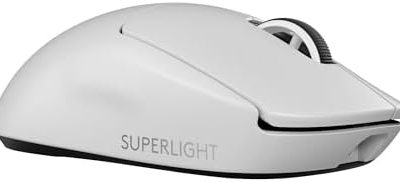
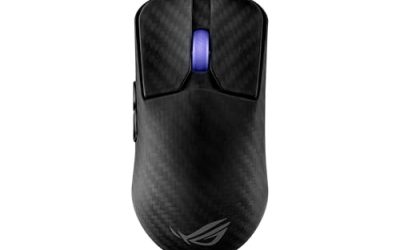
Updated November 2026 – No, higher DPI is not automatically better for gaming, and yes, 1200 DPI is a perfectly good setting for most players. If you want a mouse where DPI never gets in the way, the Logitech G Pro X Superlight 2 is a common reference point for esports-style gear.
The short version for anyone asking “is higher dpi better for gaming”: DPI only tells the sensor how many counts to report per inch of hand movement. What decides how a game feels is the combination of DPI and in-game sensitivity, plus sensor quality and polling rate. This guide explains each piece in plain English, gives the ranges that competitive players commonly use, and covers how long a gaming mouse realistically lasts.
Is Higher DPI Better for Gaming?
No. A higher DPI number makes the cursor or crosshair travel farther for the same hand movement, which is the same result you get by raising the in-game sensitivity slider. The sensor does not become more accurate just because the number is bigger. Reviewers and guides that explain the topic generally describe DPI as a speed setting rather than a quality rating.
The marketing figure on a box, which can run into the tens of thousands, is the maximum the sensor can report. Logitech lists a very high ceiling for the HERO 2 sensor in the G Pro X Superlight 2, yet nobody plays at that number. High maximums matter mainly on very large or multi-monitor desktops, where a fast cursor saves wrist movement.
There is one genuine reason to avoid very low DPI: some games and desktop uses can feel steppy when the counts per inch are tiny. There is also a reason to avoid very high DPI: tiny hand tremors become large cursor jumps. That is why most players settle in the middle.
Is 1200 DPI Good for Gaming?
Yes. 1200 DPI sits comfortably inside the range most players use, and it behaves well on 1080p and 1440p displays. Whether it feels fast or slow depends entirely on your in-game sensitivity and on how large your mouse movements are.
ProSettings.net data, as relayed by several 2026 guides, shows that the majority of Counter-Strike 2 professionals run 400 DPI, a smaller group runs 800, and a handful run 1600. Many of those players pair low DPI with a higher in-game sensitivity. 1200 DPI is less common among pros but is not a problem: it is simply the same speed as 800 DPI with a slightly lower in-game slider needed, or 400 DPI with a sensitivity three times higher.
The practical advice: if 1200 DPI feels right at a modest in-game sensitivity and your aim is consistent, keep it. If your crosshair feels twitchy, lower either number. Change one value at a time so you know what caused the difference.
DPI, Sensitivity and eDPI Explained
eDPI stands for effective DPI. You get it by multiplying the mouse DPI by the in-game sensitivity. A player on 400 DPI with sensitivity 2 has an eDPI of 800, exactly the same as a player on 800 DPI with sensitivity 1. Both turn the view the same distance for the same hand movement.
Because of this, copying a professional’s DPI alone tells you little. Copy the eDPI instead, and remember that different games scale sensitivity differently, so an eDPI from one shooter does not carry over to another. Guides that summarize pro data describe CS2 professionals as clustering around the high hundreds of eDPI, while Valorant professionals are reported to sit far lower, a few hundred. Treat these as starting points rather than rules, since the aggregators disagree slightly with each other.
Centimetres per 360 degrees
A more intuitive number is how far you must move the mouse to turn a full circle in game, often called cm/360. Many calculators convert eDPI to that distance for a specific title. Competitive aimers tend to prefer larger movements for precise tracking, while players who want quick turns on a small mousepad prefer smaller ones. Pick the distance that suits your desk space and arm movement, then work backward to DPI and sensitivity.
Quick-Reference Table
| Use case | Verdict | What to pair it with |
|---|---|---|
| Tactical shooters (CS2, Valorant) | Low to mid DPI, 400 to 1200, works well | Low in-game sensitivity, large mousepad, wrist-and-arm aiming |
| Battle royale and fast shooters | 800 to 1600 is common | Moderate sensitivity, 1000 Hz polling or higher |
| MOBA and strategy | Higher DPI is fine, since cursor speed matters more than precision | 1440p display, adjustable DPI button |
| Desktop and 4K monitors | Higher DPI saves movement | Separate desktop profile in the mouse software |
| Competitive FPS on a budget | DPI choice matters less than a reliable sensor | Any modern optical sensor from a major maker |
What Is a Good Mouse DPI for Gaming?
A good starting point for most players is 800 DPI, and anything from 400 to 1600 is mainstream. Start there, set the in-game sensitivity until the crosshair can turn a full circle in a distance your arm and mousepad can handle, and adjust slowly.
- 400 DPI: very common among CS2 professionals, pairs with a higher in-game sensitivity.
- 800 DPI: the most widely suggested default and a safe pick for beginners.
- 1200 to 1600 DPI: fine for players who like quicker cursor movement and a lower in-game slider.
- 3200 DPI and above: rarely useful for gaming; mainly for large multi-monitor desktops.
Best Mouse DPI Settings for Gaming: A Simple Process
- Set the mouse to 800 DPI in its software, and set the operating system pointer speed to the middle position with enhanced pointer precision turned off.
- In the game, set sensitivity so a full 360 degree turn takes a comfortable arm swing across your mousepad.
- Play for a few sessions without changing anything, then adjust the in-game number in small steps.
- Only change DPI if you need finer steps or the sensitivity slider has run out of range.
Consistency beats cleverness. Muscle memory builds on a stable setting, so avoid changing numbers between matches.
Polling Rate and Sensor Accuracy
Polling rate is how often the mouse reports its position to the computer, measured in Hz. It is separate from DPI. 1000 Hz is the long-standing gaming standard. Some current mice, including the G Pro X Superlight 2, list wireless polling up to 8000 Hz, according to Tom’s Hardware and spec aggregators, and Razer offers a similar high-rate feature called HyperPolling.
Guides that explain high polling note a catch: the mouse needs enough movement to fill the reports, and a high rate can load the CPU. For most players 1000 Hz is the sweet spot, and a 4000 or 8000 Hz setting is worth trying only if your system is strong and your mouse is stable at that rate.
Sensor accuracy matters more than the headline DPI. Modern flagship sensors from Logitech, Razer, Pixart and others are generally free of the old problems of smoothing and acceleration at normal DPI settings. Cheap sensors can show jitter or spin out on fast flicks, which is a better reason to buy a recognised mouse than chasing a larger number.
Best Gaming Mouse With Adjustable DPI
Nearly every mouse sold as a gaming mouse offers adjustable DPI through software, and many add an on-board button to cycle presets. When shopping, look for a mouse that stores profiles in on-board memory so settings follow you to other PCs.
Logitech G Pro X Superlight 2 – Best for esports-style wireless play
Weight about 60 g · 5 buttons · hybrid optical-mechanical switches rated for 70 million clicks · wireless polling up to 8000 Hz · USB-C charging. Tom’s Hardware reviewed it and reported a measured weight close to the maker figure. Reports note that DPI is changed through the Logitech G Hub software rather than a dedicated DPI button, though a button can be reassigned to cycle levels.
Razer Viper V3 Pro – Best for a very light symmetrical shell
Weight around 54 g according to Engadget · wireless · symmetrical shape. Razer confirms DPI adjustment through its Synapse software.
Pulsar X2 series – Best for ultra-light weight
Guides list the X2 CrazyLight at about 35 g with the included feet and the X2 V3 at about 52 g. Several guides rate Pulsar highly for light-weight choices.
What Is the Lightest Gaming Mouse?
Among mainstream options reported by guides in 2026, the Pulsar X2 CrazyLight is listed at roughly 35 g, with the Finalmouse UltralightX around 38 g and the Ninjutso Sora V2 around 39 g. Several guides say 50 to 60 g is the best balance of agility and stability, so lighter is not automatically better. Very light shells often use honeycomb or thin plastic, which some players find flexes or feels fragile.
Weight and DPI are unrelated. A lighter mouse helps with fast flicks and long sessions; it does nothing for sensitivity. If you are choosing between two mice, grip comfort and shape matter more than the last few grams.
How Long Does a Gaming Mouse Last?
A gaming mouse commonly lasts two to five years of regular use, with the main button switches usually deciding its lifespan. The numbers below come from the makers’ ratings and from reliability guides, so treat them as estimates.
| Switch type | Typical rating | What to expect |
|---|---|---|
| Mechanical Omron-style | Roughly 10 to 50 million clicks | Guides report double-click chatter often appears after one to three years of heavy use |
| Optical or hybrid optical | Often 60 to 100 million clicks | No physical contact point, so contact bounce is far less likely |
| Logitech LIGHTFORCE hybrid | 70 million clicks listed for the G Pro X Superlight 2 | Maker rating; real life depends on use |
A click rating says when a switch is expected to still register, not when it will feel perfect. The most common age-related fault is a double click, where one press registers twice. Most gaming mice carry a warranty, and the maker’s support is the first place to go if a mouse develops this fault early. Also watch for wear on the feet, a fraying cable on wired models, and battery decline on wireless ones.
Frequently Asked Questions
Is 1200 DPI too high for FPS games?
No, 1200 DPI is not too high for shooters. It simply needs a lower in-game sensitivity than 400 or 800 DPI to give the same turning distance. Judge it by eDPI and how the crosshair feels.
Does a higher DPI give an advantage in aiming?
Not by itself. A higher DPI can make quick turns easier, but it can also make fine adjustments harder. Aim improves with a stable setting you practise on rather than a bigger number.
Should I use 400 or 800 DPI?
Either works. 400 DPI is the most popular among CS2 professionals according to ProSettings.net data relayed by guides, while 800 DPI is the most common recommendation for newcomers. Match your eDPI and keep it consistent.
Does polling rate matter more than DPI?
They do different things. DPI sets how far the view moves, and polling rate sets how often the mouse reports. 1000 Hz is enough for most players, and higher rates need a capable PC.
How do I know my gaming mouse is wearing out?
The usual signs are double clicks, buttons that fail to register, a cursor that jumps, or a battery that drains quickly. If it is under warranty, contact the maker before opening or modifying it.
What is the best gaming mouse with adjustable DPI for beginners?
Any recognised gaming mouse from a major brand with a clear DPI button or software profile will do. Prioritise a comfortable shape, a reliable sensor and on-board profile memory over the maximum DPI figure.