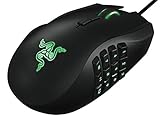
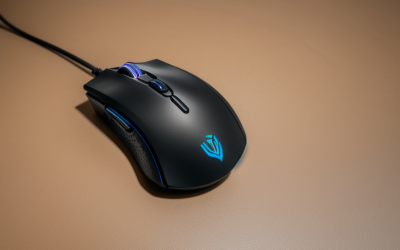
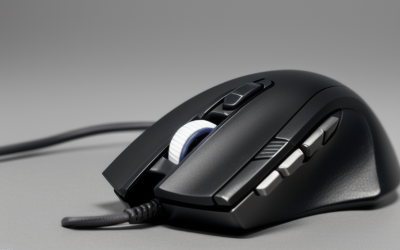
- Top Pick: Logitech G PRO X3 SUPERSTRIKE Gaming Mouse – Black | LIGHTSPEED Wireless, Programmable Buttons, Ultra-Lightweight, PC, Mac
- Best Value: Logitech G305 LIGHTSPEED Wireless Gaming Mouse, Hero 12K Sensor – Black | 12,000 DPI, lightweight, 6 programmable buttons, 250h battery life, on-board memory, PC/Mac, lightweight gaming mouse
- Premium Choice: Logitech G502 X Plus Wireless RGB Gaming Mouse – Black | Optical Switches, RGB, 13 Buttons , Infinite Scroll Toggle, <130 hr Battery, USB-C, Wireless Charging Capable, for PC/MacOS
“Premium” in the gaming mouse world rarely means a bigger DPI number. It usually points to better switches, a lower weight, longer battery endurance, wireless that behaves like a cable, or a shape built for a specific grip. If you are looking at the top tier of the category, the useful question is which of those upgrades matters for your hand and your games, because a flagship tuned for flick shots can feel wrong for an MMO player with a thumb grid. Think of the choice as picking a tool for a job, not chasing the longest spec list on the page.
This guide covers seven higher-end mice from Logitech G, Razer and ASUS ROG, spanning ultralight wireless esports shapes, a wired ergonomic all-rounder and an MMO model with a dozen side buttons. Entry-level lines were left out so the page stays on the top tier. Everything below relies on specs stated in the product titles, written for buyers deciding in 2026.
Quick Picks
As an Amazon Associate we earn from qualifying purchases at no extra cost to you.


| Product | Best for | Key spec from the title |
|---|---|---|
| Logitech G PRO X3 SUPERSTRIKE | Ultralight wireless play | LIGHTSPEED wireless, ultra-lightweight |
| Logitech G502 X Plus | Many buttons, wireless | 13 buttons, optical switches, USB-C |
| Razer Basilisk V3 | Wired ergonomic shape | 26K DPI sensor, 11 programmable buttons |
| Logitech G502 LIGHTSPEED | Tunable weight | Adjustable weights, POWERPLAY compatible |
| ASUS ROG Spatha X | MMO and MOBA | 12 programmable buttons, 168g |
| Razer Viper V3 HyperSpeed | Long battery, light weight | 82g, up to 280 hr battery |
| Logitech G PRO X2 SUPERSTRIKE | Fast actuation tuning | Rapid trigger magnetic analog switches, 61g |
How to Choose
Weight and grip come before features
Ultralight mice, such as the 61g and 82g models here, suit fast aim and long sessions because the wrist moves less mass on every flick. Heavier designs, such as the 168g ROG Spatha X, favor stability and MMO button grids, and the adjustable weights on the G502 LIGHTSPEED let you land somewhere in between. Match the shape to your grip: palm, claw or fingertip, and check whether the mouse is right-handed only. If you are unsure, measure your hand from wrist crease to middle fingertip and compare it with the dimensions on the full listing, since a title rarely states length or width.
Understand what the sensor number means
Listings quote 19K, 26K or 30K DPI, but most players use a few hundred to a couple thousand DPI. Treat these figures as a ceiling, not a quality grade: a 19K sensor and a 30K sensor can both be set to the same modest value that most players actually use. What matters more is consistent tracking at your usual sensitivity and a lift-off distance you are comfortable with. A mouse that feels smooth on a cloth pad can feel different on a hard pad, so think about the surface you already own.
Choose wired, wireless or dual-mode
Wired mice remove battery worries and tend to be the simplest to set up. Wireless models listing 2.4GHz or LIGHTSPEED connections suit clean desks, and some add dual-mode wired use so you can keep playing while the battery tops up. Battery figures in titles, such as 280 hours or 67 hours, are best-case numbers from the listing, so plan on charging more often if you use lighting, and keep a spare cable or battery within reach for tournament days.
Know where premium models still compromise
High-end mice may skip a wired option, use a proprietary dongle or have a single color and few lighting options. Replacing a lost receiver can be a hassle, so keep the original packaging. Some mice with many buttons add weight. Software is often required for deep customization, so check platform support such as PC and Mac listed in titles. If you plan to switch between a desktop and a laptop, on-board memory for profiles is a real convenience.
The 7 Best Options
Logitech G PRO X3 SUPERSTRIKE
The title for this black mouse is brief but clear: LIGHTSPEED wireless, programmable buttons and an ultra-lightweight build for PC and Mac. The name places it alongside the other SUPERSTRIKE model in this list, so it suits players who prioritize a light, simple shape and a wireless connection that does not trail a cord across the pad. Because the title is sparse, it is worth reading the full listing for the button count and battery endurance before ordering.
- LIGHTSPEED wireless for a cable-free desk
- Ultra-lightweight build suits fast aim
- Trade-off: the title gives no battery, DPI or button count
Skip it if you need a large button grid.
Logitech G502 X Plus Wireless
The G502 X Plus lists optical switches, RGB lighting, 13 buttons, an infinite scroll toggle and USB-C, with wireless charging capability. It is the high-feature option for players who bind many actions to one hand, and the listed battery figure of under 130 hours means charging is an occasional chore rather than a daily one. Cross-platform support for PC and macOS is also stated.
- 13 buttons and a scroll-mode toggle give many bindings
- Wireless charging capable with a USB-C port
- Trade-off: a feature-heavy shape tends to be bulkier than esports mice
Skip it if you want the lightest possible mouse.
Razer Basilisk V3
Razer’s wired ergonomic mouse lists Chroma RGB, a 26K DPI optical sensor, 11 programmable buttons and a HyperScroll tilt wheel. The title also advertises a fast switch, so it appeals to players who want a comfortable, contoured shape with plenty of binds and do not mind a cable. A wired link also means there is never a battery to charge before a long session.
- Ergonomic wired design avoids battery concerns
- HyperScroll tilt wheel and 11 buttons add control
- Trade-off: wired use means a cord on the desk
Skip it if you prefer a wireless setup.
Logitech G502 LIGHTSPEED Wireless
This G502 lists adjustable weights, 11 programmable buttons, RGB, on-board memory and POWERPLAY compatibility. Adjustable weights let you tune the heft to your grip, and on-board memory stores profiles on the mouse itself, which helps if you move between PCs. POWERPLAY compatibility points to a charging-mat option for those who build a wireless-only desk.
- Adjustable weights let you tune the feel
- On-board memory stores settings on the mouse
- Trade-off: weights add mass compared with ultralight shapes
Skip it if you want an ultralight shape or a modern USB-C port, since this listing does not mention one.
ASUS ROG Spatha X Wireless
Built for MMO and MOBA play, the ROG Spatha X lists 12 programmable buttons, a right-handed shape, a 168g weight, dual-mode wired and 2.4GHz connection, 19K DPI, up to 67 hours of battery and a magnetic charging dock. It is the clear specialist in this list, designed around a side panel of buttons for skill rotations and hotkeys.
- 12 side buttons suit MMO and MOBA bindings
- Dual-mode connection and a magnetic dock add flexibility
- Trade-off: 168g is heavy compared with the esports models
Skip it if you play fast shooters or are left-handed.
Razer Viper V3 HyperSpeed
Razer lists an 82g weight, a 30K DPI optical sensor, up to 280 hours of battery, second-generation mechanical switches and six programmable buttons. One AA battery is included in the box per the title. The mix of light weight and a short button list suits shooter players who want long intervals between battery changes, and it keeps the layout simple for anyone moving over from a basic office mouse.
- Up to 280 hours of listed battery life
- 82g body with a 30K DPI optical sensor
- Trade-off: it relies on an AA battery, not a built-in rechargeable cell
Skip it if you want many extra buttons or a rechargeable body.
Logitech G PRO X2 SUPERSTRIKE
The black and white G PRO X2 lists rapid trigger magnetic analog switches, adjustable click haptics, a 61g lightweight body and USB-C. Magnetic analog switches are an unusual feature on a mouse and, as listed, let you tune how the clicks respond, which is aimed at players who adjust every detail of their setup and want the click feel to match their own timing.
- Customizable magnetic analog switches
- 61g body is the lightest in the group
- Trade-off: advanced switch options mean more software settings to learn
Skip it if you want a plug-and-play feel with no tuning, or if you share the mouse with someone who dislikes software.
Which One Fits Your Situation
Fast shooters on a low-sensitivity pad
The Logitech G PRO X2 SUPERSTRIKE, at 61g, is the lightest here, while the Razer Viper V3 adds a long battery claim at 82g and a simple six-button layout. Either one suits large arm sweeps across a wide pad, and the G PRO X3 SUPERSTRIKE is a third ultralight route if you favor Logitech’s LIGHTSPEED link.
MMO or MOBA with lots of binds
The ASUS ROG Spatha X is built around 12 side buttons. The Logitech G502 X Plus is the alternative with 13 buttons and a wireless link, useful if the ROG’s 168g feels too heavy over a long raid night.
A comfortable wired mouse with no battery to manage
The Razer Basilisk V3 fits, with an ergonomic shape and a tilt wheel. It also suits office work, where scrolling through long documents is as common as gaming.
You move between PCs or play at friends’ houses
The Logitech G502 LIGHTSPEED stores profiles in on-board memory, so your bindings load the moment you plug in, and it also has adjustable weights. That combination helps at a LAN party or a friend’s desk, where you want your habits to follow you.
Common Mistakes
- Choosing by DPI number instead of shape and weight, then fighting an awkward grip for weeks
- Ignoring handedness on right-handed-only models such as the ROG Spatha X, which the title labels right-handed
- Expecting listed battery hours to match daily use with lighting on
- Buying an MMO mouse for fast shooters, where a heavy body and a side panel of keys get in the way
- Skipping software setup on advanced switch options, then wondering why the features seem missing
Related guides
- Battery Operated Smoke And Carbon Monoxide Detectors
- Combination Smoke And Carbon Monoxide Detectors
- Aio Liquid Coolers For High Performance Gaming
Frequently Asked Questions
Is a premium gaming mouse worth it?
It is if you value lower weight, better switches or longer battery life. For casual play, mainstream mice cover the basics, so decide which single upgrade you would notice every day before stepping up.
Wired or wireless for competitive play?
Modern wireless links such as LIGHTSPEED and HyperSpeed are designed for gaming, so many players go wireless. Wired still removes battery concerns. The Razer Basilisk V3 is the wired option in this list.
Does a higher DPI mean better aim?
No. DPI is a sensitivity setting, and most players run far below the maximum a title lists. Consistent tracking at your normal setting matters more than the headline number.
Are lighter mice always better?
Not always. Light mice help fast flicks, but some players prefer heavier mice for stability during slow, precise tracking. Try to match the weight to your usual game.