
First Gaming PC Beginner Guide 2026 Step-by-Step
Building or buying your first gaming PC can feel like a maze of part names, acronyms and conflicting advice. The good news is that the process is more predictable than it looks. Once you know what each component does, which decisions come first and where beginners usually waste money, the rest falls into place. This first gaming PC beginner guide walks through the steps in order: set a budget, decide what you want to play, pick a monitor, choose the core parts, then plan the build and the software. It is written for someone who has not built a PC before.
The hero listing above is a beginner-oriented gaming PC product, and the four alternatives are similar entry-level options at different price points and specifications. The listing may be a closest-match substitute rather than the exact model you searched for, so check the card for the precise configuration, included components and warranty before you buy. The steps below apply whichever system or parts you choose.


Step One: Decide What You Want to Play
Before you look at any hardware, make a short list of the games you play most. A system for esports titles such as Counter-Strike or Valorant has very different needs from one for open-world single-player games with heavy graphics. Lighter games can run well on modest hardware, while demanding titles need a stronger graphics card and more memory. The list also tells you whether high frame rates matter more to you than maximum visual detail, which shapes the entire budget.
Our best beginner gaming PC guide lists systems that suit common starting goals, and it is a useful reference before you commit to a budget.
Step Two: Set Your Budget and Choose Ready-Made or Custom
Set a total budget that includes the monitor, peripherals and the operating system if you need one. Beginners often forget these costs and then have to cut the graphics card, which is the part that matters most for gaming. A ready-made system saves time and gives you a single warranty, but you may pay for parts you would not choose. Building your own can be cheaper and more flexible, but it takes time and care. Neither route is wrong. Pick the one that matches the time and confidence you have.
If you are weighing a ready-made machine, our guide to the best budget gaming PC explains what to check on a spec sheet, and the gaming PC buying guide for 2026 covers the wider decision.
Step Three: Pick the Monitor Early
The monitor sets the performance target for the whole system. A 1080p monitor needs far less graphics power than a 1440p or 4K display, and a high refresh rate panel asks even more of the system to deliver high frame rates. Choose the resolution and refresh rate first, then size the graphics card and processor to match. Our guide to choosing a gaming monitor walks through the options.
Step Four: Choose the Core Parts
Graphics Card First
For most gaming systems, the graphics card gets the largest share of the budget. It determines the resolution and settings you can run, so it should be the first part you prioritise. A balanced build puts the GPU at the centre and then matches the processor, memory and power supply around it. Avoid spending heavily on a processor or case while leaving a weak card that limits every game you play.
Processor and Motherboard
Choose a processor that suits your games and your graphics card. A modern eight-core chip is a comfortable target for most gamers, but a six-core processor can be enough for a budget build. The motherboard must support the socket and memory type you choose. Our best gaming CPU for 2026 roundup explains which processors suit different builds.
Memory, Storage and Power
Aim for 16GB of memory as a minimum and 32GB if your budget allows, because that gives more room for modern games. A fast NVMe SSD makes the system feel responsive and shortens load times. The power supply must have enough capacity for the graphics card and a margin for spikes, and it should come from a reputable brand. Our guide to the best PSUs for gaming covers what to look for.

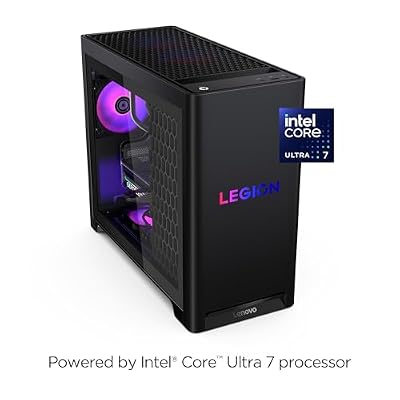
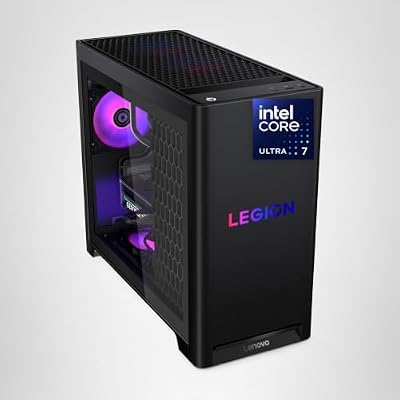
Lenovo Legion Tower 5i – AI-Powered Gaming PC - Intel® Core Ultra 7 265F Processor – NVIDIA® GeForce RTX™ 5060 Ti Graphics – 16 GB Memory – 1 TB Storage – 3 Months of PC GamePass


As an Amazon Associate we earn from qualifying purchases. Product prices and availability are accurate as of the date/time indicated.
Step Five: Plan the Build and Software
Check Compatibility Before You Buy
Compatibility mistakes are the most common reason first builds fail. Check that the processor fits the motherboard socket, that the memory type matches the board, that the graphics card fits the case and that the power supply has the right connectors. Write the list down and tick each item off before you click buy. Our step-by-step build guide explains the assembly order.
Windows, Drivers and First Boot
Install Windows on a clean drive, then update the motherboard BIOS if the board recommends it. Install the graphics driver from the GPU maker, and then the chipset and motherboard drivers. Run a few games and watch the temperatures and frame rates. If you need help with the operating system, our Windows 11 install guide for gaming PCs covers the steps.
Common Beginner Mistakes
Overspending on the Wrong Part
A premium case or a flagship processor will not make up for a weak graphics card. Put the money where your games need it most, and avoid paying for features you will not use in the first year.
Forgetting the Monitor and Peripherals
A powerful PC on an old monitor can look worse than a mid-range system on a good display. Budget for a decent monitor, keyboard and mouse, because those affect how the system feels every day.
Ignoring Upgrade Paths
Choose a motherboard and case that leave room for a better graphics card or more memory later. A small amount of foresight can save a full rebuild in two or three years.
Comparing Starter Options
The table below lists the hero system and four alternatives by the role they play for a beginner. It does not state exact prices, because they change often and vary between sellers. Confirm the graphics card, memory, storage, warranty and current price on the live listing before you order.
| Option | Starter role | Best for | Spec to confirm | Price |
|---|---|---|---|---|
| Hero listing | Primary pick for the query | First 1080p and 1440p gaming | GPU model and memory size | Check current price |
| Alternative 1 | Entry system | Esports and lighter titles | Memory and SSD capacity | Check current price |
| Alternative 2 | Balanced system | Mainstream AAA gaming | Power supply and warranty | Check current price |
| Alternative 3 | Upgrade-ready system | Players planning a GPU upgrade | Motherboard upgrade path | Check current price |
| Alternative 4 | Compact system | Small desks and living rooms | Cooling and GPU clearance | Check current price |

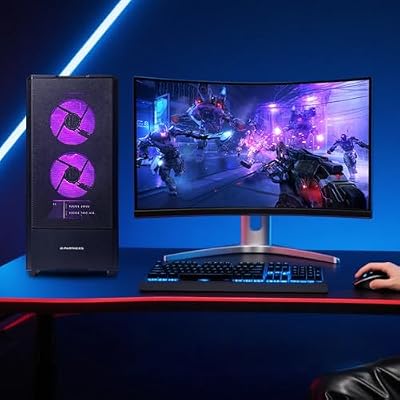
ZYNEEX Prebuilt Gaming Desktop PC, AMD Ryzen 5 5500, GeForce RTX 3050 6GB,16GB DDR4 3200MHz RAM, 1TB NVMe SSD, ARGB Air Cooling, Wi-Fi,Tower Computer for Gaming, Streaming, Editing




As an Amazon Associate we earn from qualifying purchases. Product prices and availability are accurate as of the date/time indicated.
Our Ranked Recommendation
For a first gaming PC, the ranked order is practical. First, a ready-made or custom system with a balanced graphics card, at least 16GB of memory and a fast SSD, from a seller with a clear warranty. Second, a custom build if you are comfortable with assembly and want better value. Third, a budget system for lighter games and esports titles, with a plan to upgrade the GPU later. Fourth, a more powerful system only if your monitor and game list will use it. The hero listing and the balanced alternatives suit the first choice. For a full shortlist, see our complete gaming PC buying guide.
Frequently Asked Questions
How much should I spend on a first gaming PC?
The right amount depends on the games you play and the resolution you target. Set a total budget that includes the monitor and peripherals, then allocate most of the spend to the graphics card and processor.
Is a pre-built gaming PC a good choice for beginners?
It can be. Pre-built systems save time and come with a single warranty. Check the specification sheet for the graphics card, memory, storage and power supply, because the parts matter more than the case.
Do I need 32GB of RAM for my first build?
Not always. Sixteen gigabytes can run many games, but 32GB gives more headroom for modern titles and background apps. If your budget is tight, plan to upgrade the memory later.
Can I build a gaming PC without experience?
Yes, many beginners do. Follow a step-by-step guide, check compatibility before buying, and take your time with the cable routing and first boot. Watch the process carefully and keep the manuals handy.


