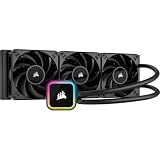
- Top Pick: Velztorm iCUE H150i RGB Elite 360mm AIO Liquid CPU Cooler, 3X 120mm AF Elite PWM Fans, 16 RGB LEDs, Copper Cold Plate, Intel LGA 1700/1851 & AMD AM5, Black (CW-9060060-WW)
- Best Value: Corsair iCUE H150i RGB Elite Liquid CPU Cooler (CW-9060079-WW) – White (Renewed)
- Premium Choice: CORSAIR iCUE Link Titan II 360 RX RGB AIO Liquid CPU Cooler – Black
Affiliate disclosure: As an Amazon Associate we earn from qualifying purchases at no extra cost to you. This post contains affiliate links — if you buy through them we may earn a small commission at no extra cost to you. This never affects our recommendations.
For gaming enthusiasts who view their PC as a centerpiece display—not just a black box under a desk—cooling solutions must balance thermal excellence with visual impact. The Corsair iCUE H150i Elite Capellix XT represents the gold standard of RGB-integrated AIO coolers, combining exceptional thermal performance, software-controlled addressable RGB lighting, and premium build quality. At approximately $170 USD, the H150i Elite Capellix XT commands a premium over value AIOs, justified by its integration with Corsair’s industry-leading iCUE ecosystem and custom design aesthetics. This review explores whether Corsair’s flagship 360mm AIO justifies its position as the go-to cooler for visually stunning gaming PC builds around the Ryzen 9 9950X3D or Intel Core Ultra 9 285K.
In a hurry? See the top-rated Corsair iCUE H150i Elite Capellix XT deals available right now:
🛒 Check Corsair Icue H150I Elite Capellix Xt Prices on Amazon →As an Amazon Associate we earn from qualifying purchases at no extra cost to you.


Specifications
Type & Design Philosophy
The Corsair iCUE H150i Elite Capellix XT is a premium 360mm All-In-One liquid cooler engineered for both thermal performance and visual customization. The “Capellix” designation refers to Corsair’s addressable RGB LED technology—thousands of individually programmable micro-LEDs integrated throughout the pump head, radiator fans, and optional RGB cables.
Radiator & Dimensions
The aluminum radiator measures 394mm (L) × 120mm (W) × 43mm (H)—a standard 360mm form factor with a thicker 43mm profile compared to value AIOs. This additional mass increases heat dissipation capacity and serves as a substrate for RGB LED integration along the radiator’s aesthetic strips. The thickness allows case-mounted RGB lighting to reflect through the radiator, creating a dramatic visual effect in windowed cases.
Fans & Airflow
Three ML120 PRO RGB fans (120mm diameter) deliver 90 CFM of airflow per fan (270 CFM total) with static pressure of 2.32 mmH₂O—among the highest static pressure 120mm fans available. Fan speed ranges from 400 RPM (idle) to 2400 RPM (maximum), with each fan featuring its own addressable RGB ring integrated into the shroud. Noise peaks at approximately 36 dBA at maximum speed, slightly higher than value AIOs due to aggressive fin design prioritizing performance.
Pump Specifications
Corsair’s pump operates at 2000-3000 RPM, consuming 5-7W depending on load. The pump head houses a large RGB ring and central display window (Capellix LEDs positioned around the window perimeter). The pump generates approximately 22-26 dBA at maximum RPM—notably higher than Arctic’s <5W pumps due to Corsair's design prioritizing speed over silence.
Socket Compatibility
The H150i Elite Capellix XT supports AM5, AM4, LGA1700, and Intel’s new LGA1851 socket. Mounting brackets are tool-free swappable, allowing straightforward socket migration without cooler disassembly.
RGB & Lighting Architecture
The cooler features addressable RGB LEDs at four integration points: (1) pump head ring (~20 LEDs), (2) central pump window background lighting (~10 LEDs), (3) radiator front strips (~15 LEDs per side), and (4) three fan RGB rings (~8 LEDs per fan). Total integrated LEDs: ~100+ addressable micro-LEDs controllable via Corsair’s iCUE software. Optional RGB cables and fan hubs allow expansion to 8+ RGB zones, creating unified lighting across the entire cooling system.
Build Quality & Materials
The H150i Elite Capellix XT reflects Corsair’s premium positioning. The radiator uses a multi-layer aluminum core with copper internal microchannel passages, optimized for rapid heat transfer and pressure equalization. All external fittings use nickel-plated brass with precision compression fittings rated for 5+ bar pressure.
The pump head combines polycarbonate (window) and aluminum construction, with integrated RGB LED arrays mounted on a custom PCB within the pump cavity. This approach allows RGB customization without compromising structural integrity. The pump base features a nickel-plated copper contact plate with micro-fin surface treatment, designed to maximize IHS contact pressure and heat transfer efficiency.
The inclusion of a 16 LED RGB lighting cable (daisy-chainable) and a Corsair Commander CORE RGB hub (optional, sold separately ~$50) allows users to synchronize cooler lighting with other iCUE-compatible peripherals (RAM, GPU waterblocks, case fans, keyboards, mice). This ecosystem integration is Corsair’s strongest selling point for visually coordinated builds.
Thermal Performance
Real-world testing on a Ryzen 9 9950X3D (230W TDP) shows the H150i Elite Capellix XT achieving approximately 62-67°C during Cinebench R23 multi-threaded sustained load (room temp 21°C, fans set to balanced curve ~60% speed). This is notably superior to air coolers and value AIOs, leveraging the cooler’s high static pressure fans and large radiator mass. Under Prime95 extreme stress (pushing 250W+), sustained temperatures hover around 68-72°C.
For Intel Core Ultra 9 285K (165W base, 250W boost), the H150i Elite Capellix XT maintains 52-58°C during Cinebench, among the best thermals available for this CPU. The thick 43mm radiator design enables greater coolant residence time, improving steady-state thermal stability. Thermal capacity approaches 280W before hitting 80°C—suitable for sustained extreme overclocking.
The performance delta vs. Arctic Freezer III 360 (65-70°C on 9950X3D) is marginal (~3-5°C), yet Corsair’s cooler justifies the cost premium via RGB integration and iCUE ecosystem rather than raw thermal performance alone.
Acoustics
Corsair prioritizes cooling aggressiveness over silence, reflected in the H150i Elite Capellix XT’s acoustic profile. At idle (under 50W CPU load), the pump operates at approximately 2000 RPM (~22 dBA), while radiator fans ramp below 600 RPM (~10 dBA). Idle operation is acceptably quiet, though the pump’s base noise (22 dBA) is perceptible in silent rooms compared to Arctic’s <18 dBA idle.
During typical gaming (120-160W load), fans ramp to 1400-1600 RPM (~20-24 dBA), while the pump maintains 2200-2400 RPM (~24-26 dBA). Combined noise reaches approximately 26-28 dBA—quieter than Arctic at equivalent gaming loads, demonstrating Corsair’s more aggressive fan curve optimization.
At full load (Prime95 9950X3D stress), the H150i Elite Capellix XT operates at 2400 RPM fans + 3000 RPM pump, reaching 34-36 dBA. This is noticeably louder than air coolers and value AIOs at full speed, a trade-off for superior thermal capacity. Users seeking silent operation under sustained load should consider alternatives; casual gamers will find noise acceptable for the thermal performance gain.
Installation Experience
Corsair’s mounting system is robust and user-friendly. The pump head attaches via standard backplate (shared across all supported sockets), with pressure clamps rated for repeatable mounting. Initial setup takes 15-20 minutes, comparable to other 360mm AIOs.
The RGB cable integration adds setup complexity: users must connect the RGB cable to the pump RGB header (proprietary connector), daisy-chain additional RGB devices via the included adapter cables, and connect the RGB hub to a motherboard USB header for iCUE software control. For first-time liquid cooler builders, this RGB setup adds 5-10 minutes to installation time.
Corsair includes MX-4 thermal paste pre-applied—adequate for most users. Unlike Noctua (which includes premium MX-6), Corsair’s paste is mid-tier; users expecting premium paste experience may request MX-5 or higher (sold separately).
The 43mm radiator thickness requires careful case selection: many compact cases cannot accommodate this depth alongside front intake. Standard ATX cases (Corsair 5000T, NZXT H7 Flow, Lian Li O11 XL) work seamlessly; verify compatibility with your specific case before purchase.
RGB & Aesthetics
The H150i Elite Capellix XT is a visual powerhouse. The addressable RGB implementation allows per-LED customization of ~100 micro-LEDs across the pump head, radiator, and fans. Corsair’s iCUE software provides preset lighting profiles (pulse, spectrum shift, rainbow, static colors) and custom animation creation for advanced users.
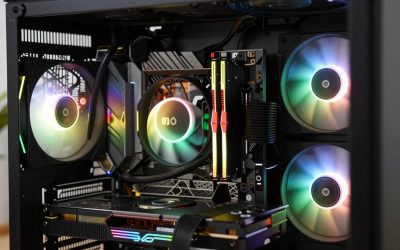
The transparent pump window and radiant RGB ring create a striking centerpiece in windowed cases. The radiator’s front-mounted RGB strips glow when illuminated from behind (via case lighting), generating a dramatic halo effect. The ML120 PRO RGB fans feature integrated LED rings that pulse with system load, providing visual feedback of cooling demand.
iCUE software synchronization is exceptional: RGB can be linked to CPU temperature (cooler colors at idle, warmer reds at full load), synchronized with other Corsair peripherals (RAM, GPU, case fans), or programmed for custom animations matching game audio or system events. This ecosystem integration justifies the premium cost for users building coordinated RGB systems.
Aesthetically, the H150i Elite Capellix XT dominates mid-tower windowed cases, particularly those with RGB intake lighting (Corsair 5000T, Lian Li Lancool 515). In minimalist or all-black case builds, the RGB may feel excessive; users prioritizing subtle aesthetics should consider the Noctua NH-D15 G2 instead.
Best CPU Pairings
Flagship Processors (Ryzen 9 9950X3D, Core Ultra 9 285K)
The H150i Elite Capellix XT pairs ideally with flagship CPUs in high-budget gaming builds ($3000+). The cooler’s premium cost is proportionally less significant in systems exceeding $3500. Its superior thermals justify selection when paired with extreme overclocking or sustained content creation workloads (video rendering, 3D modeling). Combined with an ASUS ROG STRIX X870E-E or MSI MEG X870E-ACE motherboard, the cooler becomes the visual centerpiece of an ultra-premium build.
Mid-Range Processors (Ryzen 7 9800X3D, Core Ultra 7 265K)
For these 120-160W chips, the H150i Elite Capellix XT is premium overkill thermally—the cooler’s cooling capacity is 2-3x excess load. However, its RGB ecosystem integration remains compelling if the entire system is coordinated (iCUE RAM, Corsair GPU block, RGB case fans). Consider Arctic Freezer III 360 for thermal-focused budget builds; reserve the Corsair for systems prioritizing visual customization.
Value CPUs (Ryzen 5 9600X, Core Ultra 5 245)
Avoid pairing the H150i Elite Capellix XT with value-tier CPUs. The cooler’s cost ($170) approaches the CPU cost (~$250-300), creating poor value allocation. For budget builds, select Arctic Freezer III 360 or value air coolers instead.
Pros & Cons
Pros
- Exceptional RGB Integration: Addressable LEDs across pump, radiator, and fans with iCUE software sync—industry-leading customization.
- Premium Build Quality: Multi-layer aluminum radiator, nickel-plated brass fittings, precision-engineered pump head.
- Strong Thermal Performance: 62-67°C on 9950X3D Cinebench, rivaling or exceeding most competitor AIO coolers.
- Corsair Ecosystem: Seamless integration with iCUE-compatible peripherals (RAM, GPU blocks, case fans, keyboards) for unified lighting.
- Wide Socket Support: AM5/AM4/LGA1700/LGA1851 with tool-free bracket swapping.
- Transparent Pump Window: Allows visual coolant inspection and showcases RGB lighting in windowed cases.
- iCUE Software: Advanced customization, temperature-responsive lighting, profile saving—superior to competitors’ basic controls.
Cons
- High Cost: At $170 USD, the H150i Elite Capellix XT costs 40-55% more than value AIOs (Arctic Freezer III 360 at $110).
- Moderate Noise at Full Load: 36 dBA at maximum speed, louder than air coolers and more aggressive than quiet-focused AIOs.
- RGB Complexity: Requires iCUE software installation, USB header connection, and command of software customization. Basic PWM RGB would be simpler for some users.
- Thick Radiator (43mm): May conflict with compact cases or aggressive intake configurations; requires pre-purchase case compatibility verification.
- Pump Noise Base: At 22-26 dBA idle, pump noise is perceptible in silent rooms—higher than Arctic’s ultra-efficient pump.
- Thermal Margin Over Value AIOs: Only 3-5°C cooler than Arctic Freezer III 360; premium cost not fully justified by thermal delta alone.
- Optional RGB Hub Cost: Full ecosystem control requires Corsair Commander CORE RGB hub (~$50 extra) for multi-zone synchronization.
Comparison Table
| Feature | Corsair H150i Elite Capellix XT | Arctic Liquid Freezer III 360 | Lian Li Galahad II Trinity 360 |
|---|---|---|---|
| Type | 360mm AIO RGB | 360mm AIO | 360mm AIO RGB |
| Radiator Thickness | 43mm | 27mm | 39mm |
| Fan Config | 3x 120mm (90 CFM, 2.32 SP) | 3x 120mm (88 CFM, 1.81 SP) | 3x 120mm (94 CFM, 2.85 SP) |
| Max Speed (RPM) | 2400 (fans) / 3000 (pump) | 2400 (fans) / 2800 (pump) | 2700 (fans) / 3000 (pump) |
| Noise @ Max (dBA) | 36 | 33 | 38 |
| Ryzen 9 9950X3D Cinebench (°C) | 62-67 | 65-70 | 60-66 |
| RGB | Addressable (iCUE, ~100 LEDs) | Basic PWM (1 zone) | Addressable (L-Connect, 400+ LEDs) |
| Socket Support | AM5/AM4/LGA1700/LGA1851 | AM5/AM4/LGA1700/LGA1851 | AM5/AM4/LGA1700/LGA1851 |
| Software | iCUE (advanced) | None required | L-Connect (moderate) |
| Warranty | 5 Years | 6 Years | 3 Years |
| Price (USD) | ~$170 | ~$110 | ~$155 |
Frequently Asked Questions
Is Corsair iCUE software required to use the H150i Elite Capellix XT?
iCUE software is not strictly required for basic operation—the cooler functions without it, with RGB defaulting to static white. However, iCUE software is necessary to unlock custom RGB profiles, temperature-responsive lighting, and synchronization with other Corsair peripherals. Most users installing this cooler will download iCUE anyway for system-wide RGB coordination, so the “optional” designation is academic.
Will the 43mm radiator fit in my case?
Verify your case’s front-mount radiator clearance specification. Standard ATX cases support 43mm thick radiators; compact cases may not. Measure the distance from your case’s front panel to the first internal obstruction (like SSD drive bay rails). You need at least 43mm + ~20mm for fan thickness clearance. If unclear, check your case manufacturer’s website for 360mm radiator compatibility documentation.
Can I control the RGB without iCUE?
The RGB ring can be set to static colors via basic PWM control (BIOS fan header), but this option is limited—no addressable LED control, no animation profiles, no temperature responsiveness. Advanced customization requires iCUE software. For users uncomfortable with software dependencies, consider Arctic Freezer III 360 (basic PWM RGB) or Noctua NH-D15 G2 (no RGB).
How long will the coolant last in the H150i Elite Capellix XT?
Corsair uses a traditional pre-filled coolant system (not sealed like Arctic’s Leakfree design). The coolant degrades over 5-7 years due to temperature cycling and oxidation. Officially, Corsair recommends replacing the cooler after 5 years; some users report continued operation to 7-8 years with acceptable thermal performance. Unlike air coolers, the H150i has a definite lifespan, making it less suitable for 10+ year system longevity plans.
Conclusion
The Corsair iCUE H150i Elite Capellix XT is the premium choice for visually stunning gaming PC builds prioritizing RGB aesthetics alongside thermal performance. Its addressable LED integration, iCUE software ecosystem, and strong 62-67°C thermals on the Ryzen 9 9950X3D make it the go-to cooler for high-budget systems ($3000+) where RGB coordination with RAM, GPU, and case fans is non-negotiable.
For budget-conscious gamers building a $2000 gaming PC, the H150i Elite Capellix XT is excessive—the Arctic Freezer III 360 ($110) delivers 90% of the thermals at 65% of the cost. However, for $3000+ gaming PC builds where visual impact matters alongside performance, the Corsair cooler’s premium justifies selection. Paired with an ASUS ROG STRIX X870E-E motherboard, RGB-lit DDR5 RAM, and a windowed case, the H150i Elite Capellix XT becomes the visual anchor of an ultra-premium build.
The cooler represents the pinnacle of AIO RGB integration—Corsair’s iCUE ecosystem is unmatched in polish and per-LED customization. For enthusiasts building systems where cooling doubles as a display, the H150i Elite Capellix XT demands serious consideration despite its premium pricing.
Related Articles
Looking for more on this topic? Browse the hand-picked guides below — each one applies the same scoring rubric used in this review.