

🛒 Best Price Today on Amazon
Prime members get fast, free shipping on everything above, plus member-only deals. New members get a 30-day free trial — cancel anytime.
- Top Thermal Paste Developers Picks for 2026
- Best Thermal Paste for Developers at a Glance
- 1. ARCTIC MX-4 (4 g) – Premium Performance Thermal Paste for All Processors
- 2. ARCTIC MX-4 (incl. Spatula, 4 g) – Premium Performance Thermal Paste
- 3. Thermal Grizzly Kryonaut – 1 Gram – Extremely High Performance Thermal Paste
- 4. Noctua NT-H1 3.5g, Pro-Grade Thermal Compound Paste
- 5. Arctic Silver 5 AS5-3.5G Thermal Paste
- 6. Corsair TM30 Performance Thermal Paste, Ultra-Low Thermal Impedance
- How to Choose Thermal Paste as a Developer
- Frequently Asked Questions
- Related Guides
- Related Articles
- Related Guides
Top Thermal Paste Developers Picks for 2026
Here are our current top thermal paste developers picks, compared on real Amazon owner reviews, price, and features. Live prices update below.
As an Amazon Associate we earn from qualifying purchases at no extra cost to you.


If you write code for a living, your machine spends its days compiling, running test suites, spinning up containers and crunching long background jobs — work that keeps the CPU busy and warm for hours at a stretch. Good thermal paste is the quiet, unglamorous part of that setup: a thin layer between the CPU and its cooler that moves heat away so the chip can sustain its clocks without throttling. For a developer the priority is not record-breaking numbers but reliability, easy application and a compound that holds up over years of constant use. This guide rounds up the best thermal paste for developers in 2026, focused on dependable, low-drama compounds.
We will be honest up front: at this level, paste is largely paste. The differences between a good non-conductive compound and a ‘premium’ one are small and rarely matter for a workstation that is not being pushed to extreme overclocks. So our picks were chosen on what genuinely helps a developer — ease of application, electrical safety (non-conductive is the sensible default), proven long-term stability, and value — rather than on marketing claims. Prices run from around $5 to around $8. Below is an at-a-glance comparison of all six, then a closer look at each and a buyer’s guide built around the things that actually matter when you reseat a cooler once and want to forget about it for years.
Best Thermal Paste for Developers at a Glance
| Thermal Paste | Best For | Standout Spec | Approx Price |
|---|---|---|---|
| ARCTIC MX-4 (4 g) | Easy reliable everyday default | Non-conductive, no cure time | around $5 |
| ARCTIC MX-4 with Spatula (4 g) | First-timers spreading evenly | Includes spatula applicator | around $5 |
| Thermal Grizzly Kryonaut (1 g) | Peak headroom on hot chips | High-performance compound | around $8 |
| Noctua NT-H1 (3.5 g) | Set-and-forget workstation | Pro-grade, very forgiving | around $8 |
| Arctic Silver 5 (3.5 g) | Large generous tube value | Classic high-capacity tube | around $7 |
| Corsair TM30 Performance | Budget non-conductive pick | Ultra-low thermal impedance | around $7 |
1. ARCTIC MX-4 (4 g) – Premium Performance Thermal Paste for All Processors

ARCTIC MX-4 (4 g) - Premium Performance Thermal Paste for All Processors




As an Amazon Associate we earn from qualifying purchases. Product prices and availability are accurate as of the date/time indicated.
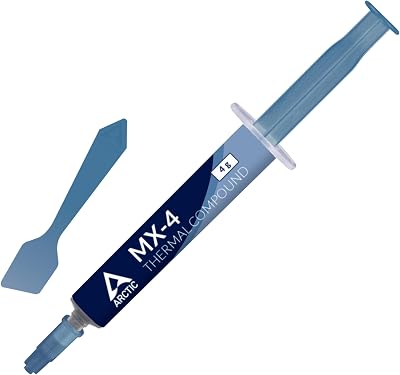
The ARCTIC MX-4 is the easy, reliable everyday default for a developer’s workstation, and for most people it is the only paste they ever need. It is a non-conductive, metal-free compound, so a stray smear near the socket will not short anything, and it requires no cure-in time — it performs at its best the moment you power on. At around $5 for a 4 g tube, it is excellent value for a build machine.
For coding work this is exactly the right intent: it is forgiving to apply, stable for years of constant compiling and test runs, and electrically safe for nervous first-timers. We will be candid — it is not a magic cooling upgrade, because at this level paste is paste, and the gap between MX-4 and anything pricier is small on a workstation that is not chasing extreme overclocks. What MX-4 buys you is peace of mind: apply it once, and forget about it. That fuss-free reliability is precisely what a developer wants.
Pros: Non-conductive and safe, no cure time, very reliable, generous 4 g tube, great value.
Cons: Performance edge over rivals is marginal; honestly, it is just dependable paste.
2. ARCTIC MX-4 (incl. Spatula, 4 g) – Premium Performance Thermal Paste


As an Amazon Associate we earn from qualifying purchases. Product prices and availability are accurate as of the date/time indicated.
This is the same trusted ARCTIC MX-4 compound, bundled with a small spatula applicator — and for a developer doing their first cooler install, that little tool is the whole point. The spatula lets you spread an even, controlled layer rather than relying on the dot-and-press method, which takes some of the guesswork out of a first build or reseat. At around $5 it costs the same as the plain tube, so the extra tool is essentially free.
The intent here is removing friction for first-timers and the methodical. If you would rather lay down a thin, deliberate layer across the heat spreader — useful on the larger lids of modern desktop CPUs — the included spatula makes that easy and clean. Everything good about standard MX-4 still applies: non-conductive, no cure time, years of stable service. To be honest the spatula changes nothing about cooling performance; it simply makes the one-time job of applying the paste tidier and less intimidating, which is worth having.

Pros: Same reliable MX-4 plus a spatula for even spreading, non-conductive, no cure time.
Cons: Spatula aids application only, not cooling; the compound itself is identical to the plain tube.
3. Thermal Grizzly Kryonaut – 1 Gram – Extremely High Performance Thermal Paste

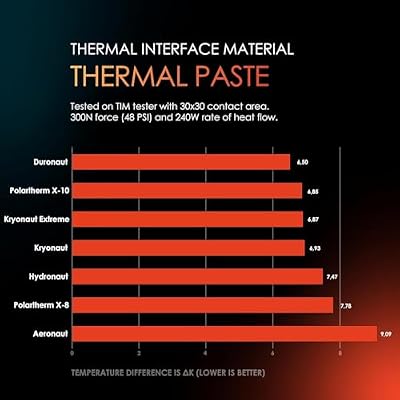
Thermal Grizzly Kryonaut - 1 Gram Thermal Paste Extremely High Performance | Thermal Compound for Demanding Applications and Overclocking - Thermal Paste for CPU/GPU/PS4/PS5/Xbox




As an Amazon Associate we earn from qualifying purchases. Product prices and availability are accurate as of the date/time indicated.
The Thermal Grizzly Kryonaut is the pick for the developer running a hot, high-core-count chip that genuinely sustains heavy all-core loads — think a workstation that compiles large projects or runs long parallel jobs for hours. It is a well-regarded high-performance compound that holds up under sustained heat, and is non-conductive for safe application. At around $8 for 1 g it is the priciest per-gram option here.
The intent is squeezing out a little extra thermal headroom when your cooler and chip are working hard for long stretches. In all honesty, the real-world advantage over MX-4 on a typical developer rig is small — paste is paste at the margins — but if you are pushing a beefy CPU and want every degree of consistency, Kryonaut is a respected choice with a strong reputation among enthusiasts. Just note the 1 g tube is sized for one or two applications, so it is better suited to a single careful install than to a lab full of machines.
Pros: Strong high-load performance, non-conductive, respected enthusiast reputation.
Cons: Highest price per gram; tiny 1 g tube; real-world gain over cheaper paste is modest.
4. Noctua NT-H1 3.5g, Pro-Grade Thermal Compound Paste

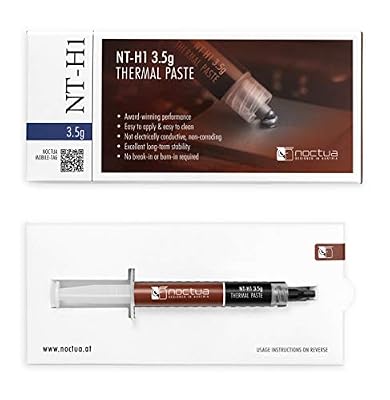
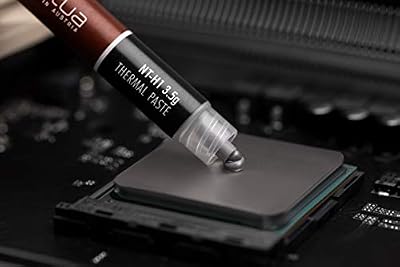
Noctua NT-H1 3.5g, High-Performance Thermal Paste | High-Performance, Easy to Apply and Clean, Good Long-term Stability, for 3-20 Applications


As an Amazon Associate we earn from qualifying purchases. Product prices and availability are accurate as of the date/time indicated.
The Noctua NT-H1 is the set-and-forget workstation pick — a pro-grade compound from a brand legendary for cooling, with a reputation for being extremely forgiving and stable. It is non-conductive and famously easy to apply, and it holds its performance for years without needing a reseat, which is exactly what you want on a machine that simply has to keep working. At around $8 for a generous 3.5 g tube, it is strong value for the quality.
For a developer the appeal is longevity and reliability over flash. NT-H1 does not demand a perfect application to perform well, it will not dry out or pump out quickly, and the larger tube covers several builds or future reseats. Honestly, like every paste here, the cooling numbers are close to its rivals — the reason to pick NT-H1 is the trust that comes with the Noctua name and a compound that just does its job, year after year, with no drama. For a workstation you want to install once and ignore, it is an ideal choice.

Pros: Pro-grade reliability, very forgiving to apply, long-lasting, generous 3.5 g tube.
Cons: Performance is on par with cheaper pastes, not ahead; you pay a little for the Noctua name.
5. Arctic Silver 5 AS5-3.5G Thermal Paste

Arctic Silver 5 AS5-3.5G Thermal Paste,Black, Grey | NBR Material, 12mm Inner Diameter, 2mm Thickness, Spare Gasket


As an Amazon Associate we earn from qualifying purchases. Product prices and availability are accurate as of the date/time indicated.
The Arctic Silver 5 is the large-tube value pick and a longtime classic that many builders grew up with. It is a high-capacity 3.5 g tube, making it a sensible buy if you maintain more than one machine or expect to reseat coolers down the line. At around $7 it offers plenty of compound for the money.
The intent here is value through volume for someone who applies paste more than once. There is one important caveat to be honest about: Arctic Silver 5 is a silver-based compound and is very slightly capacitive, so unlike the fully non-conductive pastes on this list it pays to keep it strictly on the CPU lid and away from surrounding pins and components. Apply it carefully and it is a proven, long-serving paste with a big tube; just be a touch more cautious during application than you would be with the metal-free options like MX-4 or NT-H1.
Pros: Large 3.5 g tube, proven classic compound, good value for multiple applications.
Cons: Slightly capacitive (silver-based) so apply carefully; not as foolproof as non-conductive pastes.
6. Corsair TM30 Performance Thermal Paste, Ultra-Low Thermal Impedance

Corsair TM30 Performance Thermal Paste | Ultra-Low Thermal Impedance CPU/GPU | 3 Grams|w/applicator, Silver for Desktop


As an Amazon Associate we earn from qualifying purchases. Product prices and availability are accurate as of the date/time indicated.
Rounding out the list is the Corsair TM30, the budget non-conductive pick. It is marketed for ultra-low thermal impedance and is electrically safe to apply, covering both CPU and GPU jobs in a single tube. At around $7 it is an affordable, no-nonsense compound from a familiar PC-hardware brand, and a fine choice for a straightforward workstation reseat.
The intent is simple, safe, dependable application without overthinking it. The TM30 is non-conductive, so it is forgiving of a slightly imperfect spread, and it performs perfectly well for the constant, moderate-to-heavy loads a developer’s machine sees day to day. In keeping with the theme of this guide, we will be honest: it cools about the same as the others here, because at this tier paste really is paste. Pick the TM30 if you want a safe, reasonably priced compound from a brand you recognise and do not want to fuss over which exotic formula tops a chart by a fraction of a degree.
Pros: Non-conductive and safe, ultra-low impedance marketing, works on CPU and GPU, fair price.
Cons: Cooling is comparable to rivals, not superior; it is a solid, unremarkable everyday paste.
How to Choose Thermal Paste as a Developer
The single most useful piece of advice is also the most honest one: for a developer’s workstation, almost any reputable thermal paste is good enough, because the real-world differences between quality compounds are small and rarely show up outside extreme overclocking. Your CPU spends its day compiling and running jobs, not chasing benchmark records, so do not agonise over which tube tops a chart by a fraction of a degree. Pick a trusted compound, apply it well, and move on — the cooler and case airflow matter far more than the paste.
Electrical safety should be your default priority. Non-conductive, metal-free pastes like the ARCTIC MX-4, Noctua NT-H1 and Corsair TM30 will not short anything if a little squeezes out near the socket, which makes them ideal for first-timers and for anyone who would rather not worry. Silver-based compounds such as Arctic Silver 5 are very slightly capacitive and need a steadier hand and tidier application. If you are at all unsure, choose a non-conductive paste and remove the stress from the job entirely.
Application and tube size are the practical decisions. A pea-sized dot in the centre, then letting cooler pressure spread it, works reliably for most chips; if you prefer control, the MX-4 spatula bundle lets you lay down an even layer by hand, which some find easier on the larger lids of modern desktop CPUs. Match the tube to your needs too: a 1 g tube like the Kryonaut suits a single install, while a 3.5 g or 4 g tube like the NT-H1, Arctic Silver 5 or MX-4 covers several builds or future reseats — handy if you maintain a small home lab.
Finally, prioritise longevity over headline performance, because a developer’s machine has to keep running for years. A compound that stays stable and resists drying or pump-out — qualities the MX-4 and NT-H1 are known for — means you install it once and forget about it, which is exactly what you want from infrastructure you depend on daily. Set a small budget, choose a non-conductive paste from a brand you trust, apply a thin even layer, and pick the tube on this list that fits how often you build. That is genuinely all there is to it.
Frequently Asked Questions
Does expensive thermal paste actually make my workstation faster?
Not in any way you will notice. For a developer’s machine, the differences between quality pastes are small and only show up under extreme overclocking, not during everyday compiling and test runs. We are being honest: paste is largely paste at this level. A reliable non-conductive compound like the ARCTIC MX-4, applied well, performs as well as you need — spend your attention on the cooler and case airflow instead.
Should I use non-conductive thermal paste?
For most people, yes — it is the safe default. Non-conductive, metal-free pastes like the MX-4, Noctua NT-H1 and Corsair TM30 will not short components if a little escapes near the socket, which is reassuring for first-timers. Silver-based compounds such as Arctic Silver 5 are slightly capacitive and need a more careful application, so choose non-conductive if you want to remove the worry entirely.
How often should I reapply thermal paste on a machine I use daily?
Far less often than people think. A quality compound like NT-H1 or MX-4 stays stable for many years, so a workstation that simply runs builds and jobs rarely needs a reseat unless you remove the cooler or notice temperatures creeping up over a long time. Install it once with a good paste and you can largely forget about it.
How much thermal paste do I need for one build?
Only a small amount — a pea-sized dot in the centre of the CPU is plenty for a single application. That means a 1 g tube like the Kryonaut covers one or two installs, while a 3.5 g or 4 g tube such as the NT-H1, Arctic Silver 5 or MX-4 lasts for several builds. If you maintain more than one machine, the larger tubes are the better value.
Related Guides
- Best CPU Coolers
- Best CPUs for Beginners
- Best AIO Liquid Coolers
- Best PC Cases for Airflow
- Best Case Fans
- Best Budget Gaming Setup
Affiliate Disclosure: As an Amazon Associate, we earn from qualifying purchases. If you click a link and make a purchase, we may earn a small commission at no extra cost to you. Prices and availability are accurate as of publication and may change.










