

- Top Pick: Cooler Master MasterBox Q300L Micro-ATX Tower with Magnetic Design Dust Filter & Thermaltake Smart 600W ATX 12V V2.3/EPS 12V 80 Plus Certified Active PFC Power Supply PS-SPD-0600NPCWUS-W
- Best Value: Cooler Master Q300L V1 Micro-ATX PC Case, High Airflow, Transparent Panel
- Premium Choice: Cooler Master Q300L V3 Micro-ATX PC Case, High Airflow, Tempered Glass
The Cooler Master MasterBox Q300L is a compact Micro-ATX chassis that has earned a long-standing reputation as one of the most sensible budget cases on the market. Priced at around $40, it supports Micro-ATX and Mini-ITX motherboards, uses edge-to-edge ventilation panels for airflow and fits a transparent acrylic side panel to show off the build. With more than 13,900 buyer reviews, it remains a default suggestion for new builders.
- Cooler Master MasterBox Q300L at a Glance
- Design and Aesthetics
- Build Quality and Materials
- Airflow and Cooling Layout
- Component Compatibility and Cable Management
- Who Is the Cooler Master MasterBox Q300L For?
- Pros and Cons
- Is the Cooler Master MasterBox Q300L Worth It?
- Frequently Asked Questions
- More PC Case Reviews
- Related Articles
- Related Articles
- Related Guides

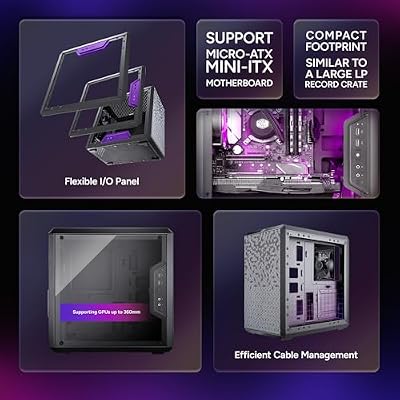
Cooler Master Q300L V1 Micro-ATX PC Case, High Airflow, Transparent Panel | 360mm Graphics Card Support, 240mm AIO Support, Micro-ATX Motherboard, Magnetic Dust Filters, Modular I/O Panel







As an Amazon Associate we earn from qualifying purchases. Product prices and availability are accurate as of the date/time indicated.
🛒 Best Price Today on Amazon
Prime members get fast, free shipping on everything above, plus member-only deals. New members get a 30-day free trial — cancel anytime.
As an Amazon Associate we earn from qualifying purchases.



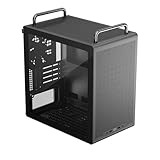


Cooler Master MasterBox Q300L at a Glance
| Component | Specification |
|---|---|
| Form factor | Compact Micro-ATX |
| Motherboard support | Micro-ATX, Mini-ITX |
| Dimensions | Compact mATX cube-style footprint |
| Side panel | Transparent acrylic |
| GPU clearance | Suitable for most mainstream graphics cards |
| Cooler clearance | Suitable for mainstream air coolers |
| Pre-installed fans | 1x 120mm |
| Front I/O | USB and audio (standard mATX layout) |
| Price | Around $40 |
Design and Aesthetics
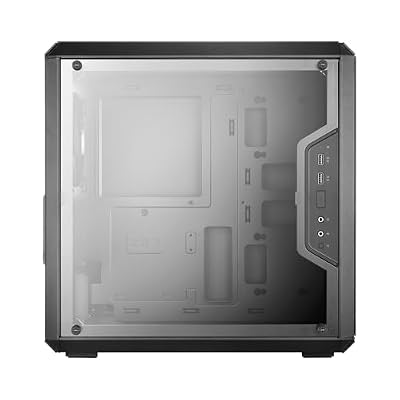
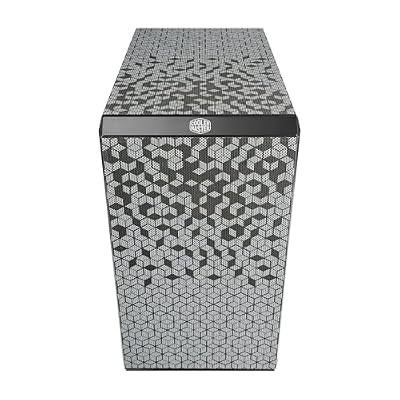
The MasterBox Q300L wears a deliberately simple, cubic Micro-ATX silhouette that has aged remarkably well. Cooler Master gives the chassis a clean front face with edge-to-edge perforation and a transparent acrylic side panel that turns the interior into the centrepiece. Nothing about the case shouts for attention, which is precisely why it has held its place in the budget mATX segment for so many years. It is a tidy, well-proportioned little box.
The acrylic side window keeps cost down while still allowing the build to be seen, and the I/O panel sits where the motherboard placement makes most sense. The overall impression is of restraint rather than flash. For builders who want a compact case that looks reasonable on a desk without resorting to RGB lighting or aggressive styling, the Q300L is a calm, understated choice that lets the components inside do the talking.
Build Quality and Materials
Cooler Master uses a steel-and-plastic construction for the Q300L that, while plainly built to a budget, feels reassuringly solid for the asking price. The chassis is rigid, the panel screws thread correctly, and the magnetic dust filters that Cooler Master fits around the case are unusually generous for a chassis costing around $40. That detail alone marks it out from many of its budget rivals, where filters are an afterthought.
The acrylic side panel is the obvious cost-cutting measure compared with tempered glass, and over time acrylic can attract small scratches if handled carelessly. In daily use that is rarely a problem, and the trade-off is sensible at this price. Overall the Q300L feels like a budget case engineered by people who took it seriously rather than a corner-cut afterthought, which is why it still has a place in 2026.
Airflow and Cooling Layout
Airflow is the Q300L’s headline trick. Cooler Master perforates the front, top and bottom panels edge-to-edge, meaning intake and exhaust paths can be configured almost anywhere the builder wants. A single 120mm fan is pre-installed, which is the bare minimum and certainly not enough for an enthusiast build, but the chassis is ready to accept additional fans for a properly ventilated configuration. Modular fan brackets allow flexible placement.
The flexibility is the appeal. Builders can mount fans on the front, top or bottom to suit the components fitted, and the magnetic dust filters make cleaning a quick job. Anyone planning a mid-range build should budget for at least a couple of extra 120mm fans, but the chassis is fundamentally an airflow-friendly design rather than a sealed enclosure, which matters more than the included fan count.
Component Compatibility and Cable Management
For a compact Micro-ATX chassis, the Q300L is impressively flexible. It accepts Micro-ATX and Mini-ITX motherboards, and the layout allows for a generous range of mainstream graphics cards and tower air coolers. PSU placement and drive trays are conventional, which makes the case easy to plan a build around. It is not a case for ultra-high-end hardware, but for the mid-range component classes it targets, compatibility is rarely a problem.
Cable management is functional rather than indulgent. There is room behind the motherboard tray to route the main cables, and the side panel closes comfortably even with a slightly untidy run, which is more than can be said for some cramped budget chassis. Builders willing to spend a little extra time can produce a clean interior; those who do not mind a few visible cables behind the acrylic window will still end up with a tidy result.
Who Is the Cooler Master MasterBox Q300L For?
The Q300L is for first-time builders, students and budget-conscious upgraders who want a compact case from a well-known brand without paying a premium. It suits Micro-ATX and Mini-ITX builds for general computing, light productivity and mid-range gaming, and the airflow-friendly layout means it can host a sensible Ryzen or Intel build without thermal complaint. At around $40 it is one of the easiest cases in the segment to recommend.
It is not the case for an enthusiast aiming at high-end thermals, a panoramic showcase or premium tempered glass. Those buyers should look further up the range. But for the very large group of builders whose priority is a solid, no-nonsense compact chassis with good ventilation, the Q300L is a sensible default — and the 13,900-plus buyer reviews suggest the market agrees.
Pros and Cons
Pros: Very affordable at around $40; airflow-friendly edge-to-edge perforation; magnetic dust filters; transparent side panel; supports both Micro-ATX and Mini-ITX motherboards.
Cons: Acrylic side panel rather than tempered glass; only one pre-installed fan; budget-grade build, not aimed at high-end thermals.
Is the Cooler Master MasterBox Q300L Worth It?
At around $40, the Cooler Master MasterBox Q300L is one of the easiest budget recommendations in the Micro-ATX segment. It is not glamorous, and an enthusiast will outgrow it quickly, but for the new builder, the office upgrader or the family second machine, it delivers airflow, decent build quality and brand support at a price that frees up money for components that matter more. It is a calm, sensible, long-running budget pick.
Buyers wanting more glass, a larger interior or stronger cooling support will find better options higher up the range, but they will spend at least twice as much. For the builder whose priority is value and competent fundamentals, the Q300L still earns a recommendation in 2026.
Frequently Asked Questions
Is a Micro-ATX case good for gaming?
Yes — Micro-ATX cases fit most gaming components, including full-size GPUs and 240–280mm radiators, while taking up less desk space than a mid-tower. Just check GPU and cooler clearance on the spec sheet, as smaller cases have tighter limits.
Does the Cooler Master MasterBox Q300L support full ATX motherboards?
No. The Q300L is a Micro-ATX chassis and supports Micro-ATX and Mini-ITX motherboards only. Builders wanting full ATX should look at a mid-tower chassis instead.
How many fans come pre-installed with the Q300L?
One 120mm fan is pre-installed. Most builders add at least one or two more to take advantage of the case’s airflow-friendly layout.
Is the side panel tempered glass?
No. The Q300L uses a transparent acrylic side panel rather than tempered glass, which keeps the price low while still showing off the build inside.
Is the Cooler Master MasterBox Q300L a good first build case?
Yes. It is one of the most widely recommended budget Micro-ATX cases for first-time builders, with more than 13,900 buyer reviews supporting its reputation.
More PC Case Reviews
- ASUS A31 ATX Mid-Tower Case Review (BTF Hidden Connectors)
- MONTECH XR-B ATX Mid-Tower Case Review
- NZXT H5 Flow 2026 Compact ATX Case Review
- NZXT H6 Flow Dual-Chamber ATX Case Review (White)
- Corsair 4000D RS ARGB Frame Modular ATX Case Review
- Corsair Frame 4500X RS ARGB Panoramic Case Review
- Lian Li O11 Vision Compact ATX Case Review
- Lian Li O11D MINI V2 Flow ATX Case Review
Affiliate Disclosure: As an Amazon Associate, we earn from qualifying purchases. If you click a link and make a purchase, we may earn a small commission at no extra cost to you. Prices and availability are accurate as of publication and may change.
Related Articles
Looking for more on this topic? Browse the hand-picked guides below — each one applies the same scoring rubric used in this review.










