

- Top Pick: Cooler Master Hyper 212 Black CPU Air Cooler, 4 Heat Pipes, PWM Fan
- Best Value: Cooler Master Hyper 212 Black CPU Air Cooler – Aluminium Finish, 4 Compact Continuous Direct Contact Heat Pipes, SickleFlow 120 Edge Fan, LGA1700 & AM5 Brackets – Black
- Premium Choice: Cooler Master Hyper 212 Halo ARGB CPU Air Cooler – 120mm High Performance PWM Fan, 4 Copper Heat Pipes, Sleek Design Top Cover, Low Noise & Easy Installation, AMD AM5/AM4 & Intel LGA 1851/1700, Black
The Cooler Master Hyper 212 Black is the modern iteration of one of the most recognised CPU coolers ever made. With over 8,100 buyer reviews accumulated across its lifetime the Hyper 212 line has defined what a budget air cooler should look like for more than a decade. The Black version updates the classic formula with a sleek matte-black finish, four copper direct-contact heat pipes and a single 120mm PWM fan, around $26. This Cooler Master Hyper 212 Black review covers form factor, thermal performance, compatibility and value.
- Cooler Master Hyper 212 Black at a Glance
- Form Factor and Cooling Type
- Thermal Performance and Fan Setup
- Compatibility: Socket, RAM Clearance, Case Fit
- Build Quality, Acoustics and RGB
- Who Is the Hyper 212 Black For?
- Pros and Cons
- Is the Hyper 212 Black Worth It?
- Bottom Line
- Frequently Asked Questions
- More CPU Cooler Reviews
- Related Articles
- Related Articles
- Related Guides

Cooler Master Hyper 212 Black CPU Air Cooler, 4 Heat Pipes, PWM Fan | AMD AM5/AM4 & Intel LGA1851/1700 Support Cooler, Quiet Cooling,120mm PWM Fan, 152mm, Easy Installation








As an Amazon Associate we earn from qualifying purchases. Product prices and availability are accurate as of the date/time indicated.
🛒 Best Price Today on Amazon
Prime members get fast, free shipping on everything above, plus member-only deals. New members get a 30-day free trial — cancel anytime.
As an Amazon Associate we earn from qualifying purchases.


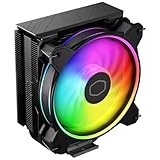

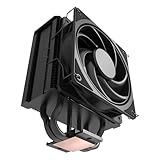


Cooler Master Hyper 212 Black at a Glance
| Component | Specification |
|---|---|
| Type | Single-tower air cooler |
| Form factor | Single heatsink with front-mounted fan |
| Fan size / count | 1x 120mm PWM fan (SickleFlow) |
| Heat pipes / radiator | 4 copper direct-contact heat pipes |
| RAM clearance / height | Approx. 152mm tall, low-profile fan placement aids RAM clearance |
| Socket support | Intel LGA1700/1200/115x; AMD AM4 (AM5 with bracket) |
| RGB | None (matte-black non-RGB finish) |
| Noise / Pump (if AIO) | PWM-controlled, quiet at idle and under light load |
| Price | Around $26 |
Form Factor and Cooling Type
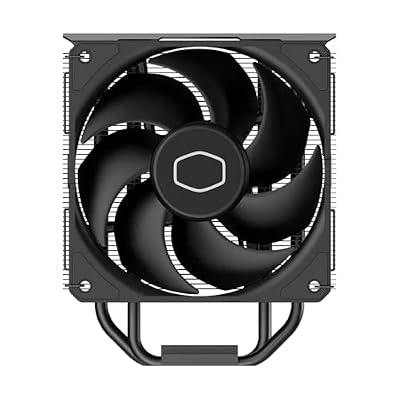
The Hyper 212 Black is a single-tower air cooler — a single rectangular heatsink stack with one 120mm fan on the front. Single-tower designs are smaller, lighter and easier to fit than dual-tower coolers, and they are the sensible choice for compact builds or for buyers who want a clear sightline across the motherboard for RAM access and visual clarity. The trade-off compared with a dual-tower design is raw cooling capacity: a single tower will not match the thermal headroom of a 2x heatsink design under extreme sustained load, but for mid-range CPUs it is more than sufficient. As an air cooler there is no pump to fail and no liquid to manage, which makes the Hyper 212 a low-risk long-term cooling choice. See our Intel Core Ultra build guide for matching platform context.
Thermal Performance and Fan Setup
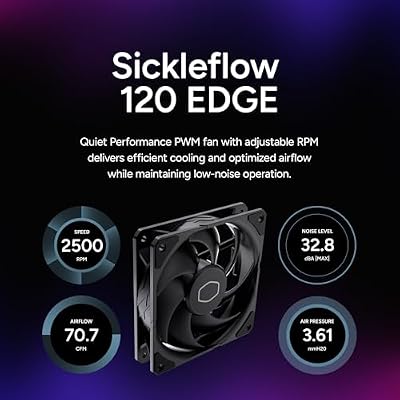
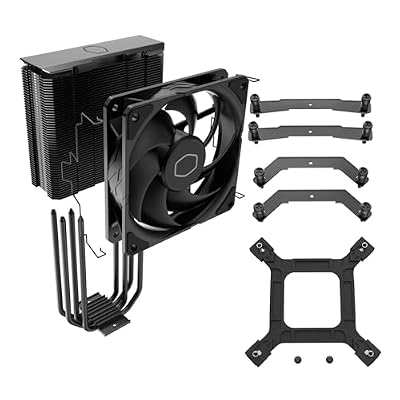
Performance comes from four copper direct-contact heat pipes pressed flat against the CPU integrated heat spreader. Direct-contact pipes shave thermal resistance by removing an intermediary baseplate, which is part of how this design achieves above-budget performance. The single 120mm SickleFlow PWM fan provides airflow through the heatsink, ramping up under load and quieting down at idle. For mainstream CPUs — a Ryzen 5 7600, Core i5-13600K, or similar — the cooler keeps temperatures well within safe operating limits during gaming and typical productivity workloads. It is not a cooler designed for sustained all-core full-load workloads on flagship CPUs, but for the chips most buyers actually install it is well matched.
Compatibility: Socket, RAM Clearance, Case Fit
Socket support covers Intel LGA1700, LGA1200 and 115x out of the box, and AMD AM4. For the newer AM5 socket buyers may need the appropriate Cooler Master bracket; AM5 is mechanically similar enough to AM4 that adapter solutions exist, but check Cooler Master’s current bundle before ordering. RAM clearance is good: the fan is mounted on the front of the heatsink rather than over the memory slots, so even tall RGB DIMMs typically clear without issue. At roughly 152mm tall the cooler is shorter than most premium dual-tower designs, which makes it a sensible choice for compact mid-tower cases where height is at a premium. The mounting hardware is straightforward and well documented.
Build Quality, Acoustics and RGB
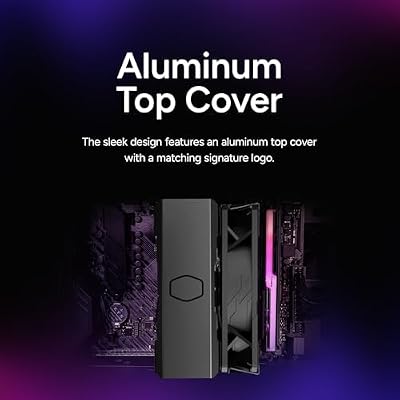
The Hyper 212 Black’s defining aesthetic is its all-black, no-RGB finish — heatsink, fan, base and mounting hardware are all matte black. For builders running a stealth or non-RGB build that look is genuinely valuable. Build quality is sound: nickel-plated copper pipes, aluminium fin stack, sturdy mounting hardware. Acoustics under PWM control are quiet at idle and remain civilised under typical load. Cooler Master’s SickleFlow fan is designed with high-pressure blade geometry to push air through the dense heatsink fins without becoming intrusive. Reviewer counts above 8,000 reflect the cooler’s long-running positive reputation. See our best 240Hz gaming setups companion guide.
Who Is the Hyper 212 Black For?
The Hyper 212 Black is for the budget-conscious builder who wants a quiet, no-fuss cooling upgrade over the stock heatsink that ships with most boxed CPUs. If you are running a mid-range gaming or productivity build — Ryzen 5 7600X, Ryzen 7 7700, Core i5-14600K or similar — and want a stealth-look cooler at a price that leaves money in the budget for GPU or SSD, this is exactly the right product. It is also a strong choice for first-time builders thanks to widely available installation guides. It is less ideal for buyers pairing it with a flagship Ryzen 9 or Core Ultra 9, where a dual-tower or 360mm AIO is the smarter match. Budget-build context is in our gaming builds under $1,200 guide.
Pros and Cons
Pros: Iconic, well-proven design; clean all-black finish suits stealth builds; quiet 120mm PWM fan; broad socket support; thousands of positive buyer reviews; very low price.
Cons: Single-tower design has less raw capacity than dual-tower rivals; AM5 may require the appropriate bracket; no RGB for buyers who want lighting.
Is the Hyper 212 Black Worth It?
At around $26 the Cooler Master Hyper 212 Black is one of the most sensible upgrades available for a mid-range PC build. It delivers a meaningful improvement over a stock cooler, runs quietly, looks clean and comes from one of the longest-running and most-reviewed cooling product lines in the PC space. The reputation is well earned. For builders on a budget who want a tidy, reliable, stealth-look cooler the Hyper 212 Black is an easy recommendation. Buyers eyeing stronger platforms can compare matched options in our best RTX 5070 gaming laptops guide.
Bottom Line
Choosing a CPU cooler is fundamentally a question of matching cooling capacity to CPU heat output, and then layering acoustic, visual and ecosystem preferences on top of that match. Air coolers offer unmatched long-term reliability — no pump to wear out, no fluid to manage — and modern dual-tower designs can handle even flagship CPUs under sustained load when paired with quality fans. All-in-one liquid coolers offer cleaner motherboard area, superior heat-spike absorption for high-power CPUs and a more modern visual presentation, at the cost of a finite-life pump and a higher initial purchase price. For modern flagships such as the Ryzen 7 9800X3D, Ryzen 9 9950X or Core Ultra 9 285K, either a premium dual-tower air cooler or a 360mm AIO is a sensible match; for mid-range CPUs a single-tower or twin-fan single-tower air cooler is more than enough, often at a meaningfully lower price. Buyers should also confirm three practical points before ordering any cooler: case height clearance for air coolers, radiator-thickness clearance for AIOs, and RAM-height clearance for tall dual-tower designs with low-set front fans. Matched-platform context is in our Intel Core Ultra build guide and best RTX 5070 gaming laptops guides.
Frequently Asked Questions
Is the Hyper 212 Black better than a stock CPU cooler?
Yes, substantially. The four direct-contact heat pipes and 120mm PWM fan deliver meaningfully lower temperatures and lower noise than the small heatsinks bundled with most boxed CPUs.
Will the Hyper 212 Black fit AM5 motherboards?
Yes, with the appropriate Cooler Master bracket — AM5 is mechanically similar to AM4, and an adapter is generally available. Always check the current included hardware before ordering.
Is the Hyper 212 Black quiet?
Yes, under typical use. The PWM-controlled 120mm SickleFlow fan runs quietly at idle and remains civilised under load — it is not designed for silent operation but is comfortably quiet.
Does the Hyper 212 Black have RGB?
No. The Black model is the matte-black non-RGB finish, designed to suit stealth or non-RGB builds. Cooler Master offers RGB variants in adjacent product lines.
More CPU Cooler Reviews
- ARCTIC Freezer 36 Black Air Cooler Review
- Noctua NH-D15 G2 Dual-Tower Air Cooler Review
- Noctua NH-U12A chromax.Black Air Cooler Review
- be quiet! Dark Rock Pro 5 Air Cooler Review
- ARCTIC Liquid Freezer III Pro 360 AIO Review
- Corsair Nautilus 360 RS AIO Review
- Cooler Master MasterLiquid 360L Core ARGB AIO Review
- Corsair iCUE Link Titan 360 RX RGB AIO Review
Affiliate Disclosure: As an Amazon Associate, we earn from qualifying purchases. If you click a link and make a purchase, we may earn a small commission at no extra cost to you. Prices and availability are accurate as of publication and may change.
Related Articles
Looking for more on this topic? Browse the hand-picked guides below — each one applies the same scoring rubric used in this review.










