Cooking Simulator, Big Cheese Studio’s physics-driven kitchen sandbox from June 2019, never received a Linux port. Steam’s record is one of the plainest in this series: the store flags the game for Windows alone, both purchase packages repeat that mask, and the Linux requirements field is not a stub or a shell but an empty list outright. No second build hides anywhere in the record.
What Linux players get instead is a translation story, and a good one. Valve has tested the game on Steam Deck and published its strongest badge, and the seven add-ons repeat the same Windows-only shape. The one caution is paperwork age: the Deck test graded a much older build than the one on sale today.
As an Amazon Associate, we earn from qualifying purchases.
Quick answer
Cooking Simulator is not native on Linux. Steam flags the game Windows only, both purchase packages agree, every content depot is a Windows payload and both launch entries point at Windows executables. The working route is Proton: ProtonDB rates the Windows build Gold, Platinum on its best-reported tier, across 45 reports, and Valve rates the game Verified on Steam Deck.
The record, layer by layer
Start with the flags. The store record for app 641320 reads windows true, mac false, linux false. That is a claim, not a verdict, so the next layer is the purchase packages, both read individually. The standard package (958821) and the Commercial License package (385482) each contain the base app alone, each repeats the Windows-only mask, and each reports full gamepad support as false. Every buyer receives the same single Windows build.
The requirements fields tell the same story in stricter form. The Windows tab is genuinely populated: a Windows 7 64-bit floor, an i5 3550 or FX-8350 class processor, 6 GB of RAM and a GTX 660Ti class card at minimum, rising to Windows 10, 16 GB of RAM and a GTX 1060 class card recommended. The Mac and Linux fields are empty lists outright: no headings, no placeholder lines, no copied Windows text.
The remaining notices are silent: no DRM notice, no external-account notice, and the declared controller position is partial support, which the gear section respects throughout.
Depots and launch entries: where the ruling is decided
Flags can be wrong in either direction, so the depot list settles this game. SteamDB lists the base content depot (641321) as a Windows payload of 5.09 GiB, plus a second Windows depot (641322, 4.11 GiB) for the Steam China realm. Every add-on depot on the same table is likewise Windows-configured, and no Linux depot exists in any state. The only size-less entry belongs to the free Chaos Tool add-on, whose depot is literally labelled Unused; this series names such shells, and it decides nothing.
The launch configuration closes the question: exactly two entries, both for Windows. The global build launches CookingSim.exe; the Steam China realm launches a Chinese-named executable. No Linux entry exists, and the icon set carries no Linux client icon. The public branch is current, build 26458658 assembled in November 2026, so this Windows-only shape is a maintained state, not a fossil.
The add-on shelf agrees
The base record lists seven add-on apps, each read on its own record rather than trusted from a search page. BBQ, Sushi, Shelter and Pizza all flag Windows alone with empty Mac and Linux requirement lists, matching the base game exactly. Cakes and Cookies and Cooking with Food Network carry a small quirk: their Linux and Mac fields exist as empty shells, Minimum and Recommended headings over blank bodies, while their flags deny both platforms and their depots stay Windows-configured. Text-free shells are not ports.
The seventh add-on, the free Chaos Tool, holds no purchase package and owns the Unused size-less depot noted above. No soundtrack or artbook app exists in the family, so the audio trap never forms. Seven add-ons, seven agreements: no dissent, no hidden Linux build under an expansion’s name.
The Proton file
ProtonDB’s file describes the Windows build under Proton, and it is substantial. The full summary reads Gold on the headline tier, Platinum on the best-reported tier and Gold on the trending tier, across 45 reports with strong confidence. The split fits the game’s texture: well-configured systems run it flawlessly, while the middle of the distribution meets a demanding Unity title that punishes weak hardware.
One label on the page needs correcting in print. ProtonDB heads its requirements block with a phrase claiming native support, and Steam’s record contradicts that at every layer read here: flags, packages, fields, depots and launch entries all say Windows only. The heading is a template artefact; the article follows Steam.
Recent filings on current Proton builds describe a game that installs and runs, including clean Steam Deck reports at playable frame rates on the low preset. The recurring complaints are performance-shaped, not compatibility-shaped: the game is a resource hog that wants its settings lowered, alt-tabbing can strand it on a black screen on some setups, and the oldest Proton 6 era filings describe input lag near the minimum tier.
The Deck sheet: Verified, but the paperwork is old
Valve’s own compatibility endpoint, read directly for this article, resolves the game to category 3: Verified on Steam Deck, with SteamOS separately rated Compatible. The sheet is clean: all functionality accessible under the default controller configuration, Deck icons shown, interface text legible, default graphics performing well. The single note concerns external pads: the game does not default to an external Bluetooth or USB controller for the primary player and may need a manual Quick Access Menu switch, pairing naturally with the declared partial support.
The staleness warning belongs in plain view. Valve’s test is dated 14 January 2023, graded build 10191236, and recommends proton-7.0-6. The public branch now stands at build 26458658, assembled in November 2026, nearly four years of updates past the tested build, so the badge grades an ancestor of the build on sale. The paperwork predates the current branch: exactly the shape that belongs on a Deck paperwork supplement list.
No second storefront
GOG was ruled from its own records, never from a search box. The game’s natural product address on GOG redirects to the general catalogue, and GOG’s catalogue data holds no product record for this title; a fuzzy query surfaces only unrelated kitchen simulators from other studios. No GOG edition exists in any flavour, so Steam’s Windows build under Proton is the only PC route, full stop.
Gear that fits the record
Valve Steam Deck OLED 512GB

The handheld the Verified badge was written for. Valve’s sheet gives the Windows build a clean pass under its recommended Proton runtime, and the game’s Windows requirements sit far below what the Deck’s APU delivers; the graphics preset is the adjustment recent Deck filings describe.
Specs
- Display: 7.4-inch HDR OLED, 1280 by 800, up to 90 Hz
- Processor: AMD Zen 2 and RDNA 2 custom APU
- Memory: 16 GB LPDDR5
- Storage: 512 GB NVMe, plus a microSD slot
- Wireless: Wi-Fi 6E and Bluetooth
- Channel note: Valve sells the Deck mainly through its own store, so Amazon listings are third-party sellers
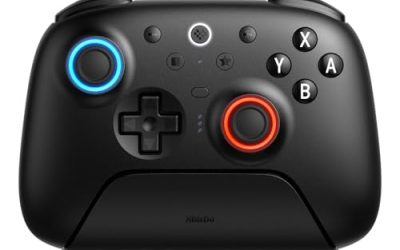
8BitDo Ultimate 2 Bluetooth Controller
The docked pad pick. The record declares partial controller support, so expect core gamepad inputs to work while some menus still favour a pointer; this pad’s sticks, triggers and back buttons suit a game built around grabbing, pouring and precise placement.
Specs
- Connectivity: Bluetooth wireless and USB-C wired
- Joysticks: TMR electromagnetic, anti-drift design
- Triggers: Hall effect, with mode switching
- Extras: two remappable back buttons, motion control
- In the box: charging dock included
Xbox Wireless Controller, Carbon Black
The safest guest pad in PC gaming: Steam Input support is universal, the glyphs match what most games display, and it pairs over Bluetooth or its own wireless standard. On the handheld, Valve’s note applies: an external pad may need a manual Quick Access Menu switch before it takes over.
- Connectivity: Xbox Wireless and Bluetooth
- Port: USB-C for wired play
- Controls: hybrid D-pad, dedicated Share button
- Power: AA batteries or optional rechargeable pack
Logitech G502 HERO
On the desktop Proton route, a mouse is the natural instrument for a first-person kitchen: aiming a pour, placing a pan and working through recipe menus are pointer tasks, and partial pad support makes mouse and keyboard the primary desk pairing. Eleven programmable buttons cover the repeated inputs.
Specs
- HERO optical sensor, up to 25,600 DPI
- 11 programmable buttons
- Adjustable weight system
- Wired USB connection
- On-board memory profiles
Samsung T9 Portable SSD 2TB
For moving a Linux game library between desktop and laptop, a fast USB-C drive is the simple answer. The headline figure needs a Gen 2×2 host port; on a lesser port the drive runs at that ceiling.
Specs
- Capacity: 2 TB portable SSD
- Interface: USB 3.2 Gen 2×2, USB-C connector
- Maker-rated speeds: up to 2,000 MB per second read, 1,950 MB per second write
- Features: Dynamic Thermal Guard, maker-rated drop resistance
How to choose
Choose by route first. On Steam Deck, the choice is already made: install the Steam copy, accept the default configuration Valve graded, and lower the graphics preset if frame rates sag, as recent Deck filings advise. On a Linux desktop, budget-tier hardware near the Windows minimums is the risky end of the Proton file; a mid-range GPU with current drivers sits in the Gold heartland, and a premium card buys headroom rather than a different verdict. If a first launch misbehaves, moving to a current Proton build is the fix the report file keeps repeating.
Choose add-ons second. All seven expansions share the base game’s Windows-only shape and Proton route, so buy them on content alone: Pizza and Cakes and Cookies for new recipe spaces, Shelter for the campaign, Sushi and BBQ for variety.
Who should skip
Skip this game if a native Linux binary is a hard requirement: none exists, none is promised anywhere on the record, and no second storefront sells one. Skip it if your only machine sits at or below the Windows minimum specifications, because the Proton file’s worst reports cluster there. Skip it if you want full, console-style controller support throughout, since the record declares partial support and some interactions stay pointer-shaped. Note the scope: this article covers the 2019 original only, not Cooking Simulator 2.
FAQ
Is Cooking Simulator native on Linux?
No. Steam flags the game Windows only, both packages repeat that mask, the Linux requirements field is an empty list, every content depot is a Windows payload and both launch entries point at Windows executables.
How well does Cooking Simulator run under Proton?
Well, on adequate hardware. ProtonDB’s full summary reads Gold on the headline and trending tiers and Platinum on the best-reported tier, across 45 reports with strong confidence. The recurring complaint is performance appetite, not failure to run, and recent filings describe clean installs.
Is Cooking Simulator Steam Deck Verified?
Yes. Valve’s endpoint resolves the game to Verified, with a clean sheet and one note about external controllers not defaulting for the primary player. The test is dated January 2023 and graded a much older build than the November 2026 branch on sale today, so the paperwork is stale even though recent Deck reports agree.
Can I buy Cooking Simulator on GOG instead?
No. GOG’s natural product address redirects to the general catalogue and its catalogue data holds no product record for the title. Steam is the only storefront selling the game, and its Windows build under Proton is the only Linux route.
Final verdict
Cooking Simulator is a clear, old-fashioned not-native ruling with an unusually comfortable fallback. Steam’s record agrees with itself at every layer, the seven add-ons agree with the base game, and GOG sells no alternative. What the Linux player gets is a Gold-rated Proton route with a Platinum best-reported tier, a Verified Deck badge whose paperwork predates the current build, and a performance appetite worth respecting on modest hardware. Buy the Steam copy and run it through Proton.
Product and ASIN Reference
| Product | ASIN |
|---|---|
| Valve Steam Deck OLED 512GB | B0CQ3RWQQZ |
| 8BitDo Ultimate 2 Bluetooth Controller | B0F194QFT2 |
| Xbox Wireless Controller, Carbon Black | B08DF248LD |
| Logitech G502 HERO | B07GBZ4Q68 |
| Samsung T9 Portable SSD 2TB | B0CHFS9K14 |