The best Windows POS terminals with receipt printer support for retail counters combine a responsive touchscreen, a familiar Windows environment, and a reliable path to a receipt printer, either built into the unit or connected through USB, serial, or network ports.
Windows remains the default choice for many retail setups because most POS software, payment integrations, and peripheral drivers are built for it first. A terminal running Windows 10 or Windows 11 can join an existing network, accept a standard receipt printer driver, and work with scanners, cash drawers, and customer displays. The three terminals below cover the main approaches: a modular terminal that connects to a separate receipt printer, and two all-in-one registers with a thermal printer built in.
What to Look For
Begin with the printer connection. A built-in 58 mm thermal printer keeps the counter tidy and removes one cable and one power supply, which suits small counters and single-lane shops. A modular terminal with USB, powered USB, serial, and Ethernet ports gives more flexibility: it can drive a wider 80 mm receipt printer, a kitchen printer, or a network printer shared across lanes. Confirm which connection your POS software expects before choosing.
Next, check the system software and the hardware underneath it. A terminal shipping with Windows 10 or Windows 11, solid-state storage, and at least 8 GB of memory handles typical retail software, a browser-based dashboard, and a payment terminal at the same time. Solid-state storage matters at the counter because it boots quickly after a power interruption and has no spinning disk to wear out in a dusty shop.
Screen size and ports deserve attention too. A 15.6-inch touchscreen is the common retail size: large enough for product grids and on-screen keypads, small enough to fit a standard counter. Look for a capacitive multi-touch panel, an adjustable tilt, and a customer-facing screen for totals and loyalty prompts. Count the ports as well: printers, scanners, drawers, and card readers each need a connection, and too few ports forces extra hubs onto a crowded counter.
The Best Windows POS Terminals for Retail Counters
Elo EloPOS Z30

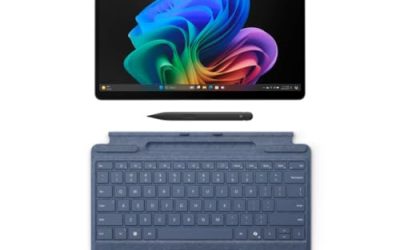
The Elo EloPOS Z30 is a modular all-in-one touchscreen terminal built for continuous retail use. The listed configuration pairs an Intel Pentium J6426 processor with 8 GB of memory and a 128 GB solid-state drive, and it runs Windows 10. Its 15.6-inch Full HD touchscreen gives staff a clear view of product grids and transaction totals, while the included customer-facing display lets shoppers follow the transaction as it happens.
Receipt printer support comes through connectivity rather than a built-in printer. The Z30 includes USB ports, Gigabit Ethernet, Wi-Fi 6, and Bluetooth 5.2, so it can connect to a USB or network receipt printer, a serial printer through an adapter, or a shared printer on the store network. That suits counters where the printer sits away from the terminal, or where one printer serves more than one lane.
This terminal suits a shop that already owns a receipt printer, or that wants a commercial-grade touchscreen from a dedicated POS hardware maker. One consideration is that the printer, cash drawer, and scanner are separate purchases, so the counter setup needs more planning than an all-in-one register. Confirm Windows 10 support and a current printer driver before ordering.
YJXQUEEN Touchscreen POS System
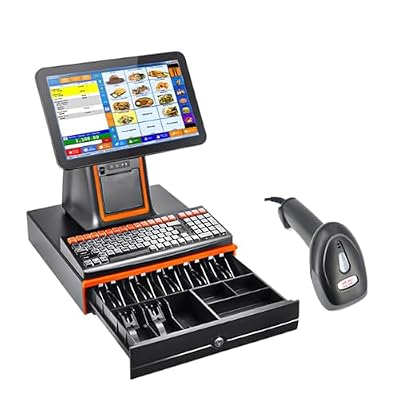
The YJXQUEEN Touchscreen POS System is an all-in-one register built around a 15.6-inch HD touchscreen with a 1366 x 768 LCD panel. It runs a Windows system, connects over dual-band Wi-Fi, and includes a built-in 58 mm thermal receipt printer plus an HD customer display, so the register, printer, and customer screen arrive as one counter unit.
The built-in printer is the main attraction for a busy counter. Receipts print directly from the register housing, which removes a separate printer, its cable, and its power brick from the workspace. The listing also notes ports for barcode scanners, cash drawers, and card readers, and support for 15 languages, which helps in shops with multilingual staff or an international customer base.
This system suits a small retail shop, cafe, or convenience store that wants a single-box checkout with minimal assembly. One consideration is that memory, storage, and bundled accessories vary by variant, and the listing does not publish a detailed processor model for every variant. Confirm the exact configuration on the Amazon listing before ordering, and check that your POS software runs on the Windows version shipped.
HNBYLMM POS System for Small Business

The HNBYLMM POS System for Small Business is an all-in-one cash register that bundles the terminal, printer, cash drawer, and keyboard into a single package. It runs Windows 10 on a dual-core i5 processor with 8 GB of DDR3 memory and a 128 GB solid-state drive, and its 15.6-inch touchscreen uses a 1366 x 768 panel with an 8-digit customer display.
Its built-in 58 mm thermal receipt printer prints clear receipts from inside the register, and the package includes a cash drawer and a keyboard, with a barcode scanner as an optional addition. Connectivity covers 6 USB ports, LAN, serial, and parallel ports, leaving room for a card reader, a second printer, or a scale. The screen adjusts across multiple angles for cashier comfort through a long shift.
This register suits a small shop that wants one delivery to cover the whole counter. It is a practical fit for grocery, clothing, convenience, and general retail counters where the software runs on Windows 10. One consideration is that this ASIN was verified through an Amazon Canada listing, so confirm the United States listing, the included accessories, and the shipped Windows version on the Amazon page before ordering.
Comparison
| Terminal | Display | System | Memory and storage | Receipt printer |
|---|---|---|---|---|
| Elo EloPOS Z30 | 15.6-inch Full HD touchscreen, customer-facing display | Windows 10 | 8 GB, 128 GB SSD | External, via USB, serial, or network |
| YJXQUEEN Touchscreen POS System | 15.6-inch HD touchscreen, HD customer display | Windows | Varies by configuration | Built-in 58 mm thermal |
| HNBYLMM POS System | 15.6-inch touchscreen, 8-digit customer display | Windows 10 | 8 GB DDR3, 128 GB SSD | Built-in 58 mm thermal |
FAQ
Do I need a separate receipt printer with a Windows POS terminal?
It depends on the terminal. All-in-one registers such as the YJXQUEEN and HNBYLMM models above include a built-in 58 mm thermal printer. Modular terminals such as the Elo EloPOS Z30 connect to a separate USB, serial, or network receipt printer, which gives more choice over printer width and placement.
Will these terminals work with my existing POS software?
A terminal running Windows 10 or Windows 11 works with most Windows-based POS software, but always check your software vendor’s system requirements first. Confirm the Windows edition, the memory, and the printer driver your software expects, and ask the vendor whether your exact terminal model is on its supported hardware list.
Is a 58 mm receipt printer wide enough for a retail counter?
For most small retail receipts, yes. A 58 mm thermal printer handles item lists, totals, tax lines, and a short message at the foot of the receipt. Shops that print wide logos, detailed returns information, or kitchen tickets often prefer an 80 mm printer, which usually connects to a modular terminal rather than a built-in bay.
Conclusion
For a retail counter, the right Windows POS terminal is the one that matches your printer plan. Choose the Elo EloPOS Z30 if you want a commercial touchscreen terminal and already have, or plan to choose, a separate receipt printer. Choose the YJXQUEEN Touchscreen POS System or the HNBYLMM POS System if you want the printer built into the register and a shorter setup. Either way, match the Windows version and ports to your software and peripherals first.
Disclosure: As an Amazon Associate, we earn from qualifying purchases.