The best desktop fiber laser engravers for small manufacturing teams turn metal marking from an outsourced job into a bench-top process. A fiber laser marks stainless steel, aluminum, brass, copper, gold, and silver with a permanent, high-contrast mark that does not rub off, and it does so without ink, chemicals, or a cutting blade to replace. For a team that personalizes jewelry, tags, tools, tumblers, and industrial parts in small batches, a desktop fiber machine pays for itself in turnaround time alone.
Fiber engravers work differently from diode and CO2 machines. The beam comes from a fiber laser source, usually at a 1064 nm wavelength, and a galvo head steers it across the work area at high speed. That makes fiber machines fast at marking many identical metal pieces in a row, and precise enough for fine text on a ring or a serial number on a small part.
What to Look For
Begin with the laser source and its power. A 20 W fiber source handles most jewelry, tag, and tool marking, while a 30 W source marks deeper and faster, which matters when the batch is large or the material is hard stainless steel. Check whether the source is a standard fiber source or a MOPA source: MOPA machines vary the pulse to create color marks on stainless steel and titanium, while standard sources are the usual choice for deep, single-color engraving.
Next, check the work area and the lenses. Fiber machines use field lenses that set the marking area, and many ship with two lenses, such as 110 x 110 mm for fine detail and 200 x 200 mm for larger flats. A rotary attachment is essential for rings and tumblers, and a handheld mode helps with oversized items that do not fit under the head. Confirm which lenses and accessories are included, because a lens bought separately adds to the setup time and the total outlay.
Software compatibility decides how smoothly the machine joins a production workflow. LightBurn is the standard choice for many small teams because it handles text, serial numbers, barcodes, and imported vector files in one program. EzCad2 is the other common option for fiber machines and gives deeper control for industrial marking. Safety planning is essential too: desktop fiber engravers are commonly listed as Class 4 laser devices, so eye protection rated for 1064 nm, a controlled workspace, and training for every operator belong in the plan.
The Best Desktop Fiber Laser Engravers for Small Teams
ComMarker B4 20W Fiber Laser Engraver

The ComMarker B4 20W is the entry point into desktop fiber marking, and it is built for jewelry and small metal parts. It uses a 20 W fiber source at a 1064 nm wavelength, lists a marking speed of up to 15,000 mm/s, and holds a minimum line width of 0.01 mm, which keeps fine text and small logos crisp. Two field lenses ship in the box, covering 110 x 110 mm and 200 x 200 mm, so the team can switch between tight jewelry work and larger flat tags.
This machine suits a small team that mainly marks jewelry, tags, and small metal parts and wants the lowest-commitment route into fiber. One consideration is that it is an open-style machine, so the supplied 1064 nm goggles are part of the working setup, not an optional extra.
Monport 30W Fiber Laser Engraver

The Monport 30W Fiber Laser Engraver steps up to a 30 W Raycus fiber source for teams that need deeper marks and faster cycle times. It lists a 150 x 150 mm work area, a marking speed of up to 10,000 mm/s, and a carving accuracy of 0.01 mm, with a source lifetime of up to 100,000 hours according to the listing. It is LightBurn compatible, and the listing describes it as a Class 4 laser product.
The extra power shows up on hard materials and deep engraving. A 30 W source cuts through a batch of stainless steel tags or brass plates faster than a 20 W source, and it handles 2.5D deep engraving and light metal sheet work that a lower-power machine would struggle with. A rotary axis option covers tumblers and rings. It fits teams with steady metal volume that want deeper marks and shorter cycle times.
xTool F1 Ultra 20W Fiber and Diode Dual Laser Engraver

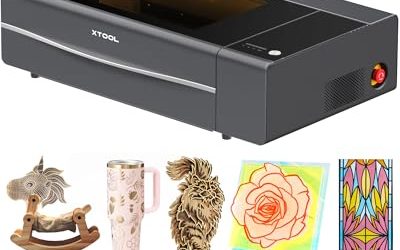
The xTool F1 Ultra is a dual-laser machine that pairs a 20 W fiber laser with a 20 W diode laser in one desktop unit, and it is the most versatile pick here for a team that marks both metal and organic materials. The fiber side handles stainless steel, aluminum, brass, and jewelry, while the diode side handles wood, leather, and acrylic. A 16 MP smart camera positions the work, the listing states a speed of up to 10,000 mm/s, and the auto-streamline feature is designed for repeat jobs on a production line.
For batch work, the camera and the software matter as much as the lasers. The machine shows the bed, aligns artwork across multiple pieces, and supports three-dimensional embossing for a raised finish on suitable materials. Rotary tools fit cylindrical items, and the enclosed desktop format keeps the machine portable enough to move between workstations. It fits teams personalizing mixed-material gift sets that want one machine for metal and wood.
Comparison
| Engraver | Laser | Work area | Speed, per listing | Software |
|---|---|---|---|---|
| ComMarker B4 20W | 20 W fiber, 1064 nm | 110 x 110 mm or 200 x 200 mm | Up to 15,000 mm/s | LightBurn, EzCad2 |
| Monport 30W | 30 W Raycus fiber | 150 x 150 mm | Up to 10,000 mm/s | LightBurn |
| xTool F1 Ultra | 20 W fiber plus 20 W diode | Desktop galvo field, camera positioned | Up to 10,000 mm/s | xTool Creative Space, LightBurn compatible workflows |
FAQ
What materials can a fiber laser engraver mark?
Fiber lasers mark metals including stainless steel, aluminum, brass, copper, gold, silver, and titanium, plus some coated plastics and stone. They are the standard choice for permanent marks on metal parts, jewelry, tags, and tools. Wood, glass, and clear acrylic are better handled by diode, UV, or CO2 lasers.
Is 20 W enough for a small manufacturing team?
For most marking work, yes. A 20 W fiber source produces clean, permanent marks on jewelry, tags, and tools, and it handles fine detail well. A 30 W source marks deeper and faster, which helps when the batch is large, the material is hard, or the team needs deep engraving rather than a surface mark.
What is the difference between a standard fiber source and a MOPA source?
A standard fiber source is the usual choice for deep, single-color engraving on metal. A MOPA source varies the pulse duration, which allows color marking on stainless steel and titanium and finer control over the mark. If color marks on metal are part of your product range, look for a MOPA configuration; if deep engraving is the priority, a standard source is the practical pick.
Conclusion
Match the source power to your deepest mark, confirm the lenses and rotary options on the listing, and set up the eye protection and workspace controls before the first production run.
Disclosure: As an Amazon Associate, we earn from qualifying purchases.