Digital illustration needs a screen you can draw on directly, and a computer that can run full desktop drawing software. The best Windows detachable tablets for digital illustration combine both: the screen detaches from the keyboard, the pen draws straight onto the canvas, and the device still runs Windows 11 with the same illustration apps used on a desktop PC.
A detachable tablet also changes shape to match the stage of a drawing. With the keyboard attached, it works as a laptop for reference images and layers. With the keyboard removed, it becomes a flat sketch surface, held at a comfortable angle by the kickstand.
This guide covers three Windows detachable tablets that suit digital illustration. Each one runs Windows 11, supports an active pen, and has a high-resolution touchscreen.
What to Look For
Pen support and pressure levels: Check whether a pen is included in the box or sold separately, and how many pressure levels it reads. A pen with 4,096 pressure levels gives fine control over line weight and shading.
Color accuracy: Illustration work depends on seeing colors correctly. Look for a display with wide color gamut coverage, such as full DCI-P3, and factory calibration such as Pantone validation.
Screen size and resolution: A 13-inch screen gives room for a canvas plus tool panels, while a 12-inch screen is lighter to carry.
Processor and memory: Illustration apps, reference browsers, and large canvas files run together, so 16GB of memory is a sensible floor. A modern multi-core processor keeps brushes responsive on large canvases.
Keyboard and kickstand: A detachable keyboard turns the tablet into a laptop for typing file names and notes, while a built-in kickstand holds the screen steady while drawing.
Storage: 512GB of SSD storage leaves room for illustration apps, brush libraries, and layered project files.
The Best Windows Detachable Tablets for Digital Illustration
Microsoft Surface Pro 11 Copilot+ PC Bundle with Sapphire Pro Keyboard and Slim Pen

- Amazon: https://www.amazon.com/dp/B0DLF2Y9FZ
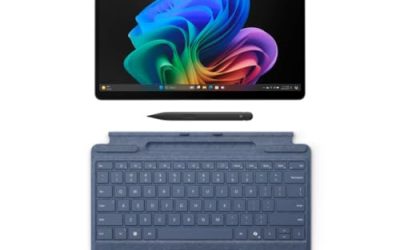
This Microsoft Surface Pro 11 bundle pairs a 13-inch 2.8K touchscreen tablet with the Sapphire Pro Keyboard and a Slim Pen, so the pen and keyboard arrive in the same box. It runs Windows 11 Pro on a Snapdragon X Plus processor, with 16GB of RAM and 512GB of SSD storage. The Slim Pen reads 4,096 pressure levels, supports tilt for shading, and stores and charges on the device, so it is always with the tablet.
The 13-inch display gives room for a canvas beside tool panels, and the built-in kickstand adjusts to a wide range of angles for drawing or typing. The keyboard attaches magnetically and includes a trackpad, turning the tablet into a full laptop for file management and writing.
This tablet suits an illustrator who wants a complete pen setup in one purchase, with the largest screen of the Surface models here. The included Slim Pen removes the need to buy a stylus separately. One consideration is that the Snapdragon processor uses ARM architecture, so illustrators who rely on older plug-ins should confirm compatibility with their drawing apps before buying.
ASUS ROG Flow Z13 2.5K 180Hz Touchscreen 2-in-1 Gaming Notebook

- Amazon: https://www.amazon.com/dp/B0DT7MNLTD
The ASUS ROG Flow Z13 is a 13.4-inch detachable 2-in-1 with a 2.5K 180Hz ROG Nebula touchscreen, an AMD Ryzen AI MAX+ 395 processor, 32GB of RAM, and a 1TB SSD, running Windows 11. Its display covers the full DCI-P3 color gamut and carries Pantone validation, which matters when color accuracy decides whether a finished piece prints or publishes as intended. The touchscreen supports stylus input, and ASUS lists a stylus among the included accessories for this model.
The Ryzen AI MAX+ 395 processor includes Radeon 8060S graphics and a 50 TOPS NPU, giving this tablet far more processing and graphics headroom than a typical illustration tablet.
This tablet suits an illustrator who wants the most color-accurate screen and the most power in this guide, in one device that also handles gaming and video work. One consideration is that it is heavier and more power-hungry than the Surface models in this guide, so buyers who prioritize the lightest bag should weigh that against its performance and screen quality.
Microsoft Surface Pro 12-Inch 2-in-1 Laptop and Tablet, Snapdragon X Plus

- Amazon: https://www.amazon.com/dp/B0DZ5DBD83
The Microsoft Surface Pro 12-inch is a 2-in-1 device that adapts between tablet and laptop modes. It runs Windows 11 as a Copilot+ PC, powered by a Snapdragon X Plus processor with 8 cores, 16GB of RAM, and 512GB of storage, with a 12-inch touchscreen display. The built-in kickstand props the screen up for drawing or video calls, and attaching a Surface Pro Keyboard, sold separately, turns it into a full laptop.
It is designed for long battery life during everyday work. Its 12-inch size is lighter and easier to carry than a 13-inch tablet, which suits illustrators who sketch on the move. The touchscreen supports pen input, with the Surface Slim Pen sold separately.
This tablet suits an illustrator who wants a compact Surface for sketching away from a desk, with strong battery life and a clean, light design. One consideration is that the keyboard and pen are sold separately, so the total cost of a complete drawing setup is higher than the tablet listing alone suggests.
Comparison
| Product | Screen | Pen | Processor | Memory and Storage | Best For |
|---|---|---|---|---|---|
| Surface Pro 11 bundle | 13-inch 2.8K touchscreen | Slim Pen included, 4,096 levels | Snapdragon X Plus | 16GB, 512GB SSD | Complete pen setup in one box |
| ASUS ROG Flow Z13 | 13.4-inch 2.5K 180Hz touchscreen | Stylus support, full DCI-P3 | Ryzen AI MAX+ 395 | 32GB, 1TB SSD | Color accuracy and power |
| Surface Pro 12 | 12-inch touchscreen | Pen sold separately | Snapdragon X Plus, 8-core | 16GB, 512GB | Compact sketching on the move |
FAQ
Do I still need a separate pen display for illustration?
Not necessarily. A Windows detachable tablet is itself a pen display that also runs the computer, so drawing apps run directly on the screen you draw on.
Can these tablets run desktop illustration apps?
Yes. These tablets run full Windows 11, so they install desktop versions of apps such as Photoshop, Clip Studio Paint, and Krita. That is the main advantage over a tablet that runs a mobile OS, where the app selection and file handling are more limited.
Does ARM or x86 matter for drawing apps?
It can matter for older plug-ins and niche tools. The Snapdragon models in this guide run modern Windows apps well, but some older plug-ins were written for x86 processors and may not work on ARM. Check compatibility for any plug-in you depend on before buying.
What screen size works best for illustration?
A 13-inch or 13.4-inch screen is a good balance, with room for a canvas and tool panels. A 12-inch screen is easier to carry and hold, but leaves less room for panels beside the canvas.
Conclusion
For digital illustration, a Windows detachable tablet should put the pen directly on a color-accurate screen and run full desktop drawing apps. The Surface Pro 11 bundle covers the most ground with its included Slim Pen and large screen, the ROG Flow Z13 adds the most accurate display and the most power, and the Surface Pro 12 is the compact choice for sketching on the move. Match the screen and pen setup to where you draw most.
Disclosure: As an Amazon Associate, we earn from qualifying purchases.