The desk decision that matters is not the light strip along the back edge. It is whether the surface is deep enough to put your monitors at a comfortable viewing distance, wide enough for the keyboard and mouse to sit where your arms expect them, and stiff enough that a tower, two screens and a leaning elbow do not turn the whole top into a trampoline. In this budget class the differences between models are mostly structural: leg geometry, rated capacity and how the top is built.
This guide is for dual-monitor players who need genuine width, for corner-room setups that have to double as storage, and for smaller stations that still need a rated, stable frame. Every pick below was chosen from the name and specifications published on its Amazon product page: desktop dimensions and material, frame and leg design, maximum weight recommendation, and the extras in the box, such as power strips, drawers, cup holders and cable grommets.
Quick Picks
As an Amazon Associate we earn from qualifying purchases.
| Product | Best for | Key spec from title |
|---|---|---|
| EUREKA ERGONOMIC Z60 60-Inch Gaming Desk | Dual-monitor setups that need real width | 60-inch desktop with RGB LED lighting |
| SEVEN WARRIOR 60-Inch T-Shaped Gaming Desk | Players who want the whole top as a mouse surface | 60-inch carbon fiber surface, T-shaped legs |
| MOTPK 51-Inch L-Shaped Gaming Desk | Corner setups that also need storage and charging | 51-inch L-shape with power outlet and drawers |
| Bestier 55-Inch L-Shaped Gaming Desk | Rooms where the layout may change later | 55-inch L-shape with LED lights and monitor shelf |
| EUREKA ERGONOMIC Z1-S Pro Gaming Desk | Compact single-monitor stations | 44.5-inch desktop with Z-shaped alloy steel frame |
How to Choose
Desktop Size and Depth for Your Monitors
Width gets the headline, but depth decides how the desk feels after an hour. A 60-inch top holds two 27-inch monitors side by side with room for speakers, while a 44.5-inch top suits one screen and a console or laptop. Depth matters just as much: around 24 inches keeps a monitor stand, keyboard and forearms on the same plane without crowding. Before ordering, measure your monitor stand’s footprint front to back, then compare it with the listed desktop depth rather than the diagonal marketing size.
Frame Stability and Weight Capacity
Leg geometry is the quiet spec that decides whether a desk wobbles. Z-shaped and T-shaped steel frames spread the load differently from straight post legs, and the published maximum weight recommendation tells you how much the maker is willing to stand behind. Two monitors, a tower and a stack of gear can pass 80 pounds quickly. The Z-frame models below are rated at 500 pounds, while the T-shaped and convertible designs carry lower ratings, so match the frame to what will actually sit on the top, not to the empty-desk photo.
Surface Material and Edge Comfort
Most tops in this class are particle board or engineered wood under a carbon fiber texture finish, which shrugs off mouse friction and wipes clean, but the edge you rest your wrists on matters more than the pattern. A full-desk mouse pad, included with two picks here, softens that front edge and unifies the tracking surface. Check the listed top material and thickness: the Bestier’s top is 15 millimeters thick, so a clamp-on monitor arm needs a jaw that opens wide enough and a load path the maker allows.
Cable Management and Extras
Extras separate a tidy station from a cable nest. Look for grommet holes at the back corners, a rack or tray to hold a power strip off the floor, and holders that keep a cup and headset off the playing surface. The MOTPK builds the power strip into the desk with AC outlets and USB ports, while the SEVEN WARRIOR routes cables through two grommets and adds a USB gaming handle rack. Decide which cables move when you adjust things, then pick the desk whose routing matches that path.
The 5 Best Options
EUREKA ERGONOMIC Z60 60-Inch Gaming Desk

This is the straightforward wide option: a 60-inch carbon fiber texture top on a reinforced Z-shaped alloy steel frame, rated far beyond what a dual-monitor rig weighs. Leveling feet help on uneven floors, and the included mouse pad covers most of the working area at 31.5 by 23.6 inches, so keyboard and mouse share one surface. Built-in RGB lighting runs along the desk for players who want the glow, but the real appeal is simpler: width, depth and a frame that does not ask you to budget your equipment weight.
Specs
- Desktop: 60 x 23.9 x 30.9 inches, carbon fiber texture melamine surface
- Frame: alloy steel Z-shaped legs with leveling feet
- Maximum weight recommendation: 500 lb
- Item weight: 60 lb
- Included: RGB LED lighting, mouse pad measuring 31.5 x 23.6 inches
Best for: dual-monitor players who want a wide, fixed-height desk with capacity to spare.
Watch out for: it is a fixed-height desk, so measure the 60-inch width against your wall and the route through doors and stairs before ordering; two people are recommended for assembly.
ASIN: B0CZRCFDRS
SEVEN WARRIOR 60-Inch T-Shaped Gaming Desk
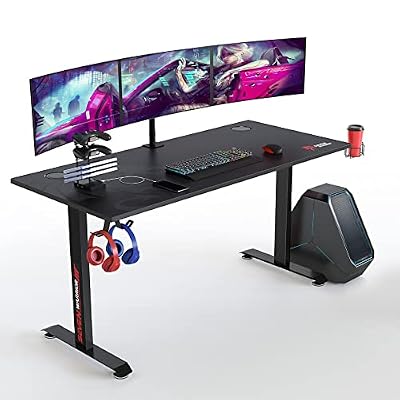
SEVEN WARRIOR takes the other route to a 60-inch surface: T-shaped alloy steel legs under a carbon fiber finish particle board top, with the entire desktop covered by the included full-desk mouse pad. The accessory count is the highest here for cable control, with two grommets, a USB gaming handle rack with four charging ports, a cup holder and a double headphone hook keeping clutter off the pad. Its 330-pound rating is lower than the Z-frame desks, which is fine for monitors and peripherals but worth noting if a heavy tower lives on top.
Specs
- Desktop: 60 inches wide, particle board with carbon fiber surface
- Frame: alloy steel T-shaped legs
- Maximum weight recommendation: 330 lb
- Item weight: 52.5 lb
- Included: full-desk mouse pad, USB gaming handle rack with 4 charging ports, cup holder, double headphone hook, 2 cable management grommets
Best for: players who want one uninterrupted pad across the whole top and powered charging within reach.
Watch out for: check the T-leg footprint against your chair’s wheels and floor-standing PC case, and weigh a desktop tower plus dual monitors against the 330-pound rating.
ASIN: B087V1VDB8
MOTPK 51-Inch L-Shaped Gaming Desk

The MOTPK turns a corner into storage as well as screen space. Its L-shaped engineered wood top sits on an alloy steel base with a reversible hutch, four fabric drawers, a shelf and a grid pegboard for controllers and accessories. A built-in power strip with three AC outlets and two USB ports removes the usual floor brick, and LED strips run under the hutch. At 51 inches across the main run it fits rooms where a 60-inch straight desk will not, while the return gives a second surface for a laptop, printer or notebook.
Specs
- Shape: L-shaped with reversible hutch design
- Desktop: engineered wood top, listed size 51 inches
- Frame: alloy steel base, powder-coated finish
- Storage: 4 fabric drawers, 1 shelf, grid pegboard
- Power: built-in power strip with 3 AC outlets and 2 USB ports
- Extras: LED light strips, headphone hook
- Item weight: 45.7 lb
Best for: corner setups that need drawers, charging and a second work surface in one footprint.
Watch out for: the listing publishes no maximum weight rating, and its dimension fields are inconsistent, so confirm the desktop measurement and drawer clearance with the seller before ordering; the main top is shallower than a full-size gaming desk.
ASIN: B0DPXB5JMV
Bestier 55-Inch L-Shaped Gaming Desk

Bestier’s desk is the flexible one: the same kit assembles as a 55-inch L-shaped desk, a 72-inch long desk, or two separate 36-inch desks, so it survives a house move or a second player better than a fixed frame. The engineered wood top carries an LED strip with seven colors and twenty dynamic modes, plus a monitor shelf, cup holder and headphone hook. The trade-off is capacity: at 250 pounds it has the lowest rating in this group, which still covers a normal monitor and console setup but not a shelf of gear.
Specs
- Layouts: 55-inch L-shape, 72-inch long desk, or two 36-inch desks
- Top: engineered wood, 15 mm thick, carbon fiber black finish
- Surface height: 30 inches
- Maximum weight recommendation: 250 lb
- Item weight: 22.5 kg
- Extras: LED light strip with 7 colors and 20 dynamic modes, monitor shelf, cup holder, headphone hook; reversible
Best for: renters and shared rooms whose layout is likely to change, or two light setups in one box.
Watch out for: map your monitor footprint before choosing the L configuration, because the corner joint and raised shelf reduce the flat area; keep heavy towers on the floor given the 250-pound rating.
ASIN: B089VPWFZP
EUREKA ERGONOMIC Z1-S Pro Gaming Desk
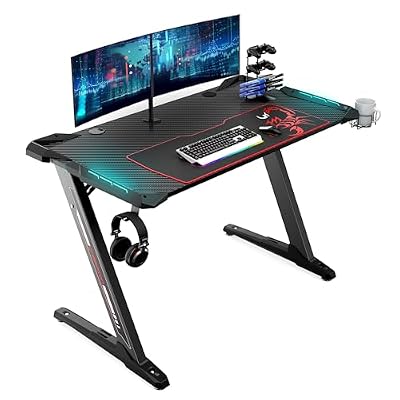
The Z1-S Pro is the compact pick that keeps the serious frame: a 44.5-inch carbon fiber finish top on Z-shaped alloy steel legs rated to 500 pounds, the strongest rating here relative to its size. Cable management holes, a controller stand, a cup holder and a headset hook are built in, and the oversized mouse pad covers the play area. RGB lighting is included for atmosphere. It suits a single monitor, a laptop dock or a console station in a bedroom corner where a 60-inch desk simply cannot go.
Specs
- Desktop: 44.5 inches wide x 24 inches deep, particle board with carbon fiber finish
- Frame: alloy steel Z-shaped legs
- Maximum load: 500 lb
- Extras: RGB LED lighting, cable management holes, controller stand, cup holder, headset hook, oversized mouse pad
- Warranty: 3-year limited warranty listed by the maker
Best for: small rooms that still need a rigid, high-capacity frame under one good monitor.
Watch out for: at 44.5 inches wide it will not hold dual monitors plus speakers comfortably, so measure your full setup width, not just the screen.
ASIN: B07DC3321Q
Which One Fits Your Situation
Two Monitors and a Tower on the Desk
Choose the EUREKA ERGONOMIC Z60. Its 60-inch top gives two screens and a keyboard natural spacing, the depth keeps the stands behind your wrists, and the 500-pound rating means a desktop tower is a non-issue. The leveling feet also help if the floor under a loaded desk is less than flat.
A Corner That Has to Hold More Than the PC
Choose the MOTPK 51-inch L-shape. The drawers swallow controllers, cables and notebooks that would otherwise live on the top, the pegboard keeps accessories visible, and the built-in power strip means one wall outlet runs the corner. Just confirm the dimensions with the seller first, since the listing’s size fields disagree with each other.
A Room That Might Get Rearranged
Choose the Bestier 55-inch. Because it rebuilds as a long straight desk or two small desks, it adapts when a roommate leaves, a second player arrives, or the setup moves rooms. The monitor shelf also helps a single screen sit at a better height without buying a separate riser. That kind of flexibility is rare in a desk of this size.
Splitting One Budget Between the PC and the Desk
If the same money covers the whole station, pair a compact desk with the machine itself: our guide to the best gaming PC under $450 covers the computer side of that budget. On the desk side, the Z1-S Pro keeps the frame quality high in a smaller footprint, leaving more of the total budget for the PC, monitor and chair.
Common Mistakes
- Buying on width alone, then finding the desktop is too shallow for a monitor stand plus keyboard at a comfortable distance.
- Setting a heavy tower on the top without checking the maker’s maximum weight recommendation for that frame.
- Choosing an L-shaped desk before confirming whether the return can sit on the side your room requires, and whether the design is reversible.
- Assembling the desk first and routing cables afterward, instead of using the grommets, racks and built-in strips while the frame is open.
- Ignoring the under-desk footprint, so the leg design collides with chair wheels, a floor-standing case or a subwoofer.
Frequently Asked Questions
How deep should a gaming desk be for two monitors?
Around 24 inches of depth is the practical floor for two monitors on their own stands: it leaves room for the stand feet, a full-size keyboard and your forearms. Shallower tops force the screens closer than most players find comfortable, unless you switch to a monitor arm that clamps at the back edge.
Can these desks hold a full-tower PC on the desktop?
The two Z-frame EUREKA models are rated at 500 pounds, so a tower is well within their published limits. The SEVEN WARRIOR is rated at 330 pounds and the Bestier at 250 pounds, which still covers a tower plus monitors, but the MOTPK listing states no rating, so floor placement is the safer default there.
Is an L-shaped desk better than a straight desk for gaming?
It depends on the room. An L-shape uses a corner efficiently and adds a second surface for work or storage, which suits the MOTPK and Bestier picks. A straight 60-inch desk gives one uninterrupted span for dual monitors and a large mouse pad, which competitive players usually prefer. Measure the corner before assuming the L fits.
Do I need a monitor shelf or arm with these desks?
Not necessarily. The Bestier includes a monitor shelf, and the MOTPK’s hutch raises part of the surface, but the straight desks here are designed for monitors on their own stands. Add an arm only if your stand footprint eats too much depth, and check the top thickness and clamp range before buying one.